当前位置:网站首页>antv x6一些简单效果的实现总结
antv x6一些简单效果的实现总结
2022-04-21 07:22:00 【笑到世界都狼狈】
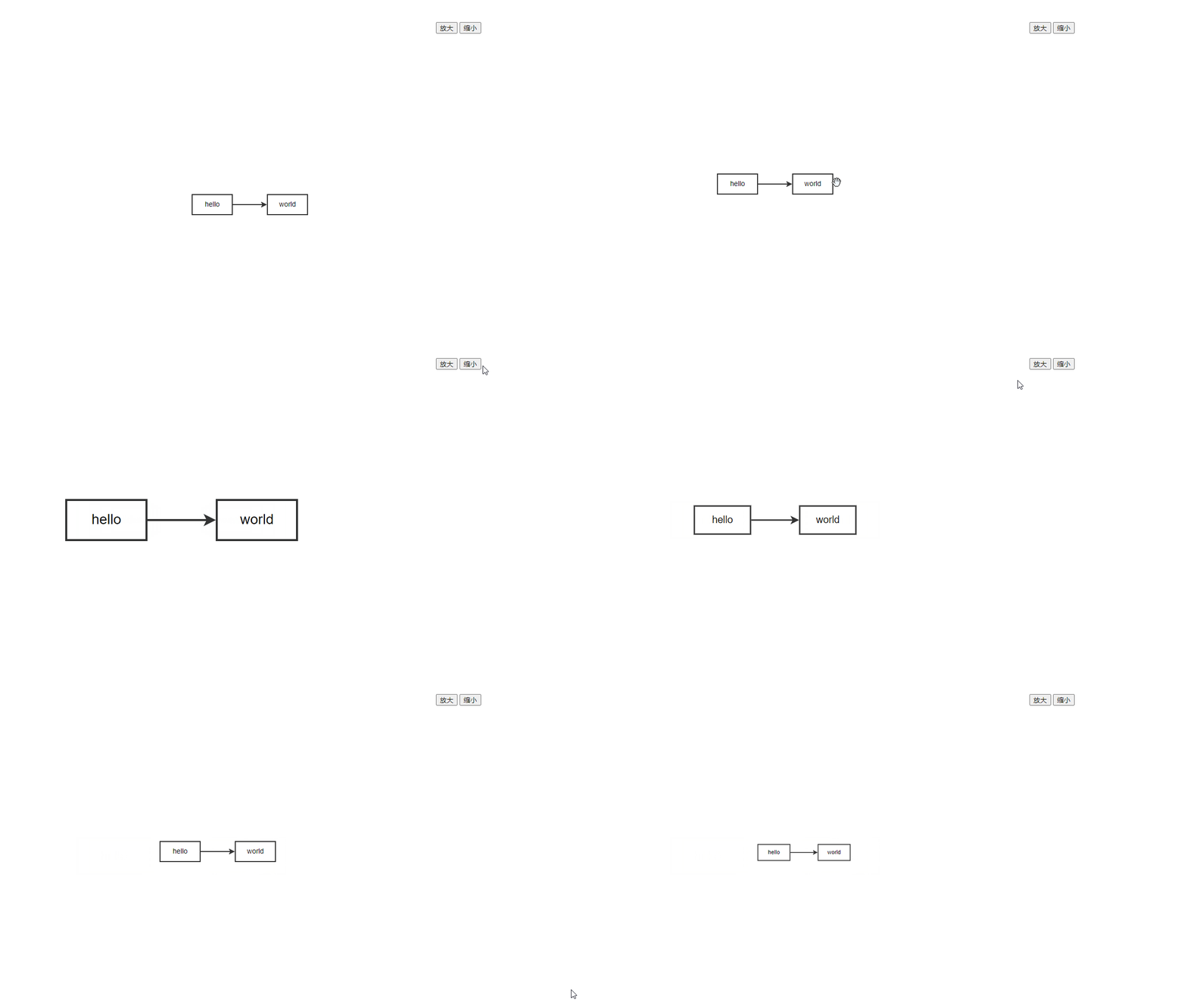
本文是对antv x6一个初步使用的简单总结,主要包括以下几点:
1.实现画布的平移拖拽
2.实现画布的layout方法
3.实现画布的放大缩小方法
4.实现画布的居中效果
实现效果如下:
完整代码如下:
<template>
  <div>
    <button @click="zoomInFn">放大</button>
    <button @click="zoomOutFn">缩小</button>
    <div id="container"></div>
  </div>
</template>

<script>
import { Graph } from '@antv/x6'
import { GridLayout } from '@antv/layout' // umd模式下, const { GridLayout } = window.layout
export default {
  name: 'X6',
  mounted () {
    this.initComponent()
  },
  data () {
    return {
      data: {}, // X6 数据
      graph: undefined, // new X6
      gridLayout: undefined, // new GridLayout
      newModel: undefined
    }
  },
  methods: {
    zoomInFn () { // 放大
      this.graph.zoom(0.2)
    },
    zoomOutFn () { // 缩小
      this.graph.zoom(-0.2)
    },
    initComponent () {
      this.data = {
        nodes: [// 节点
          {
            id: 'node1', // String,可选,节点的唯一标识
            width: 80, // Number,可选,节点大小的 width 值
            height: 40, // Number,可选,节点大小的 height 值
            label: 'hello' // String,节点标签
          },
          {
            id: 'node2', // String,节点的唯一标识
            width: 80, // Number,可选,节点大小的 width 值
            height: 40, // Number,可选,节点大小的 height 值
            label: 'world' // String,节点标签
          }
        ],
        edges: [// 边
          {
            source: 'node1', // String,必须,起始节点 id
            target: 'node2' // String,必须,目标节点 id
          }
        ]
      }
      this.graph = new Graph({
        container: document.getElementById('container'),
        width: 800,
        height: 600,
        panning: true // 拖拽平移
      })
      this.gridLayout = new GridLayout({ // layout布局
        type: 'grid',
        width: 600,
        height: 400,
        center: [300, 200],
        rows: 4,
        cols: 4
      })
      this.newModel = this.gridLayout.layout(this.data)
      this.graph.fromJSON(this.newModel)
      this.graph.centerContent() // 画布居中
    }

  }
}
</script>

<style scoped>

</style>
版权声明
本文为[笑到世界都狼狈]所创,转载请带上原文链接,感谢
https://blog.csdn.net/qq_36509946/article/details/124305778
边栏推荐
- YOLOv5模型环境搭建及使用google colab训练
- You cannot set a form field before rendering a field associated with the value
- NAS选购参考对比
- 2022 examination question bank and simulation examination of special operation certificate for hoisting machinery command
- Finds an array based on the value of a field in a two-dimensional array
- loading加载和统一异常处理
- 4.20学习记录
- sys.stdin.readline和readlines以及input()
- [Ethernet switching security] - port security and MAC address drift prevention and detection
- 动态规划--LC474.一和零
猜你喜欢

路由器设备选型参照天梯

Access-Control-Allow-Credentials:true 和 预检请求

Couchdb-垂直越权

Valentina Studio Pro for Mac(mac数据库管理软件)

webrtc+srs(sfu)

Apache solr 远程代码执行漏洞(CVE-2019-0193)复现

2022 examination question bank and simulation examination of special operation certificate for hoisting machinery command
强到离谱,Transformer为何能闯入CV界秒杀CNN?

Error: ER_NOT_SUPPORTED_AUTH_MODE: Client does not support authentication protocol requested by serv

Picture material free material picture material website picture material where to find some picture material download the purpose of picture material picture material product picture material website
随机推荐
迅为STM32MP157开发板编译U-Boot
[PROJECT] small hat takeout (V)
Vim插件管理插件Vim-plug
Go编译器源代码:语法分析
PDF OCR
Solution of losing Beijing time zone in window system
显示器选购参考天梯
Detailed explanation of classes and objects (detailed explanation of construction methods)
Swift type checking and conversion
Install the go plug-in in vscode and configure the go environment to run go
Is int not supported in analyticdb MySQL?
融资融券安全线是多少?
安装mongodb
Codeforces Round #783 (Div. 2) ABC
Win10 提示账户名与安全标识间无任何映射完成
三层交换机【Vlanif详解】开启OSPF与路由器互通【eNSP实现】
What is the safety line of margin trading?
作文以记之 ~ 克隆图
动态规划--LC474.一和零
What is the difference between localhost and 127.0.0.1? (Reprinted)