当前位置:网站首页>16. Learn Lua file I/O together
16. Learn Lua file I/O together
2022-08-08 18:42:00 【m0_66404702】
Lua file I/O
The Lua I/O library is used to read and process files.Divided into simple mode (same as C), full mode.
- The simple model has a current input file and a current output file, and provides operations related to these files.
- The complete model is implemented using an external file handle.It defines all file operations as methods on the file handle in an object-oriented form
Simple mode is more suitable for doing some simple file operations.However, when performing some advanced file operations, the simple mode seems powerless.For operations such as reading multiple files at the same time, it is more appropriate to use full mode.Friends who need the framework source code can see my profile and contact me.
The open file operation statement is as follows:
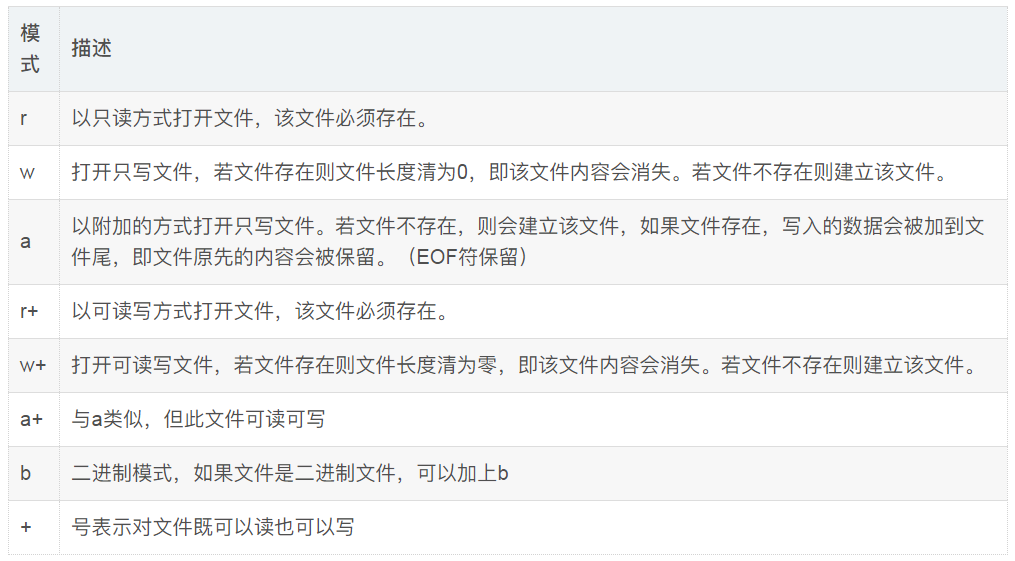
file = io.open (filename [, mode])The values for mode are:

Simple Mode
Simple mode uses standard I/O or uses one current input file and one current output file.
The following is the code of the file.lua file, the operating file is test.lua (if not, you need to create the file), the code is as follows:
Instance
-- open the file as read-onlyfile = io.open("test.lua", "r")-- set the default input file to test.luaio.input(file)-- output the first line of the fileprint(io.read())-- close open filesio.close(file)-- open a write-only file in append modefile = io.open("test.lua", "a")-- set default output file to test.luaio.output(file)-- Add a Lua comment to the last line of the fileio.write("-- comment at the end of test.lua file")-- close open filesio.close(file)Execute the above code, you will find that the first line of information in the test.lua file is output, and the lua comment is added to the last line of the file.As my output here is:
-- test.lua fileIn the above example we used the io."x" method, in which we did not take parameters in io.read(), the parameters can be one of the following table:

Other io methods are:
io.tmpfile():Returns a handle to a temporary file opened in update mode and automatically deleted when the program ends
io.type(file): Check if obj is an available file handle
io.flush(): Writes all buffered data to file
io.lines(optional file name): Returns an iterative function, each call will get a line of content in the file, when it reaches the end of the file, it will return nil, but notclose file
Full Mode
Often we need to process multiple files at the same time.We need to use file:function_name instead of io.function_name method.The following example demonstrates how to process the same file at the same time:
Instance
-- open the file as read-onlyfile = io.open("test.lua", "r")-- output the first line of the fileprint(file:read())-- close open filesfile:close()-- open a write-only file in append modefile = io.open("test.lua", "a")-- Add a Lua comment to the last line of the filefile:write("--test")-- close open filesfile:close()Execute the above code, you will find that the first line of information in the test.lua file is output, and the lua comment is added to the last line of the file.As my output here is:
-- test.lua fileThe arguments to read are the same as in simple mode.
Other methods:
file:seek(optional whence, optional offset): Set and get the current file position, return the final file position (in bytes) if successful, nil plus error if failedinformation.The parameter whence value can be:
- "set": start at the beginning of the file
- "cur": start at current position [default]
- "end": start from end of file
- offset:default is 0
file:flush(): Writes all buffered data to file
io.lines(optional file name): Open the specified file filename in read mode and return an iterative function, each call will get a line of content in the file, when the file is reachedAt the end, it will return nil, and automatically close the file.
If there is no parameter io.lines() <=> io.input():lines(); Read the content of the default input device, but do not close the file at the end, such as:
for line in io.lines("main.lua") doprint(line)endThe following example uses the seek method, locates the 25th position from the bottom of the file and uses the *a parameter of the read method, that is, reads the entire file from the current position (the 25th position from the bottom).
Instance
-- open the file as read-onlyfile = io.open("test.lua", "r")file:seek("end",-25)print(file:read("*a"))-- close open filesfile:close()The result I output here is:
st.lua end of file --test边栏推荐
猜你喜欢



随机推荐
feign的性能优化、Feign的使用-最佳优化两种方案
Why do you need to cross compiler
架构设计基本原则
精彩来袭!鲲鹏开发者创享日·长沙站来啦
面了个腾讯30k+出来的,他让我见识到什么叫精通MySQL调优
性能问题从发现到优化一般思路
Zhiwen final version
shake数据库中 启动报这个错,请问是哪里配置有问题吗?
uva1432
Digital currency perpetual contract exchange development and development functions and code presentation
面经刺客 | 关于——字节飞书基础架构产品 日常实习面经
量子力学奇妙之旅-铁磁性来由/双态系统
mysql5.7安装教程(附下载链接)
蒲公英R300A 4G路由器,远程监控PLC教程
栈指针&& 帧指针详解
01、前言
熬夜拜读349页阿里面试通关手册,成功闯入字节
数据压缩和归档(二)、zipfile
PG 之 huge page
OpenInfra Days China 2022即将开启,与 openEuler 共话开源技术