当前位置:网站首页>W801/W800-wifi-socket开发(二)-UDP蓝牙控制wifi连接
W801/W800-wifi-socket开发(二)-UDP蓝牙控制wifi连接
2022-04-23 01:36:00 【Mr·赵】
本文使用环境:
主控:W800-KIT (开发板)
兼容:W800 W801 AIR101
开发环境:CDK
SDK:W801/W800的SDK(tls库)
前文:
W801/W800-wifi-socket开发(一)-UDP
W801蓝牙收发数据与控制设计(一)-INDICATE
W801蓝牙收发数据与控制设计(二)-NOTIFY方式
本文github工程
这份代码包含前文的某些函数,所以可能会比较乱。
写在前面:
这个代码有很多地方都有BUG,有遇到的请联系我修改。比如未对传输的数据进行严格筛查,每次都要重新输入账户和密码,可以将数据写入flash。。。。因为只是一个基础的学习思路,所以并未深入完善代码。
一、项目概述
^^^^程序功能: 通过手机的蓝牙输入wifi密码和账户连接至路由器,使用开发板I连接电脑端的服务器(UDP协议,使用网络调试助手模拟),传输数据。同时手机端支持重连和停止连接。
^^^^本文是在前文的基础上完成的 。需要借鉴前文的配置。。。
二、项目设计
1、项目整体设计
^^^^整体流程如下所示。指令字符串必须严格执行,程序只判断每一串字符的前四个进行状态的选择。
连接WIFI指令的格式为:conn+账号+密码。比如:conn+yyds+1234567890
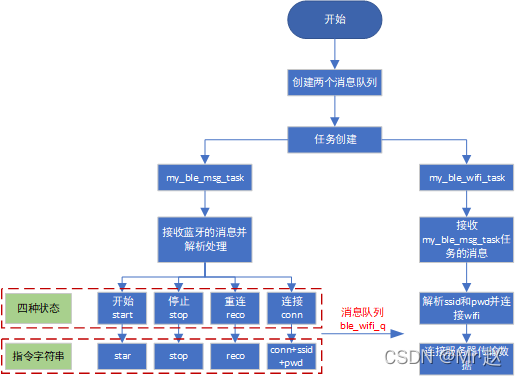
注意:上述流程只是本文设计所用函数,并不是整个工程的流程图。
三、程序设计
1、主任务设计
^^^^主任务主要创建两个任务,一个用于蓝牙信息解析,一个用于wifi连接和数据发送。
//add by zxx satrt
//创建任务
void My_task(void)
{

	//蓝牙接收消息队列
	if(tls_os_queue_create(&ble_q, 32)!=TLS_OS_SUCCESS)
	{

		printf("create queue fail\n");
		return;
	}
	//wifi连接消息队列
	if(tls_os_queue_create(&ble_wifi_q, 32)!=TLS_OS_SUCCESS)
	{

		printf("create queue fail\n");
		return;
	}
	tls_os_task_create(NULL, NULL,
                       my_ble_msg_task,				//蓝牙接收任务
                       NULL,
                       (void *)MyBLETaskStk,          /* task's stack start address */
                       MYBLE_TASK_SIZE * sizeof(u32), /* task's stack size, unit:byte */
                       MYBLE_TASK_PRIO,
                       0);
	tls_os_task_create(NULL, NULL,
                       my_ble_wifi_task,			//wifi连接任务
                       NULL,
                       (void *)MyBLEWIFITaskStk,          /* task's stack start address */
                       MYBLE_TASK_SIZE * sizeof(u32), /* task's stack size, unit:byte */
                       MYBLE_TASK_PRIO,
                       0);
}
//add by zxx end
2、蓝牙数据解析
^^^^首先重新解析一下蓝牙接收的数据,这里因为要处理字符串,所以不再单字节进行处理,打开gatt_svr_chr_demo_access_func()函数,做如下修改:
static int
gatt_svr_chr_demo_access_func(uint16_t conn_handle, uint16_t attr_handle,
                               struct ble_gatt_access_ctxt *ctxt, void *arg)
{

    int i = 0;
    struct os_mbuf *om = ctxt->om;
    switch (ctxt->op) {

        case BLE_GATT_ACCESS_OP_WRITE_CHR:
              while(om) {

                  if(g_ble_uart_output_fptr)
                  {

                    g_ble_uart_output_fptr((uint8_t *)om->om_data, om->om_len);
                  }else
                  {

					//add by zxx start
					  //print_bytes(om->om_data, om->om_len);
					  //首字节为长度,需要添加一个'\0',所以字节长度加一
					  ble_data[0] = om->om_len+1;
					  //其他的原样复制
					  memcpy(&ble_data[1],om->om_data,om->om_len);
					  printf("rec: %s len:%d\n",om->om_data,om->om_len);
					  //添加字符串结束符号
					  ble_data[om->om_len+1] = '\0';
					  if(om->om_len>0)
						tls_os_queue_send(ble_q,ble_data, 0);
					//add by zxx end
                  }
                  om = SLIST_NEXT(om, om_next);
              }
              return 0;
        default:
            assert(0);
            return BLE_ATT_ERR_UNLIKELY;
    }
}
^^^^定义一个全局变量,用于wifi的重连,手机端可以通过发送信息,改变该状态:
//全局变量,表示wifi的重连状态,0表示正常,1表示重新连接
u8 wifi_reconnect_state = 0;
^^^^蓝牙信息解析函数
//定义四种状态
#define MY_BLE_WIFI_STATE_START 1 //开始连接
#define MY_BLE_WIFI_STATE_STOP 2 //停止连接
#define MY_BLE_WIFI_STATE_RECONNECT 3 //重新连接
#define MY_BLE_WIFI_STATE_CONNECT 4 //连接wifi,并执行发送程序

void my_ble_msg_task(void *sdata)
{

	u8 msg_state[4];
	u8 ble_wifi_state = 0;
	u8 *msg;

	demo_bt_enable();
	while(bt_adapter_state == WM_BT_STATE_OFF)
	{

		tls_os_time_delay(5000 /HZ);
	}
	tls_os_time_delay(5000 /HZ);
	demo_ble_server_on();
	printf("ble ready ok \r\n");
	while(1)
	{

		//接收手机发送的数据,注意是数据是按照字节进行的接收
		//msg[0]表示数据长度已经包含有'\0'
		tls_os_queue_receive(ble_q,&msg, 0, 0);
		printf("rev main:%s len:%d\n",&msg[1] ,msg[0]);
		//提取前4位,前四位为状态标志
		strncpy(msg_state,&msg[1],4);
		//判断前四位的状态
		if(!strncmp(msg_state,"star",4)) ble_wifi_state = MY_BLE_WIFI_STATE_START;
		else if(!strncmp(msg_state,"stop",4)) ble_wifi_state = MY_BLE_WIFI_STATE_STOP;
		else if(!strncmp(msg_state,"reco",4)) ble_wifi_state = MY_BLE_WIFI_STATE_RECONNECT;
		else if(!strncmp(msg_state,"conn",4))
		{

			//conn命令至少应该是"conn+s+p'\0'" 九个字节
			if(msg[0] < 9) 	//小于9说明命令是错的
			{

				printf("conn err...\n");
				tls_ble_server_demo_api_send_notify_msg("conn err...",sizeof("conn err..."));
				ble_wifi_state = 0;
			}
			else
				ble_wifi_state = MY_BLE_WIFI_STATE_CONNECT;
		}
		else ble_wifi_state = 0;

		switch(ble_wifi_state)
		{

			case MY_BLE_WIFI_STATE_CONNECT:
				tls_ble_server_demo_api_send_notify_msg("\'conn+ssid+pwd\'",sizeof("\'conn+ssid+pwd\'"));
				wifi_reconnect_state = 0;  //重置
				tls_os_queue_send(ble_wifi_q,&msg[6], 0);
			break;
			case MY_BLE_WIFI_STATE_STOP:
				tls_ble_server_demo_api_send_notify_msg("stop connect",sizeof("stop connect"));
				wifi_reconnect_state = 1;	//断开连接
			break;
			case MY_BLE_WIFI_STATE_RECONNECT:
				tls_ble_server_demo_api_send_notify_msg("start reconnect",sizeof("start reconnect"));
				wifi_reconnect_state = 1;	//断开连接
			break;
			//只发送信息至手机端
			case MY_BLE_WIFI_STATE_START:
				tls_ble_server_demo_api_send_notify_msg("ready connect",sizeof("ready connect"));
			break;
			default:
				printf("ble_wifi_state is err \n");
			break;
		}
	}

}
3、wifi连接
^^^^连接函数较为简单,使用消息队列等待蓝牙解析任务发送的数据,正确接收后,进入服务器连接,并循环发送数据。当接收重连指令后,会更新wifi_reconnect_state,退出while发送程序,重连时,必须closesocket,否者无法正常绑定端口。
void my_ble_wifi_task(void *sdata)
{

	//密码和账户的数组,其实这里可以定义指针并使用malloc灵活申请,我图方便直接定义固定长度
	u8 ssid[50];
	u8 pwd[50];
	//测试发送数组
	u8 test_data[10] = {
    0,1,2,3,4,5,6,7,8,9};
	//消息队列接收
	u8 *msg;

	while(1)
	{

		printf("wait connect..\n");
		//必须关闭socket,否者不能正常绑定端口
		close_udp_socket_demo();
		//消息队列,接收蓝牙解析任务传输的账号和密码
		tls_os_queue_receive(ble_wifi_q,&msg, 0, 0);
		printf("rev task:%s len:%d\n",msg,strlen(msg));
		//字符串的总长度 不带结束字符的长度
		u8 msg_len = strlen(msg);
		u8 ssid_size = 0;	//账户的长度 不带结束字符
		//下列循环主要用于找出账户的长度
		for(int i=0; msg[i] != '\0'; i++)
		{

			if(msg[i] != '+')
				ssid_size++;
			else
				break;
		}
		//拷贝账户名
		memcpy(ssid,msg,ssid_size);
		//添加结束字符
		ssid[ssid_size] = '\0';
		//拷贝密码,注意要排除加号
		memcpy(pwd,&msg[ssid_size+1],msg_len-ssid_size-1); //排除掉+号
		//末尾加上结束字符
		pwd[msg_len-ssid_size-1] = '\0';
		printf("ssid:%s len:%d pwd:%s len:%d \n",ssid,strlen(ssid),pwd,strlen(pwd));
		//连接WIFI
		demo_connect_net(ssid,pwd);
		//延时
		tls_os_time_delay(3000);
		//连接服务器
		socket_udp_demo(1,10086,"192.168.1.87");
		//正常情况下发送程序,当wifi_reconnect_state为1时,表示重新连接
		while(0 == wifi_reconnect_state)
		{

			udp_send_data_self(test_data,10);
			tls_os_time_delay(500);
		}
	}
}
^^^^上述程序中close_udp_socket_demo()为自定义函数,在wm_udp_demo.c文件中。
void close_udp_socket_demo(void)
{

	printf("close udp socket \n");
	closesocket(demo_udp->socket_num);
}
^^^^同时在wm_demo_console.h申明。
extern void udp_send_data_self(u8 *data,int data_len);
extern void close_udp_socket_demo(void);

#endif /*__WM_DEMO_CMD_H__*/
四、测试
^^^^在手机端提前设置好如下发送指令。

^^^^手机蓝牙APP如下:

4.1、连接测试
^^^^程序下载至开发板,点击账户+密码。程序运行正常,配网成功,并且正常和服务器发送数据。

服务器

4.2 重连测试
^^^^点击重连后开发板断开连接,并等待新连接。

^^^^再次发送账户+密码指令。

4.3 停止测试
^^^^点击停止,开发板断开连接

4.4 功耗测试

版权声明
本文为[Mr·赵]所创,转载请带上原文链接,感谢
https://blog.csdn.net/qq_37280428/article/details/124269213
边栏推荐
- Scope of define
- Introduction to gbase 8s storage structure and space management
- 计蒜客家谱(dfs求直系后代数)
- Chapter 9 of C language programming (fifth edition of Tan Haoqiang) analysis and answer of exercises for users to establish their own data types
- Text justify, orientation, combine text attributes
- 计蒜客:等边三角形(DFS)
- [course summary] Hello harmonyos series of courses, take you to zero foundation introduction
- Futr3d: a unified 3D detection framework for sensor fusion
- New functions of ai2022, introduction to new functions of illustrator 2022
- Gbase 8s shared memory segment deletion
猜你喜欢

Is 2022 software testing easy to learn? How long will it take? (learning roadmap attached)

App uses the template message from WeChat official account for message push.

ai2022新功能,illustrator 2022 新功能介绍
Redis实现分布式锁

代码实现发邮件---sendemails

Full Permutation (DFS and next_permutation solution)

DFS parity pruning

智能手表的下半场,机遇与挑战并存

Counting garlic customers: Sudoku (DFS)
Redis implements distributed locks
随机推荐
计蒜客:方程的解数
Full Permutation (DFS and next_permutation solution)
What kind of project is suitable for automated testing?
计蒜客:等边三角形(DFS)
Soatest preliminary understanding
Introduction and management of gbase 8s database log
. net (c) MySQL conn.open() reports an error: solution to SSL connection error
学习方法与职业发展指南(2022年版)
Chris LATTNER, father of llvm: the golden age of compilers
Linux系统下以RPM方式如何安装mysql-5.7.9
深入解析Linux下的磁盘缓存机制与SSD的写入放大问题
NR polar code 七- SCL(succesive cancellation list decoding)
ai2022新功能,illustrator 2022 新功能介绍
Gbase 8s 并发控制之封锁粒度
Good test data management, in the end how to do?
轮转法分片
蒜头君开公司(DFS全排列)
Self taught programming, don't read theory books foolishly, programmer: it's all left over by others
In the second half of the smart watch, opportunities and challenges coexist
Itextsharp displays Chinese fonts