当前位置:网站首页>DevEco Studio配置:自定义头部代码注释
DevEco Studio配置:自定义头部代码注释
2022-08-05 14:12:00 【华为云】
1.实现效果
/* * Copyright (c) 2022 JianGuo Device Co., Ltd. * Licensed under the Apache License, Version 2.0 (the "License"); * you may not use this file except in compliance with the License. * You may obtain a copy of the License at * * http://www.apache.org/licenses/LICENSE-2.0 * * Unless required by applicable law or agreed to in writing, software * distributed under the License is distributed on an "AS IS" BASIS, * WITHOUT WARRANTIES OR CONDITIONS OF ANY KIND, either express or implied. * See the License for the specific language governing permissions and * limitations under the License. *//** * @ProjectName : nutsStudy * @FileName : setting * @Author : 坚果 * @Time : 2022/8/5 13:51 * @Description : 文件描述 */2.实现步骤
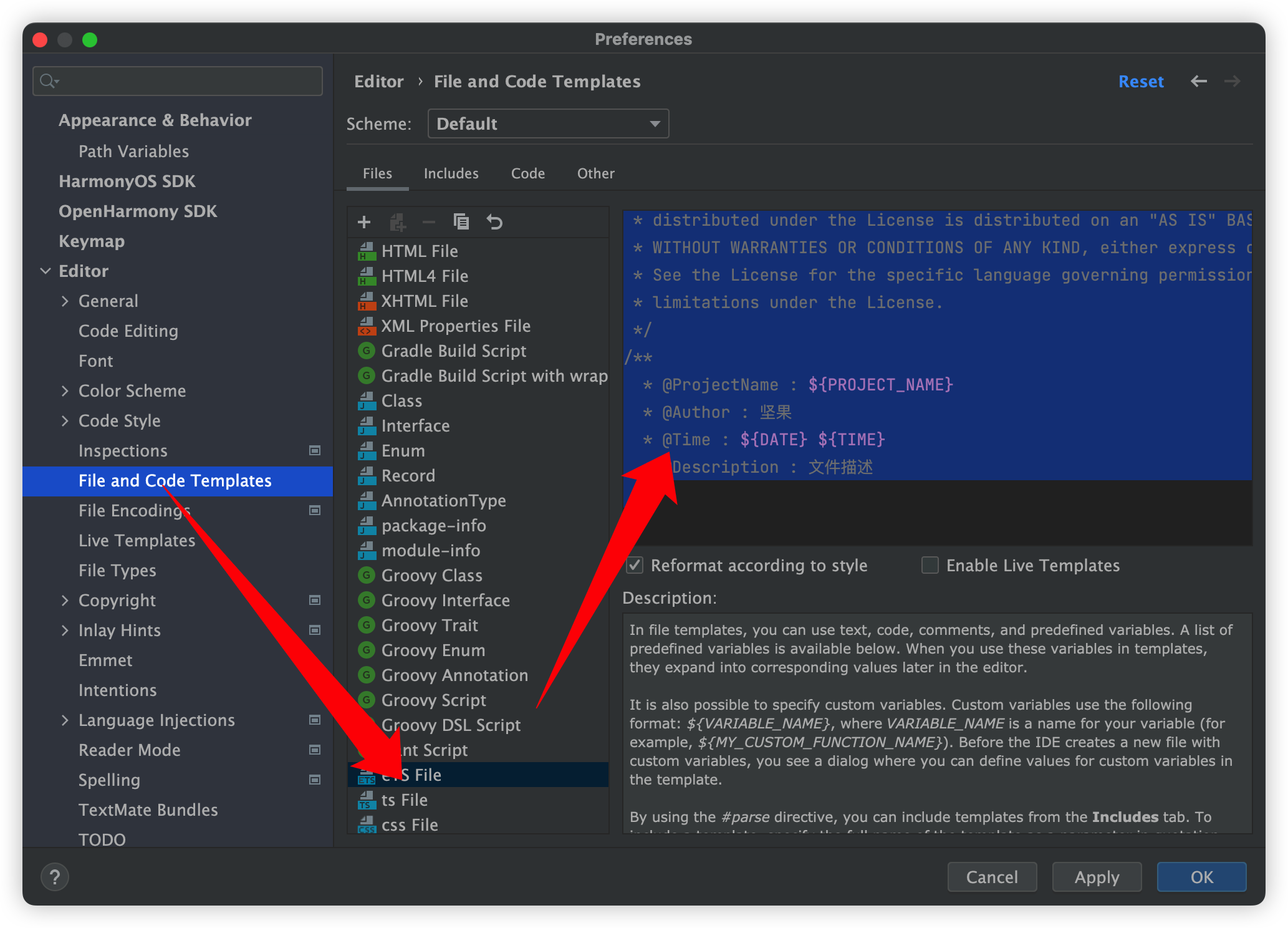
依次操作File – Settings – Editor – File and Code Templates,在详细展示窗口点击includes选项卡,找到
FileHeader点击,在编辑窗口输入自定义的注释模板即可。如下图:
3. 总结
| ${PACKAGE_NAME} | 新建文件所在包名 |
|---|---|
| ${USER} | 用户名 |
| ${DATE} | 创建文件时当前系统的日期(格式:yyyy/MM/dd) |
| ${TIME} | 创建文件时当前系统的时间(格式:hh:mm) |
| ${YEAR} | 创建文件时当前系统的年份 |
| ${MONTH} | 创建文件时当前系统的月份 |
| ${MONTH_NAME_SHORT} | 当前月份的前三位字符缩写,例如: Jan, Feb, etc |
| ${MONTH_NAME_FULL} | 当前月份的字母全写,例如: January, February, etc |
| ${DAY} | 当前时间所属月份的天数 |
| ${HOUR} | 当前的小时数 |
| ${MINUTE} | 当前的分钟数 |
| ${PROJECT_NAME} | 当前的项目名 |
| ${NAME} | 当前的文件名 |
4.我添加的内容
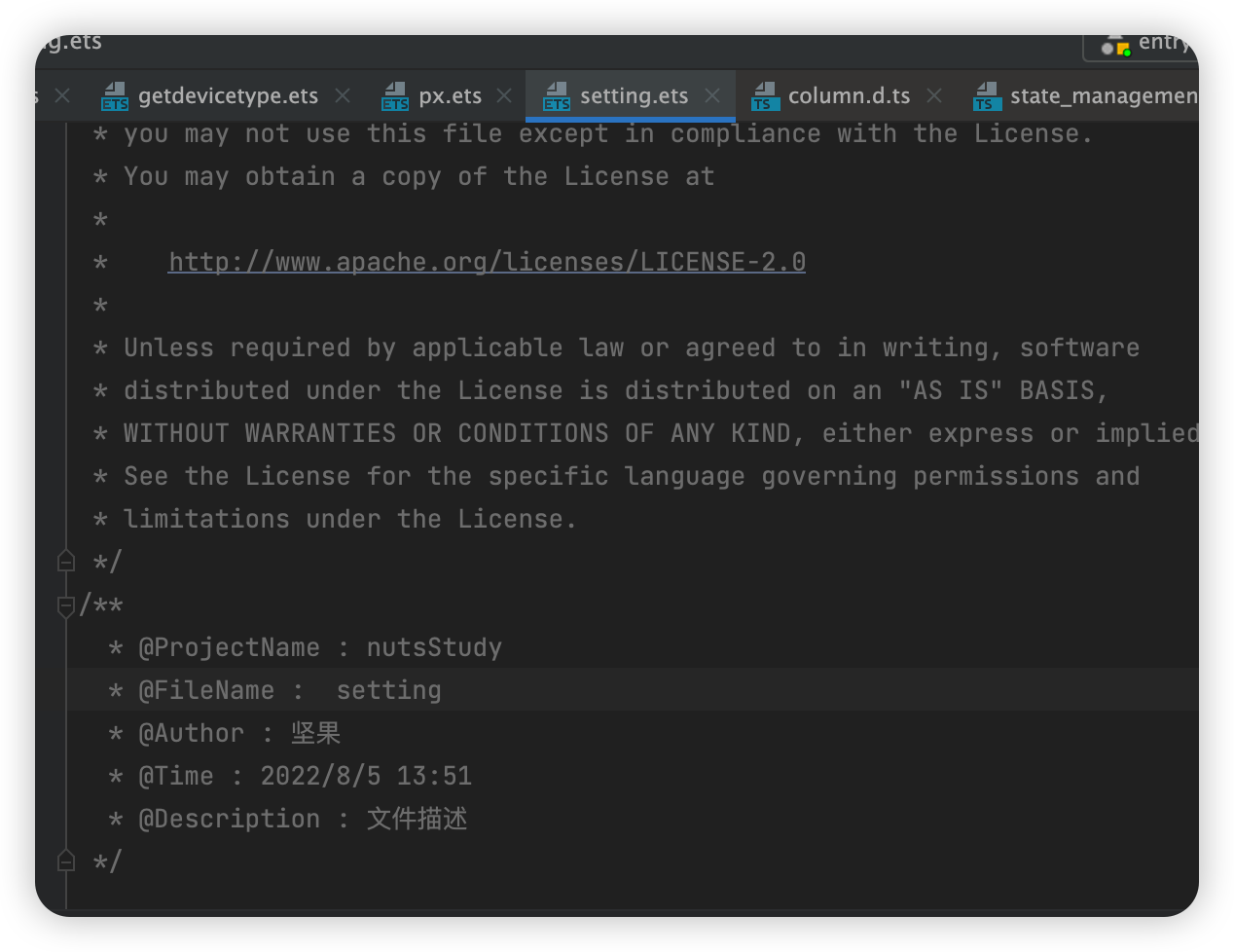
/* * Copyright (c) 2022 JianGuo Device Co., Ltd. * Licensed under the Apache License, Version 2.0 (the "License"); * you may not use this file except in compliance with the License. * You may obtain a copy of the License at * * http://www.apache.org/licenses/LICENSE-2.0 * * Unless required by applicable law or agreed to in writing, software * distributed under the License is distributed on an "AS IS" BASIS, * WITHOUT WARRANTIES OR CONDITIONS OF ANY KIND, either express or implied. * See the License for the specific language governing permissions and * limitations under the License. *//** * @ProjectName : ${PROJECT_NAME} * @FileName : ${NAME} * @Author : 坚果 * @Time : ${DATE} ${TIME} * @Description : 文件描述 */效果:
边栏推荐
- 十四、正则表达式 - 章节课后练习题及答案
- MAUI Blazor 权限经验分享 (定位,使用相机)
- Summary 623 of the force buckle solution - add a row to the binary tree
- 图片上传到淘宝的操作流程——upload_img
- day11· 对象方法、静态方法、类方法
- 深度学习之 11 空洞卷积的实现
- TVS和ESD的区别
- R语言计算时间序列数据的差分值:使用diff函数计算时间序列数据的差分值、自定义设置lag参数指定差分间距的大小(例如计算某指标年同比变化量、设置lag参数为12)
- 内存管理架构及虚拟地址空间布局
- 一行简单的样式,让网页有「高级感」
猜你喜欢

LeetCode Question of the Day (1706. Where Will the Ball Fall)

Use Redis source code to compile and release Redis For Windows distribution package for Windows

Qt实现多国语言切换

Stack和Queue 栈和队列
NLP paper reading | Parametric machine translation meets comparative learning: I want both efficiency and performance!

为什么鲜有炫富的程序员?

Xingyun Butler won the "2022 Outstanding Brand Image Award" at the 11th China Finance Summit

DSPE-PEG-Hydrazide,DSPE-PEG-HZ,磷脂-聚乙二醇-酰肼可增强稳定性

DSPE-PEG-Thiol,DSPE-PEG-SH(MV:2000),磷脂-聚乙二醇-巯基低温储存
LeetCode每日一题(1706. Where Will the Ball Fall)
随机推荐
Kernel Implementation of Block Allocator SLAB
Qt将图片保存为XML文件或者变为QSting
Get the order details of the purchased products on Taobao/Tmall——buyer_order_detail
IO流的原理以及分类
理财产品是只能看到本金看不到收益吗?
c语言小项目(排雷游戏实现)
Subnet Mask and Subnetting
How does the server push messages to the client?
NLP 论文领读|无参数机器翻译遇上对比学习:效率和性能我全都要!
The actual use of EOSJS in China Mobile Chain
Use Redis source code to compile and release Redis For Windows distribution package for Windows
AntDesign中Table的选择项居右显示
day6·动态导入模块
深度学习之 11 残差网络的实现
5G ToB业务介绍及时延需求
[CUDA study notes] What is GPU computing
-ST table template
十四、正则表达式 - 章节课后练习题及答案
@2023 Graduate Candidates: How to Spend the "Golden Period" of Summer Research Exam Preparation
FOF投资组合表现跟进(截止至2022.7.22)