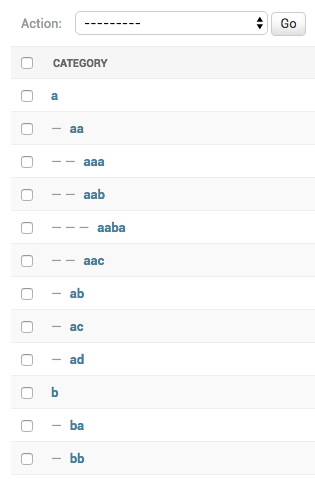
Probably the best abstract model / admin for your tree based stuff.

Overview

django-treenode

Probably the best abstract model / admin for your tree based stuff.

Features

  • Fast - get ancestors, children, descendants, parent, root, siblings, tree with no queries
  • Synced - in-memory model instances are automatically updated
  • Compatibility - you can easily add treenode to existing projects
  • No dependencies
  • Easy configuration - just extend the abstract model / model-admin
  • Admin integration - great tree visualization: accordion, breadcrumbs or indentation
indentation (default) breadcrumbs accordion
treenode-admin-display-mode-indentation treenode-admin-display-mode-breadcrumbs treenode-admin-display-mode-accordion

Installation

  • Run pip install django-treenode
  • Add treenode to settings.INSTALLED_APPS
  • Make your model inherit from treenode.models.TreeNodeModel (described below)
  • Make your model-admin inherit from treenode.admin.TreeNodeModelAdmin (described below)
  • Run python manage.py makemigrations and python manage.py migrate

Configuration

models.py

Make your model class inherit from treenode.models.TreeNodeModel:

from django.db import models

from treenode.models import TreeNodeModel


class Category(TreeNodeModel):

    # the field used to display the model instance
    # default value 'pk'
    treenode_display_field = 'name'

    name = models.CharField(max_length=50)

    class Meta(TreeNodeModel.Meta):
        verbose_name = 'Category'
        verbose_name_plural = 'Categories'

The TreeNodeModel abstract class adds many fields (prefixed with tn_ to prevent direct access) and public methods to your models.

โš ๏ธ If you are extending a model that already has some fields, please ensure that your model existing fields names don't clash with TreeNodeModel public methods/properties names.


admin.py

Make your model-admin class inherit from treenode.admin.TreeNodeModelAdmin.

from django.contrib import admin

from treenode.admin import TreeNodeModelAdmin
from treenode.forms import TreeNodeForm

from .models import Category


class CategoryAdmin(TreeNodeModelAdmin):

    # set the changelist display mode: 'accordion', 'breadcrumbs' or 'indentation' (default)
    # when changelist results are filtered by a querystring,
    # 'breadcrumbs' mode will be used (to preserve data display integrity)
    treenode_display_mode = TreeNodeModelAdmin.TREENODE_DISPLAY_MODE_ACCORDION
    # treenode_display_mode = TreeNodeModelAdmin.TREENODE_DISPLAY_MODE_BREADCRUMBS
    # treenode_display_mode = TreeNodeModelAdmin.TREENODE_DISPLAY_MODE_INDENTATION

    # use TreeNodeForm to automatically exclude invalid parent choices
    form = TreeNodeForm

admin.site.register(Category, CategoryAdmin)

settings.py

You can use a custom cache backend by adding a treenode entry to settings.CACHES, otherwise the default cache backend will be used.

CACHES = {
    'default': {
        'BACKEND': 'django.core.cache.backends.filebased.FileBasedCache',
        'LOCATION': '...',
    },
    'treenode': {
        'BACKEND': 'django.core.cache.backends.locmem.LocMemCache',
    },
}

Usage

Methods/Properties

Delete a node if cascade=True (default behaviour), children and descendants will be deleted too, otherwise children's parent will be set to None (then children become roots):

obj.delete(cascade=True)

Delete the whole tree for the current node class:

cls.delete_tree()

Get a list with all ancestors (ordered from root to parent):

obj.get_ancestors()
# or
obj.ancestors

Get the ancestors count:

obj.get_ancestors_count()
# or
obj.ancestors_count

Get the ancestors pks list:

obj.get_ancestors_pks()
# or
obj.ancestors_pks

Get the ancestors queryset (ordered from parent to root):

obj.get_ancestors_queryset()

Get the breadcrumbs to current node (included):

obj.get_breadcrumbs(attr=None)
# or
obj.breadcrumbs

Get a list containing all children:

obj.get_children()
# or
obj.children

Get the children count:

obj.get_children_count()
# or
obj.children_count

Get the children pks list:

obj.get_children_pks()
# or
obj.children_pks

Get the children queryset:

obj.get_children_queryset()

Get the node depth (how many levels of descendants):

obj.get_depth()
# or
obj.depth

Get a list containing all descendants:

obj.get_descendants()
# or
obj.descendants

Get the descendants count:

obj.get_descendants_count()
# or
obj.descendants_count

Get the descendants pks list:

obj.get_descendants_pks()
# or
obj.descendants_pks

Get the descendants queryset:

obj.get_descendants_queryset()

Get a n-dimensional dict representing the model tree:

obj.get_descendants_tree()
# or
obj.descendants_tree

Get a multiline string representing the model tree:

obj.get_descendants_tree_display()
# or
obj.descendants_tree_display

Get the first child node:

obj.get_first_child()
# or
obj.first_child

Get the node index (index in node.parent.children list):

obj.get_index()
# or
obj.index

Get the last child node:

obj.get_last_child()
# or
obj.last_child

Get the node level (starting from 1):

obj.get_level()
# or
obj.level

Get the order value used for ordering:

obj.get_order()
# or
obj.order

Get the parent node:

obj.get_parent()
# or
obj.parent

Get the parent node pk:

obj.get_parent_pk()
# or
obj.parent_pk

Set the parent node:

obj.set_parent(parent_obj)

Get the node priority:

obj.get_priority()
# or
obj.priority

Set the node priority:

obj.set_priority(100)

Get the root node for the current node:

obj.get_root()
# or
obj.root

Get the root node pk for the current node:

obj.get_root_pk()
# or
obj.root_pk

Get a list with all root nodes:

cls.get_roots()
# or
cls.roots

Get root nodes queryset:

cls.get_roots_queryset()

Get a list with all the siblings:

obj.get_siblings()
# or
obj.siblings

Get the siblings count:

obj.get_siblings_count()
# or
obj.siblings_count

Get the siblings pks list:

obj.get_siblings_pks()
# or
obj.siblings_pks

Get the siblings queryset:

obj.get_siblings_queryset()

Get a n-dimensional dict representing the model tree:

cls.get_tree()
# or
cls.tree

Get a multiline string representing the model tree:

cls.get_tree_display()
# or
cls.tree_display

Return True if the current node is ancestor of target_obj:

obj.is_ancestor_of(target_obj)

Return True if the current node is child of target_obj:

obj.is_child_of(target_obj)

Return True if the current node is descendant of target_obj:

obj.is_descendant_of(target_obj)

Return True if the current node is the first child:

obj.is_first_child()

Return True if the current node is the last child:

obj.is_last_child()

Return True if the current node is leaf (it has not children):

obj.is_leaf()

Return True if the current node is parent of target_obj:

obj.is_parent_of(target_obj)

Return True if the current node is root:

obj.is_root()

Return True if the current node is root of target_obj:

obj.is_root_of(target_obj)

Return True if the current node is sibling of target_obj:

obj.is_sibling_of(target_obj)

Update tree manually, useful after bulk updates:

cls.update_tree()

Bulk Operations

To perform bulk operations it is recommended to turn off signals, then triggering the tree update at the end:

from treenode.signals import no_signals

with no_signals():
    # execute custom bulk operations
    pass

# trigger tree update only once
YourModel.update_tree()

Testing

# create python virtual environment
virtualenv testing_django_treenode

# activate virtualenv
cd testing_django_treenode && . bin/activate

# clone repo
git clone https://github.com/fabiocaccamo/django-treenode.git src && cd src

# install dependencies
pip install -r requirements.txt
pip install -r requirements-test.txt

# run tests
tox
# or
python setup.py test
# or
python -m django test --settings "tests.settings"

License

Released under MIT License.


See also

  • django-admin-interface - the default admin interface made customizable by the admin itself. popup windows replaced by modals. ๐Ÿง™ โšก

  • django-colorfield - simple color field for models with a nice color-picker in the admin. ๐ŸŽจ

  • django-extra-settings - config and manage typed extra settings using just the django admin. โš™๏ธ

  • django-maintenance-mode - shows a 503 error page when maintenance-mode is on. ๐Ÿšง ๐Ÿ› ๏ธ

  • django-redirects - redirects with full control. โ†ช๏ธ

  • python-benedict - dict subclass with keylist/keypath support, I/O shortcuts (base64, csv, json, pickle, plist, query-string, toml, xml, yaml) and many utilities. ๐Ÿ“˜

  • python-codicefiscale - encode/decode Italian fiscal codes - codifica/decodifica del Codice Fiscale. ๐Ÿ‡ฎ๐Ÿ‡น ๐Ÿ’ณ

  • python-fontbro - friendly font operations. ๐Ÿงข

  • python-fsutil - file-system utilities for lazy devs. ๐ŸงŸโ€โ™‚๏ธ

Comments
  • Note in docs about thread/multi process safety

    Note in docs about thread/multi process safety

    The worst problem I've had with treebeard is lack of thread/multi process safety.

    It's easily demonstrated by running two processes at the same time that each have a loop that adds nodes to the tree. (because the key generation + adding nodes is not an atomic operation).

    Does django-treenode solve this ?

    If it does it would be great to have a note in the README.

    enhancement 
    opened by stuaxo 13
  • Cache update error

    Cache update error

    Python version 3.9 Django version 3.2 Package version 0.16.0

    Current behavior (bug description) I just want to say that the error manifests itself in very exotic circumstances.

    1. I created an abstract model from TreeNodeModel
    2. Dynamically, using the operator type(), I create an instance of the tree model, inheriting the model from the previously created abstract model. Entries in ContentType and Permissionshave been created. The model is registered in the apps register.
    3. Dynamically using schema_editor.create_model() tables are created in the database

    Now the essence of the error. When trying to add a new entry through the admin site, an error occurs in the cache: Can't pickle <class 'my_app_name.my_module.my_model'>: attribute lookup my_model on my_app_name.my_module failed

    Error tracing: File "D:\Envs\django\lib\site-packages\django\core\handlers\exception.py", line 47, in inner response = get_response(request) File "D:\Envs\django\lib\site-packages\django\core\handlers\base.py", line 181, in _get_response response = wrapped_callback(request, *callback_args, **callback_kwargs) File "D:\Envs\django\lib\site-packages\django\contrib\admin\options.py", line 616, in wrapper return self.admin_site.admin_view(view)(*args, **kwargs) File "D:\Envs\django\lib\site-packages\django\utils\decorators.py", line 130, in _wrapped_view response = view_func(request, *args, **kwargs) File "D:\Envs\django\lib\site-packages\django\views\decorators\cache.py", line 44, in _wrapped_view_func response = view_func(request, *args, **kwargs) File "D:\Envs\django\lib\site-packages\django\contrib\admin\sites.py", line 232, in inner return view(request, *args, **kwargs) File "D:\Envs\django\lib\site-packages\django\contrib\admin\options.py", line 1655, in add_view return self.changeform_view(request, None, form_url, extra_context) File "D:\Envs\django\lib\site-packages\django\utils\decorators.py", line 43, in _wrapper return bound_method(*args, **kwargs) File "D:\Envs\django\lib\site-packages\django\utils\decorators.py", line 130, in _wrapped_view response = view_func(request, *args, **kwargs) File "D:\Envs\django\lib\site-packages\django\contrib\admin\options.py", line 1538, in changeform_view return self._changeform_view(request, object_id, form_url, extra_context) File "D:\Envs\django\lib\site-packages\django\contrib\admin\options.py", line 1584, in _changeform_view self.save_model(request, new_object, form, not add) File "D:\Envs\django\lib\site-packages\django\contrib\admin\options.py", line 1097, in save_model obj.save() File "D:\Envs\django\lib\site-packages\django\db\models\base.py", line 726, in save self.save_base(using=using, force_insert=force_insert, File "D:\Envs\django\lib\site-packages\django\db\models\base.py", line 774, in save_base post_save.send( File "D:\Envs\django\lib\site-packages\django\dispatch\dispatcher.py", line 180, in send return [ File "D:\Envs\django\lib\site-packages\django\dispatch\dispatcher.py", line 181, in (receiver, receiver(signal=self, sender=sender, **named)) File "D:\Envs\django\lib\site-packages\treenode\signals.py", line 36, in post_save_treenode sender.update_tree() File "D:\Envs\django\lib\site-packages\treenode\models.py", line 382, in update_tree update_cache(cls) File "D:\Envs\django\lib\site-packages\treenode\cache.py", line 61, in update_cache _set_cached_collections(l, d) File "D:\Envs\django\lib\site-packages\treenode\cache.py", line 33, in _set_cached_collections c.set('treenode_list', l) File "D:\Envs\django\lib\site-packages\django\core\cache\backends\locmem.py", line 56, in set pickled = pickle.dumps(value, self.pickle_protocol)

    I understand that dynamic use of the model was not provided for by you, as well as by the developers of Django. But I am weak in dealing with the cache. Perhaps I missed something when creating the model, registering it. I'm asking for ideas on what could have gone wrong. Models created in this way from standard prototypes work great.

    I would appreciate any ideas

    bug 
    opened by TimurKady 9
  • remove a node in tree without deleting descendants

    remove a node in tree without deleting descendants

    It would be nice to allow for behaviour where deleting a node would create separate disjoint trees. Any suggestions how this could be achieved with the current implementations? I previously had just an FK field to parent node, which had a on_delete=SET_NULL which worked fine for me, and I would like to replicate this behaviour here.

    enhancement 
    opened by jvacek 7
  • QUESTION: Tree of different models

    QUESTION: Tree of different models

    Hi, I'm currently building an application and I want to manage a tree of different models in the django admin console. Like the following:

    โ”œโ”€โ”€ Chapter1
    โ””โ”€โ”€ Chapter2
        โ”œโ”€โ”€ Part1
        โ”œโ”€โ”€ Part2
    

    Is this possilbe or is there a better way to achive this in django admin ? :)

    question 
    opened by JuliusJacobitz 6
  • treenode's sorting  is not OK

    treenode's sorting is not OK

    Hi,

    i reproduce a directories treenode with name's sorting and in a directory viewer the sorting seem to be OK but with treenode, it's not OK. It seem to me that there is a problem with letter and number.

    see in attachments 2 screenshots, one to see the directory and the other to see in the treenode directory.

    image

    image

    here is my pip list output : backports.csv (1.0.7) defusedxml (0.6.0) diff-match-patch (20181111) Django (2.1) django-debug-toolbar (1.11) django-extensions (2.1.7) django-import-export (1.2.0) django-js-asset (1.2.2) django-treenode (0.13.1) et-xmlfile (1.0.1) jdcal (1.4.1) odfpy (1.4.0) openpyxl (2.6.2) pip (9.0.1) pkg-resources (0.0.0) psycopg2-binary (2.8.2) pydotplus (2.0.2) pyparsing (2.4.0) pytz (2019.1) PyYAML (5.1) setuptools (32.3.1) six (1.12.0) sqlparse (0.3.0) tablib (0.13.0) wheel (0.33.4) xlrd (1.2.0) xlwt (1.3.0)

    bug 
    opened by nicolasVaye 6
  • Search for subnodes in accordion admin isn't possible

    Search for subnodes in accordion admin isn't possible

    Search for subnodes in accordion admin isn't possible, because the parent nodes are collapsed and can not be opened.

    Model: class Element(TreeNodeModel): TYPES = Choices('Namespace', 'Class', 'Object') name = models.CharField(max_length=255, blank=False, null=False, unique=True) model_type = models.CharField( choices=TYPES, default=TYPES.Object, max_length=100) treenode_display_field = 'name'

    Admin: @admin.register(models.Element) class ElementAdmin(TreeNodeModelAdmin): # admin.ModelAdmin treenode_accordion = True autocomplete_fields = ['tn_parent'] list_display = ('id', 'model_type', ) search_fields = ['name', 'tn_parent__name'] exclude = ('tn_priority', ) form = TreeNodeForm

    No search: grafik

    Search for child node: grafik

    enhancement 
    opened by alexbredo 6
  • If an object has no parent, admin will throw an exception

    If an object has no parent, admin will throw an exception

    I made a super simple, new Django app, and only added this package to test the admin.

    Exception Type: AttributeError at /admin/tree/category/
    Exception Value: 'Category' object has no attribute 'tn_parents_count'
    
    
    opened by douglance 6
  • How to use methods like `set_parent` during manual RunPython in migrations?

    How to use methods like `set_parent` during manual RunPython in migrations?

    Python version 3.9.1

    Django version 2.2.24

    Package version 0.17.0

    Current behaviour (bug description) My model was previously using the MPTT library, and so I'd like to transfer to TreeNode. However I am not really able to do the migration due to the methods not being available when using the apps.get_model tactic, and I think directly working on the keys might not be a good idea seeing as set_parent has things going on.

    def migrate_mptt_treenode(apps, schema_editor):
        MyModel = apps.get_model("myapp", "MyModel")
        for c in MyModel.objects.all():
            if c.parent is not None:
                c.set_parent(c.parent)
                c.save()
    

    The info about the parent was stored in parent before, which is a TreeForeignKey Field from MPTT. I want to first migrate in the new fields from treenode, make the migration, and then remove the inheritance for the MPTTModel after the data is moved.

    Expected behaviour I know that apps.get_model doesn't make the methods available, so it's not that this should work. Some alternatives for this use-case would be helpful though.

    question 
    opened by jvacek 5
  • bulk create / update ?

    bulk create / update ?

    hi,

    do you plan to provide the bulk_create/update methods on TreeNodeModel ?

    for now I do a manual bulk_update specifying all the fields.

    regards, Jรฉrรฉmy

    enhancement 
    opened by jvies 5
  • Strange

    Strange "AttributeError: can't set attribute" while using "index" as field name

    Hi! I noted that django-admin creation page throw an "AttributeError" while using "index" as field name.

    I'm using Python 3.8.5 and Django 3.0.8

    don't know if that can be considered a problem.

    Really nice package anyway ๐Ÿ˜๐Ÿ˜

    opened by paviano 5
  • "TreeNodeModelAdminInline"

    Inline Mixin to edit children in their parent and added default inline if no inlines are defined.

    Either use the TreeNodeModelAdminInline as a MixIn for customizing the inline or just leave it with the default.

    opened by domlysi 5
  • question: migrating from django-mptt to django-treenode

    question: migrating from django-mptt to django-treenode

    I used some of your work in my projects, and they are fantastic; thank you for your hard work.

    I have a question, but I'm hesitant to explore till I know whether there is a history example; I searched and couldn't discover anything informative.

    I'm working on a project where I'm using django-mptt, and it's becoming clear that it has constraints that are harming the overall development quality and experience. Is it your understanding that transitioning from mptt to treenode is possible/feasible?

    Thank you, Layth.

    enhancement question 
    opened by laith43d 2
  • Add `include_self=False` parameter to functions which return lists/querysets

    Add `include_self=False` parameter to functions which return lists/querysets

    django_mptt had a nice option to include the current node in the functions which return descendants, children, etc. It is documented here

    It would be nice to be able to call get_children(include_self=True) or get_children_queryset(include_self=True), and get the node in the list as well

    enhancement 
    opened by jvacek 3
  • Queries getting slower during progress

    Queries getting slower during progress

    Thank you for providing this nice library. I am using it in a scientific project for twitter analysis. However, the db inserts seem to slow down a lot after a couple of days running it in production mode:

    [treenode] update delab.models.Tweet tree: executed 0 queries in 71.44206510693766s. [treenode] update delab.models.Tweet tree: executed 0 queries in 71.87405565101653s. [treenode] update delab.models.Tweet tree: executed 0 queries in 66.6588648010511s. [treenode] update delab.models.Tweet tree: executed 0 queries in 71.47152532404289s. [treenode] update delab.models.Tweet tree: executed 0 queries in 79.63660701399203s.

    I opened the issue also within my project, if you are interested in the way the library is used: https://github.com/juliandehne/delab/issues/15

    Probably, I will write a unit test to verify it is an issue with the treenode library.

    Any ideas?

    enhancement 
    opened by juliandehne 11
  • Order control

    Order control

    Hello! I want to share the experience of using the module. Today I see many of its advantages and two main disadvantages. One of them I want to discuss. This is control over the order of elements.

    Description of the problem. The module does not have a transparent and understandable mechanism for ordering elements in the tree. In practice, the most common are two modes: alphabetical sorting and strict order set by the user. The logic dictates that the tn_priority field provided by the default form should do this. If it is set to 0 for all elements, then they must be ordered alphabetically. If it is specified, then the field value determines the order.

    But alas, this is not the case.

    Another method of establishing a coercive order of elements, which is intuitively prompted by experience, is also not suitable. This is an attempt to import data with the tn_order field set.

    It would be nice if you made it easier to manage the order of items in tree.

    PS. The main trouble is that with all my attachment to this module, without a mechanism for intelligible order management, I have to refuse to use it. And it just tears my soul to shreds :-(

    enhancement 
    opened by TimurKady 26
Releases(0.19.0)
Owner
Fabio Caccamo
Python/Django, MySQL, JavaScript/jQuery/Vue.js, Node/Gulp/Sass, Objective-C, ...
Fabio Caccamo
A reusable Django app that configures your project for deployment

django-simple-deploy This app gives you a management command that configures your project for an initial deployment. It targets Heroku at the moment,

Eric Matthes 205 Dec 26, 2022
Management commands to help backup and restore your project database and media files

Django Database Backup This Django application provides management commands to help backup and restore your project database and media files with vari

687 Jan 04, 2023
Django-static-site - A simple content site framework that harnesses the power of Django without the hassle

coltrane A simple content site framework that harnesses the power of Django with

Adam Hill 57 Dec 06, 2022
Exemplo de biblioteca com Django

Bookstore Exemplo de biblioteca feito com Django. Este projeto foi feito com: Python 3.9.7 Django 3.2.8 Django Rest Framework 3.12.4 Bootstrap 4.0 Vue

Regis Santos 1 Oct 28, 2021
Django Persistent Filters is a Python package which provide a django middleware that take care to persist the querystring in the browser cookies.

Django Persistent Filters Django Persistent Filters is a Python package which provide a django middleware that take care to persist the querystring in

Lorenzo Prodon 2 Aug 05, 2022
A task management system created using Django 4.0 and Python 3.8 for a hackathon.

Task Management System A task management app for Projects created using Django v4.0 and Python 3.8 for educational purpose. This project was created d

Harsh Agarwal 1 Dec 12, 2021
Helps working with singletons - things like global settings that you want to edit from the admin site.

Django Solo +---------------------------+ | | | | | \ | Django Solo helps

Sylvain Toรฉ 726 Jan 08, 2023
A Django web application that allows you to be in the loop about everything happening in your neighborhood.

A Django web application that allows you to be in the loop about everything happening in your neighborhood. From contact information of different handyman to meeting announcements or even alerts.

Kennedy Ngugi Mwaura 3 Dec 11, 2022
Source files for a free pyRevit toolbar.

pyRoovit (WIP) What is this? PyRoovit is/will be a toolbar for the use with pyRevit built by Gavin Crump (aka Aussie BIM Guru). Having used and taught

Gavin Crump 11 Nov 10, 2022
Django app for building dashboards using raw SQL queries

django-sql-dashboard Django app for building dashboards using raw SQL queries Brings a useful subset of Datasette to Django. Currently only works with

Simon Willison 383 Jan 06, 2023
Django With VueJS Blog App

django-blog-vue-app frontend Project setup yarn install Compiles and hot-reload

Flavien HUGS 2 Feb 04, 2022
A multiprocessing distributed task queue for Django

A multiprocessing distributed task queue for Django Features Multiprocessing worker pool Asynchronous tasks Scheduled, cron and repeated tasks Signed

Ilan Steemers 1.7k Jan 03, 2023
The little ASGI framework that shines. ๐ŸŒŸ

โœจ The little ASGI framework that shines. โœจ Documentation: https://www.starlette.io/ Community: https://discuss.encode.io/c/starlette Starlette Starlet

Encode 7.7k Dec 31, 2022
Compresses linked and inline javascript or CSS into a single cached file.

Django Compressor Django Compressor processes, combines and minifies linked and inline Javascript or CSS in a Django template into cacheable static fi

2.6k Jan 03, 2023
User Authentication In Django/Ajax/Jquery

User Authentication In Django/Ajax/Jquery Demo: Authentication System Using Django/Ajax/Jquery Demo: Authentication System Using Django Overview The D

Suman Raj Khanal 10 Mar 26, 2022
An automatic django's update checker and MS teams notifier

Django Update Checker This is small script for checking any new updates/bugfixes/security fixes released in django News & Events and sending correspon

prinzpiuz 4 Sep 26, 2022
Thumbnails for Django

Thumbnails for Django. Features at a glance Support for Django 2.2, 3.0 and 3.1 following the Django supported versions policy Python 3 support Storag

Jazzband 1.6k Jan 03, 2023
Django Email Sender

Email-Sender Django Email Sender Installation 1.clone Repository & Install Packages git clone https://github.com/telman03/Email-Sender.git pip install

Telman Gadimov 0 Dec 26, 2021
A simple Django dev environment setup with docker for demo purposes for GalsenDev community

GalsenDEV Docker Demo This is a basic Django dev environment setup with docker and docker-compose for a GalsenDev Meetup. The main purposes was to mak

3 Jul 03, 2021
This is a personal django website for forum posts

Django Web Forum This is a personal django website for forum posts It includes login, registration and forum posts with date time. Tech / Framework us

5 May 12, 2022