当前位置:网站首页>web自动化:5.1selenium鼠标操作-单击、双击、右击、悬停、拖拽
web自动化:5.1selenium鼠标操作-单击、双击、右击、悬停、拖拽
2022-04-22 06:32:00 【花测试】
固定用法:
# 鼠标操作的固定用法:
from selenium import webdriver
from selenium.webdriver.common.action_chains import ActionChains

driver = webdriver.Chrome()  # 初始化一个谷歌浏览器对象
el = driver.find_element('xpath', 'vaule')   # xpath元素定位
action = ActionChains(driver)   # 初始化一个动作对象
action.double_click(el).perform()   # 执行对应的动作:双击
单击:
action.click(el).perform()
双击:
action.double_click(el).perform()
右击:
action.context_click(el).perform()
悬停:
action.move_to_element(el).perform()
拖拽:
# 从一个元素start_el到另一个元素end_el
action.drag_and_drop(start_el, end_el).perform()
练习:
百度–>设置(悬停)–>高级设置
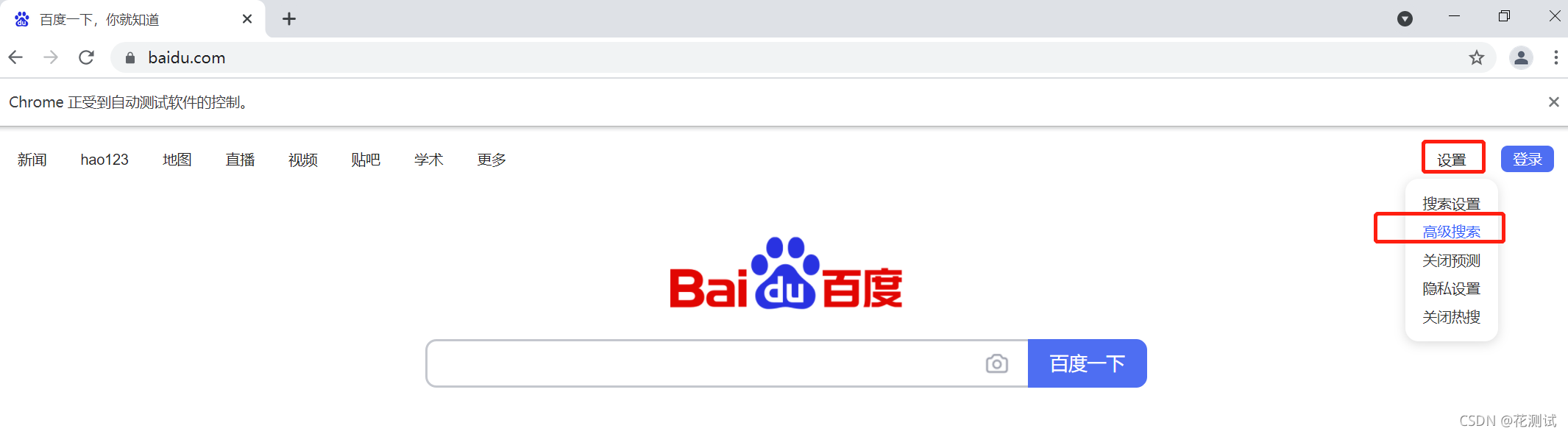
import time
from selenium import webdriver
from selenium.webdriver.common.action_chains import ActionChains

driver = webdriver.Chrome()
driver.maximize_window()
driver.get("https://www.baidu.com/")   # 打开网页:百度

# 第一步:鼠标移动到“设置”按钮
el = driver.find_element('xpath', '//span[@id="s-usersetting-top"]')   # 定位元素:按钮“设置”
action = ActionChains(driver)
action.move_to_element(el).perform()
# 第二:再点击“高级搜索”
el = driver.find_element('xpath', '//a[text()="高级搜索"]')   # 定位元素:按钮“高级设置”
el.click()

time.sleep(3)   # 等待3秒
driver.close()  # 关闭浏览器
版权声明
本文为[花测试]所创,转载请带上原文链接,感谢
https://blog.csdn.net/weixin_48415452/article/details/120134808
边栏推荐
- A simple image processor running across C raspberry pie
- 《数据安全法》解读及安全保密技术应用交流会在京成功举办
- Winform让Form窗体切换前置及活动状态
- Flink自定义sink端SinkFunction的应用
- adb命令的使用【一】
- 世平信息上榜《CCSIP 2021中国网络安全产业全景图》
- Implement data compliance and ensure data security
- 职工信息的综合运算
- .Net5中使用Swagger
- Shiping information appeared at the China traditional Chinese medicine information conference to help build the data security system of the pharmaceutical industry
猜你喜欢

web问题定位:F12,如何找到对应接口

A simple image processor running across C raspberry pie

助力2021杭州市网络安全宣传周 | 世平信息精彩活动合集

Import 3D model from web page - obj / MTL file

使用sss 框架搭建简单毕设, 宿舍管理系统

Raspberry Pie: adafruit's I2C ssd1306 OLED driver

On June 1st, write a poem

在window环境下面virtualbox加载移动硬盘里创建好的虚拟机

Focusing on data security, Shiping information is listed in the six sub areas of the panorama of China's network security industry
![[site building notes]: insert code snippets in wordpress blog posts and highlight them](/img/2f/d222c77172383fda79f2c109db0bdc.png)
[site building notes]: insert code snippets in wordpress blog posts and highlight them
随机推荐
.Net5中使用Swagger
echars动态实现散点图并自定义信息提示框
MNIST handwritten numeral recognition based on convolutional neural network lenet-5 model
Shrio 学习笔记(一)
JSON相关
postman初级-6-console:打印并查看日志
SuperSocket在.Net5中使用——AppSession和SuperSocketService篇
关于XSS跨站
ik分词器-简单使用
js-继承
记录一次爬虫的总结
落实数据合规,保障数据安全
通用测试技术【二】测试方法
postgresql 里面查询存储过程
mysql安装采坑
高级排序-快排
Application of Wireshark in traffic analysis
Configuration list of raspberry pie (entry reference)
世平信息参与衡阳市“船山论坛”企业路演,畅谈数据安全,助力协同创新
Winform让Form窗体切换前置及活动状态