当前位置:网站首页>FSM finite state machine
FSM finite state machine
2022-04-23 07:44:00 【0zien0】
When you want to make a function, you need to go through different situations ( Conditions ), When dealing with problems in different ways , In general , Will write a lot if-else Code to judge , This way of writing is confusing when switching between states or adding new states . And if you use a state machine , The functions of each state are relatively independent and clear . 23 A state pattern in a design pattern , Is a better way to realize the function of finite state machine .
When I was a child, I played a very simple game console , It's called “ Electronic pets ”.

Seeing these classic pictures, I don't know if they remind everyone of them . This is the main character of today , I'm going to use the state machine to implement a “ chicken ” The little game .
Numerical design of the game , As follows :

Next on the game code ! The code is pure lua Written .
State base class :
--  State base class
local P = class("FSMState")

FSMState = P

--  Constructors
function P:ctor(owner)
    self._owner = owner
    self._isPause = false

    self._name = "FSMState"
end

--  Pause the state machine
function P:pause()
	self._isPause = true
end

--  Continue state machine
function P:resume()
	self._isPause = false
end

--  State description
function P:info()
end

--  Set whether the current state is allowed to be switched
function P:condition()
	return true
end

--  Timer
function P:update()
end

function P:clear()
	self._owner = nil
end
State subclass 1【 Chicken... Eat 】:
--  State base class
local P = class("StateEat", FSMState)

--  Constructors
function P:ctor(owner)
    self._owner = owner

    self._name = "StateEat"
end

function P:info()
	return " The chicken went to dinner "
end

function P:update(dt)
	if not self._isPause then
		self._owner.satiety = self._owner.satiety + math.random(30, 50)
		self._owner.energy = self._owner.energy - math.random(10, 20)
		self._owner.clean = self._owner.clean - math.random(5, 10)
		self._owner.time = self._owner.time + 1
	end
end

return P
State subclass 2【 The chick sleeps 】:
--  State base class
local P = class("StateSleep", FSMState)

--  Constructors
function P:ctor(owner)
    self._owner = owner

    self._name = "StateSleep"
end

function P:info()
	return " The chicken went to bed "
end

function P:update(dt)
	if not self._isPause then
		self._owner.satiety = self._owner.satiety - math.random(20, 30)
		self._owner.energy = self._owner.energy + math.random(50, 80)
		self._owner.time = self._owner.time + math.random(8, 10)
		self._owner.happy = 70
	end
end

return P
The chick sleeps 、 having dinner 、 Take a shower 、 In a daze 、 play ,5 States , Not one by one ……
Next is the more important machine The class
--  State base class
local P = class("FSMMachine")

FSMMachine = P

P.IDLE = function(owner) return require("StateIdle"):create(owner) end
P.EAT = function(owner) return require("StateEat"):create(owner) end
P.PLAY = function(owner) return require("StatePlay"):create(owner) end
P.SLEEP = function(owner) return require("StateSleep"):create(owner) end
P.CLEAN = function(owner) return require("StateClean"):create(owner) end

--  Constructors
function P:ctor()
	self._scheduleId = nil 			--  Timer ID
	self._interval = 0.03			--  The time interval of the timer
	self._state = nil				--  state
	self._preState = nil			--  Last state [ Save the last state , Achieve freedom “ Restore the previous state ” The function of ]
end

--  Start state machine
function P:start(owner)
	self._owner = owner
	self._state = require("StateIdle"):create(owner)


	--  This class maintains a timer for the entire state machine ( Use here while Loop to force the timer ……, adopt os.clock() To achieve sleep function , Although it will occupy CPU, But it's just a hand training game , Use it like this first )
	--  If the chick's satiety is 0, Starve to death , At the end of the game, jump out of the loop
	local index = 1
	while owner.satiety > 0 do
		self:update(index)
		index = index + 1
	end

	print(" The chick died , At the age of " .. math.floor(self._owner.time / 24) .. " God " .. self._owner.time % 24 .. " Hours  ")
	-- self._scheduleId = display.scheduleScriptFunc(function (dt)
	-- 	self:update(dt)
	-- end, 5, false)
end

--  Pause the state machine
function P:pause()
	if self._state then
		self._state:pause()
	end
end

--  Continue state machine
function P:resume()
	if self._state then
		self._state:resume()
	end
end

--  Timer
function P:update(dt)
	-- print("zien ", dt)

	--  Call the current state of update Function to execute the timer of the current state
	if self._state then
		self._state:update()
		self:checkState()
	end

	self:sleep1(self._interval)
end

--  Check whether the status needs to be changed
function P:checkState()
	if self._owner.satiety < 20 then	--  Very hungry
		self:changeState(FSMMachine.EAT)
	elseif self._owner.energy < 20 then	--  Very tired
		self:changeState(FSMMachine.SLEEP)
	elseif self._owner.happy < 20 then	--  Very unhappy
		self:changeState(FSMMachine.PLAY)
	elseif self._owner.clean < 20 then	--  Very dirty
		self:changeState(FSMMachine.CLEAN)
	elseif self._owner.satiety < 40 then	--  hungry
		self:changeState(FSMMachine.EAT)
	elseif self._owner.energy < 40 then	--  Tired out
		self:changeState(FSMMachine.SLEEP)
	elseif self._owner.happy < 40 then	--  unhappy
		self:changeState(FSMMachine.PLAY)
	elseif self._owner.clean < 40 then	--  dirty
		self:changeState(FSMMachine.CLEAN)
	else 								--  If everything is normal, you will be in a daze
		self:changeState(FSMMachine.IDLE)
	end

	self:showInfo()
end

--  Output chick status information
function P:showInfo()
	local str = " Chicken age :" .. math.floor(self._owner.time / 24) .. " God " .. self._owner.time % 24 .. " Hours  "
	str = str .. "  Satiety :" .. self._owner.satiety
	str = str .. "  Joy :" .. self._owner.happy
	str = str .. "  Energy level :" .. self._owner.energy
	str = str .. "  Cleanliness :" .. self._owner.clean
	str = str .. "  " .. self._state:info()

	print(str)
end

--  State change
function P:changeState(state)
	if self._state and self._state:condition() then
		local newState = state(self._owner)
		if newState then
			--  Clear the previous status
			if self._preState then
				self._preState:clear()
			end

			self._preState = self._state
			self._state = newState
		end
	end
end

--  Return to the previous status
function P:revert()
	if self._preState and self._state then
		local tmpState = self._preState
		self._preState = self._state
		self._state = tmpState
	end
end

function P:sleep(n)
	if n > 0 then
		os.execute("ping -n " .. tonumber(n + 1) .. " localhost > NUL")
	end
end

function P:sleep1(n)
	local t = os.clock()
	while os.clock() < t + n do

	end
end

return P
Simply analyze this machine Some functions of :

It's a status table , By using the status of this table , To switch the state of the chicken .

After starting the state machine ,machine Class will maintain a timer , The timer will execute 【 Current effective status 】 Corresponding update function . adopt machine Class to drive the operation of the current state .

Switch between different states according to different conditions . After reaching the conditions , Use the values of the condition table submitted above , You can switch states .
The state pattern is roughly such a sub structure , One machine class , One state Base class , Plus N There are two different functions state Subclasses constitute a general state pattern . Here is a simple entry function .
require "tools.init"
require "init"

math.randomseed(tostring(os.time()):reverse():sub(1, 7)) --  Set random seeds

function main()
    local chick = {satiety = 100, happy = 100, energy = 100, clean = 100, time = 0}

    local fsm = FSMMachine:new()
    fsm:start(chick)
end

main()
The chicken's properties are just the initial settings , Then start the state machine , You can see the chick's life !
The operation effect is roughly as follows :

Boring me , Tried to raise 10 Second chicken , result
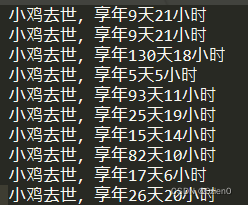
Only 3 Just barely raised , I really have a talent for raising chickens =.=!
By the way , This chicken game , It's too simple , There will be more and more complex situations in real projects , Such as :
1. In the state base class, I preset the function of pausing the state machine ;
2. stay machine Class, I preset the function of returning the state of the last execution ;
3. In this game , It is necessary to execute one state before entering the next state , In fact, it is possible that a state is still in the process of implementation , There will be a need to change the State , Specifically, interrupt the current state and directly enter the next state , Or record the next status , Wait for the execution of the current state to end before entering the next state , These all need specific analysis of specific problems .
4. This state machine is also a fully automatic state machine , And all subclass state switching conditions are consistent , So the state switching section is also very simple , Practical application , Probably because of some external changes, the state machine needs to switch states , And each subclass may have its own different state switching conditions .
Simply speaking , It's just a little practice demo, Just for fun ~
The source code is here :
版权声明
本文为[0zien0]所创,转载请带上原文链接,感谢
https://yzsam.com/2022/04/202204230623293135.html
边栏推荐
- CSDN很火的汤小洋老师全部课程总共有哪些(问号问号问号)
- SAP PI/PO rfc2RESTful 發布rfc接口為RESTful示例(Proxy間接法)
- Authorization server (simple construction of authorization server)
- 判断字符串首尾是否包含目标参数:startsWith()、endsWith()方法
- 2.限定查询
- SAP SALV14 后台输出SALV数据可直接保存文件,发送Email(带排序、超链接、筛选格式)
- ABAP 7.4 SQL Window Expression
- SAP DEBUG调试FOR IN、REDUCE等复杂的语句
- 手游性能优化
- [牛客挑战赛47]C.条件 (bitset加速floyd)
猜你喜欢

keytool: command not found

Redis connection error err auth < password > called without any password configured for the default user

SAP RFC_CVI_EI_INBOUND_MAIN BP主数据创建示例(仅演示客户)

Authorization server (simple construction of authorization server)

SAP PI / Po rfc2restful Publishing RFC interface as restful examples (proxy indirect)

int a = 1存放在哪

反思 | Android 音视频缓存机制的系统性设计

设置了body的最大宽度,但是为什么body的背景颜色还铺满整个页面?

对js中argumens的简单理解

Visualization Road (IX) detailed explanation of arrow class
随机推荐
Common DOS commands
公共依赖模块common的处理
2022.3.14 阿里笔试
js之DOM事件
【自我激励系列】你永远不会准备好
如何SQL 语句UNION实现当一个表中的一列内容为空时则取另一个表的另一列
对js中argumens的简单理解
(扩展)BSGS与高次同余方程
js之函数的两种声明方式
js案例之求最大值,反转数组,冒泡排序
js之排他思想及案例
Educational Codeforces Round 81 (Rated for Div. 2)
2022.3.14 Ali written examination
SAP PI/PO登录使用及基本功能简介
驼峰命名对像
Implementation of MySQL persistence
h5本地存储数据sessionStorage、localStorage
安装配置淘宝镜像npm(cnpm)
SAP TRANSLATE使用数据对象掩码示例
ABAP 实现发布RESTful服务供外部调用示例