当前位置:网站首页>用户认证——Kerberos部署
用户认证——Kerberos部署
2022-08-06 03:36:00 【丝丝呀】
1 Kerberos安装
选择集群中的一台主机(hadoop102)作为Kerberos服务端,安装KDC,所有主机都需要部署Kerberos客户端。
服务端主机执行以下安装命令(注意:在root账户下操作)
[[email protected] ~]# yum install -y krb5-server

客户端主机执行以下安装命令
[[email protected] ~]# yum install -y krb5-workstation krb5-libs

[[email protected] ~]# yum install -y krb5-workstation krb5-libs
[[email protected] ~]# yum install -y krb5-workstation krb5-libs

2)修改配置文件
1.服务端主机(hadoop102)
修改/var/kerberos/krb5kdc/kdc.conf文件,内容如下
[[email protected] ~]# vim /var/kerberos/krb5kdc/kdc.conf
修改如下内容

2.客户端主机(所有主机)
修改/etc/krb5.conf文件
[[email protected] ~]# vim /etc/krb5.conf

[[email protected] ~]# vim /etc/krb5.conf
[[email protected] ~]# vim /etc/krb5.conf
三台节点进行同样的操作,也可以建立软连接,直接利用xsync进行分发
[[email protected] ~]# ln -s /home/zhang/bin/xsync ~/bin
[[email protected] ~]# xsync /etc/krb5.conf

3)初始化KDC数据库
在服务端主机(hadoop102)执行以下命令,并根据提示输入密码。
[[email protected] ~]# kdb5_util create -s

4)修改管理员权限配置文件
在服务端主机(hadoop102)修改/var/kerberos/krb5kdc/kadm5.acl文件,
[[email protected] ~]# vim /var/kerberos/krb5kdc/kadm5.acl
内容如下

5 )启动Kerberos相关服务
在主节点(hadoop102)启动KDC,并配置开机自启
[[email protected] ~]# systemctl start krb5kdc
[[email protected] ~]# systemctl enable krb5kdc
在主节点(hadoop102)启动Kadmin,该服务为KDC数据库访问入口
[[email protected] ~]# systemctl start kadmin
[[email protected] ~]# systemctl enable kadmin

6) 创建Kerberos管理员用户
在KDC所在主机(hadoop102),执行以下命令,并按照提示输入密码
[[email protected] ~]# kadmin.local -q "addprinc admin/admin"

2 Kerberos使用概述
2.1 Kerberos数据库操作
1.登录数据库
1)本地登录(无需认证)
[[email protected] ~]# kadmin.local

2)远程登录(需进行主体认证,认证操作见下文)
[[email protected] ~]# kadmin

目前还没有认证,所以不能登录。
2.创建Kerberos主体
登录数据库,输入以下命令,并按照提示输入密码
kadmin.local: addprinc test
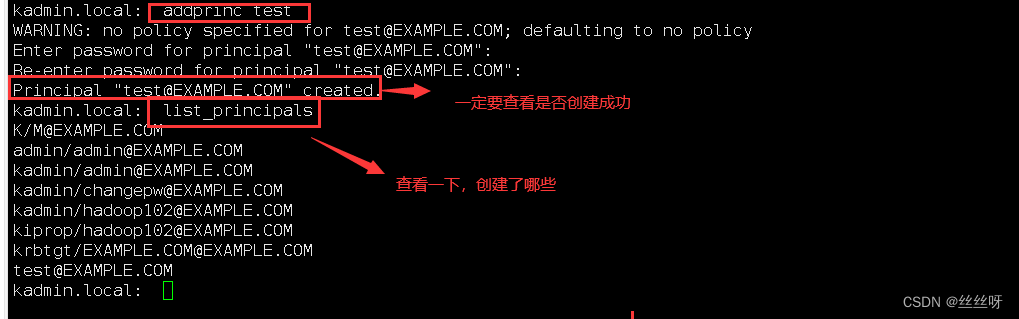
也可通过以下shell命令直接创建主体
[[email protected] ~]# kadmin.local -q"addprinc test"
3.修改主体密码
kadmin.local :cpw test

4.查看所有主体
kadmin.local: list_principals
admin/[email protected]
kadmin/[email protected]
kadmin/[email protected]
kadmin/[email protected]
kiprop/[email protected]
krbtgt/[email protected]
5.删除
kadmin.local: delprinc test
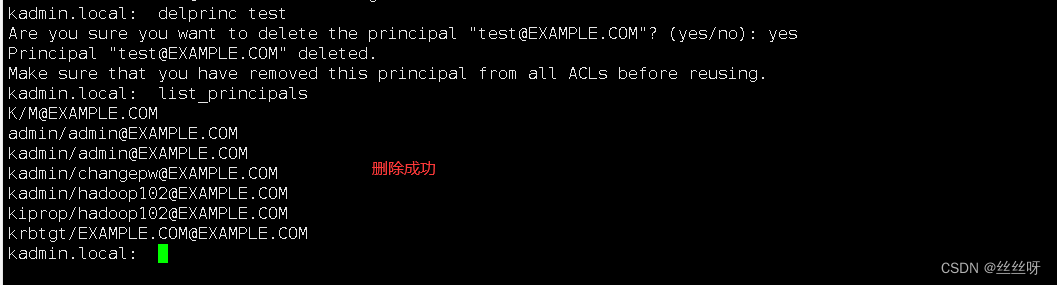
2.2 Kerberos认证操作
1.密码认证
1)使用kinit进行主体认证,并按照提示输入密码
[[email protected] ~]# kinit test
Password for [email protected]:
注意:test被前面删除了,要先进去创建一个test
2)查看认证凭证
[[email protected] ~]# klist

2.密钥文件认证
1)生成主体test的keytab文件到指定目录/root/test.keytab
[[email protected] ~]# kadmin.local -q "xst -norandkey -k /root/test.keytab [email protected]"

注:-norandkey的作用是声明不随机生成密码,若不加该参数,会导致之前的密码失效。
2)使用keytab进行认证
[[email protected] ~]# kinit -kt /root/test.keytab test
3)查看认证凭证
[email protected] ~]# klist

3.销毁凭证
[[email protected] ~]# kdestroy
[[email protected] ~]# klist

边栏推荐
- The first day of learning MySQL: MySQL overview (basic)
- Mysql installation ask for answers
- What is an Egg. The js, it have what features, installation of an Egg framework, definition of routing, what's Controller is the Controller, CORS configuration, the json configuration, a get request,
- 椭圆曲线介绍(四):椭圆曲线安全性,与RSA对比
- 【Translation】Serverless Architecture: Pros and Cons
- 【深度学习21天学习挑战赛】备忘篇:模型复用——模型的保存与加载
- jvm: synchronized关键字不同用法产生不同的字节码
- 2022年天猫七夕价格便宜吗?天猫七夕节有什么优惠?
- go mod why
- Django reports an error ModuleNotFoundError: No module named 'mysqlclient'
猜你喜欢
2022年天猫8月份有什么大的活动?
Introduction to Elliptic Curves (4): Elliptic Curve Security, Compared with RSA

(十)集合 -Set

个推数据智能技术实践 | 教你打造数据质量心电图,智能检测数据“心跳”异常

FluentValidation

Wang Qi, Secretary of the Party Committee and President of Shanghai Pudong Development Bank Changsha Branch, and Jiang Junwen, President of Huarong Xiangjiang Bank, visited Kylin Principal for investi
椭圆曲线介绍(四):椭圆曲线安全性,与RSA对比

xctf attack and defense world web master advanced area command_execution

2022 Alibaba Cloud server configuration selection strategy

文献阅读---普通狗牙根阳江基因组单倍型解析与基因组稳定性和匍匐性研究
随机推荐
[wpf] Detailed explanation of three callbacks for dependency properties
xctf attack and defense world Web master advanced area easytornado
全同态加密知识体系整理
Jvm: synchronized锁定谁?
请求DNS查找的host命令示例
xctf Attack and Defense World Web Master Advanced Zone upload1
Linux common commands
2022年天猫七夕价格便宜吗?天猫七夕节有什么优惠?
十四. go channel
2018HBCPC部分题解
Lvm root partition expansion
【无标题】
chrome NET::ERR_CERT_INVALID use thisisunsafe to solve what happened to the browser
译文推荐|深入解析 BookKeeper 协议模型与验证
Example of host command requesting DNS lookup
HTAP 能够取代 OLAP 吗?
2022年天猫8月份有什么大的活动?
【LaTex】 - How to use the alignment symbol &, the usage of the newline character \\, how to solve the Misplaced & error
To build their own core, let Google pay!Google has open source 180 nm process chip
七夕节微信表白墙小程序源码/基于Laravel的表白墙微信小程序源码