当前位置:网站首页>Kubernetes---ConfigMap配置管理
Kubernetes---ConfigMap配置管理
2022-04-21 22:43:00 【Hemi Fate】
目录
一、基本介绍
官网指南:https://kubernetes.github.io/ingress-nginx/user-guide/nginx-configuration/configmap/
ConfigMap配置管理:
• ConfigMap用于保存配置数据,以键值对形式存储;
• ConfigMap资源提供了向 Pod 注入配置数据的方法;
• 旨在让镜像和配置文件解耦,以便实现镜像的可移植性和可复用性。
典型的使用场景:
• 填充环境变量的值;
• 设置容器内的命令行参数;
• 填充卷的配置文件。
二、创建管理的4种方式
四种创建方式:
• 使用字面值创建;
• 使用文件创建;
• 使用目录创建;
• 编写configmap的yaml文件创建
2.1 使用字面值创建
##使用键值对的形式创建面变量
[root@server1 configmap]# kubectl create configmap my-config --from-literal=key1=config1 --from-literal=key2=config2

##查看所存在的环境变量
[root@server1 configmap]# kubectl get cm

##查看指定命名空间的值
[root@server1 configmap]# kubectl get cm -n kube-system

##查看细节
[root@server1 configmap]# kubectl describe cm

##删除
[root@server1 configmap]# kubectl delete configmap my-config

2.2 使用文件创建
##通过指定文件创建
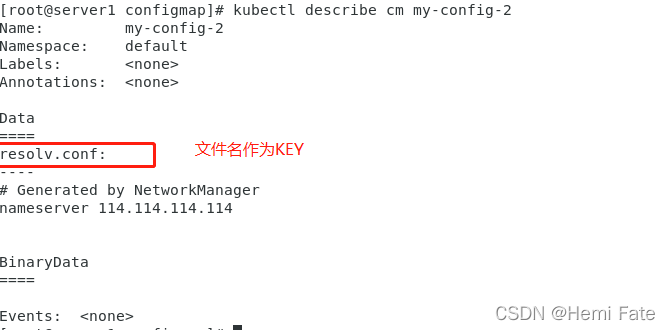
[root@server1 configmap]# kubectl create configmap my-config-2 --from-file=/etc/resolv.conf

##查看指定信息
[root@server1 configmap]# kubectl describe cm my-config-2
2.3 使用目录创建
##创建测试目录
[root@server1 configmap]# mkdir test
[root@server1 configmap]# cp /etc/resolv.conf ./test/
[root@server1 configmap]# cp /etc/fstab ./test/

##使用文件创建
[root@server1 configmap]# kubectl create configmap my-config-file --from-file=./test/

2.4 编写configmap 的yaml文件
[root@server1 configmap]# vim cm.yml
[root@server1 configmap]# cat cm.yml
apiVersion: v1
kind: ConfigMap
metadata:
  name: cm1-config
data:
  db_host: "172.25.0.250"
  db_port: "3306"
[root@server1 configmap]# kubectl apply -f cm.yml
configmap/cm1-config created
[root@server1 configmap]# kubectl get cm
NAME               DATA   AGE
cm1-config         2      5s
kube-root-ca.crt   1      11m
my-config-2        1      10m
my-config-file     2      5m4s

[root@server1 configmap]# kubectl describe cm cm1-config

三、使用创建的变量
三种方式:
• 通过环境变量的方式直接传递给pod;
• 通过在pod的命令行下运行的方式;
• 作为volume的方式挂载到pod内。
3.1 通过环境变量的方式直接传递给pod
##编写配置文件
[root@server1 configmap]# cat cm-env.yml
apiVersion: v1
kind: ConfigMap                 ##设置cm的环境变量
metadata:
  name: cm1-config
data:
  db_host: "172.25.0.250"
  db_port: "3306"
---
apiVersion: v1
kind: Pod
metadata:
  name: pod1
spec:
  containers:
    - name: pod1
      image: busybox
      command: ["/bin/sh", "-c", "env"]
      env:                            ##给环境变量命名
        - name: key1
          valueFrom:                  ##key1的值来自于cm的cm1-config中key为db_host的
            configMapKeyRef:
              name: cm1-config
              key: db_host
        - name: key2
          valueFrom:
            configMapKeyRef:
             name: cm1-config
             key: db_port
  restartPolicy: Never

##应用配置文件
[root@server1 configmap]# kubeclt apply -f cm-env.yml

##查看运行结果
[root@server1 configmap]# kubectl logs pod1

直接继承原来的key,不做改变:
[root@server1 configmap]# cat cm-env-dir.yml
apiVersion: v1
kind: ConfigMap
metadata:
  name: cm1-config
data:
  db_host: "172.25.0.250"
  db_port: "3306"
---
apiVersion: v1
kind: Pod
metadata:
  name: pod2
spec:
  containers:
    - name: pod2
      image: busybox
      command: ["/bin/sh", "-c", "env"]
      envFrom:                 ##直接指定环境变量的来源
        - configMapRef:
            name: cm1-config
  restartPolicy: Never

3.2 通过在pod的命令行下运行的方式
[root@server1 configmap]# vim cm-dir.yml
[root@server1 configmap]# kubectl apply -f cm-dir.yml
configmap/cm1-config unchanged
pod/pod1 created
[root@server1 configmap]# kubectl logs pod1
172.25.0.250 3306
[root@server1 configmap]# cat cm-dir.yml
apiVersion: v1
kind: ConfigMap
metadata:
  name: cm1-config
data:
  db_host: "172.25.0.250"
  db_port: "3306"
---
apiVersion: v1
kind: Pod
metadata:
  name: pod1
spec:
  containers:
    - name: pod1
      image: busybox
      command: ["/bin/sh", "-c", "echo $(db_host) $(db_port)"]     ##在pod内直接执行
      envFrom:
        - configMapRef:
            name: cm1-config
  restartPolicy: Never

3.3 作为volume的方式挂载到pod内
apiVersion: v1
kind: ConfigMap
metadata:
  name: cm1-config
data:
  db_host: "172.25.0.250"
  db_port: "3306"
---
apiVersion: v1
kind: Pod
metadata:
  name: pod2
spec:
  containers:
    - name: pod2
      image: busybox
      command: ["/bin/sh", "-c", "cat /config/*"]
      volumeMounts:               ##挂载的位置
      - name: config-volume
        mountPath: /config
  volumes:                        ##卷的内容
    - name: config-volume         ##卷的名字
      configMap:                  ## 挂在的内容为cm中关键字为cm1-config 的值
        name: cm1-config
  restartPolicy: Never

##应用中的使用
[root@server1 configmap]#  kubectl apply -f cm-volum.yml
[root@server1 configmap]#  kubectl logs pod2
[root@server1 configmap]#  vim cm-nginx.yml
[root@server1 configmap]#  kubectl apply -f cm-nginx.yml
[root@server1 configmap]#  kubectl exec -it pod1 -- bash        ##连接应用,查看配置
[root@server1 configmap]#  cat cm-nginx.yml
apiVersion: v1
kind: ConfigMap
metadata:
  name: cm1-config
data:
  db_host: "172.25.0.250"
  db_port: "3306"
---
apiVersion: v1
kind: Pod
metadata:
  name: pod1
spec:
  containers:
    - name: pod1
      image: nginx
      volumeMounts:
      - name: config-volume
        mountPath: /config
  volumes:
    - name: config-volume
      configMap:
        name: cm1-config

四、ConfigMap的热更新
##编写服务配置文件
[root@server1 configmap]# cat cm-in.yml
apiVersion: v1
kind: ConfigMap                 ##编写CM的格式
metadata:
  name: cm1-config
data:
  db_host: "172.25.0.250"
  db_port: "3306"
---
apiVersion: apps/v1
kind: Deployment
metadata:
  name: my-nginx
spec:
  replicas: 1
  selector:
    matchLabels:
      app: nginx
  template:
    metadata:
      labels:
        app: nginx
    spec:
      containers:
        - name: nginx
          image: nginx
          ports:
          - containerPort: 80
          volumeMounts:                  ##通过挂载的方式,讲CM变量挂到POD内
          - name: config-volume
            mountPath: /etc/nginx/conf.d
      volumes:
        - name: config-volume
          configMap:
            name: nginx-config            ##挂载的容器名

##编写CM
[root@server1 configmap]# cat  server.conf
server {
 listen       8000;
 server_name  _;

 location / {
  root /usr/share/nginx/html;
  index  index.html index.htm;
        }
}

##以文件的方式讲CM写入
[root@server1 configmap]# kubectl create configmap nginx-config --from-file=server.conf

##查看具体信息
[root@server1 configmap]# kubectl describe cm nginx-config

##启动POD,查看信息
[root@server1 configmap]# kubectl apply -f cm-in.yml
[root@server1 configmap]# kubectl get pod

##查看IP,进行测试
[root@server1 configmap]# kubectl get pod -o wide

[root@server1 configmap]# curl 10.244.1.95

[root@server1 configmap]# curl 10.244.1.95:8000

##查看服务器内配置
[root@server1 configmap]# kubectl exec my-nginx-7db4c4f989-pl6c8 -- cat /etc/nginx/conf.d/server.conf

##更改内容(这里讲端口改为8080)
[root@server1 configmap]# kubectl edit cm nginx-config
configmap/nginx-config edited

##查看修改后的配置文件
[root@server1 configmap]# kubectl exec my-nginx-6c4c97b5bc-5pxqm -- cat /etc/nginx/conf.d/server.conf


将没有生效的配置文件及逆行滚动更新
##触发滚动更新
[oot@server1 configmap]# kubectl patch deployments.apps my-nginx --patch '{"spec": {"template": {"metadata": {"annotations": {"version/config": "20220420"}}}}}'

##查看新的POD
[root@server1 configmap]# kubectl get pod -o wide

##使用新的IP惊醒访问
[root@server1 configmap]# curl 10.244.1.95:8080
版权声明
本文为[Hemi Fate]所创,转载请带上原文链接,感谢
https://blog.csdn.net/qq_41056224/article/details/124291189
边栏推荐
- Yarn online dynamic resource tuning
- [Central South University of forestry science and technology] [Chen] week 7 innovation maze
- [Central South University of forestry science and technology] [Chen] sixth week innovation question prime
- Module 3: Outsourcing student management system - architecture design document
- PyQt5+OpenCV操作本地摄像头
- L1-063 吃鱼还是吃肉 (10 分)
- Lesson 5: correlation coefficient
- 黑盒测试-数据的读取与输出方式
- Outsourcing student management system detailed architecture design document
- CC00012. ZABBIX———————————————
猜你喜欢
Core component in opencv - input / output XML, yaml (12)

2022 intermediate accounting title examination economic law practice questions and answers

CC00012.MySQL———————————————
Event distribution mechanism Android, Android interview summary of large manufacturers, detailed answers
CC00012. MySQL———————————————

Keil package common chip high-speed download address, including historical version, pay close attention to my quick collection

Pyqt5 + opencv operate local camera

1957年高考数学题

Oracle database 22c insight:_ kgl_ Large_ heap_ assert_ Threshold automatic and manual adjustment

Nacos Registry - service registration and tiered storage
随机推荐
L2-3 sequence traversal of complete binary tree (25 points) -- recursive reduction of binary tree
Mainstream app development tools. You're bald and didn't expect to do this again
PyQt5+OpenCV操作本地摄像头
L1-055 谁是赢家 (10 分)
D:MATLAB. N practical skills -MATLAB Chinese Forum essence summary
L1-055 who is the winner (10 points)
Rvb2601 startup process
MySQL multi table query exercise
事件分发机制Android,大厂Android面试总结 详细解答
【pytorch】常用函数
Outsourcing student management system detailed architecture design document
Event distribution mechanism Android, Android interview summary of large manufacturers, detailed answers
AI application theory - special production and manufacturing session (parts installation and quality inspection)
2022年中级会计职称考试会计实务练习题及答案
Review questions and answers of building materials and structures in 2022 first-class registered architect examination
读书笔记《秋园》《浮木》《我本芬芳》
【无标题】
L1-060 心理阴影面积 (5 分)
We sincerely invite you to sign up for the first openharmony developer growth plan sharing day
L1-058 6翻了 (15 分)