当前位置:网站首页>Campus talking notes (5)
Campus talking notes (5)
2022-04-21 16:11:00 【Xiao Hao is especially love】
Let us to make our app
Here we are again today !!!, Last time, we made the side drawer bar as the personal Center , The layout of the last blog was a little inappropriate , I'll change it in a few days , Please be considerate !
Today we are going to realize the basic layout of the first page ——Message( Information page ), Come on ! Directly on the actual effect drawing :
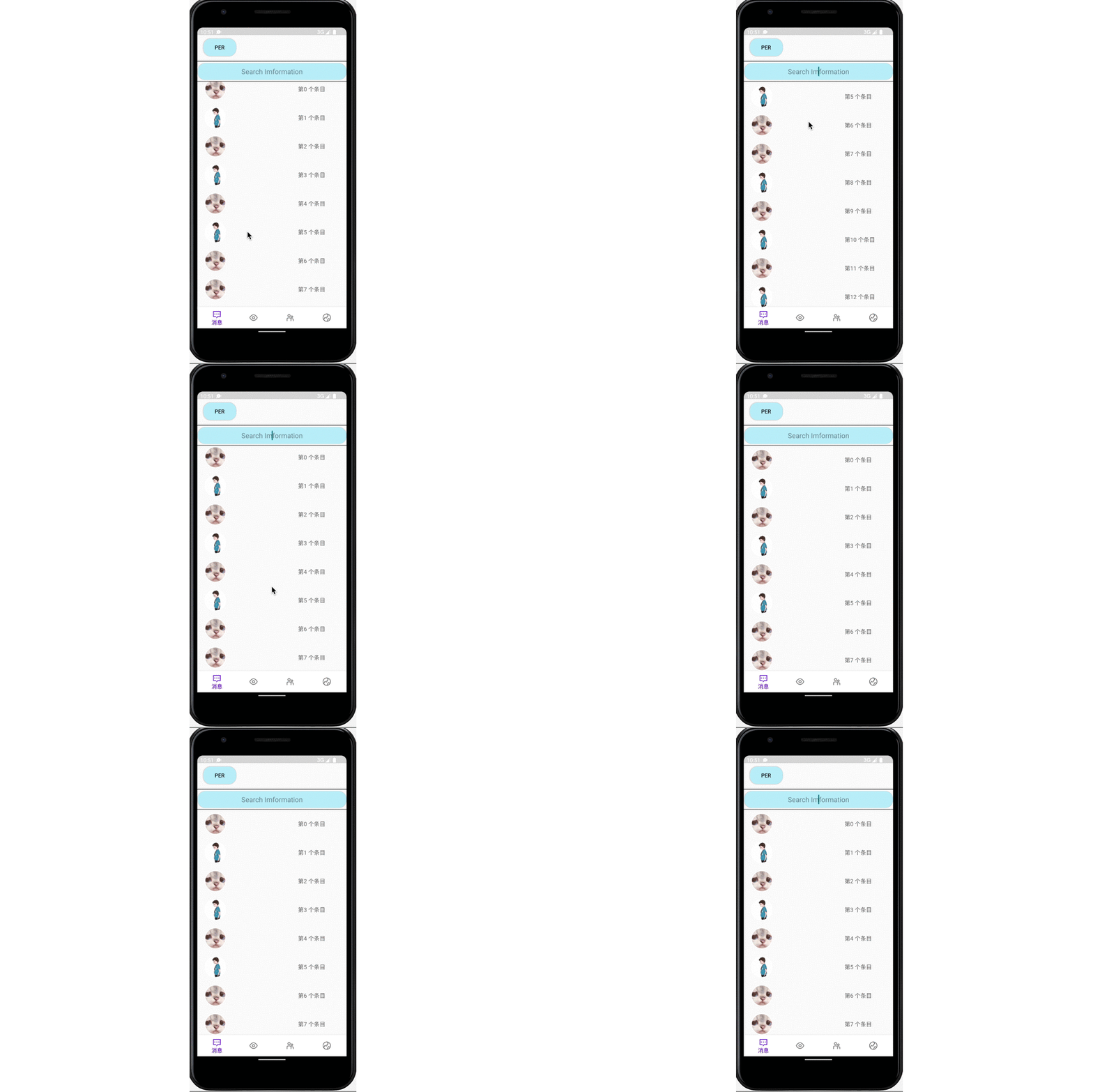
First of all, we also analyze our needs :
- 1,Message page , We first have a message list , According to half the layout of the message list , The basic information of each is avatar and information ( Because we were UI Interface writing , So now it's all dead data ).
- 2, In addition to the message list , What we also need is a search bar , According to the search bar, you can search for the desired contact , Send message .
After understanding the requirements, let's write :
First, we implement the list , We implement lists in many ways , But what is often used is ListView, But through understanding, we will find that ,ListView There are certain defects :1, Local refresh and overall refresh are inconvenient 2, Can not achieve complex layout effect Instead, we use RecycleVIew To replace it ,RecycleView More powerful than it , First RecycleView Can achieve waterfall , linear , Grid layout , And it has a five layer cache mechanism , Better .
Because every data is an object , We created one Beans Catalog , Write it down Person Entity class :

package com.example.campus_talk.Beans;

public class Person {


    public int icon;
    public String title;
}
To create another item Layout

<?xml version="1.0" encoding="utf-8"?>
<RelativeLayout xmlns:android="http://schemas.android.com/apk/res/android"
    android:layout_width="match_parent"
    android:layout_height="70dp"
    xmlns:app="http://schemas.android.com/apk/res-auto">

    <com.google.android.material.imageview.ShapeableImageView
        android:id="@+id/item_message_image"
        android:layout_width="55dp"
        android:layout_height="55dp"
        android:layout_marginStart="20dp"
        android:layout_marginTop="10dp"
        android:layout_marginEnd="10dp"
        android:layout_marginBottom="10dp"
        android:scaleType="fitXY"
        android:src="@drawable/personal"
        app:shapeAppearanceOverlay="@style/circleImageStyle"
        app:strokeColor="#FFF"
        app:strokeWidth="2dp" />

    <TextView

        android:id="@+id/item_message_text"
        android:layout_width="wrap_content"
        android:layout_height="wrap_content"
android:textSize="15sp"
        android:layout_marginTop="30dp"
        android:layout_marginLeft="180dp"
        android:layout_centerVertical="true"
        android:layout_toRightOf="@+id/item_message_image"
        android:text=" title "/>

</RelativeLayout>
Now let's realize our RecycleView.
We are now Message_Fragment Add inside RecycleView

<?xml version="1.0" encoding="utf-8"?>

<androidx.drawerlayout.widget.DrawerLayout xmlns:android="http://schemas.android.com/apk/res/android"
    xmlns:app="http://schemas.android.com/apk/res-auto"
    xmlns:tools="http://schemas.android.com/tools"
    android:id="@+id/drawmenu"
    android:layout_width="match_parent"
    android:layout_height="match_parent"
    tools:context=".menu.MessageFragment">

<androidx.constraintlayout.widget.ConstraintLayout
    android:layout_width="match_parent"
    android:layout_height="match_parent">

    <androidx.appcompat.widget.Toolbar
        android:id="@+id/toorbar"
        android:background="@color/grey"
        android:layout_width="match_parent"
        android:layout_height="20dp"
        app:layout_constraintEnd_toEndOf="parent"
        app:layout_constraintStart_toStartOf="parent"
        app:layout_constraintTop_toTopOf="parent"
        tools:ignore="MissingConstraints" >

    </androidx.appcompat.widget.Toolbar>

    <Button
        android:id="@+id/personal"
        android:layout_width="wrap_content"
        android:layout_height="wrap_content"
        android:layout_marginTop="28dp"

        android:background="@drawable/head_portrait"
        android:text="per"
        app:layout_constraintEnd_toEndOf="parent"
        app:layout_constraintHorizontal_bias="0.049"
        app:layout_constraintStart_toStartOf="parent"
        app:layout_constraintTop_toTopOf="parent" />

    <ImageView
        android:id="@+id/imageView2"
        android:layout_width="match_parent"
        android:layout_height="1dp"
        android:layout_marginTop="12dp"
        android:background="@android:color/black"
        app:layout_constraintEnd_toEndOf="parent"
        app:layout_constraintHorizontal_bias="0.0"
        app:layout_constraintStart_toStartOf="parent"
        app:layout_constraintTop_toBottomOf="@+id/personal" />

    <EditText
        android:layout_width="match_parent"
        android:layout_height="45dp"
        android:gravity="center"
        android:background="@drawable/head_portrait"
        android:hint="Search Imformation"
        app:layout_constraintBottom_toTopOf="@+id/recycler_view"
        app:layout_constraintEnd_toEndOf="parent"
        app:layout_constraintStart_toStartOf="parent"
        app:layout_constraintTop_toBottomOf="@+id/imageView2" />

    <ImageView
        android:id="@+id/imageView3"
        android:layout_width="match_parent"
        android:layout_height="1dp"
        android:layout_marginTop="52dp"

        android:background="@android:color/black"
        app:layout_constraintEnd_toEndOf="parent"
        app:layout_constraintHorizontal_bias="0.0"
        app:layout_constraintStart_toStartOf="parent"
        app:layout_constraintTop_toBottomOf="@+id/imageView2" />


    <androidx.recyclerview.widget.RecyclerView
        android:id="@+id/recycler_view"
        android:layout_width="match_parent"
        android:layout_height="0dp"
        app:layout_constraintBottom_toBottomOf="parent"
        app:layout_constraintEnd_toEndOf="parent"
        app:layout_constraintStart_toStartOf="parent"
        app:layout_constraintTop_toBottomOf="@+id/imageView3" />


</androidx.constraintlayout.widget.ConstraintLayout>
<com.google.android.material.navigation.NavigationView
    android:id="@+id/nav_view"
    android:layout_width="match_parent"
    android:layout_height="match_parent"
    android:layout_gravity="start"
    app:headerLayout="@layout/nav_header"
    app:menu="@menu/nav_menu"/>
</androidx.drawerlayout.widget.DrawerLayout>
and ListView Similarly, we need to achieve a Adapter, As follows :
package com.example.campus_talk.Adapters;

import android.media.Image;
import android.view.View;
import android.view.ViewGroup;
import android.widget.ImageView;
import android.widget.TextView;

import androidx.annotation.NonNull;
import androidx.recyclerview.widget.RecyclerView;

import com.example.campus_talk.Beans.Person;
import com.example.campus_talk.R;

import java.util.List;

public class Message_adapter extends RecyclerView.Adapter<Message_adapter.InnerHolder> {


    private final List<Person> list;

    public Message_adapter(List<Person> list){

        this.list=list;

    }
//  To create an entry view
    @NonNull
    @Override
    public Message_adapter.InnerHolder onCreateViewHolder(@NonNull ViewGroup parent, int viewType) {


        /*  Step one : Get view  establish :innerHolder */

        // Inside InnerHolder The message is view This view Is the interface of the item
        View view=View.inflate(parent.getContext(), R.layout.item_message_view,null);
        return new InnerHolder(view);
    }

    @Override
    public void onBindViewHolder(@NonNull Message_adapter.InnerHolder holder, int position) {

        holder.setData(list.get(position));

    }
// Return entry
    @Override
    public int getItemCount() {

        if(list!=null)
            return list.size();
        return 0;
    }

    public class InnerHolder extends RecyclerView.ViewHolder {

        ImageView micon;
        TextView mtitle;
        public InnerHolder(@NonNull View itemView) {

            super(itemView);


            // Find the item control
            micon=itemView.findViewById(R.id.item_message_image);
            mtitle=itemView.findViewById(R.id.item_message_text);
        }

        public void setData(Person person) {

            micon.setImageResource(person.icon);
            mtitle.setText(person.title);

        }
    }
}
In the realization of Adapter after , We are Fragment To achieve it ( For this purpose, I prepared some data )
data :

package com.example.campus_talk.Beans;

import com.example.campus_talk.R;

public class Icondata {

    public static  int[] icons= {

            R.drawable.touxiang,
            R.drawable.personal,
            R.drawable.touxiang,
            R.drawable.personal,
            R.drawable.touxiang,
            R.drawable.personal,
            R.drawable.touxiang,
            R.drawable.touxiang,
            R.drawable.personal,
            R.drawable.touxiang,
            R.drawable.personal,
            R.drawable.touxiang,
            R.drawable.personal,
            R.drawable.touxiang,
            R.drawable.personal,
            R.drawable.touxiang,
            R.drawable.personal,


    };
}
So we were Fragment The code can be written ( Pay attention to RecycleView What layout to declare in , For example, we are now Linearlayout Type of )
:
package com.example.campus_talk.menu;

import androidx.appcompat.widget.Toolbar;
import androidx.core.view.GravityCompat;
import androidx.drawerlayout.widget.DrawerLayout;
import androidx.lifecycle.ViewModelProvider;

import android.os.Bundle;

import androidx.annotation.NonNull;
import androidx.annotation.Nullable;
import androidx.fragment.app.Fragment;
import androidx.recyclerview.widget.LinearLayoutManager;
import androidx.recyclerview.widget.RecyclerView;

import android.view.LayoutInflater;
import android.view.View;
import android.view.ViewGroup;
import android.widget.Button;
import android.widget.LinearLayout;

import com.example.campus_talk.Adapters.Message_adapter;
import com.example.campus_talk.Beans.Icondata;
import com.example.campus_talk.Beans.Person;
import com.example.campus_talk.R;

import java.util.ArrayList;
import java.util.List;

public class MessageFragment extends Fragment {


    private MessageViewModel mViewModel;
    private  DrawerLayout drawerLayout;
   private Button button;
    private Toolbar toolbar;
    private RecyclerView recyclerView;
private List<Person> list;

    public static MessageFragment newInstance() {

        return new MessageFragment();
    }

    @Override
    public View onCreateView(@NonNull LayoutInflater inflater, @Nullable ViewGroup container,
                             @Nullable Bundle savedInstanceState) {

        View view=inflater.inflate(R.layout.message_fragment, container, false);
        button=view.findViewById(R.id.personal);
recyclerView=view.findViewById(R.id.recycler_view);
   drawerLayout=view.findViewById(R.id.drawmenu);
// toolbar=view.findViewById(R.id.tootbar);
//  Prepare the data , It is generally obtained in the network


        return view;
    }

    private void indata() {

        list=new ArrayList<>();
        //List<person> adapter setAdapter  Display the data
        for(int i = 0; i< Icondata.icons.length; i++){

            // Create objects
            Person person=new Person();
            person.icon=Icondata.icons[i];
                    person.title=" The first "+i+"  Entries ";
                            list.add(person);


        }
        //recycleView It is necessary to set the layout
        LinearLayoutManager layoutManager=new LinearLayoutManager(getContext());
        recyclerView.setLayoutManager(layoutManager);

        // Create adapter
        Message_adapter adapter=new Message_adapter(list);
        // Add adapter
        recyclerView.setAdapter(adapter);


    }

    @Override
    public void onActivityCreated(@Nullable Bundle savedInstanceState) {

        super.onActivityCreated(savedInstanceState);
        mViewModel = new ViewModelProvider(this).get(MessageViewModel.class);
        button.setOnClickListener(view -> drawerLayout.openDrawer(GravityCompat.START));
        indata();
        // TODO: Use the ViewModel
    }

}
So we implemented the list we needed , by the way , Forget our search input box !!, Ha ha ha , In fact, just before MessagerFragment Layout , You can look for it !
The harder you work, the luckier you are , come on. !!!
版权声明
本文为[Xiao Hao is especially love]所创,转载请带上原文链接,感谢
https://yzsam.com/2022/04/202204211607591709.html
边栏推荐
- OJ每日一练——发放奖金
- R语言广义线性模型函数GLM、广义线性模型(Generalized linear models)、glm函数构建逻辑回归模型(Logistic regression)
- Lightly: a new generation of PHP IDE
- 云呐:机房资产管理系统web版,设备资产信息管理的应用
- Establishment of instant messaging system and development of IM chat social software
- Dating and asynchronous functions
- Mark, 365 fans in two years
- Xiaomi Hongmi's note 4x brush machine succeeded
- What are the mainstream types of mobile phone screens at present
- What are the mainstream mobile phone SOC chips at present?
猜你喜欢
「查缺补漏」,DDD 核心概念梳理

Transformer model technology long article

.NET Swagger配置

HMC foundation big Ma robot synchronization token HMC (seaman) will launch pancakeswap

Xiaomi Hongmi's note 4x brush machine succeeded

Burp 一个简易的tp5-rce被动扫描插件
Campus Talking 小记(5)

. net core swagger configuration

排序课后练习题

ABAP关键字AT FIRST和AT LAST学习
随机推荐
What is the anti correlation principle? How to choose the anti Association fingerprint browser? What are the criteria?
一文读懂PlatoFarm新经济模型以及生态进展
OJ daily practice - maximum common divisor and minimum common multiple
mysql查询某一个字段是否包含中文汉字
Why are you so tired to be a programmer?
新媒体人必备的10个效率工具,神器收藏起来
Xiaobai learns MySQL - some differences in creating users in different versions
. net core swagger configuration
c# 坐标点击webBrowser1
App和小程序有哪些区别?
昊天旭辉签约长扬科技,携手共建工业互联网安全新生态
ABAP string函数一览
Must brush the simulated question bank and answers of the latest eight members of Chongqing in 2022
Solution to the problem of file damage caused by forced shutdown and power failure during nodejs FS readfilesync
Free interface for national inquiry of water and electricity fees (II)
全国查询水电气费免费接口(二)
R语言广义线性模型函数GLM、glm函数构建逻辑回归模型(Logistic regression)、使用卡方检验验证两个逻辑回归模型是否具有显著性(即删除无用特征后的模型和原始模型是否具有明显差异)
程序员美团面试经历,从基础到算法历时六个小时面试,年薪20w
Announcement of the first ship sea data intelligent application innovation competition
Is the account opening of Huishang futures company reliable? Is the transaction safe?