当前位置:网站首页>数据存储全方案----详解持久化技术
数据存储全方案----详解持久化技术
2022-08-11 02:03:00 【高朵】
数据存储全方案----详解持久化技术
保证一些关键的数据不丢失----数据持久化技术
一、 持久化技术简介
Android系统中主要提供了3种方式用于简单地实现数据持久化功能:文件存储、SharedPreference存储、数据库存储。除了这3种方式之外,还可以将数据保存在手机的SD卡中。
二、 文件存储
文件存储是Android中最基本的一种数据存储方式,不对存储的内容进行任何格式化处理,所有数据原封不动地保存到文件中,适合存储一些简单地文本数据或二进制数据。
1. 将数据存储到文件中
Context类中提供了一个openFileOutput();能将数据存储在指定的文件中。这个方法能接收两个参数。
(1) 第一个参数是文件名:且所有文件的默认路径存储到:/data/data//files/目录下的。
(2) 第二个参数是文件的操作模式:表示当指定同样文件名的时候,所写内容会覆盖原文件中的内容,而MODE_APPEND表示文件已存在。
(1) 将activity.xml中的代码改为一个文本框
<EditText
        android:id="@+id/edit"
        android:layout_width="match_parent"
        android:layout_height="wrap_content"
        android:hint="Type something here"/>
(2) 修改MainActivity中的代码
public class MainActivity extends AppCompatActivity {


    private EditText edit;

    @Override
    protected void onCreate(Bundle savedInstanceState) {

        super.onCreate(savedInstanceState);
        setContentView(R.layout.activity_main);
        edit =(EditText) findViewById(R.id.edit);
    }

    @Override
    protected void onDestroy() {

        super.onDestroy();
        String inputText =edit.getText().toString();
        save(inputText);
    }

    public void save(String inputText){

        FileOutputStream out =null;
        BufferedWriter writer =null;
        try {

            out =openFileOutput("data", Context.MODE_PRIVATE);
            writer =new BufferedWriter(new OutputStreamWriter(out));
            writer.write(inputText);
        }catch (IOException e){

            e.printStackTrace();
        }finally {

            try {

                if (writer!=null){

                    writer.close();
                }
            }catch (IOException e){

                e.printStackTrace();
            }
        }
    }
}
需要在sdk中的C:\Users\duo.gao\sdk\platform-tools目录下进行开通权限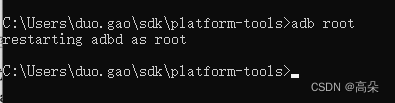
点击导入到电脑上,并打开data文件。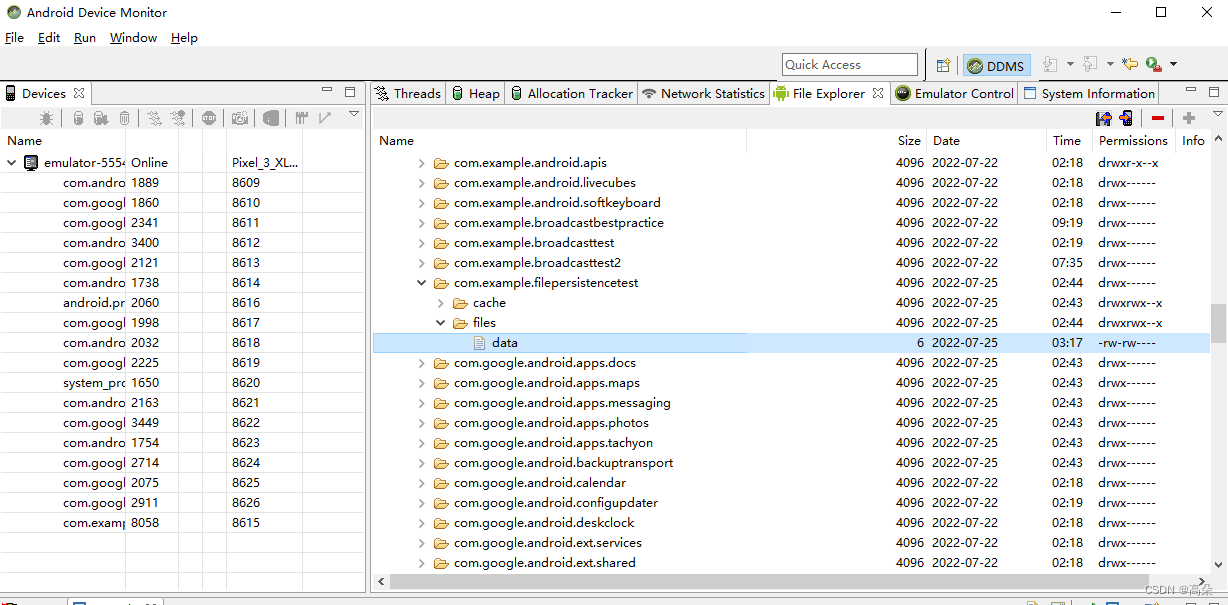
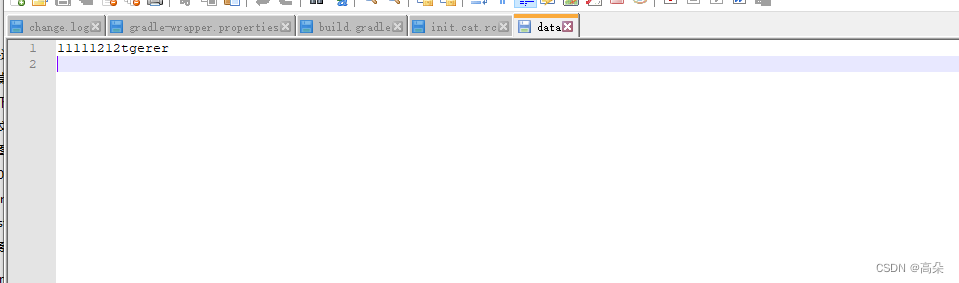
2. 从文件中读取数据
Context类提供了一个openFileInput();方法,用于从文件中读取数据。他只接收一个参数,即要读取文件名,到目录下去加载这个文件,并返回一个FileInputStream对象,在通过Java流的方式将数据读取出来。
(1) 修改MainActivity代码
public class MainActivity extends AppCompatActivity {

    private EditText edit;
    @Override
    protected void onCreate(Bundle savedInstanceState) {

        super.onCreate(savedInstanceState);
        setContentView(R.layout.activity_main);
        edit =(EditText) findViewById(R.id.edit);
        String inputText=load();
        if (!TextUtils.isEmpty(inputText)){

            edit.setText(inputText);
            edit.setSelection(inputText.length());
            Toast.makeText(this, "Restoring succeeded!!1", Toast.LENGTH_SHORT).show();
        }
    }

    @Override
    protected void onDestroy() {

        super.onDestroy();
        String inputText =edit.getText().toString();
        save(inputText);
    }

    //保存文件
    public void save(String inputText){

        FileOutputStream out =null;
        BufferedWriter writer =null;
        try {

            out =openFileOutput("data", Context.MODE_PRIVATE);
            writer =new BufferedWriter(new OutputStreamWriter(out));
            writer.write(inputText);
        }catch (IOException e){

            e.printStackTrace();
        }finally {

            try {

                if (writer!=null){

                    writer.close();
                }
            }catch (IOException e){

                e.printStackTrace();
            }
        }
    }

    //读取数据
    public String load(){

        FileInputStream in =null;
        BufferedReader reader =null;
        StringBuilder content =new StringBuilder();
        try {

            in=openFileInput("data");
            reader =new BufferedReader(new InputStreamReader(in));
            String line ="";
            while ((line =reader.readLine())!=null){

                content.append(line);
            }
        }catch (IOException e){

            e.printStackTrace();
        }finally {

            if (reader!=null){

                try {

                    reader.close();
                }catch (IOException e){

                    e.printStackTrace();
                }
            }
        }
        return content.toString();
    }
}
在EditText中输入Hello,按Back键退出程序,再重新启动程序,刚才输入的内容并不会丢失。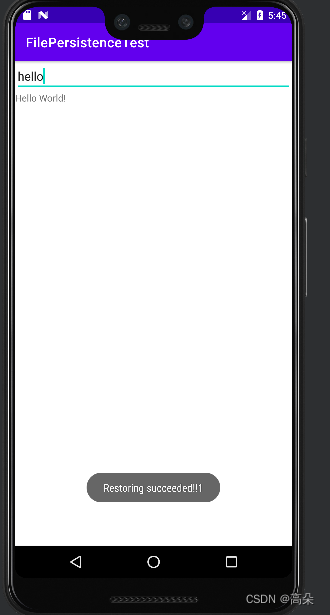
三、 SharedPreferences存储
使用键值对方式进行存储—SharedPreferences存储
支持多种不同数据类型存储
3.1将数据存储到SharedPreferences中
- Context类中的getSharedPreferences()方法
- Activity类中的getpreferences()方法
- preferenceManger类中的getDefaultSharedPreferences()方法
(1) 调用SharedPreferences对象的edit()方法来获取一个SharedPreferences.Editor对象。
(2) 向SharedPreferences.Editor对象中添加数据,比如布尔类型(putBoolean()方法);字符串(putString())。
(3) 调用apply()方法将 添加的数据提交,完成存储操作。
eg:修改MainActivity中的代码
public class MainActivity extends AppCompatActivity {

    @Override
    protected void onCreate(Bundle savedInstanceState) {

        super.onCreate(savedInstanceState);
        setContentView(R.layout.activity_main);
        Button saveData =(Button) findViewById(R.id.save_data);
        saveData.setOnClickListener(new View.OnClickListener() {

            @Override
            public void onClick(View v) {

                SharedPreferences.Editor editor =getSharedPreferences("data",MODE_PRIVATE).edit();
                editor.putString("name","kehlani");
                editor.putInt("age",23);
                editor.apply();//提交
            }
        });
    }
}

并打开data.xml文件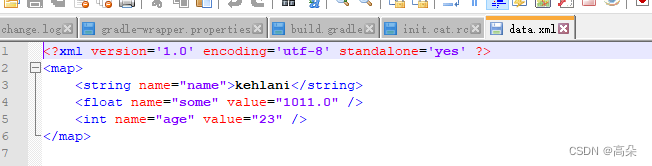
3.2从SharedPreferences中读取数据
 Button restoreData =(Button) findViewById(R.id.restore_data);
    restoreData.setOnClickListener(new View.OnClickListener() {

        @Override
        public void onClick(View v) {

            SharedPreferences pref =getSharedPreferences("data",MODE_PRIVATE);
          String name =pref.getString("name","");
          int age =pref.getInt("age",0);
          boolean married =pref.getBoolean("married",false);
            Log.d("MainActivity","name is "+name);
            Log.d("MainActivity","age is "+age);
            Log.d("MainActivity","married is "+married);
        }
    });
}
在logcat中查看打印信息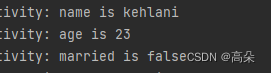
3.3实现记住密码功能
(1) 首先添加一个记住密码框checkbox
   <LinearLayout
        android:orientation="horizontal"
        android:layout_width="match_parent"
        android:layout_height="wrap_content">
        <CheckBox
            android:id="@+id/remember_pass"
            android:layout_width="wrap_content"
            android:layout_height="wrap_content"/>
        <TextView
            android:layout_width="wrap_content"
            android:layout_height="wrap_content"
            android:textSize="18sp"
            android:text="Remember password"/>
    </LinearLayout>
(2) 修改登陆页面代码
public class LoginActivity extends BaseActivity {


    private SharedPreferences pref;
    private  SharedPreferences.Editor editor;
    private CheckBox rememberPass;

    private EditText accountEdit;
    private EditText passwordEdit;
    private Button login;

    @Override
    protected void onCreate(Bundle savedInstanceState) {

        super.onCreate(savedInstanceState);
        setContentView(R.layout.activity_login);
        pref = PreferenceManager.getDefaultSharedPreferences(this);

        accountEdit = (EditText) findViewById(R.id.account);
        passwordEdit = (EditText) findViewById(R.id.password);
        rememberPass =(CheckBox)findViewById(R.id.remember_pass);

        login = (Button) findViewById(R.id.login);
        boolean isRemenber =pref.getBoolean("remember_password",false);
        if (isRemenber){

            String account =pref.getString("account","");
            String password =pref.getString("password","");
            accountEdit.setText(account);
            passwordEdit.setText(password);
            rememberPass.setChecked(true);
        }

        login.setOnClickListener(new View.OnClickListener() {

            @Override
            public void onClick(View v) {

                String account = accountEdit.getText().toString();
                String password = passwordEdit.getText().toString();
                if (account.equals("admin") && password.equals("123")) {

                    editor =pref.edit();
                    if (rememberPass.isChecked()){

                        editor.putBoolean("remember_password",true);
                        editor.putString("account",account);
                        editor.putString("password",password);
                    }else {

                        editor.clear();
                    }
                    editor.apply();
                    Intent intent = new Intent(LoginActivity.this, MainActivity.class);
                    startActivity(intent);
                    finish();
                } else {

                    Toast.makeText(LoginActivity.this, "try again ", Toast.LENGTH_SHORT).show();
                }
            }
        });
    }
}
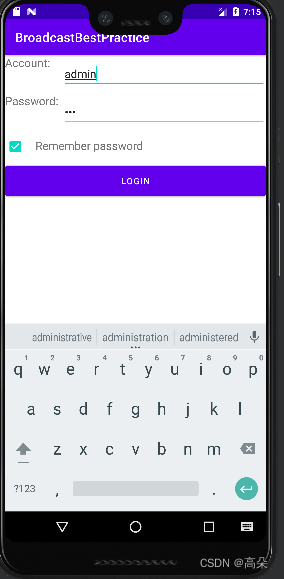
(3) 能看到密码已经被保存
四、 SQLite数据库存储
SQLite3 是一种轻量型、进程内的关系型数据库
1. 新建MyDatabaseHelper类,继承自SQLiteOpenHelper
public class MyDatabaseHelper extends SQLiteOpenHelper {

    public static final  String CREATE_BOOK ="create table Book("
            +"id integer primary key autoincrement,"
            +"author text,"
            +"price real,"
            +"pages integer,"
            +"name text)";
    private Context mcontext;

    public MyDatabaseHelper(Context context,String name,SQLiteDatabase.CursorFactory factory, int version) {

        super(context, name, factory, version);
        mcontext = context;
    }

    @Override
    public void onCreate(SQLiteDatabase db) {

            db.execSQL(CREATE_BOOK);
        Toast.makeText(mcontext, "Create succeeded", Toast.LENGTH_SHORT).show();
    }

    @Override
    public void onUpgrade(SQLiteDatabase db, int oldVersion, int newVersion) {


    }
}
2. 修改MainActivity
public class MainActivity extends AppCompatActivity {

    private MyDatabaseHelper dbHelper;

    @Override
    protected void onCreate(Bundle savedInstanceState) {

        super.onCreate(savedInstanceState);
        setContentView(R.layout.activity_main);
        dbHelper =new MyDatabaseHelper(this,"BookStore.db",null,1);
        Button createDatabase =(Button) findViewById(R.id.create_database);
        createDatabase.setOnClickListener(new View.OnClickListener() {

            @Override
            public void onClick(View v) {

                dbHelper.getWritableDatabase();
            }
        });
    }
}
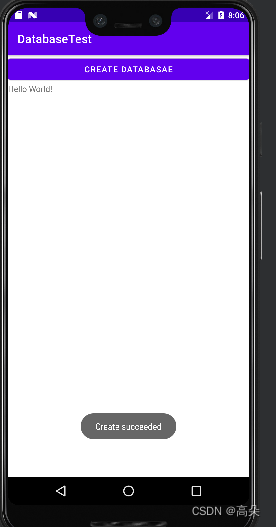
点击按钮,会出现创建数据库
查看数据库创建成功和book表创建成功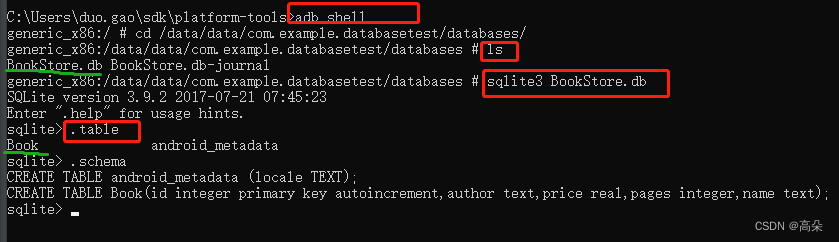
2.升级数据库
新建数据库category同上,并在onUpgrade中进行升级数据库
   @Override
    public void onUpgrade(SQLiteDatabase db, int oldVersion, int newVersion) {

        db.execSQL("drop table if exists Book");
        db.execSQL("drop table if exists Category");
        onCreate(db);
    }
dbHelper =new MyDatabaseHelper(this,“BookStore.db”,null,2);版本号也变为2。
可以看到category表创建成功
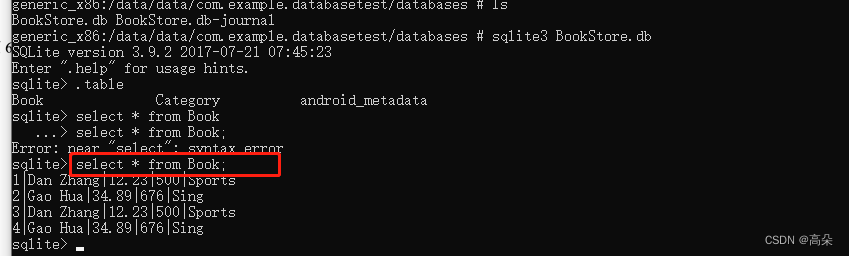
3. 添加数据
(1) 增加一个添加按钮
(2) 修改主活动代码
 Button addData =(Button) findViewById(R.id.add_data);
        addData.setOnClickListener(new View.OnClickListener() {

            @Override
            public void onClick(View v) {

                SQLiteDatabase db =dbHelper.getWritableDatabase();
                ContentValues values =new ContentValues();
                //开始组装第一条数据
                values.put("name","Sports");
                values.put("author","Dan Zhang");
                values.put("price",12.23);
                values.put("pages",500);
                db.insert("Book",null,values);
                values.clear();
                //开始组装第二条数据
                values.put("name","Sing");
                values.put("author","Gao Hua");
                values.put("price",34.89);
                values.put("pages",676);
                db.insert("Book",null,values);
            }
        });
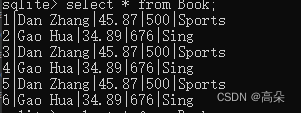
4. 修改数据
Button updataData = (Button) findViewById(R.id.update_data);
        updataData.setOnClickListener(new View.OnClickListener() {

            @Override
            public void onClick(View v) {

                SQLiteDatabase db = dbHelper.getWritableDatabase();
                ContentValues values = new ContentValues();
                values.put("price", 45.87);
                db.update("Book", values, "name=?", new String[]{
    "Sports"});
            }
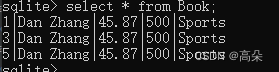
5. 删除数据
Button deleteData = (Button) findViewById(R.id.delete_data);
deleteData.setOnClickListener(new View.OnClickListener() {

    @Override
    public void onClick(View v) {

        SQLiteDatabase db = dbHelper.getWritableDatabase();
        db.delete("Book", "pages > ?", new String[]{
    "600"});
    }
});
6. 查询数据
  Button queryData = (Button) findViewById(R.id.query_data);
        queryData.setOnClickListener(new View.OnClickListener() {

            @Override
            public void onClick(View v) {

                SQLiteDatabase db = dbHelper.getWritableDatabase();
                Cursor cursor = db.query("Book",
                        null,
                        null,
                        null,
                        null,
                        null,
                        null);
                if (cursor.moveToFirst()) {

                    do {

                      @SuppressLint("Range") String name = cursor.getString(cursor.getColumnIndex("name"));
                        @SuppressLint("Range") String author = cursor.getString(cursor.getColumnIndex("author"));
                        @SuppressLint("Range") int pages = cursor.getInt(cursor.getColumnIndex("pages"));
                        @SuppressLint("Range") double price = cursor.getDouble(cursor.getColumnIndex("price"));
                        Log.d("MainActivity", "book name is" + name);
                        Log.d("MainActivity", "book author is" + author);
                        Log.d("MainActivity", "book pages is" + pages);
                        Log.d("MainActivity", "book price is" + price);
                    } while (cursor.moveToNext());
                }cursor.close();
            }
        });

五、 使用SQL操作数据库
//添加数据的方法如下:
db.execSQL("insert into Book (name, author, pages, price) values(?, ?, ?, ?)", new String[]{
    "The Da Vinci Code", "Dan Brown", "454", "16.96"});
db.execSQL("insert into Book (name, author, pages, price) values(?, ?, ?, ?)", new String[]{
    "The Lost Symbol", "Dan Brown", "510", "19.95"});
//更新数据的方法如下:
db.execSQL("update Book set price = ? where name = ?", new String[] {
    "10.99", "The Da Vinci Code"});
//删除数据的方法如下:
db.execSQL("delete from Book where pages > ?", new String[] {
    "500"});
//查询数据的方法如下
db.execSQL("select * from Book",null);
边栏推荐
猜你喜欢

Future Trends in Vulnerability Management Programs
一次简单的 JVM 调优,拿去写到简历里

请讲一讲JS中的 for...in 与 for...of (下)
Gaussian beam focused by thermal lens

【备战“金九银十”】2022年软件测试面试题最新汇总
Detailed explanation of common methods of filtering matrix (array) elements in Matlab

21、阿里云oss

项目构建工具-Gradle入门

年薪30W,BAT抢着要,懂面试技巧的测试人究竟多吃香?
MySQL基础篇【第一篇】| 数据库概述及数据准备、常用命令、查看表结构步骤
随机推荐
The iterator and generator
22. Inventory service
22-7-31
How to realize the repeatable design of FPGA
gRPC基础概念:闭包
软件测试面试题:缺陷等级应如何划分?
阿里的数据同步神器——Canal
数据库数据采集利器FlinkCDC
async和await的理解和用法
络达开发---UI定义+自定义按钮事件
The classification of inter-process communication (IPC) and the development of communication methods
Qt 中的隐式共享
3342:字符串操作 题解
连流量染色都没有,你说要搞微服务?
Inter-process communication method (2) Named pipe
14.cuBLAS开发指南中文版--cuBLAS中的Level-1函数nrm2()和rot()
Sigma开发注意细节
Construction inspection, no rules and no square
软件测试面试题:Web服务器指标指标?
OpenHarmony啃论文俱乐部-啃论文心得