当前位置:网站首页>solidworls view and model and drawing operation shortcuts
solidworls view and model and drawing operation shortcuts
2022-08-07 23:11:00 【Hexi Stone】
I. View operation
1, space bar: bring up the view shortcut panel

- Click at will for bottom view top view, left and right view, stereo view
- More intimate than the operation panel of the toolbar, the shortcut keys will be prompted on it
- Can appear at the mouse position at any time (can be clicked for the first time)
2. Click the coordinate axis to switch the view directly
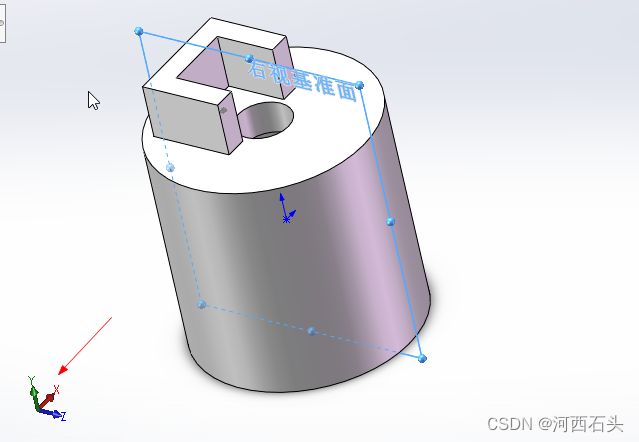
Up and down view: click on the Y axis (corresponding shortcut key: ctrl+5/6 )
Front and rear view: click on the Z axis (corresponding shortcut key: ctrl+1/2 )
Left and right view: click on the X axis (corresponding shortcut key: ctrl+3/4 )
Stereo view shortcut key: ctrl+7
To switch between two relative views, you can click the origin of the coordinate axis
Second, model view operation
- 3D rotation: middle mouse button + drag
- Vertical plane rotation: Alt+middle mouse button+drag
- Pan: ctrl+middle mouse button+drag
- Free zoom: scroll the middle mouse button, the mouse position is the zoom center position (this zoom can easily make the model run out of view)
- Lock the object position zoom: Shift+middle of the mouse (this zoom can make the model fixed position in the view)
- Fixed magnification: Shift+Z
- Fixed magnification: Z
- Maximize model: F (full view, no matter where your model is)
- The dotted line shows the model box: ctrl+A
Third, right-click and drag-and-drop shortcuts
The operation of pressing and holding the right button is also very convenient. Press and hold the right button and slide to the corresponding command to activate the command.
1. In non-sketching mode: hold down the right mouse button and drag the right mouse button, the view navigation ring will appear: 
2. In sketch mode: hold down the right mouse button, drag the right mouse button, the common command ring for sketching will appear
4. Shortcuts for common drawing operations
1. In all modes
Draw lines: L
Exit sketch: D
Exit current edit: Esc
2. In sketch mode:
Sketch drawing command panel: S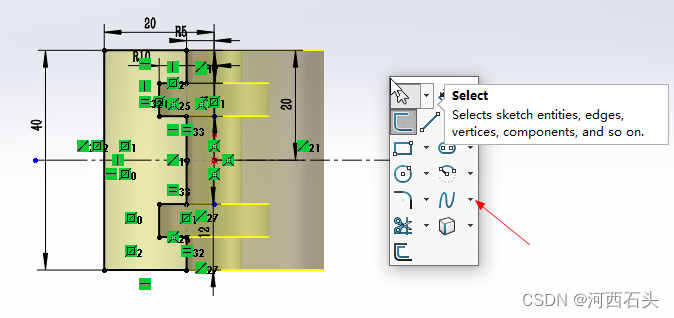
3. In non-sketch mode
Feature command panel: S
V. File operation
1. Call up the list of recently used files: R
2. Close the current file: ctrl+W
3、Activate model search: I(Enter the search name)
边栏推荐
猜你喜欢

动手学深度学习_目标检测

流式计算中的 Window 计算

Projecting Your View Attentively: Monocular Road Scene Layout Estimation via Cross-view Transformati

The expansion of the Unity editor - Inspector operations

"Experimental Details" to realize the function interpretation in nucleus sampling

The Unity editor development, Project development

【Untitled】

Unity编辑器拓展--Hierarchy拓展

Force buckle 206, reverse linked list

Shell:循环语句与函数
随机推荐
Google and universities released the end-to-end panoramic segmentation method MaX-DeepLab, which greatly reduces the artifacts of image segmentation and does not contain manual modules
银行科技岗面试
入职面经!!!
[Student Graduation Project] Design and Implementation of the Website Based on the Web Student Information Management System (13 pages)
dart 方法与属性私有化
同花顺上面可以开户吗?开户安全吗
Mongodb出现Error: couldn‘t add user: Could not find role: [email protected] 解决方法
力扣206,反转链表
【学生个人网页设计作品】使用HMTL制作一个超好看的保护海豚动物网页
Towards a Unified View of Parameter-Efficient Transfer Learning
【2022牛客多校第六场 Z题 Game on grid】dp
CSRF漏洞
动手学深度学习_目标检测
论文翻译:2021_LACOPE: Latency-Constrained Pitch Estimation for Speech Enhancement
现代企业架构框架 — 业务架构
The generation process of Presto Stage
Unity编辑器拓展--Scene视图自定义拓展
MySQL数据库的创建和基本的查询语句
Shell:循环语句与函数
强网杯2022 pwn 赛题解析——yakacmp