当前位置:网站首页>Matlab GUI zoom - some controls zoom, some controls do not zoom - Design Tutorial
Matlab GUI zoom - some controls zoom, some controls do not zoom - Design Tutorial
2022-04-22 07:08:00 【Your youth my dream】
Here are matlab gui Scaling of design , Achieve one fig Zoom and non zoom design of any control in
Consider the actual needs here , The zoom GUI You don't want to scale all the controls when you , For example, I just want to scale the waveform displayed on the coordinate axis , The setting button and serial port configuration remain unchanged in position and size
If only according to matlab Examples on and most of the information on the Internet , This requirement cannot be met when scaling the configuration , It is necessary to consider how to realize such a design process
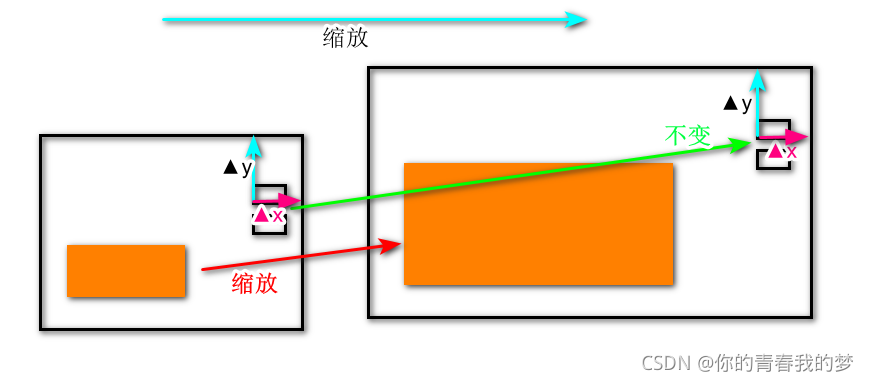
As shown in the diagram , Waveform size change , But to keep the button control unchanged
This requires a mechanism to achieve , The coordinates and size of the graph change with time figure The size is changing ;
according to matlab characteristic , The design steps are as follows :
1. First set the overall scale , stay GUI Options , Pictured 1

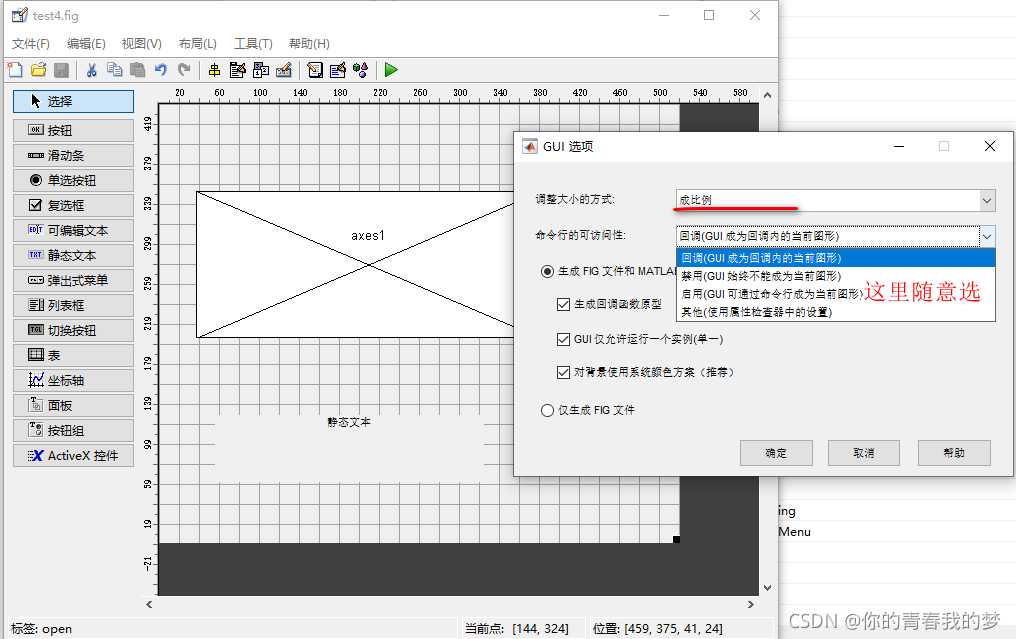
chart 1:gui Option setting
At this time, the whole form and all controls can be scaled , There is no difference between all controls
2. Set the control to be non scalable separately , Modify... In properties Units In pixels pixels, Pictured 2, At this time, the button control cannot be scaled

chart 2: The key is set to not zoom
That may ask , This is not to achieve the effect , Surely not. , Try it on your own ; This will cause the control to be in a fixed position , Although the size remains the same , But it can't be reached. The position changes with the size of the interface , Pictured 3;

chart 3: Wrong effect
3. We are going to solve 2 Problems in
We observe the position characteristics of the control , Its location is similar to fig The position difference of the upper right corner of the is fixed , All we have to do is read fig After the coordinates of the upper right corner of , And then according to xy Difference value , Update the location information of the control
With this picture, we know that as long as we guarantee Δx,Δy Keeping the same can make the position of the button control change with fig Keep the zoom changes consistent
In addition, I will introduce some information about coordinates :
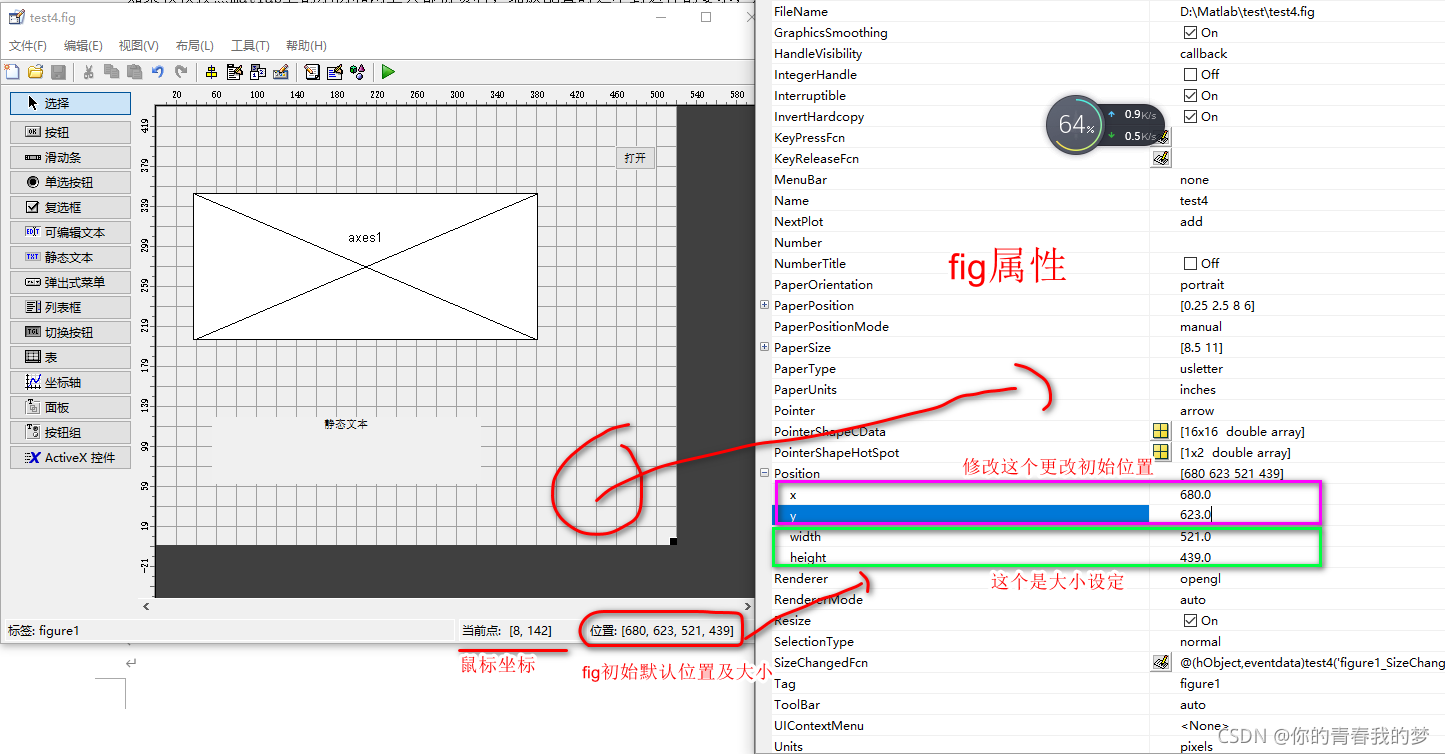
stay gui There is coordinate display under the lowest design : Current point : Coordinates are where the mouse is located , Location : Is the control we choose or fig Location information for , Here we choose fig, So what it shows is fig The location of , double-click fig Pop up properties , notice position Is consistent with this message ; modify position The value of can be changed fig Size ,xy Yes, it is on by default fig Where it is ( Starting point in the lower left corner ); Of course, you choose other components , The location shows their corresponding information ;
In actual scaling, it changes automatically fig The size of is width、height The two values change fig size ;
Now what we have to do :
First step : It's reading fig Of width、height
First of all get fig Of pisition Information
figposition=get(gcf,'position');% Here we get fig Position value of figposition=[x y width height ]
figwidth=figposition(3);% Width ,figposition It's a vector , Direct subscript reference is enough
figheight=figposition(4);% Height
The second step : Set the position of the button x,y
set(handles.button,'position',[figwidth-Δx figheight-Δx width height ]);
Δx Δy We started designing gui The difference determined when , This is for sure
4. The overall code

Here we choose fig Callback function for SizeChangedFcn To update the coordinate position of the button
function figure1_SizeChangedFcn(hObject, eventdata, handles)
% hObject handle to figure1 (see GCBO)
% eventdata reserved - to be defined in a future version of MATLAB
% handles structure with handles and user data (see GUIDATA)
size=get(gcf,'Position');
SizePosition=[(size(3)-50) (size(4)-40) 41 24];
set(handles.open,'Position',SizePosition);
5. Demonstration effect : After zooming , Button hold fig The position in the remains unchanged , The size is the same ; And the axis scaling is normal

Here are just buttons and axes as examples , The actual controls are scaled or not , It depends on the actual needs
版权声明
本文为[Your youth my dream]所创,转载请带上原文链接,感谢
https://yzsam.com/2022/04/202204220603472672.html
边栏推荐
- LwIP 1.4.1中文注释源码
- 911数据中不同月份不同类型的电话的次数的变化情况
- HDMI2. Design circuit comparison between asw3642 and ts3dv642
- Remplacer Fe1. 1S hub READER CARD Master Control Chip - ma8601
- Quantify the relationship between 911 calls and years from 2015 to 2017
- 疫情环境下工程机械中的透传云网关远程程序升级方案
- 机器人系统中CAN卡的应用
- 替代 FE1.1s HUB讀卡主控芯片-MA8601
- Dcoker installation
- QT basic knowledge summary (continuous refresh)
猜你喜欢
Rtd2171u scheme 𞓜 ag9310mfq replaces rtd2171u design circuit | typec to HDMI 4k30hz HD projection scheme design

疫情环境下工程机械中的透传云网关远程程序升级方案
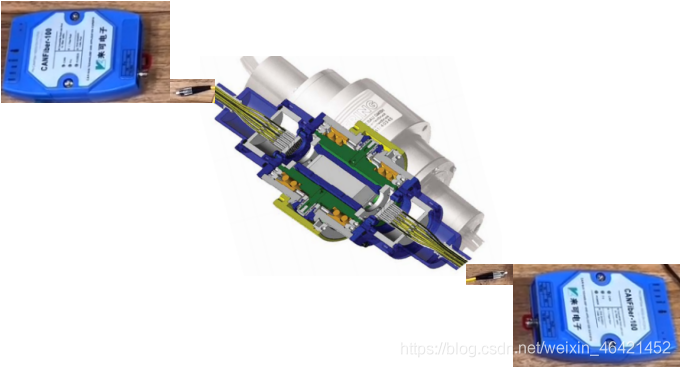
CAN光纤光端机在光电滑环中的应用

Minipcie interface can card expands can channel for industrial computer

SSS1700

Quantify the relationship between 911 calls and years from 2015 to 2017

腾讯云物联网-网关设备体验

USBCAN卡在动力电池组EOL测试系统中CAN总线的应用

It's hard to believe that this pair of high-speed signals have changed through holes so many times!!!

如何成为IC验证工程师?
随机推荐
[蓝桥杯复习] 鸣人的影分身
C skill tree evaluation - 0415 experience diary
Application of can optical fiber optical transceiver in photoelectric slip ring
替代FE1.1S,MA8601,性价比高,中文方案,奇岩一级代理,HUB方案
CS5213新版规格书|CS5213新版说明书|HDMI转VGA带音频信号输出方案设计
It's nothing to be able to dismantle the host. Mr. expressway can also test it
Stm32wb55 RTT based ble sample making process
STM32 learning record 0002-stm32
MATLAB:去除音频信号噪音
Replace Fe1 1s hub card reading master chip-ma8601
集成电路模拟版图入门-版图基础学习笔记(三)
QT basic knowledge summary (continuous refresh)
Tencent cloud Internet of things - gateway device experience
RT thread transplantation BSP driven UART
DP转HDMI方案|CS5216方案应用|CS5216设计方案
fastmock使用说明
911数据中不同月份不同类型的电话的次数的变化情况
Have you really done the right way to add stamp holes on PCB
SSS1700
如何成为IC验证工程师?