当前位置:网站首页>COLMAP+OpenMVS realizes 3D reconstruction mesh model of objects
COLMAP+OpenMVS realizes 3D reconstruction mesh model of objects
2022-08-10 06:34:00 【Half_A】
一、环境准备
(1) COLMAP
(2) OpenMVS
OpenMVSYou can download and compile from the source code yourself.If it feels compiledopenmvs可能要费点时间,That can also directly download the compiled executable program.
Github源码:https://github.com/cdcseacave/openMVS
可执行程序:https://github.com/cdcseacave/openMVS_sample
二、COLMAPThe reconstruction results in a dense point cloud
- 新建一个文件夹,在其中新建images文件夹,以及一个Database.db的空文件,Note that the file path does not appear in Chinese.imagesPut the pictures that need to be reconstructed in the folder,The more pictures, the longer the reconstruction time,Too few images may cause reconstruction to fail,我这里以96张图片为例,生成稠密点云05.
本文使用DTU数据集进行测试.
Self-built dataset requirements:
- 尽量使用单反相机或专业数码相机进行数据采集,如果要用手机进行采集,请使用单摄像头的手机进行数据采集.
- 尽量选择纹理丰富的外界环境进行数据采集,避免玻璃围墙、瓷砖和打蜡地板等强反光材料环境
- 尽量选择光照明亮,且光照条件变化不剧烈的环境,最好选择室内环境.如室内客厅,开启客厅大灯进行灯光补偿.
- 尽量围绕重建物体或环境采集较多的影像,且在采集过程中控制快门速度,避免模糊.

- 打开colmap程序(COLMAP.bat),点击File-New Project,在Database栏点击open,选择刚才新建的Database.db文件,在ImagesIn the column, select the newly created image to storeimages文件夹,点击save保存.

- 点击Processing-Feature Extraction,默认参数即可,点击Extract,Waiting for the program to finish running, you can see there is on the rightlog信息输出.
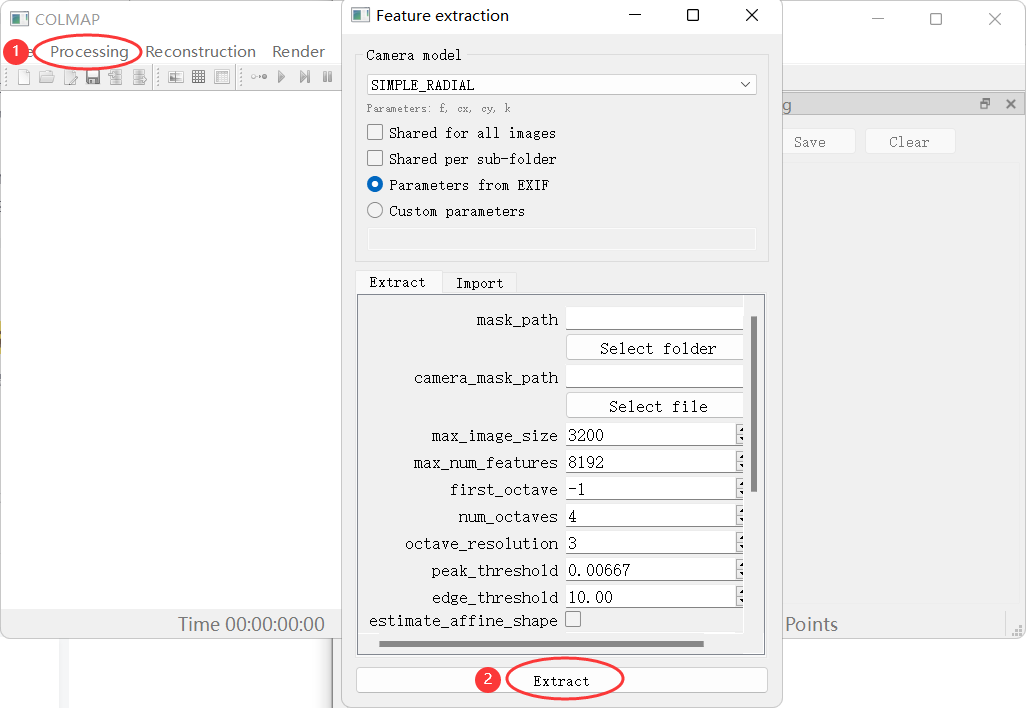
- 点击Processing-Feature matching,默认参数即可,点击Run,Waiting for the program to finish running, you can see there is on the rightlog信息输出.

- 点击Reconstruncion-Start reconstruction,等待执行完毕,The reconstruction result can be obtained.

- 在之前images的同级目录下,新建一个文件夹dense.点击Reconstruncion-Dense reconstrction,点击select,选择刚才新建的denseFolders are used to save dense point cloud results.依次点击Undistorion、Stereo、Fusion,执行完毕.

Click in the programFile-export model as txt,选择dense文件夹下的sparse文件夹(由于openmvs支支持txt格式的,So you need to convert the reconstructed file to txt文件)
检查camera.txtWhether the camera model inside is Pinhole,If not, change it directlypinhole,Regardless of whether you selected it before or not, you can change it directly.
三、OpenMVS重建得到mesh模型
to compileopenmvs_sample为例,我们要把colmapThe generated dense point cloud and image path information are converted into openmvs的.mvs文件.
- 打开命令提示窗口CMD,进入openmvs_sample下的bin目录,执行命令
interfaceCOLMAP.exe -i E:\Projects\2022.06-3DReconstruction\test\dense -o E:\Projects\2022.06-3DReconstruction\test\dense\scene.mvs --image-folder E:\Projects\2022.06-3DReconstruction\test\dense\images

可以看到dense文件夹下生成了scene.mvs文件(-oDirectory for output files,The default is in the current folder,Other paths can also be specified).
- Execute the command to rebuild
ReconstructMesh.exe -i E:\Projects\2022.06-3DReconstruction\test\dense\scene.mvs -o E:\Projects\2022.06-3DReconstruction\test\dense\mesh.mvs

- Execute command to add texture(This step consumes more computer resources,My computer is old,BSOD rebooted while running,Everyone try it as appropriate)
TextureMesh.exe -i E:\Projects\2022.06-3DReconstruction\test\dense\mesh.mvs
You can see that four new files have been created in the folder,可以使用meshlab打开其中的.ply文件(三维mesh模型),下图为Solidworks打开的样子(no texture added).

本博客文章首先发布于个人博客网站:https://www.mahaofei.com/,欢迎大家访问.
边栏推荐
猜你喜欢

NetKeeper(创翼)开WIFI方法——2018.5

如何在AdsPower中设置YiLu代理?

Tencent Cloud Song Xiang: Kubernetes cluster utilization improvement practice

1413. 逐步求和得到正数的最小值

修改 QtCreator 配置解决 “无法运行 rc.exe” 问题

深入理解数组

第11章 数据库的设计规范【2.索引及调优篇】【MySQL高级】

ES13 - ES2022 - The 123rd ECMA Congress approves the ECMAScript 2022 language specification
![[网络安全]实操AWVS靶场复现CSRF漏洞](/img/7f/f08e429e3d8ede03a1c1754e256f99.png)
[网络安全]实操AWVS靶场复现CSRF漏洞

Reproduce dns out-band data combined with sqlmap
随机推荐
关于研究鼠标绘制平滑曲线的阶段总结
Elementary Structure
交换机的功能和ipv4
UnityShader入门精要-立方体纹理、反射、折射、菲涅尔反射
XV6系统调用实现
UnityShader入门精要-渲染纹理 镜子 玻璃 效果
tqdm高级使用方法(类keras进度条)
I would like to ask you guys, when FLink SQL reads the source, specify the time field of the watermark. If the specified field is in the grid
第11章 数据库的设计规范【2.索引及调优篇】【MySQL高级】
驱动的参数传入:module_param,module_param_array,module_param_cb
Unity扩展编辑器EditorWindow 小玩意(一)
OpenGL学习笔记(LearnOpenGL)-第六部分 变换
UE 游戏模式
C语言文件操作
强化学习_03_表格方法实践(CartPole-v0 And MontoCarlo)
QEMU guest与host通过网络通信——bridge/hostfwd/guestfwd
Qt列表下方增加弹出加载数据提示效果
2022河南萌新联赛第(五)场:信息工程大学 C - 丢手绢
动态代理-cglib
Win32屏幕坐标转换Qt坐标