当前位置:网站首页>ORACLE表有逻辑坏块时EXPDP导出报错排查
ORACLE表有逻辑坏块时EXPDP导出报错排查
2022-04-23 06:02:00 【还不算晕】
某用户反馈EXPDP导出脚本异常中断,接入排查后发现导出某表时报错,后台ALERT日志中也有相应报错;最终确认排查为逻辑坏块问题,经沟通得知为某个时间段的备份表,后续排除此表后重新设置EXPDP脚本,可以正常导出,如下为相关日志:
单独导出表的报错排查:
[oracle@test1 ~]$ expdp system/oracle directory=expdphis  dumpfile=T1.dmp tables=test.test11_0301_BUGGY logfile=T1.log cluster=no

Export: Release 11.2.0.4.0 - Production on Sat Jan 22 12:19:11 2022

Copyright (c) 1982, 2011, Oracle and/or its affiliates.  All rights reserved.

Connected to: Oracle Database 11g Enterprise Edition Release 11.2.0.4.0 - 64bit Production
With the Partitioning, Real Application Clusters, OLAP, Data Mining
and Real Application Testing options
FLASHBACK automatically enabled to preserve database integrity.
Starting "SYSTEM"."SYS_EXPORT_TABLE_03":  system/******** directory=expdphis dumpfile=T1.dmp tables=test.test11_0301_BUGGY logfile=T1.log cluster=no
Estimate in progress using BLOCKS method...
Processing object type TABLE_EXPORT/TABLE/TABLE_DATA
Total estimation using BLOCKS method: 3.817 GB
Processing object type TABLE_EXPORT/TABLE/PROCACT_INSTANCE
Processing object type TABLE_EXPORT/TABLE/TABLE
Processing object type TABLE_EXPORT/TABLE/GRANT/OWNER_GRANT/OBJECT_GRANT
Processing object type TABLE_EXPORT/TABLE/COMMENT
Processing object type TABLE_EXPORT/TABLE/CONSTRAINT/CONSTRAINT
Processing object type TABLE_EXPORT/TABLE/TRIGGER

Job "SYSTEM"."SYS_EXPORT_TABLE_03" stopped due to fatal error at Sat Jan 22 12:22:22 2022 elapsed 0 00:03:04

检查后台ALERT日志:
Sat Jan 22 12:19:18 2022
DM00 started with pid=1820, OS id=22939, job SYSTEM.SYS_EXPORT_TABLE_03
ALTER TABLE "SYSTEM"."SYS_EXPORT_TABLE_03" ADD (UNIQUE (process_order, duplicate))
Sat Jan 22 12:19:28 2022
CREATE INDEX SYS_MTABLE_000061006_IND_1 ON "SYSTEM"."SYS_EXPORT_TABLE_03" (object_schema, object_name, object_type)
CREATE INDEX SYS_MTABLE_000061006_IND_2 ON "SYSTEM"."SYS_EXPORT_TABLE_03" (base_process_order)
Sat Jan 22 12:19:29 2022
DW00 started with pid=167, OS id=23647, wid=1, job SYSTEM.SYS_EXPORT_TABLE_03
Sat Jan 22 12:20:21 2022
Exception [type: SIGSEGV, Address not mapped to object] [ADDR:0x2] [PC:0x6DC0806, klufprd()+302] [flags: 0x0, count: 1]
Errors in file /u01/app/oracle/diag/rdbms/test/test1/trace/test1_dw00_23647.trc  (incident=497337):
ORA-07445: exception encountered: core dump [klufprd()+302] [SIGSEGV] [ADDR:0x2] [PC:0x6DC0806] [Address not mapped to object] []
Incident details in: /u01/app/oracle/diag/rdbms/test/test1/incident/incdir_497337/test1_dw00_23647_i497337.trc
Use ADRCI or Support Workbench to package the incident.
See Note 411.1 at My Oracle Support for error and packaging details.
Sat Jan 22 12:20:23 2022
Dumping diagnostic data in directory=[cdmp_20220122122023], requested by (instance=1, osid=23647 (DW00)), summary=[incident=497337].
Sat Jan 22 12:20:23 2022
Sweep [inc][497337]: completed
Sweep [inc2][497337]: completed
Sat Jan 22 12:21:54 2022
Thread 1 advanced to log sequence 49130 (LGWR switch)
  Current log# 20 seq# 49130 mem# 0: /hisdata/datafile/group_20.630.1076516067
  Current log# 20 seq# 49130 mem# 1: /hisdata/datafile/group_20.12531.1076516069
Sat Jan 22 12:21:54 2022
LNS: Standby redo logfile selected for thread 1 sequence 49130 for destination LOG_ARCHIVE_DEST_2
Sat Jan 22 12:21:54 2022
Archived Log entry 4742 added for thread 1 sequence 49129 ID 0xbcb39845 dest 1:
Sat Jan 22 12:22:22 2022
ALTER SYSTEM SET service_names='SYS$SYS.KUPC$S_1_20220122121913.test','test' SCOPE=MEMORY SID='test1';
ALTER SYSTEM SET service_names='test' SCOPE=MEMORY SID='test1';


Sat Jan 22 11:31:55 2022
LNS: Standby redo logfile selected for thread 1 sequence 49125 for destination LOG_ARCHIVE_DEST_2
Sat Jan 22 11:31:55 2022
Archived Log entry 4722 added for thread 1 sequence 49124 ID 0xbcb39845 dest 1:
Sat Jan 22 11:32:43 2022
Exception [type: SIGSEGV, Address not mapped to object] [ADDR:0x2] [PC:0x6DC0806, klufprd()+302] [flags: 0x0, count: 1]
Errors in file /u01/app/oracle/diag/rdbms/test/test1/trace/test1_dw03_66684.trc  (incident=517785):
ORA-07445: exception encountered: core dump [klufprd()+302] [SIGSEGV] [ADDR:0x2] [PC:0x6DC0806] [Address not mapped to object]
 []
Incident details in: /u01/app/oracle/diag/rdbms/test/test1/incident/incdir_517785/test1_dw03_66684_i517785.trc
Use ADRCI or Support Workbench to package the incident.
See Note 411.1 at My Oracle Support for error and packaging details.
Sat Jan 22 11:32:45 2022
Dumping diagnostic data in directory=[cdmp_20220122113245], requested by (instance=1, osid=66684 (DW03)), summary=[incident=51
7785].
Sat Jan 22 11:32:45 2022
Sweep [inc][517785]: completed
Sweep [inc2][517785]: completed
Sat Jan 22 11:33:50 2022
CREATE TABLE "ET$34613C510001"
   (    "RQ",
        "PATIENT_NO",
        "KSDM",
        "FEE",
        "BQZJ",
        "BQJS",
        "BQJC",
        "SQJC"
   ) ORGANIZATION EXTERNAL
    ( TYPE ORACLE_DATAPUMP DEFAULT DIRECTORY "EXPDPHIS" ACCESS PARAMETERS ( DEBUG = (0 , 0) DATAPUMP INTERNAL TABLE "test"."Z
Y_YJK_JCMX"  JOB ( "SYSTEM","SYS_EXPORT_SCHEMA_02",23) WORKERID 1 PARALLEL 1 VERSION '11.2.0.4.0' ENCRYPTPASSWORDISNULL  COMPR
ESSION ENABLED  ENCRYPTION DISABLED ) LOCATION ('bogus.dat') )  PARALLEL 1 REJECT LIMIT UNLIMITED
    AS SELECT /*+ PARALLEL(KU$,1) */ "RQ", "PATIENT_NO", "KSDM", "FEE", "BQZJ", "BQJS", "BQJC", "SQJC"
    FROM RELATIONAL("test"."ZY_YJK_JCMX" NOT XMLTYPE) AS OF SCN 21109504765917 KU$

DROP TABLE "ET$34613C510001" PURGE
Sat Jan 22 11:34:56 2022
ALTER SYSTEM SET service_names='SYS$SYS.KUPC$S_1_20220122102337.test','test' SCOPE=MEMORY SID='test1';
Sat Jan 22 11:34:57 2022
DW01 terminating with fatal err=39078, pid=683, wid=2, job SYSTEM.SYS_EXPORT_SCHEMA_02
Sat Jan 22 11:34:57 2022
DW00 terminating with fatal err=39078, pid=2233, wid=1, job SYSTEM.SYS_EXPORT_SCHEMA_02
Sat Jan 22 11:34:57 2022
DW02 terminating with fatal err=39079, pid=2662, wid=3, job SYSTEM.SYS_EXPORT_SCHEMA_02
ALTER SYSTEM SET service_names='test' SCOPE=MEMORY SID='test1';


相关TRACE日志:
[oracle@test1 ~]$ more /u01/app/oracle/diag/rdbms/test/test1/trace/test1_dw03_66684.trc
Trace file /u01/app/oracle/diag/rdbms/test/test1/trace/test1_dw03_66684.trc
Oracle Database 11g Enterprise Edition Release 11.2.0.4.0 - 64bit Production
With the Partitioning, Real Application Clusters, OLAP, Data Mining
and Real Application Testing options
ORACLE_HOME = /u01/app/oracle/product/11.2.0.4/dbhome_1
System name:    Linux
Node name:      test1
Release:        4.14.35-2025.404.1.2.el7uek.x86_64
Version:        #2 SMP Wed Jan 27 20:30:12 PST 2021
Machine:        x86_64
Instance name: test1
Redo thread mounted by this instance: 1
Oracle process number: 2723
Unix process pid: 66684, image: oracle@test1 (DW03)

*** 2022-01-22 10:24:22.556
*** SESSION ID:(8230.2561) 2022-01-22 10:24:22.556
*** CLIENT ID:() 2022-01-22 10:24:22.556
*** SERVICE NAME:(SYS$BACKGROUND) 2022-01-22 10:24:22.556
*** MODULE NAME:(Data Pump Worker) 2022-01-22 10:24:22.556
*** ACTION NAME:(SYS_EXPORT_SCHEMA_02) 2022-01-22 10:24:22.556

KUPC: Setting remote flag for this process to FALSE

*** 2022-01-22 11:32:43.553
*** MODULE NAME:(Data Pump Worker) 2022-01-22 11:32:43.557
*** ACTION NAME:(SYS_EXPORT_SCHEMA_02) 2022-01-22 11:32:43.557

Exception [type: SIGSEGV, Address not mapped to object] [ADDR:0x2] [PC:0x6DC0806, klufprd()+302] [flags: 0x0, count: 1]
Incident 517785 created, dump file: /u01/app/oracle/diag/rdbms/test/test1/incident/incdir_517785/test1_dw03_66684_i51778
5.trc
ORA-07445: exception encountered: core dump [klufprd()+302] [SIGSEGV] [ADDR:0x2] [PC:0x6DC0806] [Address not mapped to object]
 []

ssexhd: crashing the process...
Shadow_Core_Dump = PARTIAL
ksdbgcra: writing core file to directory '/u01/app/oracle/diag/rdbms/test/test1/cdump'
版权声明
本文为[还不算晕]所创,转载请带上原文链接,感谢
https://blog.csdn.net/q947817003/article/details/122945951
边栏推荐
- 基于ECS搭建云上博客(云小宝码上送祝福,免费抽iphone13任务详解)
- 用Future与CountDownLatch实现多线程执行多个异步任务,任务全部完成后返回结果
- 异常记录-13
- 异常记录-22
- Redis FAQ
- Basic concepts of database: OLTP / OLAP / HTAP, RPO / RTO, MPP
- Prometheus Cortex多租户读写的实现
- Oracle Performance Analysis Tool: oswatcher
- rdma 介绍
- Alertmanager重复/缺失告警现象探究及两个关键参数group_wait和group_interval的释义
猜你喜欢

Oracle redo log产生量大的查找思路与案例

通过源码探究@ModelAndView如何实现数据与页面的转发
Build a cloud blog based on ECS (send blessings on the cloud Xiaobao code and draw iphone13 for free)

Using Prom label proxy to implement label based multi tenant reading of Prometheus thanos

你应该知道的 JVM 基础知识
Winter combat camp hands-on combat - cloud essential environment preparation, hands-on practical operation, quickly build lamp environment, lead mouse cloud Xiaobao backpack without shadow

rdma 介绍

Problems related to Prometheus cortex using block storage
Prometheus Cortex使用Block存储时的相关问题
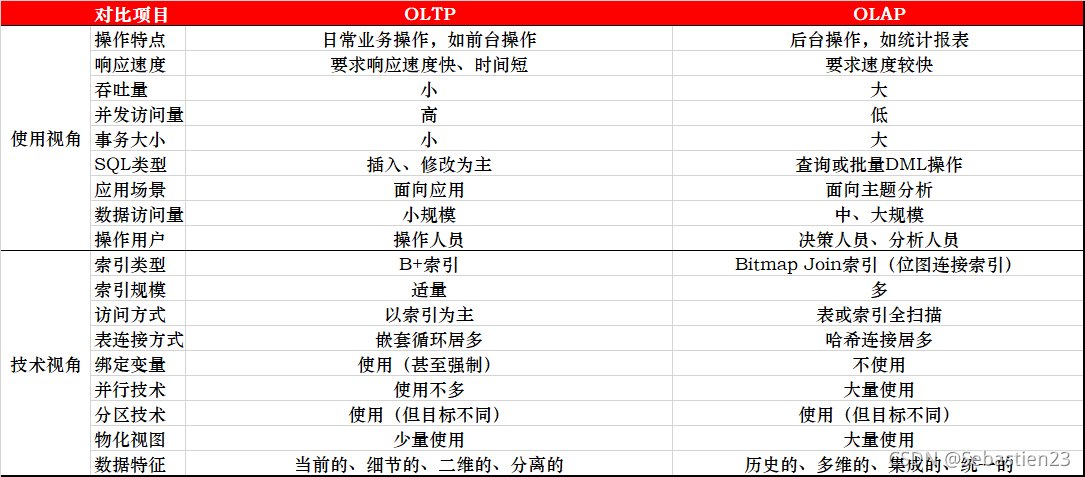
Basic concepts of database: OLTP / OLAP / HTAP, RPO / RTO, MPP
随机推荐
Winter combat camp hands-on combat - first understand the cloud foundation, hands-on practice ECS ECS ECS novice on the road to get the mouse cloud Xiaobao backpack shadowless
[shell script exercise] batch add the newly added disks to the specified VG
异常记录-17
Passerelle haute performance pour l'interconnexion entre VPC et IDC basée sur dpdk
Try catch cannot catch asynchronous errors
Redis FAQ
使用sed命令来高效处理文本
Prometheus Thanos快速指南
rdma网络介绍
SSM项目在阿里云部署
DNA reveals surprise ancestry of mysterious Chinese mummies
How to use DBA_ hist_ active_ sess_ History analysis database history performance problems
Introduction to RDMA
Prometheus Cortex多租户读写的实现
rdam 原理解析
Common views of Oracle database performance analysis
基于ECS搭建云上博客(体验有礼)
【Shell脚本练习】将新加的磁盘批量添加到指定的VG中
Thanos如何为不同租户配置不同的数据保留时长
js 格式化当前时间 日期推算