当前位置:网站首页>Basic use of CardView, DrawerLayout sliding menu, Fragment
Basic use of CardView, DrawerLayout sliding menu, Fragment
2022-08-05 22:43:00 【shuo277】
1 CardView
1.CardView的基本使用
CardView是用于实现卡片式布局效果的重要控件,实际上也是一个frameLayout,Just additionally provide rounded corners and 阴影,看上去有立体效果.
常用API:
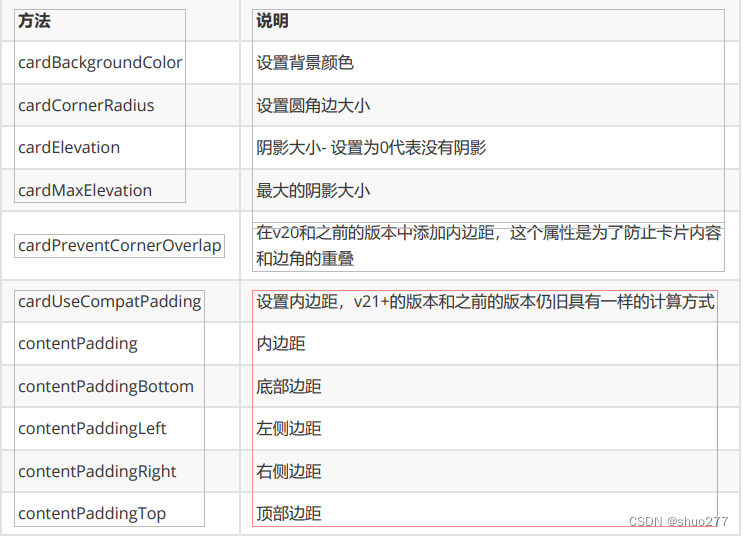 基本使用方法 :
<androidx.cardview.widget.CardView
android:layout_width="match_parent"
android:layout_height="wrap_content"
android:layout_margin="5dp"
app:cardElevation="5dp"
app:cardCornerRadius="4dp">
<LinearLayout
android:layout_width="match_parent"
android:layout_height="wrap_content"
android:padding="3dp"
android:orientation="horizontal">
<ImageView
android:id="@+id/iv_img"
android:layout_width="120dp"
android:layout_height="120dp"
android:scaleType="centerCrop"
app:srcCompat="@mipmap/a1" />
<TextView
android:id="@+id/tv_title"
android:text="AI Change thousands of industries,How developers get involved AI voice new“声”态"
android:layout_width="wrap_content"
android:layout_height="wrap_content"
android:layout_gravity="center_vertical"
android:layout_margin="5dp"
android:textSize="16sp" />
</LinearLayout>
2 DrawerLayout 滑动菜单
DrawerLayout包含两个界面,一个主界面和一个隐藏界面.隐藏界面可以通过点击按钮或者滑动屏幕边缘显示出来,一般隐藏界面用来做菜单使用.
DrawerLayout是一个布局,It is not much different from the normal layout,Add one to the layout file first
DrawerLayout
<?xml version="1.0" encoding="utf-8"?>
<androidx.drawerlayout.widget.DrawerLayout
 xmlns:android="http://schemas.android.com/apk/res/android"
 xmlns:app="http://schemas.android.com/apk/res-auto"
 xmlns:tools="http://schemas.android.com/tools"
  android:layout_width="match_parent"
  android:layout_height="match_parent"
  tools:context=".MainActivity3">
 <TextView
        android:id="@+id/textView"
        android:layout_width="match_parent"
        android:layout_height="match_parent"
        android:text="主界面" />
<TextView
        android:id="@+id/textView2"
        android:layout_gravity="start"
        android:layout_width="match_parent"
        android:layout_height="match_parent"
        android:text="滑出页面"
        android:background="#fff"/>
</androidx.drawerlayout.widget.DrawerLayout>
DrawerLayoutContains two direct child controls(或布局)
The first one will be displayed on the main interface,The second one will be displayed in the sub-interface.
第二个控件(或布局)中必须添加android:layout_gravity 属性,
android:layout_gravity 有三个值:left,right,start.Respectively means to hide the menu from the left,右边,Choose to slide out from the left or the right according to the system language.
At this point, the sliding menu has been set up,But for the convenience of user experience,We usually set a button to remind the user of the existence of the hidden interface
3 Fragment
3.1 Fragment的概念
3.1.1 Fragment的简介
1. Fragment是依赖于Activity的,不能独立存在.
2. 一个Activity里可以有多个Fragment.
3. 一个Fragment可以被多个Activity重用.
4. Fragment有自己的生命周期,并能接收输入事件.
5. 可以在Activity运行时动态地添加或删除Fragment.
3.1.2 Fragment生命周期

3.2 Fragment的静态加载
静态加载--Added to as a tagActivity的布局当中.

3.3 Fragment的动态使用
FragmentThe real power is that it can be dynamically added toActivity当中,So this is something you have to master.When you learn to run the programActivity添加Fragment,The interface of the program can be customized more diversely.
1. activity_main.xml
<?xml version="1.0" encoding="utf-8"?>
<LinearLayout xmlns:android="http://schemas.android.com/apk/res/android"
xmlns:app="http://schemas.android.com/apk/res-auto"
xmlns:tools="http://schemas.android.com/tools"
android:layout_width="match_parent"
android:orientation="vertical"
android:layout_height="match_parent"
tools:context=".MainActivity5">
<LinearLayout
android:orientation="horizontal"
android:layout_width="match_parent"
android:layout_height="wrap_content" >
<Button
android:id="@+id/btn_fragment1"
android:layout_width="match_parent"
android:layout_height="wrap_content"
android:layout_weight="1"
android:text="第一个碎片" />
<Button
android:id="@+id/btn_fragment2"
2. 创建Fragment1
android:layout_width="match_parent"
android:layout_height="wrap_content"
android:layout_weight="1"
android:text="第二个碎片" />
</LinearLayout>
<FrameLayout
android:id="@+id/lay_fl"
android:layout_width="match_parent"
android:layout_height="match_parent" />
</LinearLayout>
2. 创建Fragment1
public class Fragment1 extends Fragment {
// TODO: Rename parameter arguments, choose names that match
// the fragment initialization parameters, e.g. ARG_ITEM_NUMBER
private static final String ARG_PARAM1 = "param1";
private static final String ARG_PARAM2 = "param2";
// TODO: Rename and change types of parameters
private String mParam1;
private String mParam2;
public Fragment1() {
// Required empty public constructor
}
/**
* Use this factory method to create a new instance of
* this fragment using the provided parameters.
*
* @param param1 Parameter 1.
* @param param2 Parameter 2.
* @return A new instance of fragment Fragment1.
*/
// TODO: Rename and change types and number of parameters
public static Fragment1 newInstance(String param1, String param2) {
Fragment1 fragment = new Fragment1();
Bundle args = new Bundle();
args.putString(ARG_PARAM1, param1);
args.putString(ARG_PARAM2, param2);
fragment.setArguments(args);
return fragment;
}
@Override
public void onCreate(Bundle savedInstanceState) {
super.onCreate(savedInstanceState);
if (getArguments() != null) {
mParam1 = getArguments().getString(ARG_PARAM1);
mParam2 = getArguments().getString(ARG_PARAM2);
3. 创建Fragment2
}
}
@Override
public View onCreateView(LayoutInflater inflater, ViewGroup container,
Bundle savedInstanceState) {
// Inflate the layout for this fragment
return inflater.inflate(R.layout.fragment_1, container, false);
}
}
<?xml version="1.0" encoding="utf-8"?>
<FrameLayout xmlns:android="http://schemas.android.com/apk/res/android"
xmlns:tools="http://schemas.android.com/tools"
android:layout_width="match_parent"
android:layout_height="match_parent"
android:background="#DC8888"
tools:context=".fragment.Fragment1">
<!-- TODO: Update blank fragment layout -->
<TextView
android:layout_gravity="center"
android:layout_width="wrap_content"
android:layout_height="wrap_content"
android:textColor="@color/white"
android:textSize="24sp"
android:text="第一个碎片" />
</FrameLayout>
3. 创建Fragment2
public class Fragment2 extends Fragment {
// TODO: Rename parameter arguments, choose names that match
// the fragment initialization parameters, e.g. ARG_ITEM_NUMBER
private static final String ARG_PARAM1 = "param1";
private static final String ARG_PARAM2 = "param2";
// TODO: Rename and change types of parameters
private String mParam1;
private String mParam2;
public Fragment2() {
// Required empty public constructor
}
/**
* Use this factory method to create a new instance of
* this fragment using the provided parameters.
*
* @param param1 Parameter 1.
* @param param2 Parameter 2.
4. 在活动中,点击按钮后切换Fragment
* @return A new instance of fragment Fragment2.
*/
// TODO: Rename and change types and number of parameters
public static Fragment2 newInstance(String param1, String param2) {
Fragment2 fragment = new Fragment2();
Bundle args = new Bundle();
args.putString(ARG_PARAM1, param1);
args.putString(ARG_PARAM2, param2);
fragment.setArguments(args);
return fragment;
}
@Override
public void onCreate(Bundle savedInstanceState) {
super.onCreate(savedInstanceState);
if (getArguments() != null) {
mParam1 = getArguments().getString(ARG_PARAM1);
mParam2 = getArguments().getString(ARG_PARAM2);
}
}
@Override
public View onCreateView(LayoutInflater inflater, ViewGroup container,
Bundle savedInstanceState) {
// Inflate the layout for this fragment
return inflater.inflate(R.layout.fragment_2, container, false);
}
}
4. 在活动中,点击按钮后切换Fragmen
public class MainActivity5 extends AppCompatActivity {
private Button btn_fragment1, btn_fragment2;
@Override
protected void onCreate(Bundle savedInstanceState) {
super.onCreate(savedInstanceState);
setContentView(R.layout.activity_main5);
btn_fragment1 = findViewById(R.id.btn_fragment1);
btn_fragment2 = findViewById(R.id.btn_fragment2);
btn_fragment1.setOnClickListener(new View.OnClickListener() {
@Override
public void onClick(View v) {
Fragment1 fragment1 = new Fragment1();
getSupportFragmentManager().beginTransaction().replace(R.id.lay_fl,
fragment1).show(fragment1).commitAllowingStateLoss();
}
});
btn_fragment2.setOnClickListener(new View.OnClickListener() {
@Override
public void onClick(View v) {
Fragment2 fragment2 = new Fragment2();
getSupportFragmentManager().beginTransaction().replace(R.id.lay_fl,
fragment2).show(fragment2).commitAllowingStateLoss();
}
});
}边栏推荐
- CAN-Oe 通道配置方法
- Qt uses wget to download file case
- DIKW体系对AI的影响
- [debian]cockpit 报错Cannot refresh cache whilst offline
- On how to download m3u8/ts videos in web pages
- 物联网如何推动农业发展
- JuiceFS 在多云存储架构中的应用 | 深势科技分享
- 视觉slam学习|基础篇02
- 选择排序(Selection Sort)
- How to write a student information management system using C language code
猜你喜欢

SwiftUI中应用Hero动画(Hero Animation)时一些需要填的坑

Redies(四) session共享的优化

过孔设计得越小就越好吗?

Hualang's re-reading connection camp is an inspirational camp!The full lineup of famous teachers escorts and interprets the key to success in the college entrance examination

七夕节最深情表白文案从此告别搓衣板

动态内存管理
Is it better to design vias as small as possible?

What are the common nested queries in MySQL

认识一下MRS里的“中间人”Alluxio

leetcode:291. 单词规律
随机推荐
[ssh] Solve the problem that the debian 11 system crt cannot ssh login
精益生产之MES制造执行系统
Redies(四) session共享的优化
[GKCTF 2021]easycms
2022年官方排名前十的证券公司有哪些?开户安全的吗?
leetcode:291. 单词规律
【frp】树莓派使用Frp内网穿透访问
[Home Assistant]esp32 巴法云接入ha
How to use debug to debug projects in IDEA step-by-step detailed tutorial
What are the common nested queries in MySQL
js全屏实现代码
橡胶制造业APS解决方案
ARC142F
选择排序(Selection Sort)
[debian]cockpit error Cannot refresh cache whilst offline
[frp] Raspberry Pi uses Frp intranet penetration access
代码越写越乱?那是因为你没用责任链!
上课作业(8)——#631. 字符串匹配问题(strs)
【树莓派】树莓派使用0.96吋OLED显示屏
七夕节最深情表白文案从此告别搓衣板