当前位置:网站首页>重新安装window10
重新安装window10
2022-04-22 23:53:00 【manmanlu2006】
重新安装了window10,做个记录。
一、制作系统盘
准备8G以上的U盘(U盘中的文件最好先拷贝出来,因为安装过程会格式化)

下载之后是可运行的exe文件,如下图:

电脑上插入U盘,在电脑上打开这个安装工具,如下:

接受条款


选择版本,我选的是中文家庭版,有需求可以选企业版,企业版需要激活。

选择使用的介质:U盘

安装介质选择U盘,下一步。

安装过程会提示格式化U盘
最后提示U盘准备完毕。
可以打开U盘,内容如下:

二、系统重装
2.1 进电脑的BIOS中修改相关的启动设置,设置U盘启动,以U开头,好像是“UEFI”,每个电脑不一样,可以根据自己电脑型号找。

进入BIOS界面的快捷键可以网上查,不同电脑的快捷键不同,一般F12或ESC键...
2.2 开始安装
进入一个安装界面


暂时选“没有产品密钥”
一直下一步,选“仅安装windows”

一直到 分区,可能会出问题。分区时候最好找到C系统盘再格式化,其他盘不动。如果系统分区好的不想用,可以删除自己再分区。
win10重装系统 超详细教程 官方原版系统镜像 win10系统安装全程演示教程(可同时用作win7升级win10)雷神电脑重装win10系统_哔哩哔哩_bilibili
在进行磁盘分区,已经确定了要格式化哪几个磁盘,这时候一定看清磁盘编号,不同磁盘编号代表不同的硬盘,选择要格式化的分区,点击“删除”即可,接下来就可以分盘了。
删除的分区会变成“未分配的空间”,这时候点击“未分配的空间”
可进入如下图所示界面,点击“新建”,新建时,需要输入分配磁盘大小,单位是MB,1G=1024MB,如果你想分C盘100G,则输入102400MB即可。
电脑中显示无法安装,详细信息显示,我windows必须格式化到NTFS分区。这时我们就需要对整个硬盘进行删除并重新格式化,这个过程会删除整个硬盘的数据。请大家务必先备份数据!
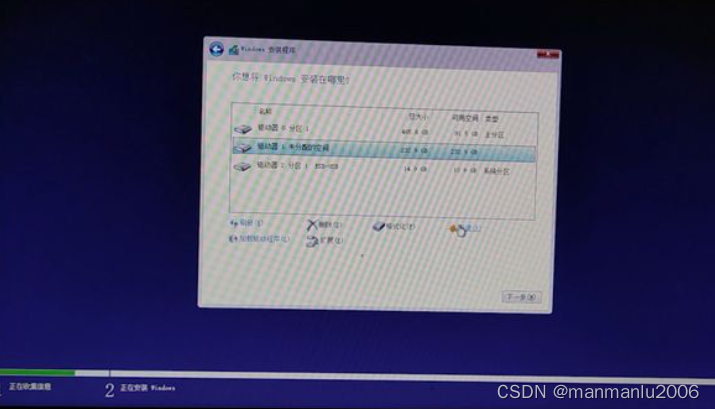
创建磁盘完成后,选择想做C盘的分区,点击“下一步”

等待完成
安装完成后会提示重启,这时我们就可以把U盘拔掉(建议重启时拔掉U盘)。不出意外的话,电脑就会自动从安装win10系统的硬盘启动。
三、系统配置
区域选中国
语言是中文
其他的设置可参考网上其他文章
如果是企业版window10,需要进一步激活。
四:问题
4.1安装后没有网络
打开“设备管理器”,查看“网络适配器”是否正常

在右下角网络处,右击,点“疑难解答”解决网络问题,提示找不到网络适配器的驱动程序,如下:

网上试了一些方法,如安装驱动精灵,360驱动,或者在”开始“中打开”Windows powerShell"再输入命令,都 不好使。
解决:去联想官网下载驱动程序,再安装。
官网:Lenovo联想售后客户服务中心,提供驱动下载,配置查询,保修服务-联想服务
先查好电脑型号,再下载驱动
驱动拷贝到U盘中,再刚安装的系统中安装驱动,然后就可以了。
参考:
版权声明
本文为[manmanlu2006]所创,转载请带上原文链接,感谢
https://blog.csdn.net/manmanlu2006/article/details/124325682
边栏推荐
- Ajustement de style typora
- FPGA (VI) RTL code II (complex circuit design 1)
- Install the most complete version of ActiveMQ under the official website in 2022 and the official website access method
- FileNotFoundError: [Errno 2] No such file or directory: 'image/1. Jpg 'problem solving
- SystemVerilog verification - Test Platform writing guide learning notes (3): connecting design and test platform
- 简便工作时间的法宝:以密钥验证的方式来登录服务器
- Django creates table structure and adds, deletes, modifies and queries database
- 网狐U3D客户端游戏配置加载失败Couldn‘t connect to server解决
- Django指定数据库的时候报No module named ‘django_test.settings‘
- websoket封装版 参数配置化 开箱即用
猜你喜欢
![[Objective-C advanced programming] - GCD](/img/54/62e8060421f8d3d05d13f02f4f4efd.png)
[Objective-C advanced programming] - GCD
Thought of reducing Governance -- detailed summary of binary search
Share two recent classic OJ questions (arrange subsequences + find the longest continuous number string in the string)

"100 million" little technical feelings
![[leetcode] binary tree, 226 flip the binary tree, 116 fill in the right pointer of the binary tree node, and 114 expand the binary tree into a linked list](/img/ea/dcecef82651f15ed1be3821bf8a063.png)
[leetcode] binary tree, 226 flip the binary tree, 116 fill in the right pointer of the binary tree node, and 114 expand the binary tree into a linked list

【Turtle表白合集】“海底月是天上月,眼前人是心上人。”余生多喜乐,长平安~(附3款源码)

FPGA (VI) RTL code II (complex circuit design 1)

Vscode uses emmylua plug-in to debug unity project tolua code

【DVCon2020】采用先进 Save & Restore 技术加速仿真周转时间 (Simulation Turnaround Time)
FPGA(六)RTL代码之二(复杂电路设计1)
随机推荐
[superpower] I want to pause time and space
Mung bean sprouts on the 22nd day of home
Reg 正则表达式学习笔记
【事務管理】
Share two recent classic OJ questions (arrange subsequences + find the longest continuous number string in the string)
共轭梯度法(Conjugate Gradients)(4)
[Day22]-[链表]相交链表
Django创建表结构及对数据库增删改查
北京航空航天大学开通CnOpenData试用
No module named 'Django is reported when Django specifies the database_ test. settings‘
程序设计语言基础(1)
[annual summary] carry forward the past and forge ahead into the future: look back on the unreliable 2021 and hope for the reliable 2022
Interpretation of UVM source code, uvm-1.2 code review notes
Vscode uses emmylua plug-in to debug unity project tolua code
Write a Tetris game in C language
Django指定数据库的时候报No module named ‘django_test.settings‘
[perseverance challenge] PCIe ask and answer every day (filed on February 2022)
[perseverance challenge] PCIe asks and answers every day (2022.04 in progress)
On LD_ Preload hijacking
线程池(通俗易懂)