当前位置:网站首页>JS基础8
JS基础8
2022-04-22 12:23:00 【鹏程933】
DOM文档对象模型
定义
提供操作HTML文档对象能力,提供API
操作
- 获取标签元素
- 操作内容
- 操作样式
- 操作属性
DOM对象
- document.title
- document.write()
<title>Document</title>
<script>
    var box=document.title
    console.log(box)
//结果Document
    document.write('hello word')
//结果hello word
</script>
获取标签元素
| 属性 | 含义 |
|---|---|
| document.getElementById(’’) | 通过ID获取 |
| document.getElementsByClassName(’’) | 通过CLASS获取 |
| document.getElementsByTagName(’’) | 通过标签获取 |
| getElementsByName(’’) | 通过NAME获取 |
| document.querySelector(’’) | 像CSS样获取 |
| document.querySelectorAll(’’) | 像CSS样获取 |
注:
- getElementsByName(’’)用来获取表单元素name
- 只有document.getElementById(’’)和document.querySelector(’’)才能得到单个值,其他都是伪数组
	<div id="box">box1</div>
    <div class="box">box2</div>
    <p>p1</p>
    <input type="text" name="text">
<script>
    var box1=document.getElementById('box')
    var box4=document.querySelector('#box')
    var box5=document.querySelector('.box')
    var box6=document.querySelectorAll('div')
    var box2=document.getElementsByClassName('box')
    var box3=document.getElementsByTagName('div')
    var input=document.getElementsByName('text')
    console.log(box1)
//结果<div id="box">box1</div>
    console.log(box2)
//结果[div.box]
    console.log(box3)
//结果[div#box, div.box, box: div#box]
    console.log(input)
//结果[input]
    console.log(box4)
//结果<div id="box">box1</div>
    console.log(box5)
//结果<div class="box">box2</div>
    console.log(box6)
//结果[div#box, div.box]
 </script>
操作内容
- innerHTML获取文本内容,包括里面的标签元素
- innerText获取文本内容,不包括里面的标签元素,只能得到纯文本内容
- value获取文本内容,只能获得文本(input)里面的内容
<div>
        <div>测试文字</div>
    </div>

    <script>
        var divEle=document.querySelector('div')
        var content1=divEle.innerHTML
        var content2=divEle.innerText
        console.log(content1);
//结果 <div>测试文字</div>
        console.log(content2);
//结果测试文字
    </script>
设置内容
- Ele.innerHTML=‘内容’
- Ele.innerText=‘内容’
操作样式
| 属性 | 含义 |
|---|---|
| Ele.style.color=‘red’ | 添加行内样式 |
| Ele.className=‘类名’ | 添加类名 |
| Ele.classList.add(‘类名’) | 添加类名 |
| Ele.classList.remove(‘类名’) | 移除类名 |
 <div></div>
    <script>
        var divEle=document.querySelector('div')
        divEle.style.backgroundColor='red'
        console.log(divEle);
//结果<div style="background-color: red;"></div>
        divEle.className='box'
        console.log(divEle);
//结果<div class="box" style="background-color: red;"></div>
         divEle.classList.add('box2')
         console.log(divEle)
//结果<div class="box box2" style="background-color: red;"></div>
        divEle.classList.remove('box2')
        console.log(divEle);
//结果<div class="box" style="background-color: red;"></div>
    </script>
操作属性
- 设置属性
setAttribute(‘属性名’,‘属性值’) - 获取属性
getAttribute(‘属性名’) - 移除属性
removeAttribute(‘属性名’)
<div></div>
    <script>
       var divEle=document.querySelector('div')
       divEle.setAttribute('class','box')
	   console.log(divEle);
//结果<div class="box"></div>
       var ToObtain=divEle.getAttribute('class')
//结果box
       var ToObtain=divEle.removeAttribute('class')
        console.log(ToObtain);
 //结果<div></div>
    </script>
查找节点
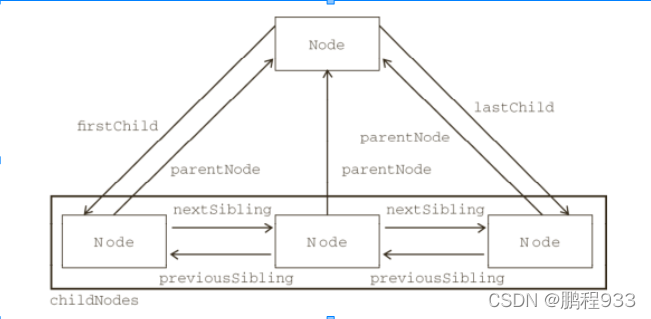
DOM节点对象
- 整个HTML文档看做一个文档对象document
- 整个HTML标签元素看做DOM节点对象
- 每个HTML标签元素的内容属性也看做DOM节点对象
注:在元素节点之间有空白文本节点
动态操作节点
- 创建节点
- 创建元素节点
var elment=document.createElenment('div') - 创建文本节点
var textNode=document.createTextNode('元素')
- 添加节点
- 给元素追加子节点
父节点.oppendchild('子节点') - 在父元素指定子节点插入节点
父节点.insertBefore('新子节点',旧子节点)
- 删除节点
删除父节点下的子节点
父节点.removeChild('子节点')
子节点.remove() - 替换节点
新节点替换父节点下的子节点
父节点.replaceChild('新节点','旧节点')
<div></div>
    <script>
        var elmentNode=document.createElement('div')
//创建元素节点
        var textNode=document.createTextNode('测试创建元素')
//创建文本元素
        elmentNode.appendChild(textNode)
//文本元素加入到节点里
        var node=document.querySelector('div')
		node.appendChild(elmentNode)
//结果<div>
		<div>测试创建元素</div>
	  </div>
        elmentNode.remove()
//结果<div></div>
     </script>
克隆节点
节点.clone()
node节点
所有节点类型都必须继承node类型,成为node的子类或孙类
| 属性 | nodeType | nodeName | nodeValue |
|---|---|---|---|
| 元素 | 1 | 大写标签名 | null |
| 文本 | 3 | #text | 内容 |
| 属性 | 2 | 属性名 | 属性值 |
获取非行间样式
window.getComputedStyle(节点对象).样式名
<style> div{

            width: 100px;
            height: 100px;
        }
    </style>
</head>
<body>
    <div></div>

    <script>
        var divEle=document.querySelector('div')
        var accept=window.getComputedStyle(divEle).width
        console.log(accept)
//结果100px
    </script>
偏移量
- offsetTop
距离父元素上面距离 - offsetLeft
距离父元素上面距离
注:没定位与窗口,有定位于父元素
获取元素宽度
| 属性 | 含义 |
|---|---|
| window.getComputedstyle(节点对象).样式名 | 内容 |
| clientWidth | 内容宽+padding |
| offsetWidth | 内容宽+padding+border |
<style> div{

            width: 100px;
            height: 100px;
            padding: 10px;
            border: 10px solid #000;
        }
    </style>
</head>
<body>
    <div></div>

    <script>
        var divEle=document.querySelector('div')
        var content=window.getComputedStyle(divEle).width
        console.log(content)
//结果100px
        var contentPadding=divEle.clientWidth
        console.log(contentPadding);
//结果120
        var contentBorder=divEle.offsetWidth
        console.log(contentBorder);
//结果140
    </script>
版权声明
本文为[鹏程933]所创,转载请带上原文链接,感谢
https://blog.csdn.net/weixin_64925940/article/details/123668479
边栏推荐
- [concurrent programming 052] talk about double check lock and its advantages?
- [concurrent programming 053] Why use volatile variables for double check lock variables
- Redis cannot add data
- In recent years, oppo, Xiaomi and other mobile phone manufacturers have begun to take the road of self-developed chips. Can this road run through?
- [concurrent programming 054] multithreading status and transition process?
- NLP数据集整理(更新中)
- base64加密解密和json处理
- Machine learning training template, summarizing multiple classifiers
- 腾讯云域名绑定
- 案例4-1.7:文件傳輸(並查集)
猜你喜欢

【并发编程055】如下守护线程是否会执行finally模块中的代码?

MySQL 5.0 installation tutorial illustration detailed tutorial

【并发编程052】说说双重检查锁以及其优点?

NER简单综述

MySQL学习第四弹——多表查询分类以及案例练习源码详解
![【深入理解TcaplusDB技术】删除列表所有数据接口说明——[List表]](/img/ed/cccd5dee09d2f0a3e6c788bd265b36.png)
【深入理解TcaplusDB技术】删除列表所有数据接口说明——[List表]
[in depth understanding of tcallusdb technology] description of data interface of designated location in replacement list - [list table]

Application case sharing of isolated integrated current sensor ch704 which can measure current above 50A

LeetCode 617、合并二叉树
The fourth play of MySQL learning - detailed explanation of multi table query classification and case exercise source code
随机推荐
Electrician Lecture 2
刷了一千道选择题,我总结了这些C语言易错点【第二弹】
“Stack Overflow中文内容”终于来了!邀您体验反馈拿好礼
A记录、MX记录、CNAME记录这些名词是什么意思?
NLP dataset collation (updating)
可以测量50A以上电流的隔离集成式电流传感器CH704应用案例分享
The ordering system breaks the bottleneck period of wholesale enterprises and helps enterprises with digital transformation
redis 不能添加数据
CPU和GPU有什么区别?
Set the sliding wheel in vscode to change the font size
LeetCode 206、反转链表
What is the lifecycle of automated testing?
base64加密解密和json处理
Read attention concatenation volume for accurate and efficient stereo matching
Comparison of data protection modes between Oracle data guard and Jincang kingbasees cluster
Research shows that young people are more and more reluctant to change their mobile phones. What are the hardware updates of the next generation of smart phones that will make you have the impulse to
[concurrent programming 050] type and description of memory barrier?
Whether l3-010 is complete binary search tree (30 points)
Efr32 crystal calibration guide
[in depth understanding of tcallusdb technology] example code - asynchronous call interface