当前位置:网站首页>Dolphin DB vscode plug-in tutorial
Dolphin DB vscode plug-in tutorial
2022-04-21 19:46:00 【Dolphin DB Zhiyu Technology】
VSCode It is a lightweight product developed by Microsoft 、 High performance and highly extensible code editor . It provides a powerful plug-in framework , Developers can expand by writing plug-ins VSCode Editor function , Even support new programming languages .
To enhance the user experience , We have developed for DolphinDB Database VSCode plug-in unit , stay VSCode The of self-study has been added in DolphinDB Scripting language support , Allows users to write and execute scripts to manipulate the database , Or view the data in the database .
This tutorial mainly includes the following contents :
- Download and install
- Edit the server link configuration
- New script file
- Execute code
- Browse data sets and generated objects online
- Automatic replenishment of functions and real-time document browsing
- VSCode window
Click the picture below to jump to the link , Quick view of new features introduction video

Download and install
Click on VSCode On the left navigation bar Extensions Icon , Or by Ctrl+Shift+X Shortcut to open the plug-in installation window . Type in the search box dolphindb, You can search for dolphindb plug-in unit , Click on Install Installation . See the details of the plug-in for specific methods .
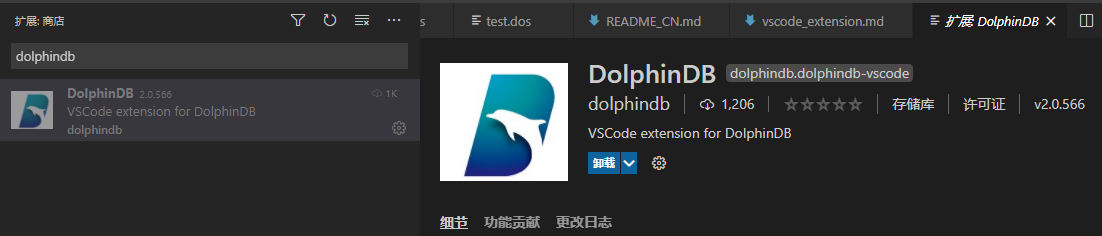
If the installation fails due to network reasons , You need to manually download the suffix through the link below .vsix Plug in for , Click on Version History Download the latest version to your local , And drag it to VSCode In the plug-in panel .
https://marketplace.visualstudio.com/items?itemName=dolphindb.dolphindb-vscode
Be careful : Restart after installation VSCode Make plug-ins work .
Edit the server connection configuration
open VSCode Set up . Type in the search box dolphindb, Click on the settings.json , Edit the dolphindb.connections Configuration item . dolphindb.connections Under a {...} object , Represents a connection configuration , The user can modify the object manually , To create or delete a session . among name and url Is a required attribute .
"dolphindb.connections": [ // A connection configuration is as follows : { "name": "local8848", // Alias of the connection "url": "ws://127.0.0.1:8848", // Connected ip and port, The format is "ws://ip:port" "autologin": true, // Turn on automatic login , The user name and password need to be configured to take effect "username": "admin", "password": "123456", "python": false // Is it enabled? python parser }]After configuring the connection , Users can use the left panel of the editor under explorer DOLPHINDB Window to view and switch connections . By default ,DOLPHINDB The connection shown in the window is not connected to the server , However, when you select a connection and execute a script under that connection, you will automatically connect to the server . After switching the server connection , The original connection will not be disconnected .
Be careful : If the connection configuration item is modified , The original connection will be automatically disconnected .

New script file
- If the script file name suffix is .dos , The plug-in will automatically recognize as DolphinDB Language .
- If the script file name suffix is not .dos, For example .txt, You need to manually associate DolphinDB Language . The method is as follows : Click on VSCode The language selection button in the status bar at the lower right corner of the editor , Here's the picture :

Enter... In the language selection pop-up box dolphindb Back carriage return , You can switch the language associated with the current file to DolphinDB Language .

Execute code
VSCode By default, the shortcut key Ctrl + E perform DolphinDB Code . If you need to customize the shortcut keys for code execution , You have in VSCode Of file > Preferences > Keyboard shortcuts (File > Preferences > Keyboard Shortcuts) Modify in process . Enter... In the search field dolphindb, find execute And double-click , Modify the shortcut keys according to the prompts .
If you use the default shortcut , Through Ctrl + E Shortcut keys to execute the selected code , If no code is selected , The current cursor line is executed .
Browse data sets and generated objects online .
VSCode The left panel of the editor shows the connected session in Explorer , Users can view all variables in the session here . The name of the variable is shown here , type , Dimension and memory size . Users can also click the icon on the right side of the variable bar to browse the specific information of the variable in the browser .
Please make sure that the following two points , To avoid server connection errors ( Such as :ws://xxx errored):
- DolphinDB Server Version no less than 1.30.16 or 2.00.4 .
- If the system agent is configured , Then the proxy software and proxy server need to support WebSocket Connect . Otherwise, please close the agent in the system , Or will DolphinDB Server Of IP Add to exclusion list , And then restart VSCode.
Automatic replenishment of functions and real-time document browsing .
The user is in VSCode When the editor enters a function , The function name... Will be automatically supplemented , And the specific information of the expandable function . Hover the cursor over the corresponding function to automatically display the document corresponding to the function .
VSCode window
- Variable navigation bar

Connection bar : Click the circular icon on the left to switch to the corresponding connection , Click the link icon on the right to disconnect .
Variable bar : Hover the mouse over the corresponding variable , You can view the value of this variable . Variable (scalar and pair Except type ) There are two icons on the right . Clicking the first icon will display the variables in the browser , And each click will refresh the variable value . Click on the second icon , Will open the browser pop-up window ( Please open the browser to allow pop-up function ) Here's the picture , It is convenient for users to view variables and observe the changes before and after variables .

- Data browser
Click the first icon on the right side of the variable to open a public browser page (localhost:8321). You can view the contents of variables on this page . Other users can also use (ip:8321) View correspondence ip Real time results of user code execution .

- terminal
DolphinDB The execution result of the script will be displayed on the terminal :

The first line of the execution result shows the execution time of the code , The server alias corresponding to the session .
Take table as an example , The print execution result is shown in the figure above :
- First, display the data form , Here is table.[20r][4c] Indicates that the table is a 20 That's ok 4 Data table for column .
- Then print the data type of each column in turn , length , Column names and the data they contain .
- Finally, it shows the time-consuming of code execution .
版权声明
本文为[Dolphin DB Zhiyu Technology]所创,转载请带上原文链接,感谢
https://yzsam.com/2022/04/202204211941236274.html
边栏推荐
猜你喜欢

OpenCV之OpenCL介绍
高端制造业企业信息化解决方案,工业电商平台设备、数据、体系预测性维护

Abbexa donkey anti goat IgG (H & L) antibody

Modifying the root password of MySQL

Chekine series high density lipoprotein (HDL-C) content detection scheme

图像中stride的含义
![[netty] is it difficult to implement a redis client by yourself?](/img/02/a9609465d2cc90251168b2ed0b94f0.png)
[netty] is it difficult to implement a redis client by yourself?

SVPWM模块为什么会出现扇区判断错误?

Overview of relational database and non relational database, introduction to redis, common commands and optimization
Why does SVPWM module have sector judgment error?
随机推荐
fiddler抓包PC微信小程序失败的解决方案
状态码封装--转载
leetcode18. Sum of four numbers
leetcode18. 四数之和
leetcode344. 反转字符串
Installing MySQL 8 on Linux centos7 (simple and practical)
Interface component telerik UI for WPF Getting Started Guide - color theme generator
使用CMake构建/CMake命令参考
野路子玩Qt,第三十一集,擦玻璃游戏
PostgreSql postgres_ fdw
阿里IOT
juc-Queue接口以及其实现类
Redis Lua script detailed explanation of lua script high frequency interview questions
Results of the 21st day at home
ParaView Glance 启动报错
照片删除了怎么恢复?4个方案,这才是官方指南
Instructions of crystal Chem mouse glucose detection kit
SVPWM模块为什么会出现扇区判断错误?
【2021】腾讯秋招技术岗编程 有效序列的数量
联想承诺 2025 年全线计算机产品 100% 含再生塑料