当前位置:网站首页>Archengine point, line, face, text rendering
Archengine point, line, face, text rendering
2022-04-22 14:23:00 【ShirmyMao】
Arcengine spot , Line , Noodles , Text rendering
- 1. spot
- 2. Line
- 3. Noodles
-
- (1)pFillSymbol.Style = esriSimpleFillStyle.esriSFSSolid
- (2)pFillSymbol.Style = esriSimpleFillStyle.esriSFSNull
- (3)pFillSymbol.Style = esriSimpleFillStyle.esriSFSHollow
- (4)pFillSymbol.Style = esriSimpleFillStyle.esriSFSHorizontal
- (5)pFillSymbol.Style = esriSimpleFillStyle.esriSFSVertical
- (6)pFillSymbol.Style = esriSimpleFillStyle.esriSFSForwardDiagonal
- (7)pFillSymbol.Style = esriSimpleFillStyle.esriSFSBackwardDiagonal;
- (8)pFillSymbol.Style = esriSimpleFillStyle.esriSFSCross
- (9)pFillSymbol.Style = esriSimpleFillStyle.esriSFSDiagonalCross
- 4. written words
1. spot
IMarkerElement pMarkerElement = new MarkerElementClass();
pMarkerElement.Symbol.Color = TransColorToAEColor(geoColor);
var pElement = pMarkerElement as IElement;
pElement.Geometry = pubGeometry;
var g = mapcontrol.ActiveView.GraphicsContainer;
g.AddElement(pElement, 0);
mapcontrol.ActiveView.PartialRefresh(esriViewDrawPhase.esriViewGraphics, null, null);
2. Line
ISimpleLineSymbol pSimpleLineSymbol = new SimpleLineSymbolClass();
pSimpleLineSymbol.Color = TransColorToAEColor(geoColor);
pSimpleLineSymbol.Width = 2;
var pLineElement = new LineElementClass();
pLineElement.Symbol = pSimpleLineSymbol;
var element = pLineElement as IElement;
IRubberBand pRubberBand;
pRubberBand = new RubberLineClass();
element.Geometry = pubGeometry;
var g = mapcontrol.ActiveView.GraphicsContainer;
g.AddElement(element, 0);
mapcontrol.ActiveView.PartialRefresh(esriViewDrawPhase.esriViewGraphics, null, null);
3. Noodles
The code for drawing polygons on the map is as follows :
 // Simple fill patterns and colors
 ISimpleFillSymbol pFillSymbol = new SimpleFillSymbol();
 pFillSymbol.Style = esriSimpleFillStyle.esriSFSSolid;
 pFillSymbol.Color = TransColorToAEColor(Color.LightGray);
 pFillSymbol.Style = esriSimpleFillStyle.esriSFSBackwardDiagonal;
 // Set the fill feature
 IFillShapeElement pPolygonEle = new PolygonElementClass();
 pPolygonEle.Symbol = pFillSymbol;
 // determine Geometry attribute
 IElement pEle = pPolygonEle as IElement;
 pEle.Geometry = polygon;
 var g = mapcontrol.ActiveView.GraphicsContainer;
 g.AddElement(pEle, 0);
 mapcontrol.ActiveView.PartialRefresh(esriViewDrawPhase.esriViewGraphics, null, null);
Envelop The rectangle is drawn as follows :
ISimpleFillSymbol simpleFillsymbol = new SimpleFillSymbolClass();
IRgbColor color = new RgbColorClass();
color.RGB=0;
simpleFillsymbol.Outline.Color = color;
simpleFillsymbol.Outline.Width = 1;
simpleFillsymbol.Style = esriSimpleFillStyle.esriSFSHollow;
IFillShapeElement rectElemnt = new RectangleElementClass();
rectElemnt.Symbol = simpleFillsymbol;
var element = rectElemnt as IElement;
element.Geometry = env;
g.AddElement(element, 0);
(1)pFillSymbol.Style = esriSimpleFillStyle.esriSFSSolid
( Default fill method )
Solid fill.

(2)pFillSymbol.Style = esriSimpleFillStyle.esriSFSNull
Empty fill.
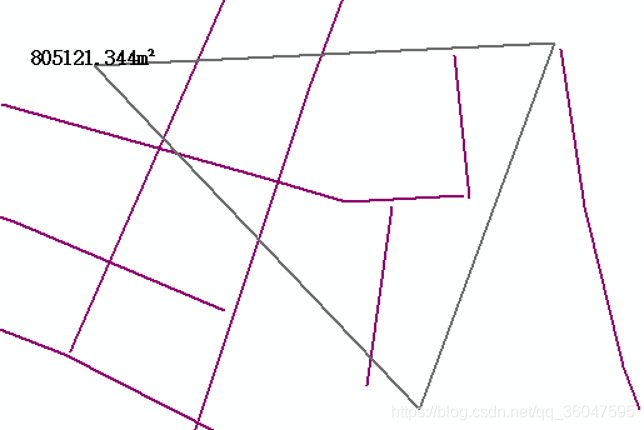
(3)pFillSymbol.Style = esriSimpleFillStyle.esriSFSHollow
Hollow fill (same as esriSFSNull).

(4)pFillSymbol.Style = esriSimpleFillStyle.esriSFSHorizontal
Horizontal hatch fill ------.
(5)pFillSymbol.Style = esriSimpleFillStyle.esriSFSVertical
Vertical hatch fill ||||||.

(6)pFillSymbol.Style = esriSimpleFillStyle.esriSFSForwardDiagonal
45-degree downward, left-to-right hatch fill \.

(7)pFillSymbol.Style = esriSimpleFillStyle.esriSFSBackwardDiagonal;
45-degree upward, left-to-right hatch fill //.

(8)pFillSymbol.Style = esriSimpleFillStyle.esriSFSCross
Horizontal and vertical crosshatch ++++++.

(9)pFillSymbol.Style = esriSimpleFillStyle.esriSFSDiagonalCross
45-degree crosshatch xxxxxx.

4. written words
var pTextElement = new TextElementClass();
var pFont = (IFontDisp)new StdFont();
pFont.Bold = true;
pFont.Name = " Song style ";
pFont.Size = 10;
var pColor = new RgbColorClass();
pColor.RGB = 0;
var pTextSymbol = new TextSymbolClass();
pTextSymbol.Color = pColor;
pTextSymbol.Font = pFont;
pTextElement.Text = text;
pTextElement.Symbol = pTextSymbol;
var pElement = (IElement)pTextElement;
pElement.Geometry = point;
var g = mapcontrol.ActiveView.GraphicsContainer;
g.AddElement(pElement, 0);
 mapcontrol.ActiveView.PartialRefresh(esriViewDrawPhase.esriViewGraphics, null, null);
版权声明
本文为[ShirmyMao]所创,转载请带上原文链接,感谢
https://yzsam.com/2022/04/202204221421352047.html
边栏推荐
- Ladder race -- l2-004 is this a binary search tree? (25 points) (recursive)
- Solve command line is too long Shorten command line for........ error
- Linked list ring linked list linked list ring judgment to find the ring in nodes 141 and 142
- Codeforces Round #782 (Div. 2) D. Reverse Sort Sum
- QT create window flash back problem
- leetcode:215. 数组中的第K个最大元素
- asp.net framework配置swagger并支持上传文件
- 动规初解||最大子序和 最长上升子序列53、128
- 20 required questions for 25K + Android Engineer Interview and Netease Android interview
- 多线程进阶
猜你喜欢

CRM系统改善客户体验的方法
2020 popular whole network series: This is a very suitable Android advanced - interview key and difficult data notes for collection and collection! Continuously update the high-quality interview links

10天完成民猫电商毕设——用户模块实现(2nd day)

深入剖析Lock与AQS

Eight strange facts about semiconductors
代码覆盖率之 sonar

多线程初阶

Huawei cloud media Zha Yong: Huawei cloud's technical practice in the field of video AI transcoding

dxg:TableView.FormatConditions 表格按条件高亮显示

Thread pool--

随机推荐
Knowledge is power, but more importantly, the ability to use knowledge - wechat code scanning payment on the web - technical design
双指针 同向双指针、滑动窗口3、594、|27、26、80、83、82、611、187、643、674、209、438、567、424、76、30
Hashtable hash table and index 1, 599, 219
awk命令
Shiro之缓存管理
图的遍历 深度优先DFS 广度优先BFS
Huawei cloud media Zha Yong: Huawei cloud's technical practice in the field of video AI transcoding
Hashtable hash table and statistics 594, 350, |554, 609, 454, 18
leetcode:215. 数组中的第K个最大元素
3. Fiddler certificate installation and fetching hettps settings
Interrupted () and isinterrupted () detail the method of paging query of millions of data and its optimization method
Hashtable hash table practice finding, inserting, deleting 217, 349, 202, 287, 290, 532, 205, 128
多线程初阶
HanderThread基本使用以及内部实现原理
字节跳动的面试分享,为了拿下这个offer鬼知道我经历了什么
Bitmap bloomfilter BitSet details
CorelDRAW插件-CPG插件开发-环境搭建-VS2017-TLB文件-CDR插件
asp.net framework配置swagger并支持上传文件
Codeforces Round #782 (Div. 2) D. Reverse Sort Sum
interrupted()和isInterrupted()详述,百万数据分页查询的方法及其优化方式