当前位置:网站首页>Common text processing commands
Common text processing commands
2022-04-21 09:36:00 【FYR@】
List of articles
1 Sort —sort
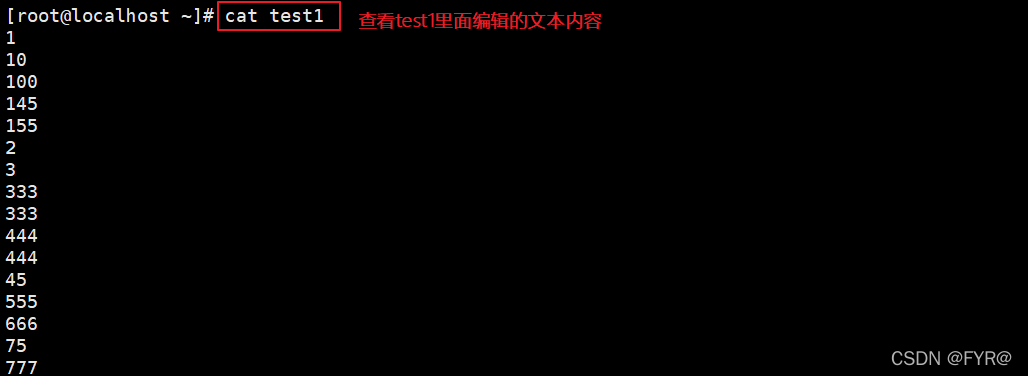
sort command — Sort the contents of the file in behavioral units , You can also sort according to different data types. The comparison principle is from the first character to the last character , Press... In turn ASCII Code value for comparison , Finally, output them in ascending order .
 Grammar format
sort [ Options ]  Parameters
cat file | sort  Options
Common options :
| -n | Sort by number |
|---|---|
| -r | Reverse sorting |
| -u | Equate to uniq, Indicates that only one row of the same data is displayed |
| -t | Specifies the field separator , By default [Tab] The key to separate |
| -k | Specify sort fields |
| -o < The output file > | Transfer the sorted results to the specified file |
| -f | Ignore case , Will convert all lowercase letters to uppercase letters for comparison |
| -b | Ignore spaces before each line |


2 duplicate removal —uniq
uniq command — Used to report or ignore consecutive duplicate lines in the file , Often with sort Command in combination with
 Grammar format :
uniq [ Options ]  Parameters
cat file | uniq  Options
Common options :
| -c | Count , And delete the repeated lines in the file |
|---|---|
| -d | Show only consecutive repeating lines |
| -u | Show only rows that appear once |


3 Delete replace compression —tr
tr command — Commonly used to replace characters from standard input 、 Compress and delete
 Grammar format :
tr [ Options ] [ Parameters ]

tr [ Options ]  Parameters 1    Parameters 2
          Character set 1   Character set 2
Common options :
| -c | Preserve the character set 1 The characters of , Other characters ( Include line breaks \n) With the character set 2 Replace |
|---|---|
| -d | Delete all characters that belong to the character set 1 The characters of |
| -s | Compress the repeated string into a string ; With the character set 2 Replace character set 1 |
| -t | Character set 2 Replace character set 1, Without options, it is the same as the result |
Parameters
Character set 1: Specifies the original character set to convert or delete . When performing a transformation operation , Parameters must be used “ Character set 2” Specifies the target character set of the transformation . But when you delete , No parameters required “ Character set 2”
Character set 2: Specifies the target character set to convert to
- -c: Preserve the character set 1 The characters of , Other characters

Be careful :
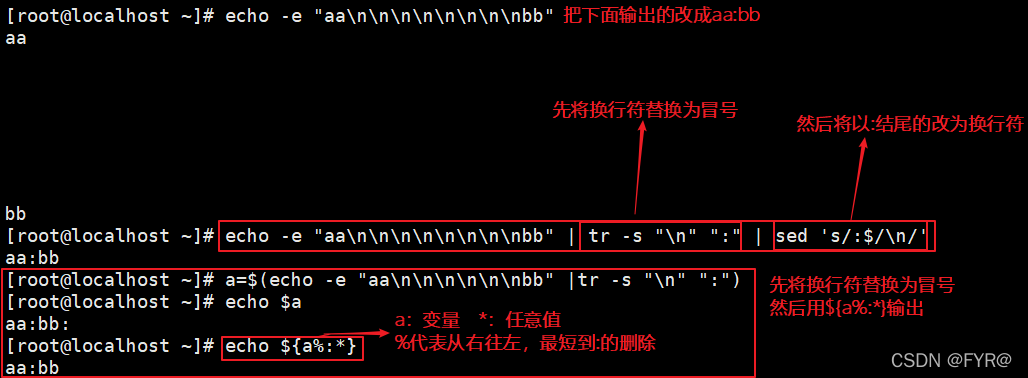
echo -n
echo -e "XXXXXXX\c"
 In addition to the above two methods, the end of the output content will not carry a newline character ,echo Other output methods will carry a newline character at the end of the content by default \n
- -s: Compress the repeated string into a string

Case a
[root@localhost ~]# tr 123 abc // As long as there is 123  Turn it into abc

[root@localhost ~]# tr 12345678 abc // The last one always uses
[root@localhost ~]# tr -d abc // Delete
2a34bc
234
[root@localhost ~]# tr -s " "
1     2      3     4
1 2 3 4
[root@localhost ~]# tr -s "a"

Case 2 : How to delete empty lines
 Method 1 :grep -v "^$"   file
 Method 2 :cat  file  | tr -s "\n"

Case three : Interview questions generate random passwords
[root@fyr ~]# cat /dev/urandom |tr -dc '[:alnum:]' | head -c12

Case four
[root@fyr ~]# cat 1.txt
aaaaa     11111
bbbbb     22222
[root@fyr ~]# cat 1.txt |tr -c "[a-z]" " " // use   Space replaces all characters except lowercase letters
[root@fyr ~]# cat 1.txt |tr -sc "[a-z]" " " // Add s Compress

3.1 expand 1 ${i%,*}...
${i%,*} String from right to left , The shortest matching comma is deleted
${i%%,*} String from right to left , The longest matching comma is deleted
${i#*,} String from left to right , The shortest match is deleted
${i##*,} String from left to right , The longest matching comma is deleted

3.1 expand 2
- Linux Line break encountered in ("\n") Will enter + Line feed operation , Instead, the carriage return character will only be used as a control character ("^M") Show , No carriage return occurs .
- Windows Carriage return in + A newline ("\r\n") Will enter + Line break , Missing a control character or out of order cannot start another line correctly .

solve Windows The documents inside are placed in Linux Use in will be recognized
 Method 1 :cat  file  | tr -d "\r" >  New files
 Method 2 :
 install dos2unix(yum install -y dos2unix)
dos2unix  file

4 Intercept field or string —cut
cut command — The specified part in the display line deletes the specified field in the file
 Grammar format :
cut  Parameters
cat file | cut Options
Common options :
| -f | By specifying which field to extract .cut Command to use "TAB" As the default field separator |
|---|---|
| -d | "TAB" Is the default separator , Use this option to change to another separator |
| –complement | This option is used to exclude the specified field |
| –output-delimiter | Change the separator for the output |
#:  The first # A field , for example  3
#,#[,#]: Discrete multiple fields , for example  1,3,6
#-#: Continuous multiple fields ,  for example  1-6
 A mixture of :1-3,7

Example 1
[root@fyr ~]# cut -d : -f1,3 /etc/passwd
// Conditions separated by colons , Take the first and third columns of the file

Case 2
[root@fyr ~]# ll | tail -n +2 | tr -s " "| cut -d " " -f3,9
// Start with the second line , Compress empty lines into a post , Then use the space as the separator , Take the first place 3  And the 9 Column


Case three
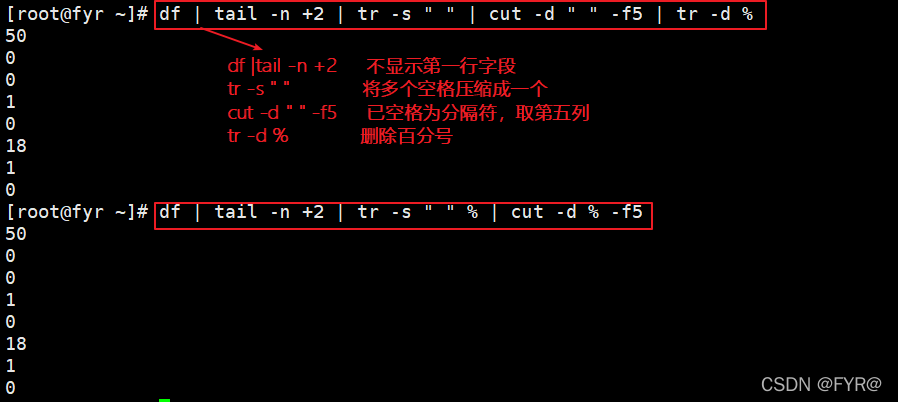
[root@fyr ~]# df | tail -n +2 | tr -s " " | cut -d " " -f5 | tr -d %
# df |tail -n +2  Do not display the first row of fields
# tr -s " "  Compress multiple spaces into one
# cut -d " " -f5  Spaces have been used as separators , Take the fifth column
# tr -d %  Delete the percent sign

[root@fyr ~]# df | tail -n +2 | tr -s " " % | cut -d % -f5
# df |tail -n +2  Do not display the first row of fields
# tr -s " "  Compress multiple spaces into one   Replace the space with %
# cut -d % -f5  has % Separator   Take the first place 5 Column

4.1 String replacement and interception
String match replacement
${i/a/b}# The first one. a Replace with b
${i//a/b}# Will all a Replace with b
${i/%a/b}# Will be the last a Replace with b
Intercepting string
 Method 1 :
${i:0:3} Subscript from 0 Start : Length of intercepted characters
 Method 2 :
echo $i | cut -b 1-3  Subscript from 1 Start position - Termination position
 Method 3 :
expr substr $i 1 3 Subscript from 1 Start   1 Represents the starting position  3 Represents the length of the character intercepted

Be careful :cut Command if you use -b Options , When executing, we will first -b All the following positions are sorted from small to large , Then extract , You can't reverse the order .
5 Split files —split
split command —linux Next, split a large file into several small files
 Grammar format :
split  Options   Parameters   The original document   After splitting, the file name is prefixed with
Common options :
| -l | Split by number of lines |
|---|---|
| -b | Split by size |
split -l 10 /etc/pasawd passwd # With 10 Line to split the file , The number of lines in the last file does not 10 Rows are allocated based on the actual number of rows ( discontent 10 Line will also put a separate file )

6 Scan command —eval
eval command — Add... Before the command word eval when ,shell It will be scanned twice before executing the command .eval The command will first scan the command line for all permutations , Then execute the command . This command is applicable to those variables that cannot perform their functions in one scan . This command scans variables twice .
Scan command 2 Time , For the first time $ Convert variables to values , Then execute the order

Case a :

Case 2 :

版权声明
本文为[FYR@]所创,转载请带上原文链接,感谢
https://yzsam.com/2022/04/202204210930251297.html
边栏推荐
- Yuanshu training dance room, cyberpunk cool style, waiting for you to dance
- 1155: 字符串比较 多实例
- gltf模型带透明贴图的显示问题
- 1161: 字符串长度(指针专题)
- 【云驻共创】华为云数据库之数据库原理及应用课程11、数据库系统控制
- CentOS下Docker中安装MySQL
- 1171: encryption (pointer topic)
- 2022制冷与空调设备运行操作考试题模拟考试题库及答案
- Simulation implementation vector
- Regular expression syntax and common regular expressions
猜你喜欢

Multithreaded copy set (New 4)

My life of Honker Security Commando

控制另一个程序的启动、隐藏、显示、关闭

Download the first analysis report on China's database industry!

【ACM】131. Split palindrome string

【总结】1296- 总结 12 个常见移动端 H5 与 Hybrid 开发问题

【手拉手 带你准备电赛】单色块识别(基于openmv)
Control the start, hide, display and close of another program
【笔记】.launch文件语法记录
Fashion cloud learning -js implementation disables right click and F12
随机推荐
【总结】1296- 总结 12 个常见移动端 H5 与 Hybrid 开发问题
利用已有的标签文件生成训练集和验证集(YOLO)
Kali:sqlmap :[10:39:37] [CRITICAL] unable to connect to the target URL
1146: eat candy
【手拉手 带你准备电赛】单色块识别(基于openmv)
Geek challenge 2019 upload 1
Multithreaded copy set (New 4)
Fashion cloud learning -js implementation disables right click and F12
1166: rounding of real numbers (pointer topic)
1169: 大整数(指针专题)
[Yugong series] wechat applet - API related function case of map use in April 2022
Interview question of a small factory: what is false awakening?
m3u8视频下载器-idm突破无法下载受保护的数据, 下不了限制
Performance analysis ideas
2022年危险化学品生产单位安全生产管理人员特种作业证考试题库模拟考试平台操作
Kali:sqlmap :[10:39:37] [CRITICAL] unable to connect to the target URL
给网站添加pjax无刷新,换页音乐不中断
Write table of MySQL Foundation (create table)
1150: 数数多少个整数
2022 a special equipment related management (elevator) test question simulation test platform operation