当前位置:网站首页>How Zotero quotes in word jump to references / hyperlink
How Zotero quotes in word jump to references / hyperlink
2022-04-23 03:40:00 【Ling Xi】
Provincial directory
List of articles
problem : As the title
Zotero Hyperlinks between citations and references are not supported .
What kind of shit ... The most important function is not !!!
Just from endnote Switch to Zotero That's what happened .... Favorability -1-1-1-1-1~~~
Solution
Test only individual cases , Most are generic .
Software :word2019
Citation format : Numeric 2015 National standard 7714

1. open word-> View -> macro -> Click on , Select View macro

2. Create macros

3. Replace all the code with the following
Public Sub ZoteroLinkCitation()

' get selected area (if applicable)
    Dim nStart&, nEnd&
    nStart = Selection.Start
    nEnd = Selection.End

' toggle screen updating
    Application.ScreenUpdating = False

' define variables
    Dim title As String
    Dim titleAnchor As String
    Dim style As String
    Dim fieldCode As String
    Dim numOrYear As String
    Dim pos&, n1&, n2&, n3&

    ActiveWindow.View.ShowFieldCodes = True
    Selection.Find.ClearFormatting

' find the Zotero bibliography
    With Selection.Find
        .Text = "^d ADDIN ZOTERO_BIBL"
        .Replacement.Text = ""
        .Forward = True
        .Wrap = wdFindContinue
        .Format = False
        .MatchCase = False
        .MatchWholeWord = False
        .MatchWildcards = False
        .MatchSoundsLike = False
        .MatchAllWordForms = False
    End With
    Selection.Find.Execute

    ' add bookmark for the Zotero bibliography
    With ActiveDocument.Bookmarks
        .Add Range:=Selection.Range, Name:="Zotero_Bibliography"
        .DefaultSorting = wdSortByName
        .ShowHidden = True
    End With

    ' loop through each field in the document
    For Each aField In ActiveDocument.Fields
        ' check if the field is a Zotero in-text reference
        '##################################################
        If InStr(aField.Code, "ADDIN ZOTERO_ITEM") > 0 Then
            fieldCode = aField.Code
            '#############
            ' Prepare
            ' Plain citation== Format of Textfield shown
            ' must be in Brackets
            Dim plain_Cit As String
            plCitStrBeg = """plainCitation"":""["
            plCitStrEnd = "]"""
            n1 = InStr(fieldCode, plCitStrBeg)
            n1 = n1 + Len(plCitStrBeg)
            n2 = InStr(Mid(fieldCode, n1, Len(fieldCode) - n1), plCitStrEnd) - 1 + n1
            plain_Cit = Mid$(fieldCode, n1 - 1, n2 - n1 + 2)
            'Reference 'as shown' in word as a string

            'Title array in fieldCode (all referenced Titles within this field)
            Dim array_RefTitle(32) As String
            i = 0
            Do While InStr(fieldCode, """title"":""") > 0
                n1 = InStr(fieldCode, """title"":""") + Len("""title"":""")
                n2 = InStr(Mid(fieldCode, n1, Len(fieldCode) - n1), """,""") - 1 + n1
                If n2 < n1 Then 'Exception the type 'Article'
                    n2 = InStr(Mid(fieldCode, n1, Len(fieldCode) - n1), "}") - 1 + n1 - 1
                End If
                array_RefTitle(i) = Mid(fieldCode, n1, n2 - n1)
                fieldCode = Mid(fieldCode, n2 + 1, Len(fieldCode) - n2 - 1)
                i = i + 1
            Loop
            Titles_in_Cit = i

            'Number array with References shown in PlainCit
            'Numer is equal or less than Titels, depending on the type
            '[3], [8]-[10]; [2]-[4]; [2], [4], [5]
            ' All citations have to be in Brackets each! [3], [8] not [3, 8]
            ' This doesnt work otherwise!
            ' --> treatment of other delimiters could be implemented here
            Dim RefNumber(32) As String
            i = 0
            Do While (InStr(plain_Cit, "]") Or InStr(plain_Cit, "[")) > 0
                n1 = InStr(plain_Cit, "[")
                n2 = InStr(plain_Cit, "]")
                RefNumber(i) = Mid(plain_Cit, n1 + 1, n2 - (n1 + 1))
                plain_Cit = Mid(plain_Cit, n2 + 1, Len(plain_Cit) - (n2 + 1) + 1)
            i = i + 1
            Loop
            Refs_in_Cit = i
                 'treat only the shown references (skip the rest)
            '[3], [8]-[10] --> skip [9]
            'Order of titles given from fieldcode, not checked!
            If Titles_in_Cit > Refs_in_Cit Then
                array_RefTitle(Refs_in_Cit - 1) = array_RefTitle(Titles_in_Cit - 1)
                i = 1
                Do While Refs_in_Cit + i <= Titles_in_Cit
                    array_RefTitle(Refs_in_Cit + i - 1) = ""
                    i = i + 1
                Loop
            End If

            '#############
            'Make the links
            For Refs = 0 To Refs_in_Cit - 1 Step 1
                title = array_RefTitle(Refs)
                array_RefTitle(Refs) = ""
                ' make title a valid bookmark name
                titleAnchor = title
                titleAnchor = MakeValidBMName(titleAnchor)

                ActiveWindow.View.ShowFieldCodes = False
                Selection.GoTo What:=wdGoToBookmark, Name:="Zotero_Bibliography"

                '' locate the corresponding reference in the bibliography
                '' by searching for its title
                Selection.Find.ClearFormatting
                With Selection.Find
                    .Text = Left(title, 255)
                    .Replacement.Text = ""
                    .Forward = True
                    .Wrap = wdFindContinue
                    .Format = False
                    .MatchCase = False
                    .MatchWholeWord = False
                    .MatchWildcards = False
                    .MatchSoundsLike = False
                    .MatchAllWordForms = False
                End With
                Selection.Find.Execute

                ' select the whole caption (for mouseover tooltip)
                Selection.MoveStartUntil ("["), Count:=wdBackward
                Selection.MoveEndUntil (vbBack)
                lnkcap = "[" & Selection.Text
                lnkcap = Left(lnkcap, 70)

                ' add bookmark for the reference within the bibliography
                Selection.Shrink
                With ActiveDocument.Bookmarks
                    .Add Range:=Selection.Range, Name:=titleAnchor
                    .DefaultSorting = wdSortByName
                    .ShowHidden = True
                End With

                ' jump back to the field
                aField.Select
                ' find and select the numeric part of the field which will become the hyperlink
                Selection.Find.ClearFormatting
                With Selection.Find
                    .Text = RefNumber(Refs)
                    .Replacement.Text = ""
                    .Forward = True
                    .Wrap = wdFindContinue
                    .Format = False
                    .MatchCase = False
                    .MatchWholeWord = False
                    .MatchWildcards = False
                    .MatchSoundsLike = False
                    .MatchAllWordForms = False
                End With
                Selection.Find.Execute

                numOrYear = Selection.Range.Text & ""

                ' store current style
                style = Selection.style
                ' Generate the Hyperlink -->Forward!
                ActiveDocument.Hyperlinks.Add Anchor:=Selection.Range, Address:="", SubAddress:=titleAnchor, ScreenTip:=lnkcap, TextToDisplay:="" & numOrYear
                ' reset the style
                Selection.style = style

                ' comment if you want standard link style
                aField.Select
                With Selection.Font
                     .Underline = wdUnderlineNone
                     .ColorIndex = wdBlack
                End With

            Next Refs 'References in Cit

        End If  'If Zotero-Field
        '#########################

        Next aField ' next field

        ' go back to original range selected
        ActiveWindow.View.ShowFieldCodes = False
        ActiveDocument.Range(nStart, nEnd).Select

    End Sub
    Function MakeValidBMName(strIn As String)
        Dim pFirstChr As String
        Dim i As Long
        Dim tempStr As String
        strIn = Trim(strIn)
        pFirstChr = Left(strIn, 1)
        If Not pFirstChr Like "[A-Za-z]" Then
            strIn = "A_" & strIn
        End If
        For i = 1 To Len(strIn)
            Select Case Asc(Mid$(strIn, i, 1))
            Case 49 To 57, 65 To 90, 97 To 122
                tempStr = tempStr & Mid$(strIn, i, 1)
            Case Else
                tempStr = tempStr & "_"
            End Select
            Next i
            tempStr = Replace(tempStr, " ", " ")
            MakeValidBMName = Left(tempStr, 40)
        End Function
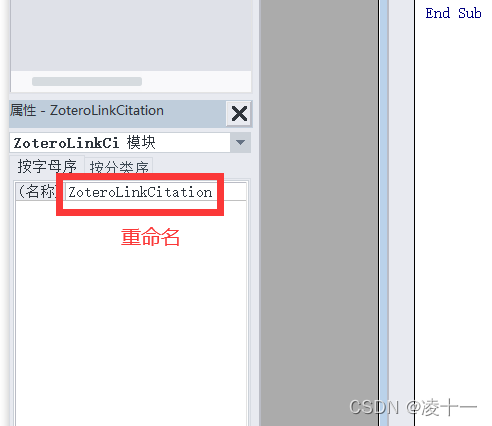
4. Ctrl+s preservation , Rename the lower left corner to ZoteroLinkCitation, Close page
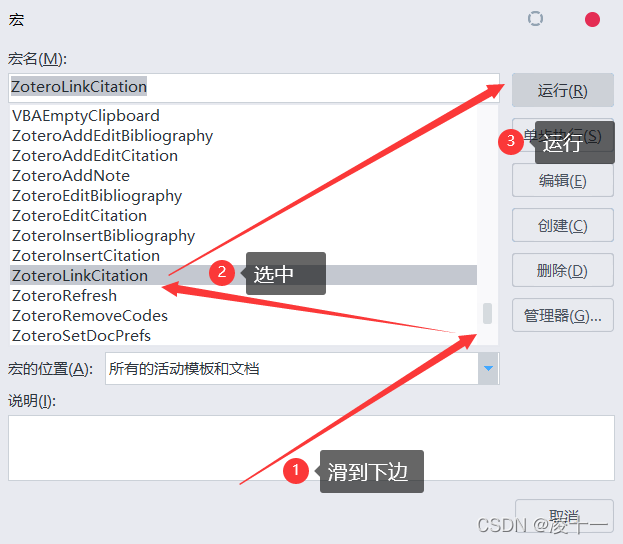
5. View macro
6. Run macro
Premise : You have inserted the reference , And build references . This macro just adds a hyperlink to both
Perfect solution !!!*,°:.*( ̄▽ ̄)/$:.°*. And the flower !!!
版权声明
本文为[Ling Xi]所创,转载请带上原文链接,感谢
https://yzsam.com/2022/04/202204220601418103.html
边栏推荐
- ROS series (IV): ROS communication mechanism series (3): parameter server
- The art of concurrent programming (6): explain the principle of reentrantlock in detail
- (valid for personal testing) compilation guide of paddedetection on Jetson
- Chapter 8 exception handling, string handling and file operation
- Abstract classes, interfaces and common keywords
- Vs Studio modifie le langage C scanf et d'autres erreurs
- The principle and solution of not allowing pasting in an English Network
- Activity supports multi window display
- Process seven state transition diagram
- Why is it necessary to divide the variance by 255^2 when adding Gaussian noise using the imnoise function of MATLAB
猜你喜欢
Unity Basics

Development record of primary sensitive word detection

2022 团体程序设计天梯赛 模拟赛 L2-1 盲盒包装流水线 (25 分)

L3-011 direct attack Huanglong (30 points)
Visual programming - drawing assignment
Design and implementation of redis (5): master-slave replication strategy and optimization

Seekbar custom style details

Romantic silhouette of L2-3 of 2022 group programming ladder Simulation Competition (25 points)

C abstract class
MySQL zip installation tutorial
随机推荐
List interface of collection
Code forces round # 784 (DIV. 4) solution (First AK CF (XD)
Codeforces Round #784 (Div. 4)題解 (第一次AK cf (XD
Codeforces round 784 (Div. 4) (AK CF (XD) for the first time)
JS takes out the same elements in two arrays
Design and implementation of redis (5): master-slave replication strategy and optimization
对象和类的概念
ROS series (IV): ROS communication mechanism series (2): Service Communication
Websites frequented by old programmers (continuously updated)
Chapter VI, Section III pointer
Section 1 array and slicing in Chapter 6
The content of the website is prohibited from copying, pasting and saving as JS code
Idea debug debugging tutorial
Leetcode 617 merge binary tree
Unity Basics
Identifier and type conversion
Translation of l1-7 matrix columns in 2022 group programming ladder Simulation Competition (20 points)
Activity supports multi window display
Section 2 map and structure in Chapter 6
Punch in: 4.22 C language chapter - (1) first knowledge of C language - (11) pointer