当前位置:网站首页>Laravel8- use JWT
Laravel8- use JWT
2022-04-23 03:03:00 【Stupid little attendant】
laravel8- Use jwt
jwt- Official website
https://jwt-auth.readthedocs.io/en/develop/laravel-installation
install
- First step :composer Pull the latest version
composer require tymon/jwt-auth
- The second step : Add service provider (Laravel 5.4 Or below )
Add the service provider to the configuration file config/app.php Medium providers Array , As shown below :
'providers' => [

    ...

    Tymon\JWTAuth\Providers\LaravelServiceProvider::class,
]

'aliases' => [
		...

        'JWTAuth' => Tymon\JWTAuth\Facades\JWTAuth::class,
        'JWTFactory' => Tymon\JWTAuth\Facades\JWTFactory::class,
    ],
- The third step : Run the following command to publish the package configuration file
php artisan vendor:publish --provider="Tymon\JWTAuth\Providers\LaravelServiceProvider"
After running, there should be a config/jwt.php file , Allows you to configure the basics of this package
- Step four : Run the following command to generate a key
php artisan jwt:secret
After operation .env The file will generate a JWT_SECRET
stay laravel Configuration in the project
- First step : To configure config/auth.php
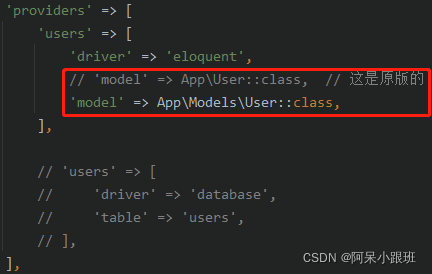
stay config/auth.php in , take api Of driver Change to drive jwt

Then register and write it yourself model
- The second step : Define routes

Specific code
- controller - newly build AuthController
<?php

namespace App\Http\Controllers\Auth;

use App\Http\Controllers\Controller;
use Illuminate\Http\Request;
use App\Models\User;
use Illuminate\Support\Facades\Auth;
use Tymon\JWTAuth\Facades\JWTAuth;

class AuthController extends Controller
{

    /** * Create a new AuthController instance. * * @return void */
    public function __construct()
    {

        $this->middleware('auth:api', ['except' => ['login']]);
    }

    /** * Get a JWT via given credentials. * * @return \Illuminate\Http\JsonResponse */
    public function login(Request $request)
    {

        $credentials = $request->only('name', 'password');

        if (count($credentials) < 2) {

            return response()->json(['error' => 'Unauthorized'], 401);
        }

        $user = User::where('name', $credentials['name'])
            ->where('password', ($credentials['password']))
            ->first();

        if (empty($user) || !$token = JWTAuth::fromUser($user)) {

            return response()->json(['error' => 'Unauthorized'], 401);
        }

        return $this->respondWithToken($token);

    }

    /** * Get the authenticated User. * * @return \Illuminate\Http\JsonResponse */
    public function me()
    {

        return response()->json(auth('api')->user());
    }

    /** * Log the user out (Invalidate the token). * * @return \Illuminate\Http\JsonResponse */
    public function logout()
    {

        auth('api')->logout();

        return response()->json(['message' => 'Successfully logged out']);
    }

    /** * Refresh a token. * @return \Illuminate\Http\JsonResponse */
    public function refresh()
    {

        return $this->respondWithToken(auth('api')->refresh());
    }

    /** * Get the token array structure. * * @param string $token * * @return \Illuminate\Http\JsonResponse */
    protected function respondWithToken($token)
    {

        return response()->json([
            'access_token' => $token,
            'token_type' => 'bearer',
            'expires_in' => auth('api')->factory()->getTTL() * 60
        ]);
    }
}
- Model- newly build User
<?php

namespace App\Models;

use Illuminate\Database\Eloquent\Model;
use Tymon\JWTAuth\Contracts\JWTSubject;
use Illuminate\Notifications\Notifiable;
use Illuminate\Foundation\Auth\User as Authenticatable;

class User extends Authenticatable implements JWTSubject
{

    use Notifiable;

    protected $table = 'users';

    // Rest omitted for brevity

    /** * Get the identifier that will be stored in the subject claim of the JWT. * * @return mixed */
    public function getJWTIdentifier()
    {

        return $this->getKey();
    }

    /** * Return a key value array, containing any custom claims to be added to the JWT. * * @return array */
    public function getJWTCustomClaims()
    {

        return [];
    }
}
end- To this end
版权声明
本文为[Stupid little attendant]所创,转载请带上原文链接,感谢
https://yzsam.com/2022/04/202204220630238413.html
边栏推荐
- MYSQL04_ Exercises corresponding to arithmetic, logic, bit, operator and operator
- Systemctl start Prometheus + grafana environment
- Error installing Mongo service 'mongodb server' on win10 failed to start
- Detailed explanation of distributed things
- Q-Learning & Sarsa
- ASP.NET和ASP.NETCore多环境配置对比
- Kubernetes - detailed explanation of pod
- The input of El input input box is invalid, and error in data(): "referenceerror: El is not defined“
- 【新版发布】ComponentOne 新增 .NET 6 和 Blazor 平台控件支持
- MYSQL03_ SQL overview, rules and specifications, basic select statements, display table structure
猜你喜欢
![Introduction to ACM [inclusion exclusion theorem]](/img/3a/9bc2a972d7587aab51fceb8cd2b9bd.png)
Introduction to ACM [inclusion exclusion theorem]

How to write the expected salary on your resume to double your salary during the interview?
Array and collection types passed by openfeign parameters
Distributed system services

L2-006 树的遍历(中后序确定二叉树&层序遍历)

Kubernetes - Introduction to actual combat

ASP.NET 6 中间件系列 - 自定义中间件类
![FileNotFoundError: [Errno 2] No such file or directory](/img/ea/0c3f2768d14c1f4bb42bd1309ab996.png)
FileNotFoundError: [Errno 2] No such file or directory

最通俗易懂的依赖注入与控制反转
ASP.NET和ASP.NETCore多环境配置对比
随机推荐
Liunx foundation - zabbix5 0 monitoring system installation and deployment
tf. keras. layers. Inputlayer function
ele之Table表格的封装
Systemctl start Prometheus + grafana environment
Service avalanche effect
The express project changes the jade template to art template
Reverse a linked list < difficulty coefficient >
《信息系统项目管理师总结》第四章 项目成本管理
微软是如何解决 PC 端程序多开问题的——内部实现
Binary tree
AC380V drop 5v12v24v200ma, UHV non isolated chip IC scheme
Onenet connection process
[if you want to do a good job, you must first use its tools] Guide for downloading and using paper editing and document management (endnote, latex, jabref, overflow) resources
Xamarin效果第二十一篇之GIS中可扩展浮动操作按钮
AspNetCore配置多环境log4net配置文件
JSON data text
腾讯视频涨价:一年多赚74亿!关注我领取腾讯VIP会员,周卡低至7元
Redis data server / database / cache (2022)
Depth deterministic strategy gradient (ddpg)
REINFORCE