当前位置:网站首页>VS2019配置opencv4
VS2019配置opencv4
2022-04-21 20:28:00 【航空界的小爬虫】
一、系统环境变量设置
1、将opencv放置在一个固定目录下
电脑搜索环境变量设置


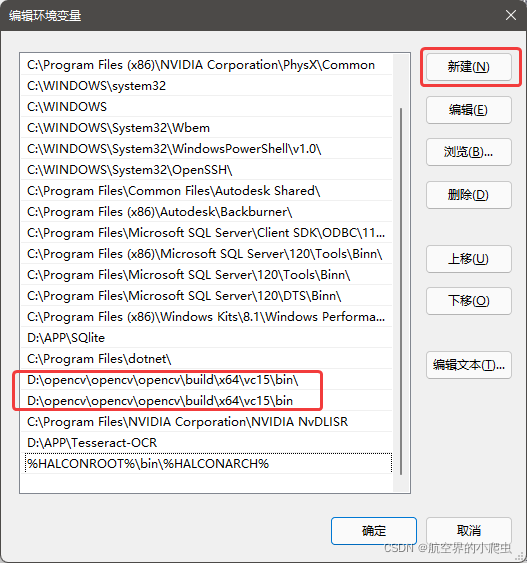
双击进入,新建环境变量,添加路径(根据自己盘和opencv放置的文件夹位置):
D:\......\opencv\build\x64\vc15\bin
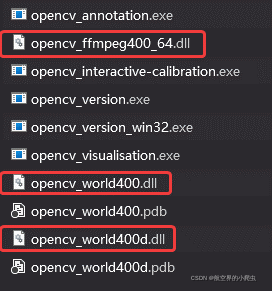
2、在目录D:\......\opencv\build\x64\vc15\bin下,找到opencv_world400d.dll、opencv_world400.dll、opencv_ffmpeg400_64.dll这三个dll文件,将opencv_world400.dll和opencv_world400d.dll文件复制到C:\Windows\SysWOW64文件夹,将opencv_ffmpeg400_64.dll复制到C:\Windows\System32文件夹。
二、vs2019环境配置
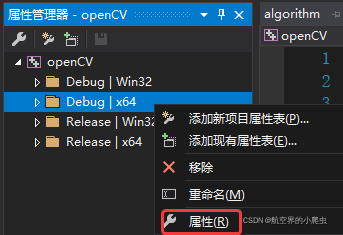
1、用vs新建项目,找到属性管理器,点击Debug丨x64的属性

2、选择VC++里的包含目录和库目录,进入编辑
 包含目录:新建路径,选址以下路径包含进来:
D:\...\opencv\build\include\opencv2
D:\...\opencv\build\include

库目录:新建路径,选址以下路径包含进来:
D:\...\opencv\build\x64\vc15\bin

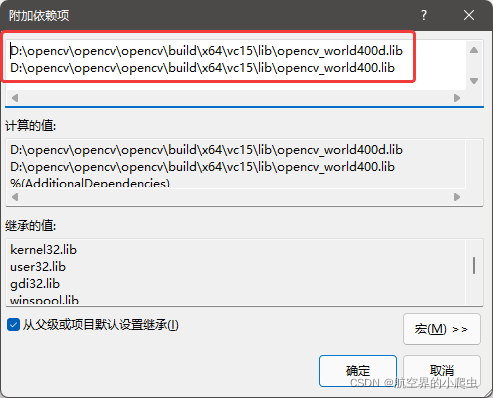
3、选择链接器-输入里的附加依赖项,进入编辑(注意opencv_world400d.lib放在第一个)
D:\...\opencv\build\x64\vc15\lib\opencv_world400d.lib
D:\...\opencv\build\x64\vc15\lib\opencv_world400.lib
三、测试是否成功
1、运行opencv测试程序
#include <iostream>
#include<opencv2/opencv.hpp>

using namespace std;
using namespace cv;

int main(int argc, char** argv)
{
	Mat src;//初始化一个操作对象
	src = imread("C:/Users/JAY/Desktop/Others/tang.jpg");
	if (!src.data)//判断图片是否加载进来
	{
		cout << "不能加载图片" << endl;
		return -1;
	}
	namedWindow("加载的图片", WINDOW_AUTOSIZE);
	imshow("加载的图片", src);//""内命名一致,才能显示在一个窗口
	waitKey(0);
	return 0;
}
加载出图标,则表示环境配置成功

版权声明
本文为[航空界的小爬虫]所创,转载请带上原文链接,感谢
https://blog.csdn.net/weixin_42872122/article/details/124275594
边栏推荐
- 浅谈多核CPU、多线程与并行计算
- IaaS,PaaS,SaaS 的区别
- Interface non idempotent solution
- TCP example of grpc implemented by golang
- ROS knowledge: how to realize camera access
- Actual combat | UI automation test framework design and pageobject transformation
- 分布式秒杀系统构建
- Source insight configuration and problem summary
- glew, glee与 gl glu glut glx glext的区别和关系
- (转载)mysql HA
猜你喜欢
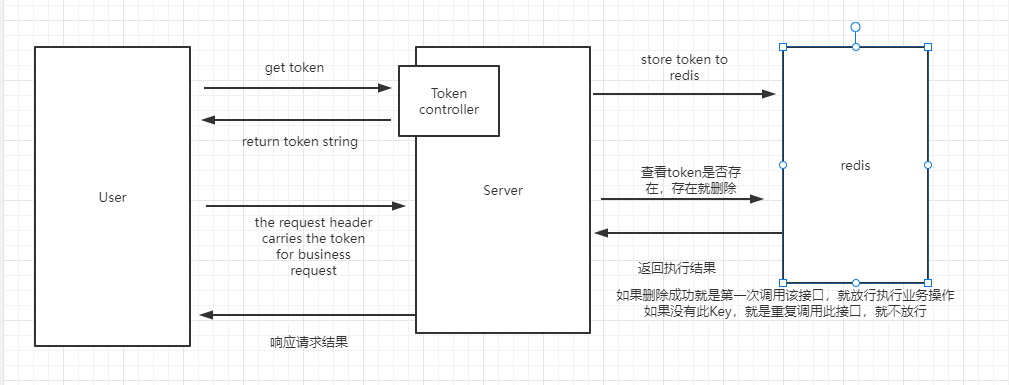
Interface non idempotent solution

Lenovo announced the new progress of ESG: it promised that 100% of all computer products would contain recycled plastics by 2025
<2021SC@SDUSC>山东大学软件工程应用与实践JPress小组课题介绍
![[gradle] problem analysis + download and installation + environment configuration + installation verification](/img/a6/d6ea65127fbbed259f5f22faf23839.png)
[gradle] problem analysis + download and installation + environment configuration + installation verification

LeetCode_746 使用最小花费爬楼梯

JUC queue interface and its implementation class

<2021SC@SDUSC>山东大学软件工程应用与实践JPress代码分析(一)

如何在不加锁的情况下解决线程安全问题

How to beat the king with sonic cloud machine

单、双链表的循环链表(十五)
随机推荐
Redis Foundation
My medical experience of "traditional Chinese medicine"
LeetCode_746 使用最小花费爬楼梯
glew, glee与 gl glu glut glx glext的区别和关系
3D 沙盒游戏之人物的点击行走移动
实战 | 电商业务性能测试(二): Jmeter 参数化功能实现注册登录的数据驱动
After learning this tutorial of capturing packages by Charles, I unloaded Fiddler directly
如何让网卡后门搞死一个系统,让你知道网卡是个多么厉害的角色
Channel allocation don't use the four-color theorem
HW - new employee examination - traversal
如何在不加锁的情况下解决线程安全问题
Actual combat | e-commerce business performance test (II): JMeter parameterization function realizes data-driven registration and login
Actual combat | performance pressure test of JMeter typical e-commerce scenario (order / payment)
Changan dark blue c385 product information exposure aims at 200000 level, and the number one target is model 3!
webrtc入门:3.使用enumerateDevices获取设备中可用的流媒体
金山云前COO刘志刚加入白海科技担任总裁
Interface non idempotent solution
warning: LF will be replaced by CRLF in composer.json.
动态规划小结
Cuda02 - memory access optimization and unified memory