当前位置:网站首页>Apache Atlas 编译及安装记录
Apache Atlas 编译及安装记录
2022-04-23 06:03:00 【若小鱼】
1、环境准备
atlas现在是市场很受欢迎的数据管理工具,但是atlas的下载完是一个源码的项目,无法直接使用,所以要对源码进行编译(就是由源程序到目标程序的过程内含代码生成、代码集成、语法分析、词法分析、依赖下载)后才能安装使用。
linux
但是编译过程中要通过网络下载相应的依赖包,所以内网环境下的服务器暂时用不了,所以我采用的是腾讯云的云服务器。
JDK 8安装
-
下载地址 https://www.oracle.com/java/technologies/downloads/#java8
-
下载:jdk-8u311-linux-x64.rpm
-
将安装文件通过宝塔面板传入云服务器目录
-
使用root权限
su root
- 执行安装语句
rpm -ivh jdk-8u311-linux-x64.rpm
- 验证
java -version
java version “1.8.0_311”
Java SE Runtime Environment (build 1.8.0_311-b11)
Java HotSpot 64-Bit Server VM (build 25.311-b11, mixed mode)
- 配置环境变量
vim /etc/profile
export JAVA_HOME=/usr/java/jdk1.8.0_311-amd64
export JRE_HOME=$JAVA_HOME/jre
export CLASSPATH=$JAVA_HOME/lib:$JRE_HOME/lib:$CLASSPATH
export PATH=$JAVA_HOME/bin:$JRE_HOME/bin:$PATH
source /etc/profile
验证
echo $JAVA_HOME
/usr/java/jdk1.8.0_311-amd64
maven 安装
- 下载 官网地址: http://maven.apache.org/download.cgi
- 安装包上传云服务器
- tar -zxvf apache-maven-3.6.3-bin.tar.gz
- 配置环境变量
vi /etc/profile
export MAVEN_HOME=/tmp/apache-maven-3.6.3
export PATH=$MAVEN_HOME/bin:$JAVA_HOME/bin:$JRE_HOME/bin:$PATH
- 刷新环境变量
source /etc/profile
- 检查版本
mvn -v
2、编译
编译文件通过国外的镜像下载很慢,我们接下来添加国内下载镜像,用来加快编译(下载依赖包)速度
vim /tmp/apache-maven-3.6.3/conf/settings.xml
在mirrors中添加一个国内镜像
<mirror>
    <id>alimaven</id>
    <name>aliyun maven</name>
    <url>http://maven.aliyun.com/nexus/content/groups/public/</url>
    <mirrorOf>central</mirrorOf>
</mirror>
- maven在调配置文件的时候优先调用的是/root/.m2/(隐藏目录)下的内容
- 创建/root/.m2目录一个然后将配置文件复制过去
[conf]# cp settings.xml /root/.m2/
下载atlas

解压
-
tar -zxvf apache-atlas-2.2.0-sources.tar.gz
-
解决版本冲突的问题,将zookeeper和hbase等依赖的版本修改成自己环境一致(或兼容)的版本。同时考虑到需要使用国内的镜像网站下载镜像文件,hbase和solr版本要在https://mirrors.tuna.tsinghua.edu.cn/apache/中存在。
-
比如hbase我们现在可以选择2.3.7版本,如果选择2.3.3,则无法找打路径


<hbase.version>2.3.7</hbase.version>
<solr.version>8.11.1</solr.version>
- 在distro模块(子工程)中的pom文件修改hbase和solr的下载路径为清华大学的下载网址,下载速度会快很多
<hbase.tar>http://mirrors.tuna.tsinghua.edu.cn/apache/hbase/${hbase.version}/hbase-${hbase.version}-bin.tar.gz</hbase.tar>
<solr.tar>http://mirrors.tuna.tsinghua.edu.cn/apache/lucene/solr/${solr.version}/solr-${solr.version}.tgz</solr.tar>
编译/usr/apps/apache-atlas-sources-2.0.0文件
- 首先将编译器的初始堆内存调大,在把最大堆内存调大,因为文件比较大,用的内存比较多
[apache-atlas-sources-2.2.0]# export MAVEN_OPTS="-Xms2g -Xmx2g"
- 用maven清空测试程序的package,编译一个发布版本的包含hbase和solr的程序
[apache-atlas-sources-2.2.0]# mvn clean -DskipTests package -Pdist,embedded-hbase-solr
3、安装
编译完成后,从云服务器下载编译好的apache-atlas-2.2.0-server.tar.gz文件。
下载后将编译文件上传到本地服务器。

执行解压安装
tar zxvf apache-atlas-2.2.0-server.tar.gz
进入apache-atlas-2.2.0目录

修改配置文件
vim conf/atlas-env.sh
设置java环境变量
JAVA_HOME: export JAVA_HOME=/opt/bigdata/jdk1.8.0_311

我是用atlas自带的hbase和solr所以这里要设为true
export MANAGE_LOCAL_HBASE=true
export MANAGE_LOCAL_SOLR=true

关于atlas-application.properties,我踩了几次坑,修改来修改去,最后运行成功时只是下面这个配置多了个2181的端口号,网上看别人也可以采用默认,应该也可以。
atlas.graph.storage.hostname=localhost:2181
这里最关键的是如果用Atlas自带的hbase和solr,就是采用的hbase自带的zk,所以solr的zk地址千万别改,否则报错。
配置后不要先启动atlas,会报异常,原因是hbase和solr同时启动,而solr用的是hbase里的zk,所以要先启动hbase,再启动solr,最后再启动atlas
启动hbase
[root@hive2 apache-atlas-2.2.0]# hbase/bin/start-hbase.sh

启动solr
- 注意这里zk用的是localhost:2181
- -c:创建一个表 -z:开启zookeeper,hbase代替开启, -p:solr的端口 -force:强制开启
[root@hive2 apache-atlas-2.2.0]# solr/bin/solr start -c -z localhost:2181 -p 8983 -force
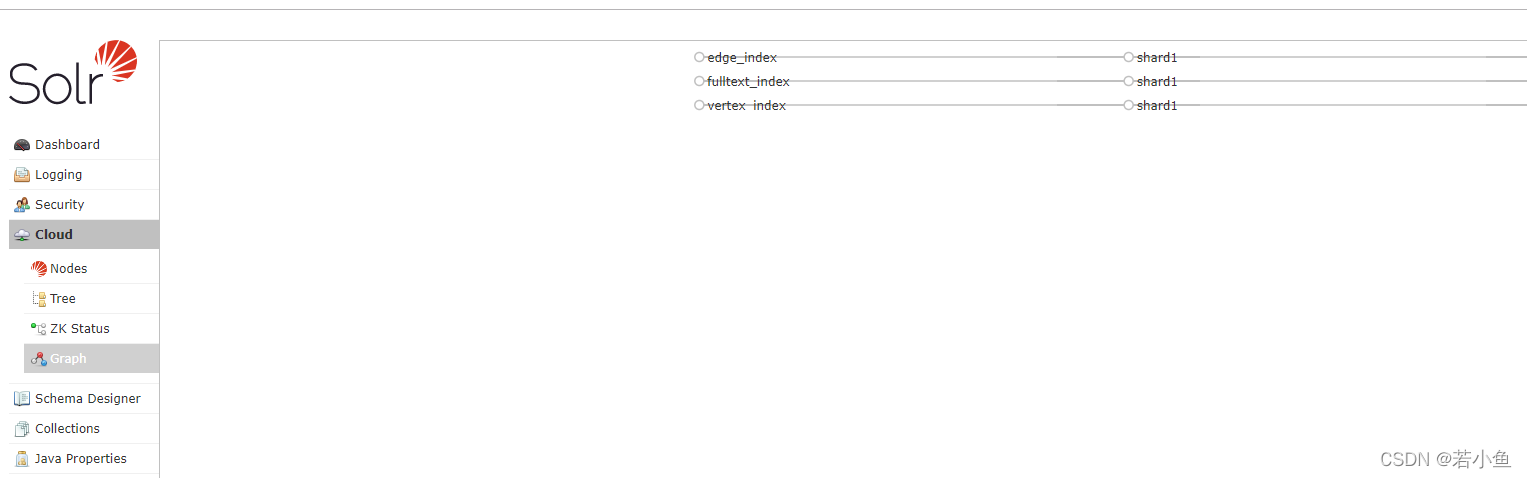
- 创建索引节点,否则启动会报错
solr/bin/solr  create -c fulltext_index -force -d conf/solr/
solr/bin/solr  create -c edge_index -force -d conf/solr/
solr/bin/solr  create -c vertex_index -force -d conf/solr/
- 访问地址 localhost:8983 (如果hosts文件配置无效可直接用安装服务器的ip地址代替)
启动atlas
[root@hive2 apache-atlas-2.2.0]# bin/atlas_start.py

- 访问地址 localhost:21000
- 初始用户名和密码都是admin

停机命令
停止atlas
[root@hive2 apache-atlas-2.2.0]# bin/atlas_stop.py
停止hbase
[root@hive2 apache-atlas-2.2.0]# hbase/bin/stop-hbase.sh
停止solr
[root@hive2 apache-atlas-2.2.0]# solr/bin/solr stop
4、踩坑
4.1异常 No goals have been specified for this build
[ERROR] No goals have been specified for this build. You must specify a valid lifecycle phase or a goal in the format <plugin-prefix>:<goal> or <plugin-group-id>:<plugin-artifact-id>[:<plugin-version>]:<goal>. Available lifecycle phases are: validate, initialize, generate-sources, process-sources, generate-resources, process-resources, compile, process-classes, generate-test-sources, process-test-sources, generate-test-resources, process-test-resources, test-compile, process-test-classes, test, prepare-package, package, pre-integration-test, integration-test, post-integration-test, verify, install, deploy, pre-clean, clean, post-clean, pre-site, site, post-site, site-deploy. -> [Help 1]
org.apache.maven.lifecycle.NoGoalSpecifiedException: No goals have been specified for this build. You must specify a valid lifecycle phase or a goal in the format <plugin-prefix>:<goal> or <plugin-group-id>:<plugin-artifact-id>[:<plugin-version>]:<goal>. Available lifecycle phases are: validate, initialize, generate-sources, process-sources, generate-resources, process-resources, compile, process-classes, generate-test-sources, process-test-sources, generate-test-resources, process-test-resources, test-compile, process-test-classes, test, prepare-package, package, pre-integration-test, integration-test, post-integration-test, verify, install, deploy, pre-clean, clean, post-clean, pre-site, site, post-site, site-deploy.
    at org.apache.maven.lifecycle.internal.LifecycleStarter.execute (LifecycleStarter.java:97)
    at org.apache.maven.DefaultMaven.doExecute (DefaultMaven.java:305)
    at org.apache.maven.DefaultMaven.doExecute (DefaultMaven.java:192)
    at org.apache.maven.DefaultMaven.execute (DefaultMaven.java:105)
    at org.apache.maven.cli.MavenCli.execute (MavenCli.java:957)
    at org.apache.maven.cli.MavenCli.doMain (MavenCli.java:289)
    at org.apache.maven.cli.MavenCli.main (MavenCli.java:193)
    at sun.reflect.NativeMethodAccessorImpl.invoke0 (Native Method)
    at sun.reflect.NativeMethodAccessorImpl.invoke (NativeMethodAccessorImpl.java:62)
    at sun.reflect.DelegatingMethodAccessorImpl.invoke (DelegatingMethodAccessorImpl.java:43)
    at java.lang.reflect.Method.invoke (Method.java:498)
    at org.codehaus.plexus.classworlds.launcher.Launcher.launchEnhanced (Launcher.java:282)
    at org.codehaus.plexus.classworlds.launcher.Launcher.launch (Launcher.java:225)
    at org.codehaus.plexus.classworlds.launcher.Launcher.mainWithExitCode (Launcher.java:406)
    at org.codehaus.plexus.classworlds.launcher.Launcher.main (Launcher.java:347)
[ERROR]
[ERROR]
[ERROR] For more information about the errors and possible solutions, please read the following articles:
[ERROR] [Help 1] http://cwiki.apache.org/confluence/display/MAVEN/NoGoalSpecifiedException
解决
如果出现以上报错可尝试使用以下配置
pom.xml 文件中 <build> 标签要加配置: <defaultGoal>compile</defaultGoal>
4.2 Error creating assembly archive impala-hook
[INFO] Building tar: /tmp/apache-atlas-sources-2.2.0/distro/target/apache-atlas-2.2.0-hive-hook.tar.gz
[INFO] ------------------------------------------------------------------------
[INFO] BUILD FAILURE
[INFO] ------------------------------------------------------------------------
[INFO] Total time:  07:42 min
[INFO] Finished at: 2021-12-29T16:08:19+08:00
[INFO] ------------------------------------------------------------------------
[ERROR] Failed to execute goal org.apache.maven.plugins:maven-assembly-plugin:2.4.1:single (default) on project atlas-distro: Failed to create assembly: Error creating assembly archive impala-hook: You must set at least one file. -> [Help 1]
[ERROR]
[ERROR] To see the full stack trace of the errors, re-run Maven with the -e switch.
[ERROR] Re-run Maven using the -X switch to enable full debug logging.
[ERROR]
[ERROR] For more information about the errors and possible solutions, please read the following articles:
[ERROR] [Help 1] http://cwiki.apache.org/confluence/display/MAVEN/MojoExecutionException
解决
这个报错是我多次修改pom文件后遇到的,我大概定位出来时因为all-jar.xml文件里没有fileset的原因,但是我相信源码不会有错,所以,我最终选择重置主工程的pom文件,只修改hbase和solr的版本,其他的都没动。最终编译成功。
4.3 Service Unavailable 503

解决
出现这个报错,不要再花时间去找什么IIS了,先看下logs/application.log日志文件,多半是因为没启动成功,检查一些配置,看看有没有手滑改错。
版权声明
本文为[若小鱼]所创,转载请带上原文链接,感谢
https://blog.csdn.net/weixin_44162809/article/details/122214381
边栏推荐
- VirtualBox如何修改“网络地址转换(NAT)”网络模式下分配给虚拟机的IP网段
- Exception record-5
- Oracle Performance Analysis Tool: oswatcher
- JS function package foreach use return can not jump out of the outer function
- prometheus告警记录持久化(历史告警保存与统计)
- MySQL【ACID+隔离级别+ redo log + undo log】
- Thanos Compact组件测试总结(处理历史数据)
- RAC环境报错ORA-00239: timeout waiting for control file enqueue排查
- Will restarting the Oracle listener break the existing connection
- 异常记录-6
猜你喜欢

Ali vector library Icon tutorial (online, download)
数据库基本概念:OLTP/OLAP/HTAP、RPO/RTO、MPP

Detailed explanation of RDMA programming

实践使用PolarDB和ECS搭建门户网站

【OSS文件上传快速入门】

qs.stringify 接口里把入参转为&连接的字符串(配合application/x-www-form-urlencoded请求头)

OVS and OVS + dpdk architecture analysis
Passerelle haute performance pour l'interconnexion entre VPC et IDC basée sur dpdk
Prometheus Cortex架构概述(水平可扩展、高可用、多租户、长期存储)

Chaos带你快速上手混沌工程
随机推荐
使用prom-label-proxy实现Prometheus Thanos的基于标签的多租户读
ansible模块之include_tasks:为什么加了tags后导入的任务没有执行?
How does thanos configure different data retention durations for different tenants
Prometheus Cortex使用Block存储时的相关问题
Prometheus Thanos与Cortex组件比较
"Write multi tenant" implementation of Prometheus and thanos receiver
Introduction to the top 12 domestic databases in 2021
将数组中指定的对象排在数组的前边
Oracle RAC数据库实例启动异常问题分析IPC Send timeout
Virtio and Vhost_ Net introduction
异常记录-6
10g数据库使用大内存主机时不能启动的问题
[MySQL basics] startup options and configuration files
用反射与注解获取两个不同对象间的属性值差异
你应该知道的 JVM 基础知识
Construire un blog Cloud basé sur ECS (bénédiction sur le Code Cloud Xiaobao, explication détaillée de la tâche iphone13 gratuite)
prometheus告警记录持久化(历史告警保存与统计)
Oracle Net Service:监听器与服务名解析方法
如何使用TiUP部署一个TiDB v5.0集群
RAC环境集群组件gipc无法正确识别心跳网络状态问题分析