当前位置:网站首页>kaggle小白必看:小白常见的2个错误解决方案
kaggle小白必看:小白常见的2个错误解决方案
2022-08-10 05:29:00 【公众号学一点会一点】
本文分享下kaggle小白可能经常遇到的两个错误的解决方案。

1.提交失败
第一次使用的可能在测试notebook的时候没报错,但是在提交结果的时候报错了,可能为如下:
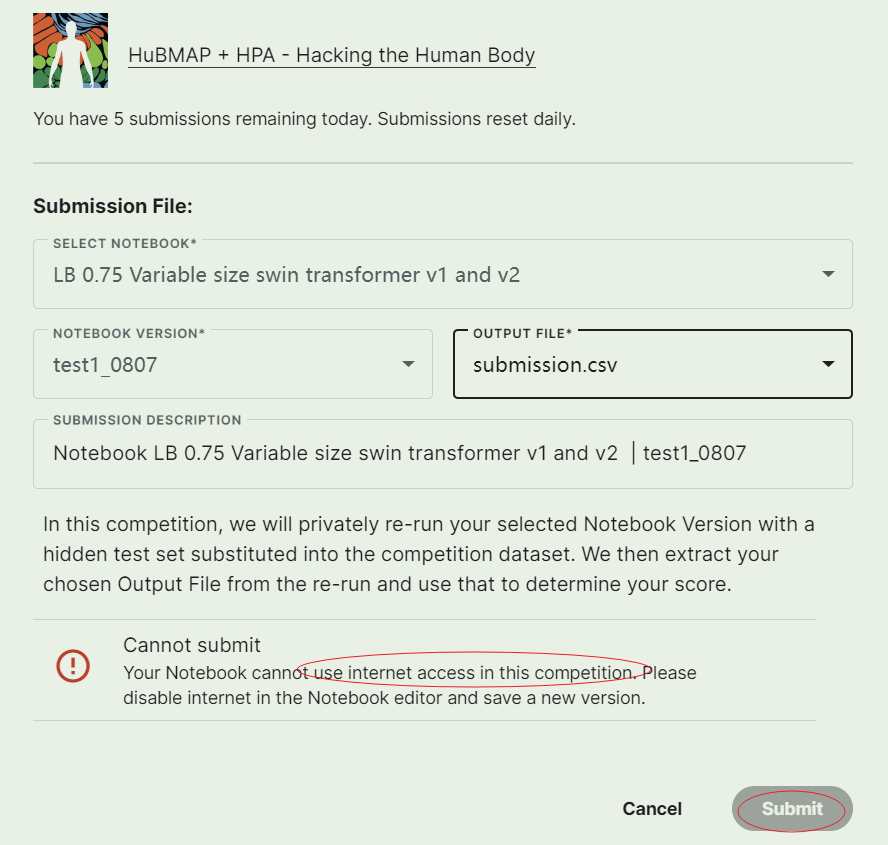
解决方法
这是因为save version的时候notebook是在有网环境下的,而一般的比赛在推理的时候是断网的,所以需要在保存notebook的时候把网络关掉,如下图所示:

2.找不到segmentation_models_pytorch模块等问题
因为代码中用到了segmentation_models_pytorch,而这个包在kaggle的推理环境中是没有的,所以在保存的时候就报错了:

解决方法
解决方法就是在提交的时候离线安装.whl文件,可以有如下3种方式:
1. 自己下载好.whl文件,然后上传到Datasets,然后添加到Input文件夹下,比如:

上面的文件夹下就是放的我上传的.whl文件。然后在notebook的第一行用如下代码安装:
!pip install -q ../input/smp-env/segmentation_models_pytorch-0.2.1-py3-none-any.whl
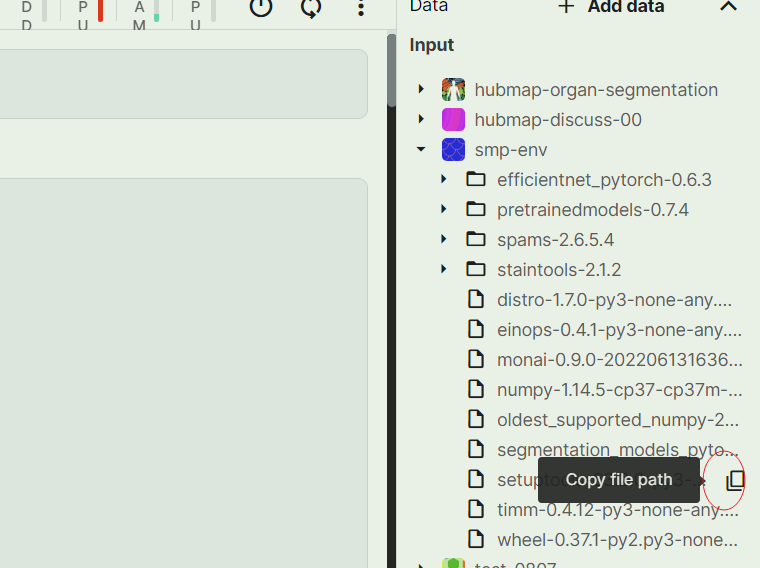
如果不知道路径在哪里的新手,直接点击文件后面的copy file path就可以了:
从上面也可以看出,kaggle上notebook的工作路径是与input平级的文件夹(在working下):
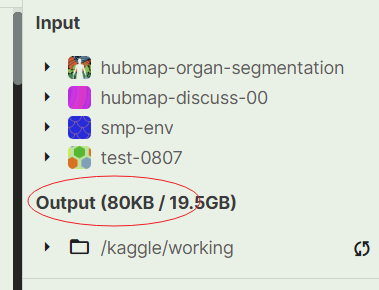

上面的安装命令中-q代表的是静默安装,可以不加。 这种方法可能会出现依赖问题;
2. 在kaggle中的notebook在线安装,然后一顿操作再安装,具体的过程可以看参考链接【1】
主要过程如下:
2.1 先给notebook联网,然后用pip安装,记录下安装文件的缓存路径,把缓存copy到working文件夹下:
!pip install segmentation_models_pytorch
查看缓存路径:
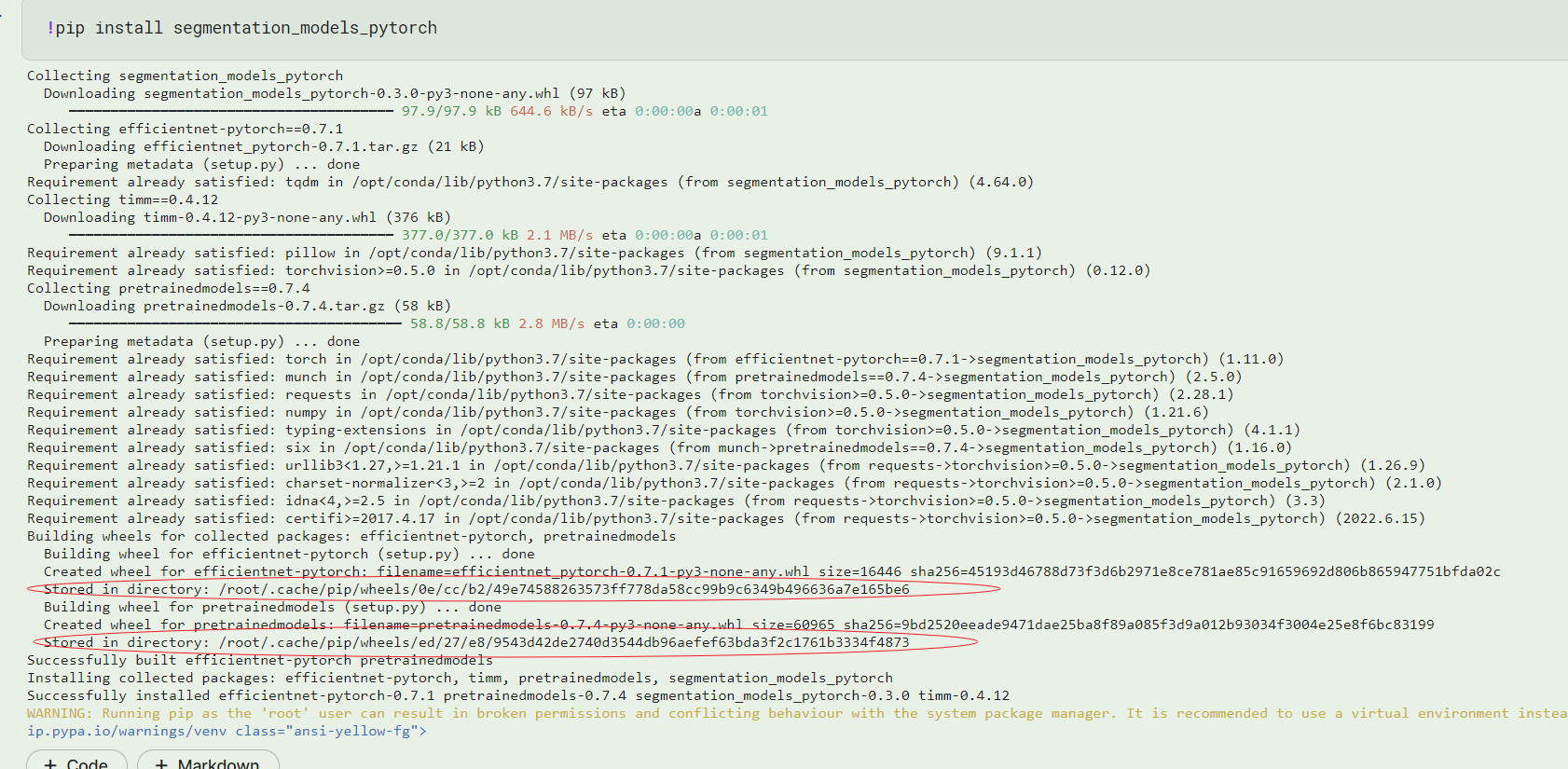
2.2 把缓存的文件copy到自己的working文件夹下:
!cp /root/.cache/pip/wheels/ed/27/e8/9543d42de2740d3544db96aefef63bda3f2c1761b3334f4873/* /kaggle/working/wheels
!cp /root/.cache/pip/wheels/0e/cc/b2/49e74588263573ff778da58cc99b9c6349b496636a7e165be6/* /kaggle/working/wheels
**注意要把pretrainedmodels和efficientnet-pytorch需要的whl文件都copy一下; **
2.3 然后用pip下载segmentation_models_pytorch需要的文件以及依赖:
!pip download segmentation_models_pytorch
这些会默认下载到当前路径:
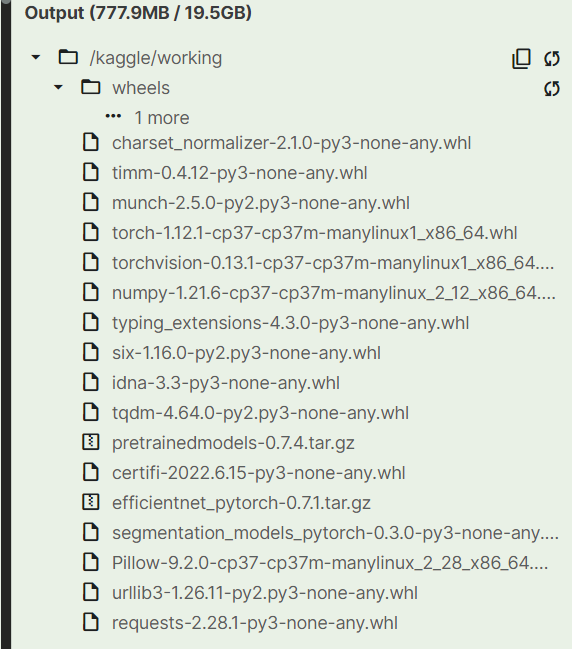
2.4 把上面的所有.whl文件下载下来,然后上传到kaggle中自己的Datasets中; 2.5 在notebook环境添加自己上传的whl文件; 2.6 在notebook中用pip安装whl文件(放在notebook第一个cell)
!pip install -q ../input/wheels/wheels/timm-0.4.12-py3-none-any.whl
!pip install -q ../input/wheels/wheels/efficientnet_pytorch-0.7.1-py3-none-any.whl
!pip install -q ../input/wheels/wheels/pretrainedmodels-0.7.4-py3-none-any.whl
!pip install -q ../input/wheels/wheels/segmentation_models_pytorch-0.3.0-py3-none-any.whl
这次提交就不会报错了。
补充
上面用!pip download segmentation_models_pytorch命令会把所有的依赖都下载下来,但是很多都是在infer环境中本来就有的,实际上segmentation_models_pytorch只需要安装如下四个whl 文件就可以:
timm efficientnet_pytorch pretrainedmodels segmentation_models_pytorch
所以可以用下面的命令下载我们需要的就行:
!pip download segmentation_models_pytorch efficientnet-pytorch timm pretrainedmodels --no-deps
下载好后其余的操作跟上面一致;
总结
kaggle上提交的时候记得要在 断网环境下提交; 如果在infer的时候提示缺少某个包,那么就只能采用离线安装的形式,上面给出了两种解决方案,推荐使用第二种,一般不会出现依赖问题,因为还是用的kaggle自己的环境。
比赛是学习非常有效的一种方式,冲!

如果觉得有用,点个关注和赞吧!
公众号:GIS与Climate,分享关于Python、GIS和Climate相关的技术与教程。

参考
【1】kaggle上离线安装:segmentation_models_pytorchhttps://www.kaggle.com/c/hubmap-kidney-segmentation/discussion/206088
【2】https://cloud.tencent.com/developer/ask/sof/527701
本文由 mdnice 多平台发布
边栏推荐
- SQLSERVER 2008 parses data in Json format
- Buu Web
- Qiskit官方文档选译之量子傅里叶变换(Quantum Fourier Transform, QFT)
- 基于Servlet的验证码登陆demo
- Read the excerpt notes made by dozens of lightweight target detection papers for literacy
- MySql's json_extract function processes json fields
- Touch chip used in smart touch remote control
- Pony语言学习(六):Struct, Type Alias, Type Expressions
- SQL Server query optimization
- `id` bigint(20) unsigned NOT NULL COMMENT 'Database primary key',
猜你喜欢

Talk about API Management - Open Source Edition to SaaS Edition

实战小技巧19:List转Map List的几种姿势
PyTorch 入门之旅

利用PyQt5制作YOLOv5的GUI界面

AVL tree insertion--rotation notes

YOLOv5 PyQt5(一起制作YOLOv5的GUI界面)
Practical skills 19: Several postures of List to Map List

【Pei Shu Theorem】CF1055C Lucky Days
![[Thesis Notes] Prototypical Contrast Adaptation for Domain Adaptive Semantic Segmentation](/img/ac/51c2b2e4efed822f110d6963308eef.png)
[Thesis Notes] Prototypical Contrast Adaptation for Domain Adaptive Semantic Segmentation

awk of the Three Musketeers of Shell Programming
随机推荐
scikit-learn机器学习 读书笔记(二)
`id` bigint(20) unsigned NOT NULL COMMENT 'Database primary key',
Concurrency tool class - introduction and use of CountDownLatch, CyclicBarrier, Semaphore, Exchanger
Read the excerpt notes made by dozens of lightweight target detection papers for literacy
How does flinksql write that the value of redis has only the last field?
Pony语言学习(六):Struct, Type Alias, Type Expressions
Thread.sleep, Thread.yield role explanation
接口文档进化图鉴,有些古早接口文档工具,你可能都没用过
You can‘t specify target table ‘kms_report_reportinfo‘ for update in FROM clause
OneFlow源码解析:算子指令在虚拟机中的执行
FPGA工程师面试试题集锦31~40
手把手带你写嵌入式物联网的第一个项目
Transforming into a product, is it reliable to take the NPDP test?
Consulting cdc 2.0 for mysql does not execute flush with read lock. How to ensure bin
动手写prometheus的exporter-02-Counter(计数器)
pytorch框架学习(5)torchvision模块&训练一个简单的自己的CNN (二)
Introduction to curl command
【论文笔记1】小样本分类
Buu Web
I have a dream for Career .