当前位置:网站首页>【CocosCreator 3.x】实现场景小地图效果 => 攻略
【CocosCreator 3.x】实现场景小地图效果 => 攻略
2022-08-05 22:45:00 【木限东】
在开发游戏中,场景的小地图也是一个重要的需求。王者荣耀的场景小地图是位于左上角,那么如何实现呢?
我们今天来聊聊如何实现 场景小地图 效果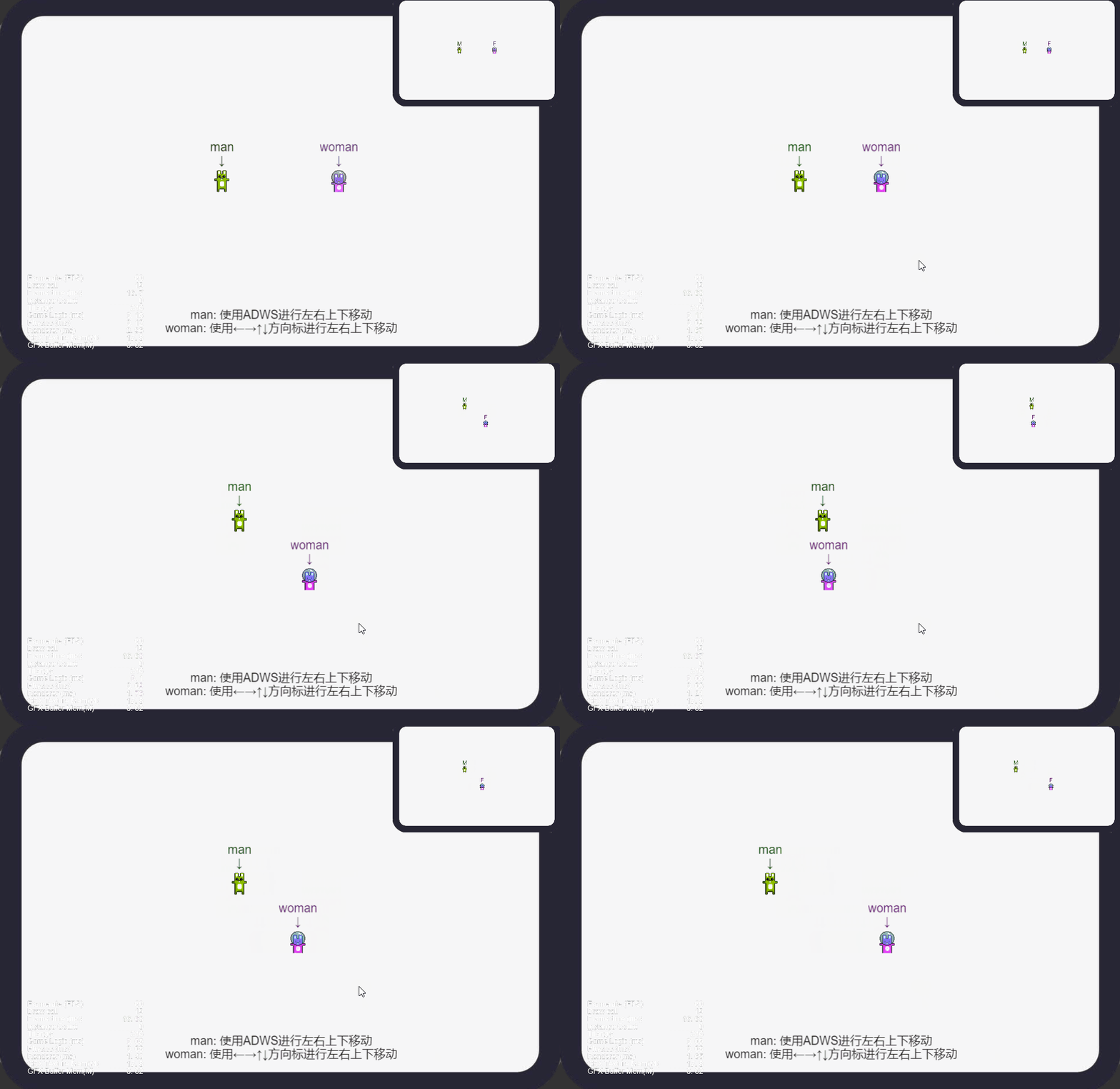
实现原理
通过摄像机 Camera 组件的 Rect 属性调整相机最终渲染到屏幕上的视口位置和大小,采用2个摄像机来渲染场景地图和场景小地图。
实现步骤
- 以 Cocos Creator 3.5.2 版本为例,新建一个场景 scene 。导入需要的角色内容(比如两个小人,bunnys_03 作为 角色A man、bunnys_01 作为角色B woman)

- 将角色图片从资源管理器拖到层级管理器上。
- 将 Camera 命名为 CameraBig,复制摄像机 Camera 并重命名为 CameraSmall。CameraBig 用于渲染场景内容,CameraSmall 用于渲染小地图内容。

- 添加场景的背景 bg。

- CameraBig 的 Rect 参数我们设置为 (0, 0, 1, 1)。这个意思是,相机最终的渲染内容会从 (0 * x, 0 * y, 1 * width, 1 * height)渲染。即完整渲染场景的内容。

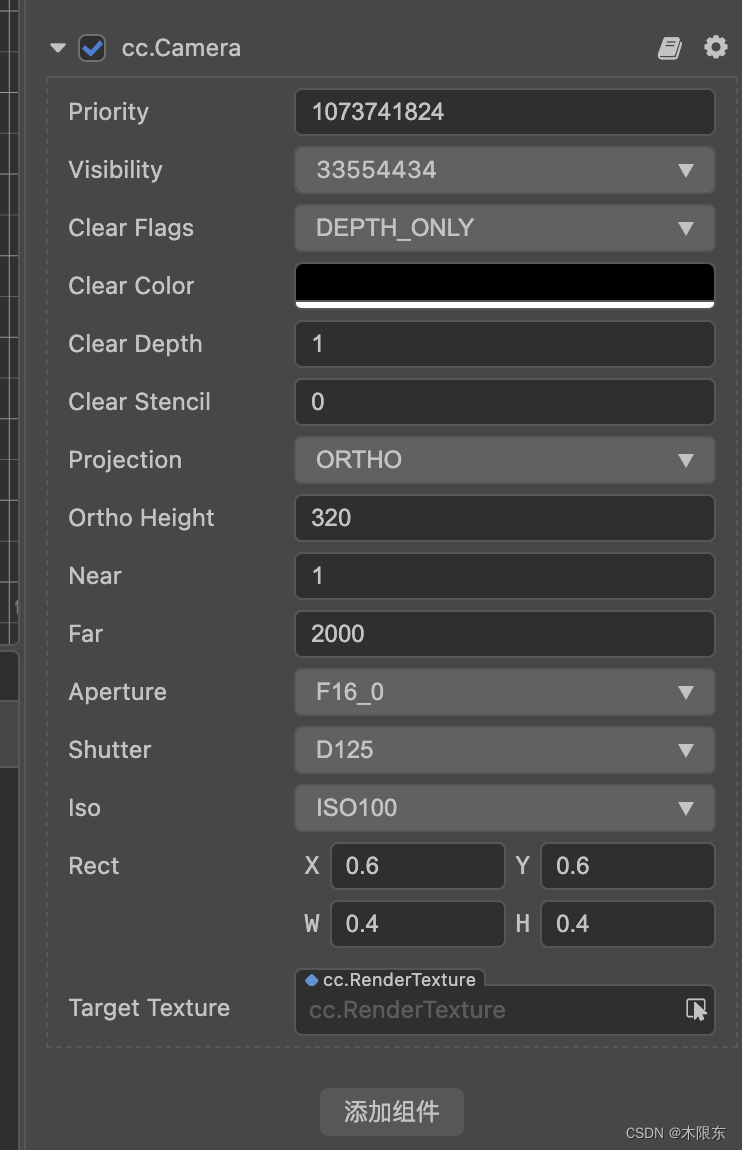
- CameraSmall 的 Rect 参数我们设置为 (0.6, 0.6, 0.4, 0.4)。这个意思是,相机最终的渲染内容会从 (0.6 * x, 0.6 * y, 0.4 * width, 0.4 * height)渲染。以屏幕左下角为(0,0)点,屏幕右上角为(1,1),(0.6,0.6)在中心偏右上的位置,渲染一个宽度为原本 40%,高度为原本 40% 的内容。注意:如果要完整渲染整个内容, x+w 的和不应该超过1,y+h的和也不应该超过1,超过的部分不会被渲染。
- 加一个逻辑代码来控制角色的移动,新建一个 move.ts 脚本,把脚本挂载 Canvas 上,然后把角色 A 和角色 B 挂载到脚本的属性上。
参考代码
import {
     _decorator, Component, Node, systemEvent, SystemEventType, EventKeyboard, macro } from 'cc';
const {
     ccclass, property } = _decorator;

@ccclass('Move')
export class Move extends Component {


    @property(Node)
    man! : Node;

    @property(Node)
    woman! : Node;

    LIMIT_TOP : number = 260;
    LIMIT_BOTTOM : number = -260;
    LIMIT_LEFT : number = -410;
    LIMIT_RIGHT : number = 410;

    onLoad () {

        systemEvent.on(SystemEventType.KEY_DOWN, this.onKeyDown, this);
        systemEvent.on(SystemEventType.KEY_UP, this.onKeyUp, this);
    }

    onDestroy () {

        systemEvent.off(SystemEventType.KEY_DOWN, this.onKeyDown, this);
        systemEvent.off(SystemEventType.KEY_UP, this.onKeyUp, this);
    }

    onKeyDown (event: EventKeyboard) {


    }

    onKeyUp (event: EventKeyboard) {

        let posMan = this.man.getPosition();
        let posWoman = this.woman.getPosition();
        switch (event.keyCode) {

            case macro.KEY.a:
                this.man.setPosition(posMan.x - 10, posMan.y, posMan.z);
                this.fixPosition(this.man, 0);
                break;
            case macro.KEY.d:
                this.man.setPosition(posMan.x + 10, posMan.y, posMan.z);
                this.fixPosition(this.man, 1);
                break;
            case macro.KEY.w:
                this.man.setPosition(posMan.x, posMan.y + 10, posMan.z);
                this.fixPosition(this.man, 2);
                break;
            case macro.KEY.s:
                this.man.setPosition(posMan.x, posMan.y - 10, posMan.z);
                this.fixPosition(this.man, 3);
                break;
            case macro.KEY.left:
                this.woman.setPosition(posWoman.x - 10, posWoman.y, posWoman.z);
                this.fixPosition(this.woman, 0);
                break;
            case macro.KEY.right:
                this.woman.setPosition(posWoman.x + 10, posWoman.y, posWoman.z);
                this.fixPosition(this.woman, 1);
                break;
            case macro.KEY.up:
                this.woman.setPosition(posWoman.x, posWoman.y + 10, posWoman.z);
                this.fixPosition(this.woman, 2);
                break;
            case macro.KEY.down:
                this.woman.setPosition(posWoman.x, posWoman.y - 10, posWoman.z);
                this.fixPosition(this.woman, 3);
                break;
        }
    }

    fixPosition (player: any, direct: number) {

        let pos = player.getPosition();
        switch (direct) {

            case 0:
                if (pos.x <= this.LIMIT_LEFT) {

                    pos.x = this.LIMIT_LEFT;
                }
                break;
            case 1:
                if (pos.x >= this.LIMIT_RIGHT) {

                    pos.x = this.LIMIT_RIGHT;
                }
                break;
            case 2:
                if (pos.y >= this.LIMIT_TOP) {

                    pos.y = this.LIMIT_TOP;
                }
                break;
            case 3:
                if (pos.y <= this.LIMIT_BOTTOM) {

                    pos.y = this.LIMIT_BOTTOM;
                }
                break;
        }
        player.setPosition(pos);
    }
}
[关注我,了解更多 Cocos Creator 用法]
更多参考可以访问
3.5.x
https://gitee.com/yeshao2069/CocosCreatorDemos/tree/v3.5.x/demo/2d/Creator3.5.0_2D_SceneMiniMap
3.4.x
https://gitee.com/yeshao2069/CocosCreatorDemos/tree/v3.4.x/demo/Creator3.4.2_2D_SceneMiniMap
3.0.x
https://gitee.com/yeshao2069/CocosCreatorDemos/tree/v3.0.x/demo/Creator3.0.0_2D_SceneMiniMap
[如果喜欢,可以点个 gitee 关注和 star 哟,谢谢哟]
边栏推荐
- 【双11狂欢的背后】微服务注册中心如何承载大型系统的千万级访问?
- Learn these VRay renderer HDRI lighting tricks and get 3ds Max with ease
- [Raspberry Pi] Raspberry Pi uses a 0.96-inch OLED display
- C#调用 kernel32.dll
- 宝塔实测-电商ERP进销存系统源码
- 浅析ES6六种声明变量的方法
- Merge Sort
- 【Flask】使用gevent部署flask
- excel函数从0到掌握(官方文档+自我解析)
- [debian]cockpit error Cannot refresh cache whilst offline
猜你喜欢




随机推荐
登录注册(无封装)flask
【树莓派】树莓派使用0.96吋OLED显示屏
从零开始配置 vim(8)——文件类型检测
IDEA中如何使用debug调试项目 一步一步详细教程
Qt uses wget to download file case
[esp32] esp8266 connects to Xiao Ai to control the relay
论如何下载网页中的m3u8/ts视频
Smart Warehouse Manager - WMS
How the Internet of Things is Driving Agriculture
排序 Go入门
【双11狂欢的背后】微服务注册中心如何承载大型系统的千万级访问?
js全屏实现代码
学会这些VRay渲染器HDRI照明技巧,轻松搞定3ds Max
[flask] red map for module splitting
物联网如何推动农业发展
LINQ学习之旅(三)
华朗复读衔接营励志开营!全名师阵容护航 解读高考成功秘钥
[Raspberry Pi] Install OpenWrt on Raspberry Pi
[GKCTF 2021]easycms
关于 Invalid prop: type check failed for prop “index“. Expected String, got Undefined