当前位置:网站首页>项目day(3) 前台环境搭建
项目day(3) 前台环境搭建
2022-08-06 03:35:00 【初心魏】
一、前端知识学习
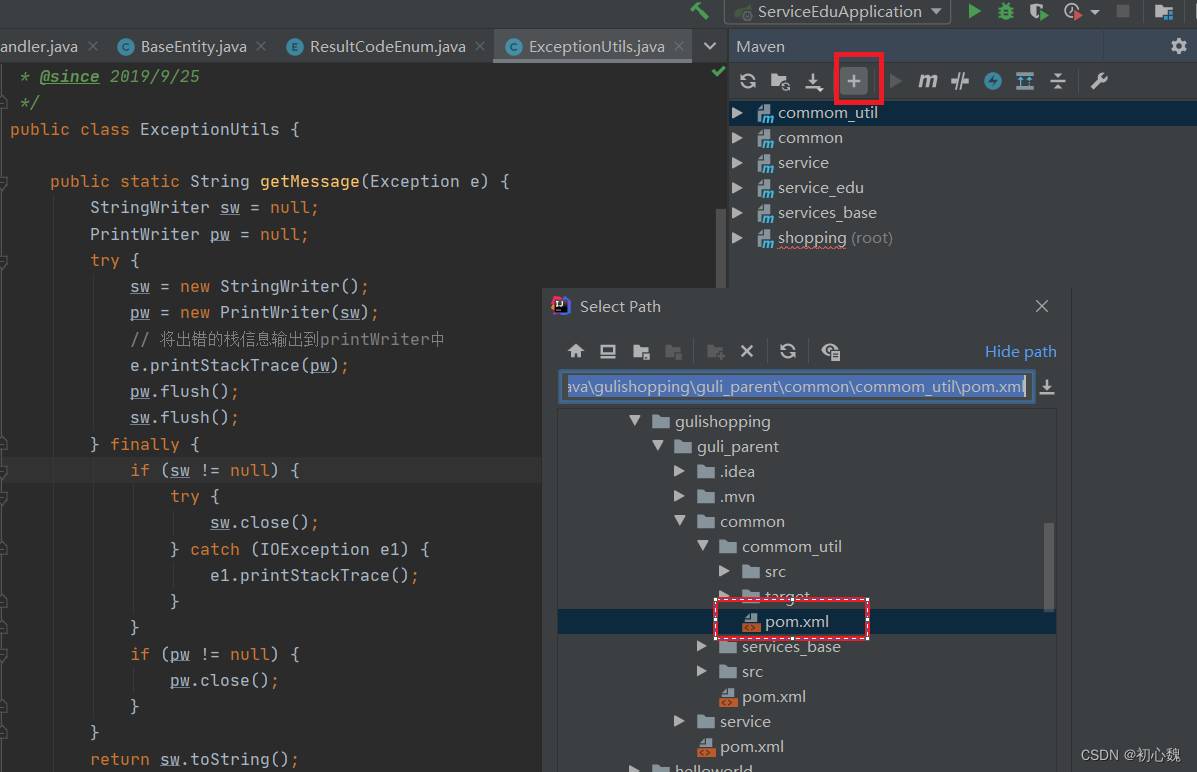
1.1 maven加入模块
- 微服务模块没有被maven管理的解决方法
- 使用maven加入pom文件即可
1.2 插件安装

1.2.1 中文界面配置

1.2.2 emmet设置

- ul>li*3
- !+tab键
1.3 let和var
- let有局部作用域,{}外访问不到{}内定义的局部变量
- var相同的关键字可以重新定义,let不行
1.4 ES6一些语法新规范
- ES6中有变量提升
- const定义常量
- 数组解构
let arr = [1, 2, 3]
let [x, y, z] = arr
console.log(x,y,z)
- 对象解构
let user = {
    name: "jack",
    age: 29
}
let { name, age } = user
console.log(name, age)
- 模板字符串
let name = 'jack'
let age = '99'
console.log(`我是${name},年龄是${age}`)
console.log(`第一行,
第二行`)

- 声明对象的简写
let name = 'jack'
let age = '99'
let person = {
    name,
    age
}
console.log(person)
- 定义方法的简写
let person = {
    name: "jack",
    // sayHi: function () {
    //     console.log("hi")
    // }
    sayHi() {
        console.log("hi")
    }
}
console.log(person.sayHi)
- 对象拓展运算符,类似于对象拷贝,不会对原对象进行修改
let person = {
    name: 'jack',
    age: 23
}
let own = { ...person }
own.name = 'rose'
console.log(person.name)
1.5 js中注意的点
- js中没有方法重载
function showMsg(name, age) {
    console.log(name,age)
}
function showMsg(name) {
    console.log(name)
}
//会调用第二个方法,不会调用第一个
showMsg("jack",23)
- 2个=只判断内容,3个=可以判断类型
console.log('100' == 100) //true
console.log('100' === 100) //false
- 函数参数默认值
//age赋默认值23
function showMsg(name, age = 23) {
    //这里是undifined判断,不是null判断
    if (!age) {
        console.log(name, age)
    } else {
        console.log(name)
    }
}
showMsg("jack")
showMsg("jack", null)
showMsg("jack", undefined)

1.6 vue的一些知识点
- v-bind:绑定的值一般要被计算
<h1 :title="1+1">{
   {name}}</h1>
- v-model双向数据绑定
输入的数会影响原来的数值,视图变化会影响数据,数据变化也会影响视图。 - v-on事件绑定,简写为@
- 修饰符
比如.prevent阻止表单的默认跳转行为 - v-if:直接对底层dom修改,初始化开销小,切换开销大
- v-show:其实控制的是display属性,不会直接删除dom节点,初始化开销大,切换开销小
1.6.1 选择框与数据绑定,选中值为true,未选中为false
<!DOCTYPE html>
<html lang="en">
<head>
    <meta charset="UTF-8">
    <meta http-equiv="X-UA-Compatible" content="IE=edge">
    <meta name="viewport" content="width=device-width, initial-scale=1.0">
    <title>Document</title>
</head>
<body>
    <div id="app">
        <input type="checkbox" v-model="ok">选择框
        <h1>{
   {ok}}</h1>
    </div>
</body>
<script src="./vue.min.js">
</script>
<script>
    new Vue({
        el: '#app',
        data:{
            name: "jack",
            ok: true
        }
    })
</script>
</html>
1.6.2 vue生命周期
- created:页面创建成功,可以调用data和方法,但是页面还没有渲染成功
- mounted:页面已经渲染成功
1.6.3 跨域
- 后端加上注解@CrossOrign

1.7 axios请求后端资源
- axios中一定要用箭头函数,不然axios中的赋值操作不会影响到外部data
- 或者用let _this = this
<!DOCTYPE html>
<html lang="en">
<head>
    <meta charset="UTF-8">
    <meta http-equiv="X-UA-Compatible" content="IE=edge">
    <meta name="viewport" content="width=device-width, initial-scale=1.0">
    <title>Document</title>
</head>
<body>
    <div id="app">
        <!-- <button @click="getlist()">查看列表</button> -->
        <ul v-for="item in dataList">
            <li>{
   {item.id}}</li>
            <li>{
   {item.name}}</li>
        </ul>
        <h1>{
   {name}}</h1>
    </div>
</body>
<script src="./vue.min.js"></script>
<script src="./axios.min.js"></script>
<script>
    new Vue({
        el: '#app',
        data(){
            return{
              name: "",
              ok: true,
              dataList:[],
            }
        },
        created(){
          console.log("数据输出")
          this.getlist()
          console.log(this.name)
        },
        mounted(){
        },
        methods:{
            getlist(){
                //let _this = this
                axios.get("http://127.0.0.1:8110/admin/edu/teacher/list").then(response=>{
                    this.dataList = response.data
                    this.name = "jack"
                }).catch(err=>console.log(err))
            }
        }
    })
</script>
</html>
- 不使用箭头函数
getlist(){
                let _this = this
                axios.get("http://127.0.0.1:8110/admin/edu/teacher/list").then(function(res){
                    _this.dataList = res.data
                    _this.name = "jack"

                }).catch(err=>console.log(err))
            }
1.8 前端分层开发
//基础配置:返回值是一个函数
             initRequest() {
                    return axios.create({
                        baseURL: 'http://localhost:8110',
                        timeout: 5000
                    })
                },

                //api调用
                teacherListApi() {
                    //request是一个函数
                    let request = this.initRequest()
                    return request({
                        url: '/admin/edu/teacher/list',
                        method: 'get'
                    })
                },

                //数据渲染
                getTeacherList2() {
                    console.log('getTeacherList2')
                    this.teacherListApi().then(response => {
                        this.dataList = response.data
                    }).catch(error => {
                        console.log(error)
                    })
                }
1.9 element-ui
1.9.1 引入
- head中引入link
<link rel="stylesheet" href="../element-ui/lib/theme-chalk/index.css">
- script中引入js
<script src="../element-ui/lib/index.js"></script>
- 项目中引入element-ui的lib文件
1.9.2 element-ui的简单应用
- scope.row能取到当前行的数据
<!DOCTYPE html>
<html lang="en">

<head>
    <meta charset="UTF-8">
    <meta http-equiv="X-UA-Compatible" content="IE=edge">
    <meta name="viewport" content="width=device-width, initial-scale=1.0">
    <title>Document</title>
    <link rel="stylesheet" href="../element-ui/lib/theme-chalk/index.css">
</head>

<body>
    <div id="app">
        <el-table :data="dataList" style="width: 100%">
            <el-table-column prop="id" label="标签" width="180">
            </el-table-column>
            <el-table-column prop="name" label="姓名" width="180">
            </el-table-column>
            <el-table-column fixed="right" label="级别" width="180">
                <template slot-scope="scope">
                    {
   {scope.row.level === 1 ? "高级讲师" : "普通讲师"}}
                </template>
            </el-table-column>
        </el-table>
    </div>
</body>
<script src="./vue.min.js"></script>
<script src="./axios.min.js"></script>
<script src="../element-ui/lib/index.js"></script>
<script>
    new Vue({
        el: '#app',
        data() {
            return {
                dataList: [],
            }
        },
        created() {
            console.log("数据输出")
            this.getTeacherList2()
            console.log(this.dataList)
            console.log(this.name)
        },
        mounted() {
        },
        methods: {
            getlist() {
                let _this = this
                axios.get("http://127.0.0.1:8110/admin/edu/teacher/list").then(function (res) {
                    _this.dataList = res.data
                    _this.name = "jack"

                }).catch(err => console.log(err))
            },
            //基础配置:返回值是一个函数
            initRequest() {
                return axios.create({
                    baseURL: 'http://localhost:8110',
                    timeout: 5000
                })
            },

            //api调用
            teacherListApi() {
                //request是一个函数
                let request = this.initRequest()
                return request({
                    url: '/admin/edu/teacher/list',
                    method: 'get'
                })
            },

            //数据渲染
            getTeacherList2() {
                console.log('getTeacherList2')
                this.teacherListApi().then(response => {
                    this.dataList = response.data
                    console.log(this.dataList)
                }).catch(error => {
                    console.log(error)
                })
            }
        }
    })
</script>

</html>
二、前端项目学习
2.1npm
2.1.1 npm -v
2.1.2 npm init -y
2.1.3 修改npm源
npm config list
2.1.4 下载依赖
- 下载指定版本依赖
npm install [email protected]
- 下载开发依赖,项目打包到生产环境时不会
npm install --save-dev xx
npm i -D xx - 下载全局依赖
npm install -g xx
- 更新包
npm upgrade xx - 还原依赖,根据package.json还原包
npm install - npm init
初始化npm目录
2.2 js文件的导入导出
2.2.1 文件的整体导入导出
- api文件
export default {
    getList() {
        console.log("get list")
    },
    setList() {
        console.log("set list")
    }
}
- api中方法调用
import teacher from "./teacherApi.js"
teacher.getList()
teacher.setList()
2.2.2 babel转码
- 将es6代码转为es5
- es6代码编程起来更方便
- babel-cli安装
npm install -g babel-cli
2.2.3 babel配置文件
新建.babelrc
添加配置
{
    "presets": [ "es2015"],
    "plugins": []
}
- 安装转码器,安装到dev环境
npm install -D babel-preset-es2015
- 转码操作
babel src -d dist
- 运行dist下的js文件

2.2.4 文件的分别导出导入
- 导出
export function getList() {
    console.log("get list")
}
export function setList() {
    console.log("set list")
}
- 引入
import {getList, setList} from "./teacherApi.js"
getList()
setList()
2.3 webpack
2.3.1 安装
npm install webpack webpacck-cli
2.3.2 webpack.config.js配置文件
- 项目根目录下
const path = require("path") //Node.js内置模块

module.exports = {
    entry: './src/main.js', //配置入口文件
    output: {
        path: path.resolve(__dirname, './dist'), //输出路径,__dirname:当前文件所在路径
        filename: 'bundle.js' //输出文件
    },
    module: {
        rules: [
            {
                test: /\.css$/,    //打包规则应用到以css结尾的文件上
                use: ['style-loader', 'css-loader']
            }
        ]
    }
}
- 打包命令,就回打包到dist中的bundle.js文件中
webpack --mode=development
2.3.3 打包css
webpack只认识js,打包css需要loader插件
css-loader:将css装载到js上
style-loader:让js认识css
插件安装
npm install -D css-loader style-loader
2.3.4 配置css打包规则
- webpack.config.js
const path = require("path") //Node.js内置模块

module.exports = {
    entry: './src/main.js', //配置入口文件
    output: {
        path: path.resolve(__dirname, './dist'), //输出路径,__dirname:当前文件所在路径
        filename: 'bundle.js' //输出文件
    },
    module: {
        rules: [
            {
                test: /\.css$/,    //打包规则应用到以css结尾的文件上
                use: ['style-loader', 'css-loader']
            }
        ]
    }
}
2.3.5 main.js引入css
const common = require('./common.js')
const utils = require('./utils.js')
require("../css/style.css")
common.getName()
utils.getAge()
2.3.6 npm run dev
- 将打包命令添加进package.json文件中的script位置
  "scripts": {
    "test": "echo \"Error: no test specified\" && exit 1",
    "dev": "webpack --mode=development"
  }
2.4 commonJs
- common.js
exports.getName = function () {
    console.log("jack")
}
- utils.js
exports.getAge = function () {
    console.log("12")
}
- main.js
const common = require('./common.js')
const utils = require('./utils.js')
common.getName()
utils.getAge()
边栏推荐
- 泡沫填充轮胎
- NPDP为什么越来越受追捧?产品经理你可知道?
- 入坑机器学习:三,非监督学习
- Several common misunderstandings of enterprises and webmasters renting servers in 2022
- leetcode 15. Sum of three numbers
- [Deep Learning 21 Days Learning Challenge] Memo: Model Reuse - Model Saving and Loading
- Google Cloud Security Summit
- 【无标题】
- Questions about the control class of electric games
- Digital Smart Factory Solutions 47 pages
猜你喜欢
leetcode 15. Sum of three numbers

Entering the pit of machine learning: three, unsupervised learning

Introduction to Elliptic Curves (4): Elliptic Curve Security, Compared with RSA

Summer training week3-DP

6.软件测试-----自动化测试之unittest框架

Use BeanUtils with caution, the performance really stretches!

Crypto Bear Market Offers M&A Opportunity Ambitious or Savior?The only truth is that interests come first

xctf attack and defense world web master advanced area command_execution

xctf attack and defense world Web master advanced area easytornado

Internet protocol overview
随机推荐
C Student Management System Print/Modify Designated Location Information
LabVIEW 应用程序视窗始终置于顶层
FluentValidation
2022 使用Go语言构建现代 Web 应用程序实战内容课程
入坑机器学习:三,非监督学习
Wang Qi, Secretary of the Party Committee and President of Shanghai Pudong Development Bank Changsha Branch, and Jiang Junwen, President of Huarong Xiangjiang Bank, visited Kylin Principal for investi
leetcode 15. Sum of three numbers
椭圆曲线介绍(四):椭圆曲线安全性,与RSA对比
自定义View,和Canvas(画布),Paint(画笔),Path(路径)的用法
Entering the pit of machine learning: 2. Supervised learning
Sorting out the knowledge system of fully homomorphic encryption
Mysql安装 求大拿解答
Qt开发经验小技巧231-235
The third day of learning MySQL: functions (basic)
NetCore - custom exception handling
喜欢我们不如加入我们:来投稿吧,稿酬靠谱!
Crypto Bear Market Offers M&A Opportunity Ambitious or Savior?The only truth is that interests come first
【无标题】
Deep Learning Course2 Week 2 Hyperparameter tuning, Batch Normalization, Programming Frameworks exercises
To build their own core, let Google pay!Google has open source 180 nm process chip