当前位置:网站首页>nodejs+express realizes the access to the database mysql and displays the data on the page
nodejs+express realizes the access to the database mysql and displays the data on the page
2022-08-04 01:02:00 【m0_67392661】
1.Express基础框架的搭建
首先,创建一个websafe文件如下图所示
Cdcommand to the newly created directory.
重点步骤:
1.1初始化项目
npm init

一直往下enter键就可以

yesThere will be one more in our project laterjson文件
1.2安装express
安装命令为:
npm install -g express-generator

Just execute this command and wait for the execution to end.
1.3 Express创建一个目录,进入该目录
创建命令:
express -e websafe
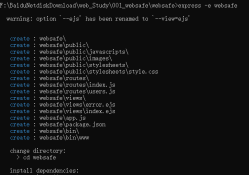

1.4Download package dependencies
Download base dependencies command:
npm install
下载mysqlDatabase dependent commands:
npm install mysql
After completing the above four steps, the specific project structure is as follows:
In this case, we create an initial oneexpress项目架构
2.A connection to the database is created
前提:Built locallymysql数据库,And there is a table namedmysql
Then create a connectionjs文件(index.js),具体代码如下所示:
var express = require("express"); //Reference external module interface,That is, get the module object
var router = express.Router();//创建路由实例
//调用mysql模块
const mysql = require("mysql");
//配置本机mysqlBasic connection information
let connectInfo = mysql.createConnection({
	host: 'localhost',
	port: 3306,
	user: 'root',
	password: '123456',
	database: 'mysql'
})
//数据库建立连接
connectInfo.connect();
//查询sql语句
var sqlWord = 'select * from nodetest';
connectInfo.query(sqlWord, function (err, result) {
	if (err) {
	console.log('[query]-:' + err);
	} else {
	router.get('/', function (req, res, next) {
		res.render('index', {
		title: 'expressThe test instance connects to the database',
		data: result
	})
})
}
});
module.exports = router;
Remember to have it locallymysql数据库,And there is a table named in the databasenodetest
3. 页面的展示(ignore creationmysqlThe process of the local database)
The creation page is displayed through variables,通过express框架中的index.ejsto create a form for the pagedata数据的展示,具体代码如下:
<!DOCTYPE html>
<html>

<head>
<title>
<%= title %>
</title>
<!-- 引入bootstrap框架 -->
<link href="https://cdn.bootcss.com/twitter-bootstrap/4.3.1/css/bootstrap.min.css" rel="stylesheet">

<link rel='stylesheet' href='/stylesheets/index.css' />
<!-- Styles are based onpublicfrom below -->
</head>

<body>
<div class="parts">
	<div class="part">
	<div class="fh3">家庭信息表 <sub> (测试nodejs+express+mysql)</sub></div>
		<table class="table table-bordered text-center">
			<tr>
				<td>id</td>
				<td>name</td>
				<td>address</td>
				<td>user</td>
			</tr>
			<% for(var i=0;i<data.length;i++){ %>
			<tr>
				<td>
				<%= data[i].id %>
				</td>
				<td>
				<%= data[i].name %>
				</td>
				<td>
				<%= data[i].address %>
				</td>
				<td>
				<%= data[i].user %>
				</td>
			</tr>
			<% } %>
		</table>
	</div>
</div>

</body>

</html>
The style can be freely defined by yourself,无关紧要的,需要demoYou can private me or leave an email.
After completing these operations, you will find that the final page will display the relevant data of the database,其实是采用了expressBuild the front frame,nodejs后台实现,The final page effect is shown below:
先自我介绍一下,小编13年上师交大毕业,曾经在小公司待过,去过华为OPPO等大厂,18年进入阿里,直到现在.深知大多数初中级java工程师,想要升技能,往往是需要自己摸索成长或是报班学习,但对于培训机构动则近万元的学费,着实压力不小.自己不成体系的自学效率很低又漫长,而且容易碰到天花板技术停止不前.因此我收集了一份《java开发全套学习资料》送给大家,初衷也很简单,就是希望帮助到想自学又不知道该从何学起的朋友,同时减轻大家的负担.添加下方名片,即可获取全套学习资料哦
边栏推荐
猜你喜欢

一文参透分布式存储系统Ceph的架构设计、集群搭建(手把手)

typescript51-泛型的基本使用

LeetCode third topic (the Longest Substring Without Repeating Characters) trilogy # 3: two optimization

轻量级网络整理及其在Yolov5上的实现

nodejs切换版本使用(不需要卸载重装)

面试必问的HashCode技术内幕

jmeter distributed stress test

typescript57 - Array generic interface

typescript56-泛型接口
typescript51 - basic use of generics
随机推荐
Linux安装mysql最简单教程(一次成功)
ASP.NET 获取数据库的数据并写入到excel表格中
fsdbDump用法
咱们500万条数据测试一下,如何合理使用索引加速?
【超详细】手把手教你搭建MongoDB集群搭建
How to find the cause of Fiori Launchpad routing errors by single-step debugging
面试必问的HashCode技术内幕
vxe-table 从页面批量删除数据 (不动数据库里的数据)
Mvc、Mvp和Mvvm
typescript58 - generic classes
跨域问题解决方式 代理服务器
【无标题】
nodejs切换版本使用(不需要卸载重装)
GNSS文章汇总
电子组装行业对MES管理系统的需求分析
LDO investigation
ENS域名注册量创历史新高 逆市增长之势?光环之下存在炒作风险
取模运算(MOD)
字符串变形
typescript58-泛型类