当前位置:网站首页>在 Flutter 添加页面过渡动画
在 Flutter 添加页面过渡动画
2022-04-22 11:47:00 【会煮咖啡的猫咪】

原文
https://medium.com/@aayushkedawat/adding-page-transition-animations-in-flutter-8886a04fea3c
参考
- https://pub.dev/packages/page_animation_transition
正文
大家好,在这篇文章中,我们将学习如何添加动画,同时从一个页面到其他在 Flutter。我们将覆盖不同类型的动画和实现基本动画 Flutter 使用包页动画过渡。

引言
动画在提升用户体验方面起着至关重要的作用,但动画到底是什么呢?
设计语言,例如 Material,定义了在路线(或屏幕)之间转换时的标准行为。不过,有时候,自定义屏幕之间的转换可以使应用程序更加独特。
在本教程中,我们将使用包页面 page_animation_transition 来简化在页面上添加转换。
使用插件探索不同的转换
第一步: 在 pubspec.yaml 中添加页面动画转换

步骤 2: 在 PageOne 上导入库
假设您正在从 PageOne 过渡到 PageTwo
以下是图书馆支持的动画类型:
BottomToTopTransition
TopToBottomTransition
RightToLeftTransition
LeftToRightTransition
FadeAnimationTransition
ScaleAnimationTransition
RotationAnimationTransition
TopToBottomFadedTransition
BottomToTopFadedTransition
RightToLeftFadedTransition
LeftToRightFadedTransition底到上转换到底转换
右转移
左/右转变
淡化动画/转换
标量动画/转换
转动/动画/转变
上到下到过渡
底部/上部/下部/上部/下部/上部/下部/上部/下部/上部/下部/上部/
右转到/ftfaded/transition
左/右/插入/转换
步骤 3: 添加以下导航代码行
Navigator.of(context).push(PageAnimationTransition(page: const PageTwo(), pageAnimationType: BottomToTopTransition()));
对于预定义的路由:
onGenerateRoute: (settings) {
    switch (settings.name) {
      case '/pageTwo':
        return PageAnimationTransition(child: PageTwo(), pageAnimationType: LeftToRightFadedTransition());
        break;
      default:
        return null;
    }
  }
Navigator.pushNamed(context, '/pageTwo');
Pushnamed (context,’/pageTwo’) ;
Output:
输出:
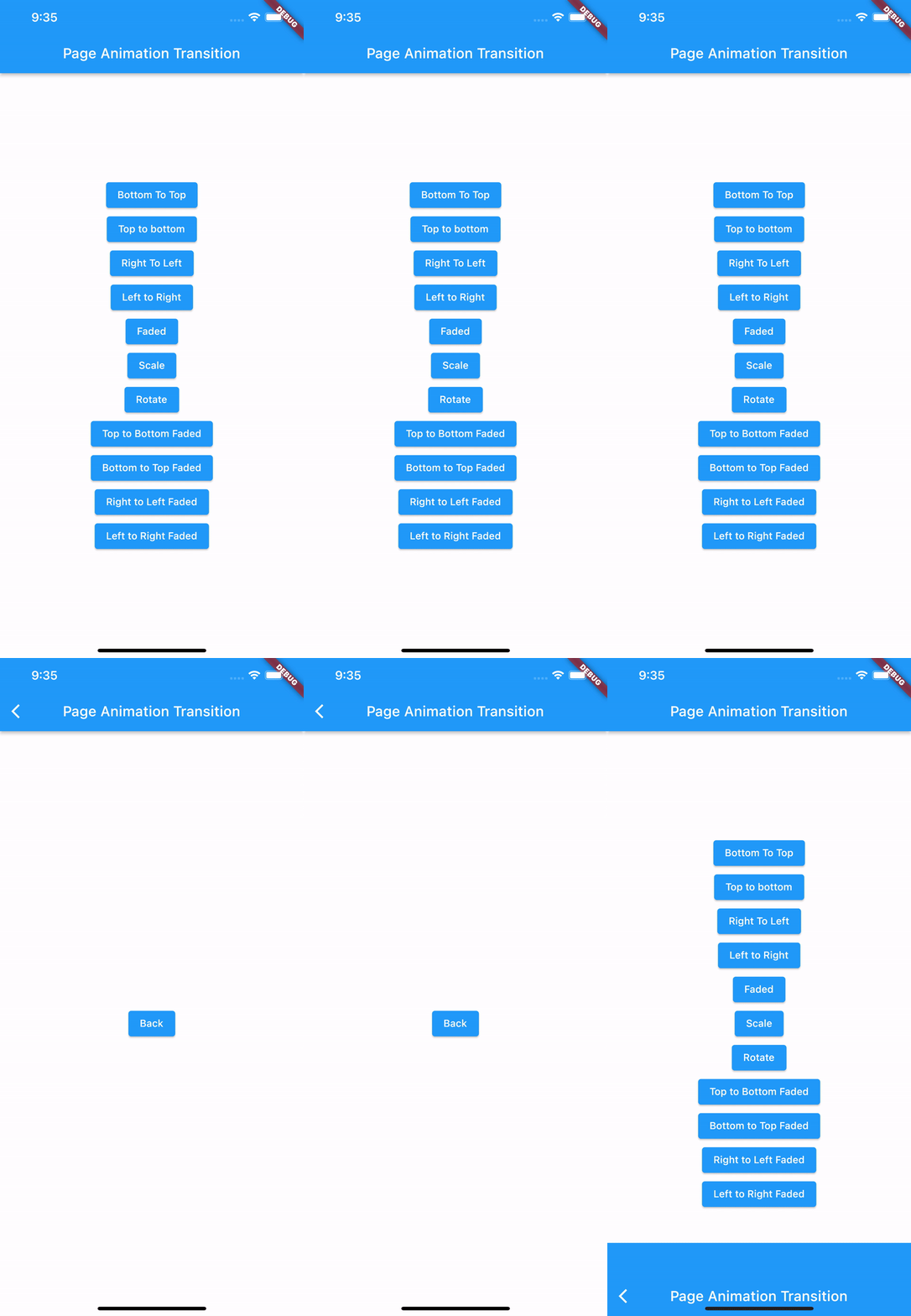
其他类型转换的完整代码:
import 'package:page_animation_transition/animations/bottom_to_top_faded_transition.dart';
import 'package:page_animation_transition/animations/bottom_to_top_transition.dart';
import 'package:page_animation_transition/animations/fade_animation_transition.dart';
import 'package:page_animation_transition/animations/left_to_right_faded_transition.dart';
import 'package:page_animation_transition/animations/left_to_right_transition.dart';
import 'package:page_animation_transition/animations/right_to_left_faded_transition.dart';
import 'package:page_animation_transition/animations/right_to_left_transition.dart';
import 'package:page_animation_transition/animations/rotate_animation_transition.dart';
import 'package:page_animation_transition/animations/scale_animation_transition.dart';
import 'package:page_animation_transition/animations/top_to_bottom_faded.dart';
import 'package:page_animation_transition/animations/top_to_bottom_transition.dart';
import 'package:page_animation_transition/page_animation_transition.dart';
import 'page_two.dart';
import 'package:flutter/material.dart';class PageOne extends StatelessWidget {
  const PageOne({Key? key}) : super(key: key);[@override](http://twitter.com/override)
  Widget build(BuildContext context) {
    return Scaffold(
      appBar: AppBar(
        title: const Text('Page Animation Transition'),
        centerTitle: true,
      ),
      body: SizedBox(
        width: MediaQuery.of(context).size.width,
        child: Column(
          mainAxisAlignment: MainAxisAlignment.center,
          crossAxisAlignment: CrossAxisAlignment.center,
          children: [
            ElevatedButton(
                onPressed: () {
                  Navigator.of(context).push(PageAnimationTransition(
                      page: const PageTwo(),
                      pageAnimationType: BottomToTopTransition()));
                },
                child: const Text('Bottom To Top')),
            ElevatedButton(
                onPressed: () {
                  Navigator.of(context).push(PageAnimationTransition(
                      page: const PageTwo(),
                      pageAnimationType: TopToBottomTransition()));
                },
                child: const Text('Top to bottom')),
            ElevatedButton(
                onPressed: () {
                  Navigator.of(context).push(PageAnimationTransition(
                      page: const PageTwo(),
                      pageAnimationType: RightToLeftTransition()));
                },
                child: const Text('Right To Left')),
            ElevatedButton(
                onPressed: () {
                  Navigator.of(context).push(PageAnimationTransition(
                      page: const PageTwo(),
                      pageAnimationType: LeftToRightTransition()));
                },
                child: const Text('Left to Right')),
            ElevatedButton(
                onPressed: () {
                  Navigator.of(context).push(PageAnimationTransition(
                      page: const PageTwo(),
                      pageAnimationType: FadeAnimationTransition()));
                },
                child: const Text('Faded')),
            ElevatedButton(
                onPressed: () {
                  Navigator.of(context).push(PageAnimationTransition(
                      page: const PageTwo(),
                      pageAnimationType: ScaleAnimationTransition()));
                },
                child: const Text('Scale')),
            ElevatedButton(
                onPressed: () {
                  Navigator.of(context).push(PageAnimationTransition(
                      page: const PageTwo(),
                      pageAnimationType: RotationAnimationTransition()));
                },
                child: const Text('Rotate')),
            ElevatedButton(
                onPressed: () {
                  Navigator.of(context).push(PageAnimationTransition(
                      page: const PageTwo(),
                      pageAnimationType: TopToBottomFadedTransition()));
                },
                child: const Text('Top to Bottom Faded')),
            ElevatedButton(
                onPressed: () {
                  Navigator.of(context).push(PageAnimationTransition(
                      page: const PageTwo(),
                      pageAnimationType: BottomToTopFadedTransition()));
                },
                child: const Text('Bottom to Top Faded')),
            ElevatedButton(
                onPressed: () {
                  Navigator.of(context).push(PageAnimationTransition(
                      page: const PageTwo(),
                      pageAnimationType: RightToLeftFadedTransition()));
                },
                child: const Text('Right to Left Faded')),
            ElevatedButton(
                onPressed: () {
                  Navigator.of(context).push(PageAnimationTransition(
                      page: const PageTwo(),
                      pageAnimationType: LeftToRightFadedTransition()));
                },
                child: const Text('Left to Right Faded')),
          ],
        ),
      ),
    );
  }
}
输出:

总结
希望这个博客能帮助你深入了解 Flutter 的转变。谢谢阅读!如果有任何错误,请在评论中让我知道,这样我可以改进。如果这个博客对你有帮助,就鼓掌吧!
猫哥
-
微信 ducafecat
版权声明
本文为[会煮咖啡的猫咪]所创,转载请带上原文链接,感谢
https://blog.csdn.net/weixin_42320543/article/details/124333291
边栏推荐
- Go developer survey: 92% of developers are satisfied with go
- Summary of important knowledge points of discrete structure and its application
- C语言dll动态链接库
- 分支和循环语句
- 【安全建设】日志监控的极品工具sysmon
- C语言小项目----> 推箱子
- 12.(地图数据篇)cesium城市建筑物贴图
- How to make the tab top by clicking on the tab bar
- TS中通过变量存储key值读取对象的属性值时报错(TS: 7053)
- 12. (map data) cesium city building map
猜你喜欢

Chapter 1 Introduction

11.(地图数据篇)OSM数据如何下载使用

12.(地图数据篇)cesium城市建筑物贴图
Redis clears the data of all databases and the currently selected database

Redis resolves key conflicts

互联网求职卷中卷,应届生怎样才能杀出重围

FinBI连接本机mysql
北汽福田与中国石化、轻程物联网组建中石化销售氢能源(北京)

Stack frame understanding of function

Open new space for development with digital key

随机推荐
深度报告:异构时代,芯片需集成多个模板
JDBC实现数据库的增删改查
How does software spread?
【无标题】
LeetCode383. 赎金信
How to solve this problem when installing MySQL?
2. flddler响应显示乱码问题解决方案
Leetcode Tencent selected exercises 50 questions - 104 Maximum depth of binary tree
13. (map data) conversion between Baidu coordinate (bd09), National Survey Bureau coordinate (Mars coordinate, gcj02), and WGS84 coordinate system
(10 pieces of terrain data for offline processing)
软件智能:aaas系统的 AI服务功能:大纲图的无意识代理功能和八卦图的关系
Summary of important knowledge points of discrete structure and its application
Ampere computing releases the computing power of observation cloud "core" and jointly promotes the development of observability
CrashSight 接入上报常见问题及解决方案
How to make the tab top by clicking on the tab bar
If you are in Russia under "technology sanctions", gbase
Solve the problem that the computer connection is normal, but the browser cannot open the web page
Summary of seven design principles
Process pool create multi process Download Web page
MySQL view database and table creation statements