当前位置:网站首页>STM32 peripherals [iv] RCC
STM32 peripherals [iv] RCC
2022-04-22 07:52:00 【Ke Yuqian】
Stm32 Peripherals [ Four ] RCC
Preface
Open a special topic , Record your own learning STm32 The process of . A lot of information comes from previous notes and excerpts , I don't remember the specific source of some documents and knowledge points . If there is your hard work and the source is not indicated , Please contact me .
mailbox :[email protected]
WeChat :18852982072
( Only the most basic concepts and operations of some peripherals are listed here , Registers are just a part of the list , For detailed study, please refer to the official manual and check the source code )
For peripherals, use , Generally, you need to understand the basic concept and principle of peripherals , Learn about related registers . When using , First initialize the clock , Then initialize ( To configure ) peripherals , If used to GPIO To initialize the corresponding port and reuse it as the corresponding function , Finally, if you need to use interrupts , The interrupt should be turned on , Write interrupt handling functions . After initialization, we can use the corresponding library functions in the main logic code and use the corresponding peripherals to complete our functional requirements .
1. What is the clock source ?
Clock is the basis of MCU operation , The clock signal pushes each part of the MCU to execute the corresponding instructions .
The system clock , Is the processor runtime benchmark ( One clock cycle per machine instruction )
STM32 The main purpose of clock system is to provide clock for relatively independent peripheral modules , It is also to reduce the energy consumption of the whole chip .
Different function modules have different clock upper limits , Therefore, different clocks are provided , More functional modules can also be placed in a single chip microcomputer .
Add on and off functions for clocks of different modules , It can reduce the power consumption of MCU
STM32 For low power consumption , He set all peripheral clocks to disable( Do not enable ), What peripherals are used , Just turn on the clock of the corresponding peripheral , Other unused items can still be disable( Do not enable ), This will reduce energy consumption .( This is why no matter what function you configure, you need to turn on the corresponding clock first )
 Clock source :
HSI、HSE、LSI、LSE、
PLL( Lord PLL and I2S Part of it is dedicated to PLLI2S and SAI Part of it is dedicated to PLLSAI)
Look at the clock tree SYSCLK The clock source can have three options HSI HSE PLL
Here we generally choose HSE( High speed external clock source )
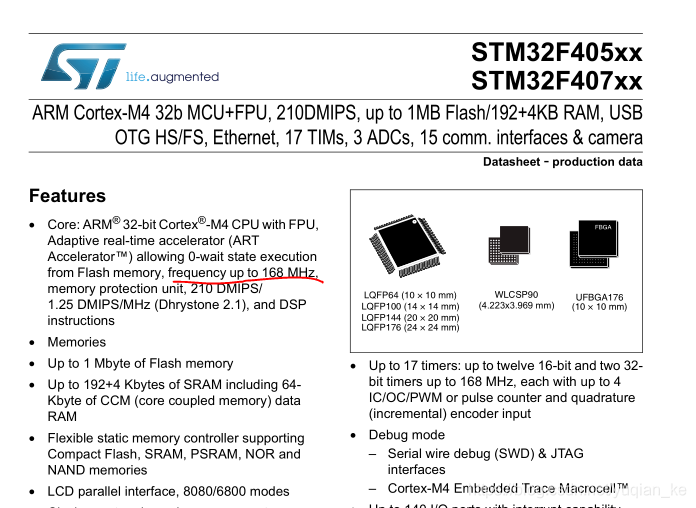
It can be seen that the maximum clock frequency of the system can be set to 168MHz
It can also be found in the chip manual
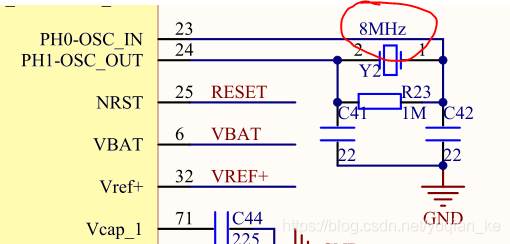
 STM32F407 Schematic diagram :
View external HSE Crystal vibration is 8Hz LSE by 32.768Hz( If there is This value is fixed )
 CubeMX On the configuration
Configure our high-speed clock source as HSE
// Configure our low-speed clock source as LSE
 choose HSE As SYSCLK Clock source To configure SYSCLK by 168MHz
 The generated code
void SystemClock_Config(void)
{
  RCC_OscInitTypeDef RCC_OscInitStruct = {0};
  RCC_ClkInitTypeDef RCC_ClkInitStruct = {0};

  /** Configure the main internal regulator output voltage
  */
  __HAL_RCC_PWR_CLK_ENABLE();
  __HAL_PWR_VOLTAGESCALING_CONFIG(PWR_REGULATOR_VOLTAGE_SCALE1);
  /** Initializes the RCC Oscillators according to the specified parameters
  * in the RCC_OscInitTypeDef structure.
  */
  RCC_OscInitStruct.OscillatorType = RCC_OSCILLATORTYPE_HSE;
  RCC_OscInitStruct.HSEState = RCC_HSE_ON;
  RCC_OscInitStruct.PLL.PLLState = RCC_PLL_ON;
  RCC_OscInitStruct.PLL.PLLSource = RCC_PLLSOURCE_HSE;
  RCC_OscInitStruct.PLL.PLLM = 8;
  RCC_OscInitStruct.PLL.PLLN = 336;
  RCC_OscInitStruct.PLL.PLLP = RCC_PLLP_DIV2;
  RCC_OscInitStruct.PLL.PLLQ = 4;
  if (HAL_RCC_OscConfig(&RCC_OscInitStruct) != HAL_OK)
  {
    Error_Handler();
  }
  /** Initializes the CPU, AHB and APB buses clocks
  */
  RCC_ClkInitStruct.ClockType = RCC_CLOCKTYPE_HCLK|RCC_CLOCKTYPE_SYSCLK
                              |RCC_CLOCKTYPE_PCLK1|RCC_CLOCKTYPE_PCLK2;
  RCC_ClkInitStruct.SYSCLKSource = RCC_SYSCLKSOURCE_PLLCLK;
  RCC_ClkInitStruct.AHBCLKDivider = RCC_SYSCLK_DIV1;
  RCC_ClkInitStruct.APB1CLKDivider = RCC_HCLK_DIV4;
  RCC_ClkInitStruct.APB2CLKDivider = RCC_HCLK_DIV2;

  if (HAL_RCC_ClockConfig(&RCC_ClkInitStruct, FLASH_LATENCY_5) != HAL_OK)
  {
    Error_Handler();
  }
}
版权声明
本文为[Ke Yuqian]所创,转载请带上原文链接,感谢
https://yzsam.com/2022/04/202204220622549212.html
边栏推荐
猜你喜欢

【TCP/IP 五 ICMP】
关于SM2加密验签的操作
QT学习汇总

动态库总结
Stm32外设篇 [四] RCC
Unity知识点(UGUI 2)

Run program ~ customize similar CMD commands to open non system software

【TCP/IP 四 IP 网际协议】

树莓派:访问Bitlocker To Go加密过的磁盘

Dependency conflict finding and resolution (taking easypoi as an example, nosuchmethoderror or NoClassDefFoundError appears)
随机推荐
【TCP/IP 四 IP 网际协议】
QT常用工具类函数封装汇总
Stm32外设篇 [一]IO
Database addition, deletion, modification and query
C# break,continue,return的区别和使用
MySQL Chinese field sorting problem (sorting according to Chinese Pinyin)
unity小游戏及相关面试题
CSharp type conversion
MQTT[一]基础知识介绍
【C - 属性】
Unity读取excel 数据 并创建对应的json文件
redis监听key过期事件
多线程(Thread 类、Runnable 接口、Callable 接口、synchronized 、Lock、线程池)
可视化编程——如何自定义鼠标光标
elmentUI 表格样式自定义(行颜色、背景色、内容滚动、去滚动条)
Unity基础知识2
MySQL configuration query
Rt-thread [三] link.lds链接脚本详解
unity面试题附一个(网上商城)
Instructions for functional interface @ functionalinterface