当前位置:网站首页>Installation of Anaconda
Installation of Anaconda
2022-08-07 12:02:00 【W_chuanqi】
个人简介
作者简介:大家好,我是W_chuanqi,一个编程爱好者
个人主页:W_chaunqi
支持我:点赞+收藏️+留言
愿你我共勉:“若身在泥潭,心也在泥潭,则满眼望去均是泥潭;若身在泥潭,而心系鲲鹏,则能见九万里天地.”

Anaconda的安装
1.简介
- 开源免费
- 支持近800个第三方库
- 包含多个主流工具
- 适合数据计算领域开发
- 支持Win/Linux/OS X 操作系统
进入官网(https://www.anaconda.com/),查看Anaconda首页

2.下载
There are two download methods here
官网下载
下载地址:https://www.anaconda.com/
Here I use the official website to download,The download speed is still relatively fast,About an hour or so

清华镜像源下载
If your computer cannot download on the official website or the download is slow,可以到清华镜像源下载,下载地址:
https://mirrors.tuna.tsinghua.edu.cn/anaconda/archive/
在下载之前,Check your computer first(现在应该都是64位的)
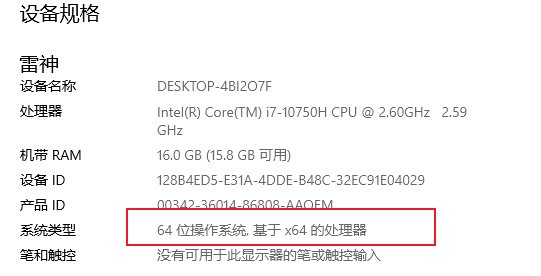
然后下载对应版本,x86-64是64位版本,x86是32位版本,你需要下载跟你电脑系统一致的版本.如果是MAC系统和Linux系统,Just download the corresponding version.
3.安装
After we download it,开始进行安装
双击下载好的文件

如下图所示,进入安装界面,点击next(下一步)即可

The following is the software installation agreement interface,**点击 I Agree **即可

Here is which users are asked during installation,Just Me(只有我),All Users(所有用户),这里选择第二个,点击next


This page is the installation path page,The path can be modified atD盘安装

Tick the second one here

点击install开始安装,直到进度条结束,appears above withsuccessfully字样即为成功

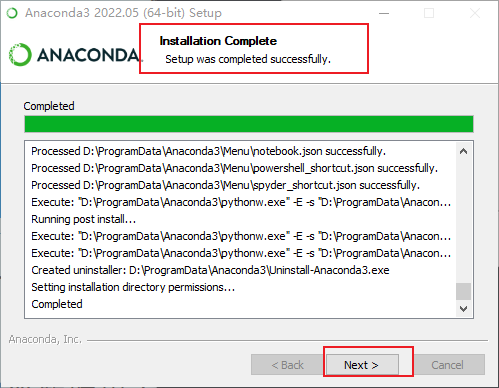

点击Next下一步,Do not tick these two ticks,然后点击finish
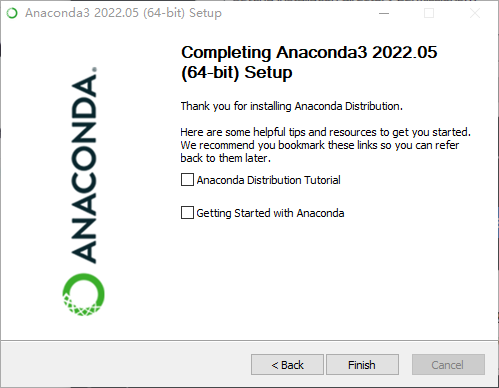
安装完毕...
4.配置Anaconda环境配置
接下来配置环境变量
鼠标右击此电脑——属性——高级系统设置——环境变量——path——编辑——新建


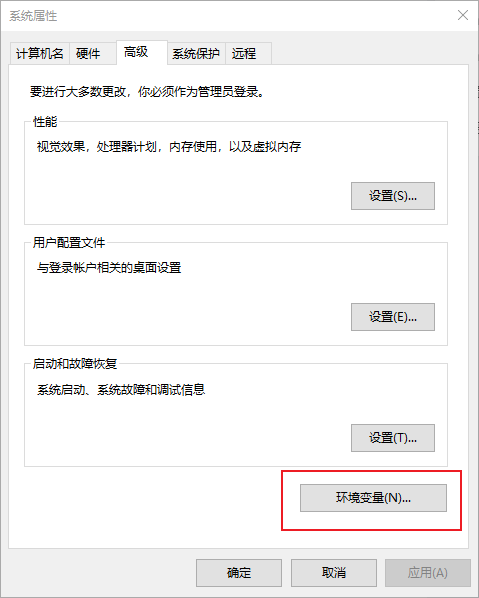
选择系统变量里的path(路径),点击编辑按钮:

打开Anaconda的安装路径,我的安装路径是在D盘,Add the following to the environment variables
D:\ProgramData\Anaconda3
D:\ProgramData\Anaconda3\Scripts
D:\ProgramData\Anaconda3\Library\mingw-w64\bin
D:\ProgramData\Anaconda3\Library\bin
If your installation path has the following path,Add this to environment variables as well(No need to add)
D:\你的路径\Anaconda\Library\usr\bin

So our environment is configured...
5.检查是否安装成功
在cmd中输入 :conda --version,查看是否有conda环境. (检验安装成功的标志)
conda --version

在cmd中输入conda info ,查看是否有? (检验安装成功的标志)
conda info

如果提示conda不是内部或外部命令,那就意味着,你的anaconda没有把环境变量配置好.You can check the environment variables,Or restart your computer.
Next we click on the start menu(徽标键),找到Anaconda Navifator并将其打开

When this interface appears, the installation is successful:

边栏推荐
- If you want to learn a language, you need many previous knowledge points
- Apipost的极客精神
- 动态规划:背包问题
- 第4章 漏洞扫描
- SyntaxError: EOL while scanning string literal【已解决】
- 如果想学一门语言,需要许多前趋知识点
- As the complexity of the model increases, how is overfitting caused?How to solve?
- 介绍几个适用于matlab的colormap
- 【学习】代码里引入的包都是啥东西
- 中国石油大学(北京)-《 渗流力学》第一阶段在线作业
猜你喜欢

Shell 正则及其命令

搭一个K3S 玩玩

聊聊电源自动切换电路(常用自动切换电路总结)

vmware入门之运行RHEL虚拟机
Talk about automatic power switching circuit (summary of common automatic switching circuits)
Shell regular and its commands
Million weft independent research and development of lithium can first pick up 46 rolled out series of large cylindrical battery system products

Data Structures----带头双向循环链表学习总结1
状态存储 - Nanny State
![[生物信息]临床研究统计分析成长营14天班](/img/e8/13c0ede146978e424349eade6e84dd.png)
[生物信息]临床研究统计分析成长营14天班

随机推荐
【深度学习】李沐的深度学习笔记来了!
[OFDM communication] Signal detection of OFDM system based on matlab deep learning [including Matlab source code issue 2023]
What is the performance of MySQL's COUNT(*)?
flutter打包
db_recovery_file_dest is the same as db_create_file_dest
【Kali安全渗透测试实践教程】第5章 漏洞利用
状态存储 - Nanny State
Interesting feature: the CHECK constraint
leetcode: 860. 柠檬水找零
Linux - Install and start Redis on a Linux system
【微服务架构】分布式限流策略
yolo v5 口罩监测
Job interview, written test experience and preparation process
What is the Office Open XML file format
心灵在旅行
What is the Office Open XML file format
UGUI Series - Implementing Hierarchical Menus (Unity3D)
What is the Office Open XML file format
Flutter packaging
[Bio-Information] 14-day class of clinical research statistical analysis growth camp