当前位置:网站首页>openharmony容器组件之Flex
openharmony容器组件之Flex
2022-08-09 13:12:00 【lplj717】
Flex:弹性布局容器
Flex(options?: { direction?: FlexDirection, wrap?: FlexWrap, justifyContent?: FlexAlign, alignItems?: ItemAlign, alignContent?: FlexAlign })
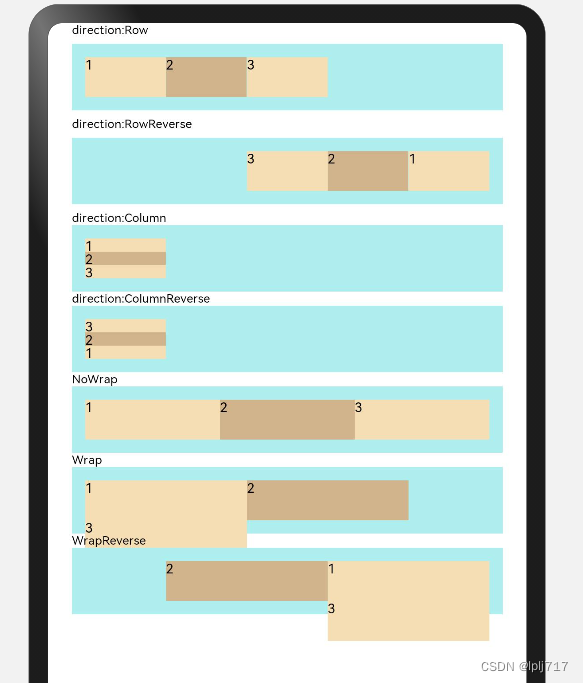
direction:子组件在Flex容器上排列的方向,默认:FlexDirection.Row
Row:主轴与行方向一致作为布局模式。
RowReverse:与Row方向相反方向进行布局。
Column:主轴与列方向一致作为布局模式。
ColumnReverse:与Column相反方向进行布局。
wrap:Flex容器是单行/列还是多行/列排列,默认:FlexWrap.NoWrap
NoWrap:Flex容器的元素单行/列布局,子项允许超出容器。
Wrap:Flex容器的元素多行/列排布,子项允许超出容器。
WrapReverse:Flex容器的元素反向多行/列排布,子项允许超出容器
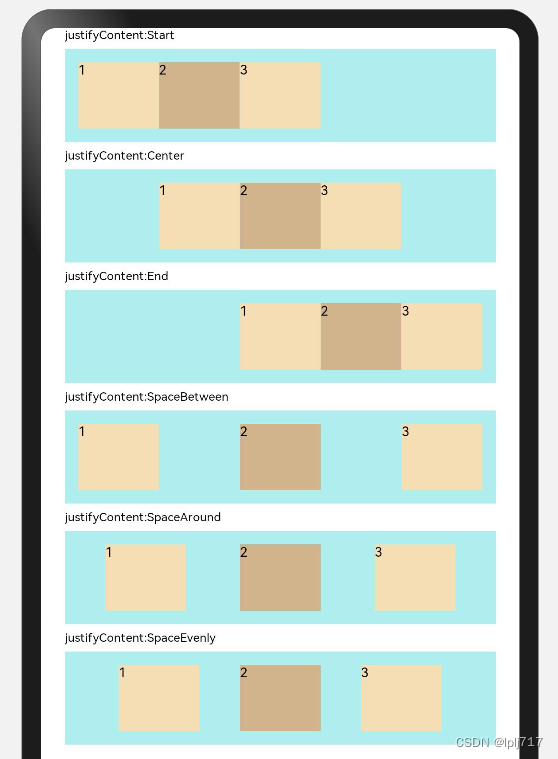
justifyContent:子组件在Flex容器主轴上的对齐格式,默认:FlexAlign.Start
Start:元素在主轴方向首端对齐,第一个元素与行首对齐,同时后续的元素与前一个对齐。
Center:元素在主轴方向中心对齐,第一个元素与行首的距离与最后一个元素与行尾距离相同。
End:元素在主轴方向尾部对齐, 最后一个元素与行尾对齐,其他元素与后一个对齐。
SpaceBetween:Flex主轴方向均匀分配弹性元素,相邻元素之间距离相同。第一个元素与行首对齐,最后一个元素与行尾对齐。
SpaceAround:Flex主轴方向均匀分配弹性元素,相邻元素之间距离相同。第一个元素到行首的距离和最后一个元素到行尾的距离是相邻元素之间距离的一半。
SpaceEvenly:Flex主轴方向元素等间距布局,相邻元素之间的间距、第一个元素与行首的间距、最后一个元素到行尾的间距都完全一样。
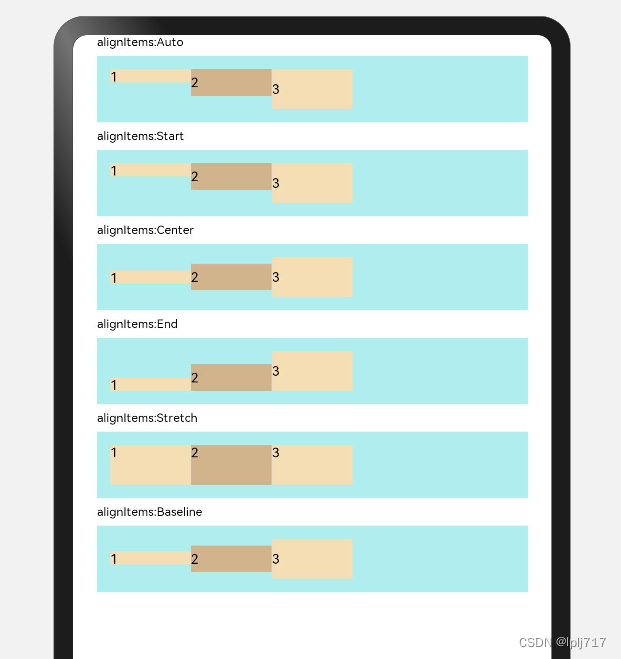
alignItems:子组件在Flex容器交叉轴上的对齐格式,默认:ItemAlign.Stretch
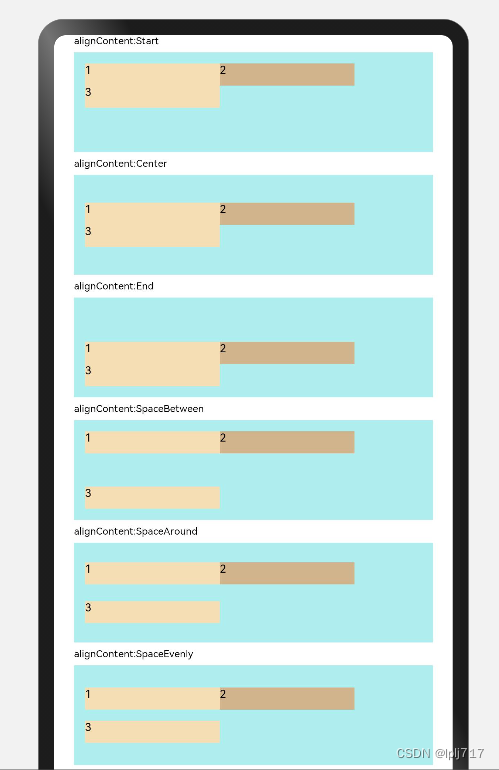
alignContent:交叉轴中有额外的空间时,多行内容的对齐方式。仅在wrap为Wrap或WrapReverse下生效,默认:FlexAlign.Start
direction&wrap
效果如图:
代码:
@Entry
@Component
struct FlexT {
  build() {
    Column() {
      Column({ space: 5 }) {
        Text('direction:Row').fontSize(9).fontColor(0x000000).width('90%')
        //横向布局
        Flex({ direction: FlexDirection.Row }) {
          Text('1').width('20%').height(30).backgroundColor(0xF5DEB3)
          Text('2').width('20%').height(30).backgroundColor(0xD2B48C)
          Text('3').width('20%').height(30).backgroundColor(0xF5DEB3)
        }
        .height(50)
        .width('90%')
        .padding(10)
        .backgroundColor(0xAFEEEE)

        Text('direction:RowReverse').fontSize(9).fontColor(0x000000).width('90%')
        //横向反向布局
        Flex({ direction: FlexDirection.RowReverse }) {
          Text('1').width('20%').height(30).backgroundColor(0xF5DEB3)
          Text('2').width('20%').height(30).backgroundColor(0xD2B48C)
          Text('3').width('20%').height(30).backgroundColor(0xF5DEB3)
        }
        .height(50)
        .width('90%')
        .padding(10)
        .backgroundColor(0xAFEEEE)
      }

      Text('direction:Column').fontSize(9).fontColor(0x000000).width('90%')
      //列布局
      Flex({ direction: FlexDirection.Column }) {
        Text('1').width('20%').height(30).backgroundColor(0xF5DEB3)
        Text('2').width('20%').height(30).backgroundColor(0xD2B48C)
        Text('3').width('20%').height(30).backgroundColor(0xF5DEB3)
      }
      .height(50)
      .width('90%')
      .padding(10)
      .backgroundColor(0xAFEEEE)

      Text('direction:ColumnReverse').fontSize(9).fontColor(0x000000).width('90%')
      //列反向布局
      Flex({ direction: FlexDirection.ColumnReverse }) {
        Text('1').width('20%').height(30).backgroundColor(0xF5DEB3)
        Text('2').width('20%').height(30).backgroundColor(0xD2B48C)
        Text('3').width('20%').height(30).backgroundColor(0xF5DEB3)
      }
      .height(50)
      .width('90%')
      .padding(10)
      .backgroundColor(0xAFEEEE)

      Text('NoWrap').fontSize(9).fontColor(0x000000).width('90%')
      //容器单行or列显示
      Flex({ wrap: FlexWrap.NoWrap }) {
        Text('1').width('40%').height(30).backgroundColor(0xF5DEB3)
        Text('2').width('40%').height(30).backgroundColor(0xD2B48C)
        Text('3').width('40%').height(30).backgroundColor(0xF5DEB3)
      }
      .height(50)
      .width('90%')
      .padding(10)
      .backgroundColor(0xAFEEEE)

      Text('Wrap').fontSize(9).fontColor(0x000000).width('90%')
      //容器多行or列显示
      Flex({ wrap: FlexWrap.Wrap }) {
        Text('1').width('40%').height(30).backgroundColor(0xF5DEB3)
        Text('2').width('40%').height(30).backgroundColor(0xD2B48C)
        Text('3').width('40%').height(30).backgroundColor(0xF5DEB3)
      }
      .height(50)
      .width('90%')
      .padding(10)
      .backgroundColor(0xAFEEEE)

      Text('WrapReverse').fontSize(9).fontColor(0x000000).width('90%')
      //容器反向多行or列显示
      Flex({ wrap: FlexWrap.WrapReverse }) {
        Text('1').width('40%').height(30).backgroundColor(0xF5DEB3)
        Text('2').width('40%').height(30).backgroundColor(0xD2B48C)
        Text('3').width('40%').height(30).backgroundColor(0xF5DEB3)
      }
      .height(50)
      .width('90%')
      .padding(10)
      .backgroundColor(0xAFEEEE)

    }
    .width('100%')
    .height('100%')

  }
}
justifyContent
效果如图:
代码:
@Entry
@Component
struct FlexT {
  build() {
    Column() {
      Column({ space: 5 }) {

        Text('justifyContent:Start').fontSize(9).fontColor(0x000000).width('90%')
        //元素在主轴方向首端对齐, 第一个元素与行首对齐,同时后续的元素与前一个对齐。
        Flex({ justifyContent: FlexAlign.Start }) {
          Text('1').width('20%').height(50).backgroundColor(0xF5DEB3)
          Text('2').width('20%').height(50).backgroundColor(0xD2B48C)
          Text('3').width('20%').height(50).backgroundColor(0xF5DEB3)
        }.width('90%')
        .padding(10)
        .backgroundColor(0xAFEEEE)

        Text('justifyContent:Center').fontSize(9).fontColor(0x000000).width('90%')
        //元素在主轴方向中心对齐,第一个元素与行首的距离与最后一个元素与行尾距离相同。
        Flex({ justifyContent: FlexAlign.Center }) {
          Text('1').width('20%').height(50).backgroundColor(0xF5DEB3)
          Text('2').width('20%').height(50).backgroundColor(0xD2B48C)
          Text('3').width('20%').height(50).backgroundColor(0xF5DEB3)
        }.width('90%')
        .padding(10)
        .backgroundColor(0xAFEEEE)

        Text('justifyContent:End').fontSize(9).fontColor(0x000000).width('90%')
        //元素在主轴方向尾部对齐,  最后一个元素与行尾对齐,其他元素与后一个对齐。
        Flex({ justifyContent: FlexAlign.End }) {
          Text('1').width('20%').height(50).backgroundColor(0xF5DEB3)
          Text('2').width('20%').height(50).backgroundColor(0xD2B48C)
          Text('3').width('20%').height(50).backgroundColor(0xF5DEB3)
        }.width('90%')
        .padding(10)
        .backgroundColor(0xAFEEEE)

        Text('justifyContent:SpaceBetween ').fontSize(9).fontColor(0x000000).width('90%')
        //Flex主轴方向均匀分配弹性元素,相邻元素之间距离相同。 第一个元素与行首对齐,最后一个元素与行尾对齐
        Flex({ justifyContent: FlexAlign.SpaceBetween }) {
          Text('1').width('20%').height(50).backgroundColor(0xF5DEB3)
          Text('2').width('20%').height(50).backgroundColor(0xD2B48C)
          Text('3').width('20%').height(50).backgroundColor(0xF5DEB3)
        }.width('90%')
        .padding(10)
        .backgroundColor(0xAFEEEE)

        Text('justifyContent:SpaceAround').fontSize(9).fontColor(0x000000).width('90%')
        //Flex主轴方向均匀分配弹性元素,相邻元素之间距离相同。 第一个元素到行首的距离和最后一个元素到行尾的距离是相邻元素之间距离的一半
        Flex({ justifyContent: FlexAlign.SpaceAround }) {
          Text('1').width('20%').height(50).backgroundColor(0xF5DEB3)
          Text('2').width('20%').height(50).backgroundColor(0xD2B48C)
          Text('3').width('20%').height(50).backgroundColor(0xF5DEB3)
        }.width('90%')
        .padding(10)
        .backgroundColor(0xAFEEEE)

        Text('justifyContent:SpaceEvenly ').fontSize(9).fontColor(0x000000).width('90%')
        //Flex主轴方向元素等间距布局, 相邻元素之间的间距、第一个元素与行首的间距、最后一个元素到行尾的间距都完全一样
        Flex({ justifyContent: FlexAlign.SpaceEvenly }) {
          Text('1').width('20%').height(50).backgroundColor(0xF5DEB3)
          Text('2').width('20%').height(50).backgroundColor(0xD2B48C)
          Text('3').width('20%').height(50).backgroundColor(0xF5DEB3)
        }.width('90%')
        .padding(10)
        .backgroundColor(0xAFEEEE)

      }
      .width('100%')
      .height('100%')

    }
  }
}
alignItems
效果如图:
代码:
@Entry
@Component
struct FlexT {
  build() {
    Column() {
      Column({ space: 5 }) {

        Text('alignItems:Auto').fontSize(9).fontColor(0x000000).width('90%')
        //子组件在Flex容器交叉轴上的对齐格式:默认配置
        Flex({ alignItems: ItemAlign.Auto }) {
          Text('1').width('20%').height(10).backgroundColor(0xF5DEB3)
          Text('2').width('20%').height(20).backgroundColor(0xD2B48C)
          Text('3').width('20%').height(30).backgroundColor(0xF5DEB3)
        }.width('90%')
        .padding(10)
        .backgroundColor(0xAFEEEE)

        Text('alignItems:Start ').fontSize(9).fontColor(0x000000).width('90%')
        //子组件在Flex容器交叉轴上的对齐格式:横轴方向头对齐
        Flex({ alignItems: ItemAlign.Start }) {
          Text('1').width('20%').height(10).backgroundColor(0xF5DEB3)
          Text('2').width('20%').height(20).backgroundColor(0xD2B48C)
          Text('3').width('20%').height(30).backgroundColor(0xF5DEB3)
        }.width('90%')
        .padding(10)
        .backgroundColor(0xAFEEEE)

        Text('alignItems:Center ').fontSize(9).fontColor(0x000000).width('90%')
        //子组件在Flex容器交叉轴上的对齐格式:横轴方向中间对齐
        Flex({ alignItems: ItemAlign.Center }) {
          Text('1').width('20%').height(10).backgroundColor(0xF5DEB3)
          Text('2').width('20%').height(20).backgroundColor(0xD2B48C)
          Text('3').width('20%').height(30).backgroundColor(0xF5DEB3)
        }.width('90%')
        .padding(10)
        .backgroundColor(0xAFEEEE)

        Text('alignItems:End  ').fontSize(9).fontColor(0x000000).width('90%')
        //子组件在Flex容器交叉轴上的对齐格式:横轴方向底部对齐
        Flex({ alignItems: ItemAlign.End }) {
          Text('1').width('20%').height(10).backgroundColor(0xF5DEB3)
          Text('2').width('20%').height(20).backgroundColor(0xD2B48C)
          Text('3').width('20%').height(30).backgroundColor(0xF5DEB3)
        }.width('90%')
        .padding(10)
        .backgroundColor(0xAFEEEE)

        Text('alignItems:Stretch').fontSize(9).fontColor(0x000000).width('90%')
        //子组件在Flex容器交叉轴上的对齐格式:填充将跨轴拉伸,如果未设置维度,则为容器大小
        Flex({ alignItems: ItemAlign.Stretch }) {
          Text('1').width('20%').height(10).backgroundColor(0xF5DEB3)
          Text('2').width('20%').height(20).backgroundColor(0xD2B48C)
          Text('3').width('20%').height(30).backgroundColor(0xF5DEB3)
        }.width('90%')
        .padding(10)
        .backgroundColor(0xAFEEEE)

        Text('alignItems:Baseline').fontSize(9).fontColor(0x000000).width('90%')
        //子组件在Flex容器交叉轴上的对齐格式:横轴方向基准线对齐
        Flex({ alignItems: ItemAlign.Baseline }) {
          Text('1').width('20%').height(10).backgroundColor(0xF5DEB3)
          Text('2').width('20%').height(20).backgroundColor(0xD2B48C)
          Text('3').width('20%').height(30).backgroundColor(0xF5DEB3)
        }.width('90%')
        .padding(10)
        .backgroundColor(0xAFEEEE)

      }
      .width('100%')
      .height('100%')

    }
  }
}
alignContent
效果如图:
代码:
@Entry
@Component
struct FlexT {
  build() {
    Column() {
      Column({ space: 5 }) {

        Text('alignContent:Start').fontSize(9).fontColor(0x000000).width('90%')
        //交叉轴中有额外的空间时,多行内容的对齐方式:顶端对其
        Flex({ wrap: FlexWrap.Wrap, alignContent: FlexAlign.Start }) {
          Text('1').width('40%').height(20).backgroundColor(0xF5DEB3)
          Text('2').width('40%').height(20).backgroundColor(0xD2B48C)
          Text('3').width('40%').height(20).backgroundColor(0xF5DEB3)
        }.width('90%').height(90)
        .padding(10)
        .backgroundColor(0xAFEEEE)

        Text('alignContent:Center').fontSize(9).fontColor(0x000000).width('90%')
        //交叉轴中有额外的空间时,多行内容的对齐方式:中间对其
        Flex({ wrap: FlexWrap.Wrap, alignContent: FlexAlign.Center }) {
          Text('1').width('40%').height(20).backgroundColor(0xF5DEB3)
          Text('2').width('40%').height(20).backgroundColor(0xD2B48C)
          Text('3').width('40%').height(20).backgroundColor(0xF5DEB3)
        }.width('90%').height(90)
        .padding(10)
        .backgroundColor(0xAFEEEE)

        Text('alignContent:End').fontSize(9).fontColor(0x000000).width('90%')
        //交叉轴中有额外的空间时,多行内容的对齐方式:底部对其
        Flex({ wrap: FlexWrap.Wrap, alignContent: FlexAlign.End }) {
          Text('1').width('40%').height(20).backgroundColor(0xF5DEB3)
          Text('2').width('40%').height(20).backgroundColor(0xD2B48C)
          Text('3').width('40%').height(20).backgroundColor(0xF5DEB3)
        }.width('90%').height(90)
        .padding(10)
        .backgroundColor(0xAFEEEE)

        Text('alignContent:SpaceBetween ').fontSize(9).fontColor(0x000000).width('90%')
        //交叉轴中有额外的空间时,多行内容的对齐方式:相邻元素之间的距离相同,第一个元素与行首对齐,最后一个元素与行尾对齐
        Flex({ wrap: FlexWrap.Wrap, alignContent: FlexAlign.SpaceBetween }) {
          Text('1').width('40%').height(20).backgroundColor(0xF5DEB3)
          Text('2').width('40%').height(20).backgroundColor(0xD2B48C)
          Text('3').width('40%').height(20).backgroundColor(0xF5DEB3)
        }.width('90%').height(90)
        .padding(10)
        .backgroundColor(0xAFEEEE)

        Text('alignContent:SpaceAround  ').fontSize(9).fontColor(0x000000).width('90%')
        //交叉轴中有额外的空间时,多行内容的对齐方式:相邻元素之间的距离相同。相邻元素之间距离的一半作为,第一个元素和最后一个元素到行尾之间的距离
        Flex({ wrap: FlexWrap.Wrap, alignContent: FlexAlign.SpaceAround }) {
          Text('1').width('40%').height(20).backgroundColor(0xF5DEB3)
          Text('2').width('40%').height(20).backgroundColor(0xD2B48C)
          Text('3').width('40%').height(20).backgroundColor(0xF5DEB3)
        }.width('90%')
        .height(90)
        .padding(10)
        .backgroundColor(0xAFEEEE)

        Text('alignContent:SpaceEvenly').fontSize(9).fontColor(0x000000).width('90%')
        //交叉轴中有额外的空间时,多行内容的对齐方式:相邻元素之间的间距,第一个元素与行开头之间的间距,并且最后一个元素与行尾之间的间距相同
        Flex({ wrap: FlexWrap.Wrap, alignContent: FlexAlign.SpaceEvenly }) {
          Text('1').width('40%').height(20).backgroundColor(0xF5DEB3)
          Text('2').width('40%').height(20).backgroundColor(0xD2B48C)
          Text('3').width('40%').height(20).backgroundColor(0xF5DEB3)
        }.width('90%').height(90)
        .padding(10)
        .backgroundColor(0xAFEEEE)

      }
      .width('100%')
      .height('100%')

    }
  }
}边栏推荐
猜你喜欢
随机推荐
Q_06_05 文件结构
将 .json 格式 转换成 .xml格式
FFmpeg长时间无响应的解决方法
FFmpeg multimedia file processing (implementation of ffmpeg operation directory and list)
群组行动控制--自动队列化实现策略
The sword refers to the offer, cuts the rope 2
NC96 判断一个链表是否为回文结构
微服务+微信小程序实现社区服务
RobotFramework 之 RF变量与标准库关键字使用
常用函数
RTP打包发送H.264
ArcEngine(八) 选择要素并高亮显示
FFmpeg multimedia file processing (the basic concept of ffmpeg processing stream data)
正则表达式-re模块
KMP方法
对百度的内容进行修改
Q_07 词汇表
Process/Thread related in Sandbox - 1
NC53 删除链表的倒数第n个节点
Unity3d_API_Gyroscope 陀螺仪的接口