当前位置:网站首页>Unity3d_API_GPS_LocationService
Unity3d_API_GPS_LocationService
2022-08-09 13:02:00 【MOVCat】
LocationService
class in UnityEngine
类成员
//指定是否在用户设置中启用位置服务。
public bool isEnabledByUser { get; }
//返回位置服务状态。
public LocationServiceStatus status { get; }
//最后测量设备的地理位置。
public LocationInfo lastData { get; }

//启动位置服务更新。
Start();
//停止定位服务更新。这可能有助于节省电池寿命。
Stop();
[代码示例]
using System.Collections;
using System.Collections.Generic;
using UnityEngine;


public class GetGPS : MonoBehaviour {


    public string gps_info = "";
    public int flash_num = 1;


    IEnumerator StartGPS()
    {
        //用户设置里的定位服务是否启用
        if (!Input.location.isEnabledByUser)
        {
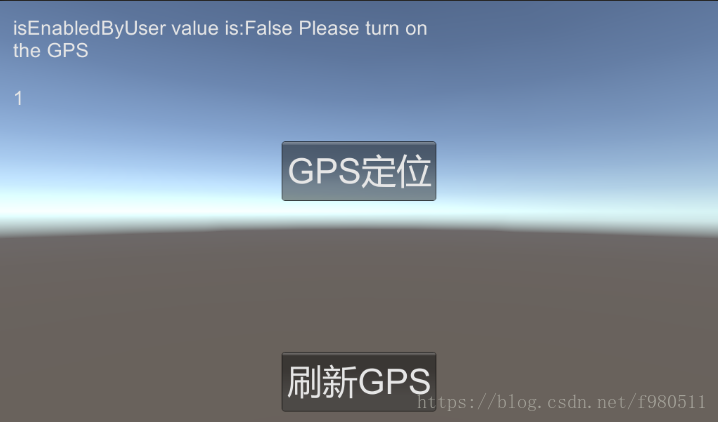
            gps_info = "isEnabledByUser value is:" + Input.location.isEnabledByUser.ToString() + " Please turn on the GPS";
            yield break;
        }

        Input.location.Start(10.0f, 10.0f);


        int maxWait = 20;
        while (Input.location.status == LocationServiceStatus.Initializing && maxWait > 0)
        {
            yield return new WaitForSeconds(1);
            maxWait--;
        }


        if (maxWait < 1)
        {
            gps_info = "Init GPS service time out";
            yield break;
        }


        if (Input.location.status == LocationServiceStatus.Failed)
        {
            gps_info = "Unable to determine device location";
            yield break;
        }
        else
        {
            gps_info = "N:" + Input.location.lastData.latitude + " E:" + Input.location.lastData.longitude;
            gps_info = gps_info + " Time:" + Input.location.lastData.timestamp;
            yield return new WaitForSeconds(100);
        }
        //如果不需要连续查询位置更新,则停止服务。
        Input.location.Stop();
    }
    void OnGUI()
    {
        GUI.skin.label.fontSize = 28;
        GUI.Label(new Rect(20, 20, 600, 100), gps_info);
        GUI.Label(new Rect(20, 120, 600, 48), flash_num.ToString());


        GUI.skin.button.fontSize = 50;
        if (GUI.Button(new Rect(Screen.width / 2 - 110, 200, 220, 85), "GPS定位"))
        {
            StartCoroutine(StartGPS());
        }
        if (GUI.Button(new Rect(Screen.width / 2 - 110, 500, 220, 85), "刷新GPS"))
        {
            gps_info = "N:" + Input.location.lastData.latitude + " E:" + Input.location.lastData.longitude;
            gps_info = gps_info + " Time:" + Input.location.lastData.timestamp;
            flash_num += 1;
        }
    }
}
边栏推荐
猜你喜欢
随机推荐
glibc memory management model freeing C library memory cache
Map mixed density function and quantile added line
kustomize入门示例及基本语法使用说明
万物皆可柯里化的 Ramda.js
面试攻略系列(四)-- 你不知道的大厂面试
IDEA Gradle 常遇问题(二)(持续更新)
Redis源码剖析之跳表(skiplist)
kustomize entry example and basic syntax instructions
#WeArePlay | 与更多开发者一起,探索新世界
电脑重装系统还原0x80070005错误如何解决
Professor Chen Qiang's "Machine Learning and R Application" course Chapter 14 Assignment
力扣解法汇总1413-逐步求和得到正数的最小值
剑指 Offer 21. 调整数组顺序使奇数位于偶数前面(循环不变量)
handwritten big pile
telnet+ftp to control and upgrade the device
NFS 特别注意权限的问题
【NVIDIA】Tesla V100安装NVIDIA-Driver驱动程序适配CUDA-Toolkit-11.6
Oracle Recovery Tools修复空闲坏块
七夕力扣刷不停,343. 整数拆分(剑指 Offer 14- I. 剪绳子、剑指 Offer 14- II. 剪绳子 II)
read stream 特别注意