当前位置:网站首页>App update
App update
2022-04-22 06:44:00 【Zhou zhouchi】
App There are two main ways to update
- Package update
- Hot update
Recent project encounters app Update questions , Android and iOS to update .
Today I mainly talk about app Package update (Android And IOS)
Function realization effect
android: Check for new versions , Background download , The installation page will pop up automatically
IOS: Jump appStore app Update the interface
One 、 Click Detect version
Directly on the code ha , There are renderings in the back
adopt plus.runtime.getProperty obtain APP Version information ,
//  obtain APP Version number
			getVersion() {

				let that = this;
				plus.runtime.getProperty(plus.runtime.appid, (wgtinfo) => {

					this.version = wgtinfo.version.split('.').join('')
				})
			},
Get the latest version of customized information on the server
The custom information is as follows
// Android APP Update data dynamically
{

	"code":"200",
	"version":"1.2.7",   // The latest version
	"iosappid":"*********",   //APP stay ios The only one in id
	"url":"http://xxxxxx/xx/yy/xxxx.apk"    //android Installation package (1.2.7)
}
Get server information , Judge the present app Whether the version information is smaller than the customized version information of the server
UpdatedVersion() {
       // Test version
				let that = this
				this.$util.appReqeust('get', AppToUpdate, "", false).then(res => {

					let Myversion = res.version.split('.').join('')
					if (that.version < Myversion) {
     // There's a new version
						that.content = ` Can be updated to  **${
      res.version}`
						that.LoadreUrl = res.url
						that.show = true
						that.IosAppid = res.iosappid
					} else {
     // No new version
						that.showToast()
					}
				})
			},
Confirm update
SubmitUpdate() {
        // Click to confirm the update
				let platform = uni.getSystemInfoSync().platform;
				this.show = false
				if (platform == 'android') {

					var dtask = plus.downloader.createDownload(this.LoadreUrl, {

						filename: "_downloads/"
					}, function(d, status) {

						//  Download complete
						if (status == 200) {

							plus.runtime.install(plus.io.convertLocalFileSystemURL(d
								.filename), {
    }, {
    }, function(error) {

								plus.nativeUI.closeWaiting();
								uni.showToast({

									title: ' Installation failed !',
									icon: "none",
									mask: false,
									duration: 1500
								});
							})
						} else {

							plus.nativeUI.closeWaiting();
							uni.showToast({

								title: ' Update failed !',
								icon: "none",
								mask: false,
								duration: 1500
							});
						}
					});
					var prg = 0;
					var showLoading = plus.nativeUI.showWaiting(" Downloading ");
					dtask.addEventListener('statechanged', function(task, status) {

						switch (task.state) {

							case 1:
								showLoading.setTitle(" Downloading ");
								break;
							case 2:
								showLoading.setTitle(" Connected to server ");
								break;
							case 3:
								prg = parseInt(
									(parseFloat(task.downloadedSize) /
										parseFloat(task.totalSize)) *
									100
								);
								showLoading.setTitle(" Version update , Downloading " + prg + "% ");
								break;
							case 4:
								plus.nativeUI.closeWaiting();
								// Download complete
								break;
						}
					});
					dtask.start();
				} else {

					// ios Auto update
					let appleId = this.IosAppid
					plus.runtime.launchApplication({

						action: `itms-apps://itunes.apple.com/cn/app/id${
      appleId}?mt=8`
					}, function(e) {

						// console.log('Open system default browser failed: ' + e.message);
					});
				}
			},
If a new version is detected , User click Update
android End It will download the information on the server in the background apk file , When you're done, open , as long as apk Of documents appid Consistent with the application package name , The installation will replace the lower version apk Installation package
IOS Will jump to App store market , Users need to manually click Update . appleId Can be in IOS Developer Center APP View in info
design sketch
Test version

Confirm update

Updating (android)
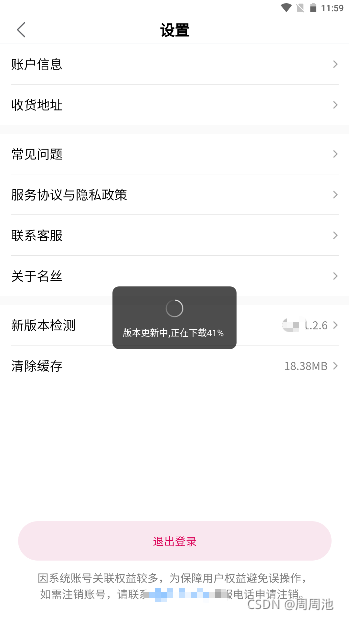
IOS Click to update , Will jump to the mobile application center App store Manually follow the new version
版权声明
本文为[Zhou zhouchi]所创,转载请带上原文链接,感谢
https://yzsam.com/2022/04/202204220557471998.html
边栏推荐
- EXCEL IFS函数的使用
- Usage rules of cast function in MySQL
- EXCEL VLOOKUP函数的使用
- 总结一下我使用过的定时器:@Scheduled注解
- EXCEL IF、AND以及OR函数的嵌套使用
- To summarize the timers I've used: @ scheduled annotation
- 毕业设计碎碎念
- ES6 array method record
- You can't open more than 10 pages in wechat applet. After reaching 10 pages, you can't open a new page
- 创新实训(七)FBV视图&CBV视图
猜你喜欢




随机推荐
自定义微信小程序顶部导航栏(自适应微信胶囊按钮,flex布局)
手写通用防抖与节流函数
创新实训(三)进度
mysql时间函数查询
API centralized management
List&lt;Map&gt;复制:浅拷贝与深拷贝
EXCEL 利用替换、分列、填充功能综合整理财务数据
总结一下我使用过的定时器:@Scheduled注解
Functions and methods in Scala, function creation, closure and corrilization
微信支付功能
Arduino UNO r3+LCD1602+DHT11
将Chrome浏览器背景设置为护眼色(眼睛护航/darkReader插件)
watch和computed的区别
EXCEL VLOOKUP函数的使用(二)
移动端触底加载动画 (uni)
Usage rules of cast function in MySQL
知识点整理:es6
数据密集型应用系统设计专题
MySQL——索引
指纹支付相关的细节处理