当前位置:网站首页>在Docker环境上使用Debezium捕获PostgreSQL 14.2中的变更数据到Kafka
在Docker环境上使用Debezium捕获PostgreSQL 14.2中的变更数据到Kafka
2022-04-22 11:27:00 【墨天轮】
实验环境
- Debezium 版本 1.9 (2022-04-05)
- Debezium Tested Versions

- PostgreSQL 版本是单机的 14.2
- 本测试参考文档:https://debezium.io/documentation/reference/1.9/
- 基于 Debezium 的变更数据捕获的架构:

- https://github.com/debezium/docker-images
启动 Zookeeper
# 后台运行docker run -d --name zookeeper -p 2181:2181 -p 2888:2888 -p 3888:3888 quay.io/debezium/zookeeper# 实时查看 zookeeper 的日志信息docker logs -f -t --tail 10 zookeeper
启动 Kafka
# 后台运行docker run -d --name kafka -p 9092:9092 --link zookeeper:zookeeper quay.io/debezium/kafka# 实时查看 kafka 的日志信息docker logs -f -t --tail 10 kafka
启动 PostgreSQL 14.2,使用 debezium 提供的示例镜像,里面自带了一个测试的 schemas inventory
# 创建一个数据持久化目录mkdir -p /docker_data/postgreschmod -R a+rwx /docker_data/postgres/# 后台运行 14.2 版本的 PostgreSQL 数据库docker run -d --name postgres \ -p 5432:5432 \ -e POSTGRES_PASSWORD=postgres \ -e PGDATA=/var/lib/pgdata \ -v /docker_data/postgres:/var/lib/pgdata \ quay.io/debezium/example-postgres# 运行 psql 容器[root@docker ~]# alias psql='docker run -it --rm --name psql debezium/example-postgres psql -h 192.168.0.40 -U postgres -p 5432'[root@docker ~]# psqlPassword for user postgres:psql (14.2 (Debian 14.2-1.pgdg110+1))Type "help" for help.postgres=# select version(); version----------------------------------------------------------------------------------------------------------------------------- PostgreSQL 14.2 (Debian 14.2-1.pgdg110+1) on x86_64-pc-linux-gnu, compiled by gcc (Debian 10.2.1-6) 10.2.1 20210110, 64-bit(1 row)postgres=# \l List of databases Name | Owner | Encoding | Collate | Ctype | Access privileges-----------+----------+----------+------------+------------+----------------------- postgres | postgres | UTF8 | en_US.utf8 | en_US.utf8 | template0 | postgres | UTF8 | en_US.utf8 | en_US.utf8 | =c/postgres + | | | | | postgres=CTc/postgres template1 | postgres | UTF8 | en_US.utf8 | en_US.utf8 | =c/postgres + | | | | | postgres=CTc/postgres(3 rows)postgres=# \dn List of schemas Name | Owner-----------+---------- inventory | postgres public | postgres(2 rows)postgres=# \dt inventory.* List of relations Schema | Name | Type | Owner-----------+------------------+-------+---------- inventory | customers | table | postgres inventory | geom | table | postgres inventory | orders | table | postgres inventory | products | table | postgres inventory | products_on_hand | table | postgres inventory | spatial_ref_sys | table | postgres(6 rows)postgres=# select schemaname,relname,n_live_tup from pg_stat_user_tables; schemaname | relname | n_live_tup------------+------------------+------------ inventory | customers | 4 inventory | products_on_hand | 9 inventory | orders | 4 inventory | products | 9 inventory | spatial_ref_sys | 8500 inventory | geom | 3(6 rows)
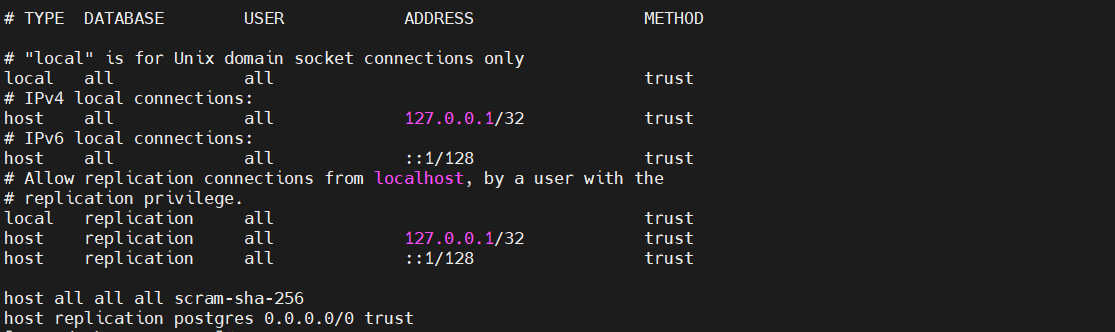
看看这个 debezium 提供的 PostgreSQL 镜像中都做了哪些配置
- pg_hba.conf
[root@docker ~]# cd /docker_data/postgres/[root@docker postgres]# cat pg_hba.confhost all all all scram-sha-256host replication postgres 0.0.0.0/0 trust
- postgresql.conf
listen_addresses = '*'shared_preload_libraries = 'decoderbufs,wal2json'wal_level = logicalmax_wal_senders = 4#wal_keep_segments = 4#wal_sender_timeout = 60smax_replication_slots = 4

启动 Kafka Connect
# 后台运行docker run -d --name connect \-p 8083:8083 \-e GROUP_ID=1 \-e CONFIG_STORAGE_TOPIC=my_connect_configs \-e OFFSET_STORAGE_TOPIC=my_connect_offsets \-e STATUS_STORAGE_TOPIC=my_connect_statuses \--link zookeeper:zookeeper \--link kafka:kafka \--link postgres:postgres \quay.io/debezium/connect# 实时查看 Kafka Connect 的日志信息docker logs -f -t --tail 10 connect
Debezium PostgreSQL connector
- 准备 Debezium PostgreSQL connector 配置文件
将配置文件创建在 docker 宿主机上即可,connect 容器开放了 REST API 来管理 Debezium 的连接器
[root@docker ~]# vi pgsql-inventory-connector.json{ "name": "pgsql-inventory-connector", "config": { "connector.class": "io.debezium.connector.postgresql.PostgresConnector", "database.hostname": "postgres", "database.port": "5432", "database.user": "postgres", "database.password": "postgres", "database.dbname": "postgres", "database.server.name": "pgsql", "slot.name": "inventory_slot", "table.include.list": "inventory.orders,inventory.products", "publication.name": "dbz_inventory_connector", "publication.autocreate.mode": "filtered", "plugin.name": "pgoutput" }}
- 向 Kafka 连接器注册 Debezium PostgreSQL connector
[root@docker ~]# curl -i -X POST -H "Accept:application/json" -H "Content-Type:application/json" 192.168.0.40:8083/connectors/ -d @pgsql-inventory-connector.jsonHTTP/1.1 201 CreatedDate: Fri, 22 Apr 2022 00:08:47 GMTLocation: http://192.168.0.40:8083/connectors/pgsql-inventory-connectorContent-Type: application/jsonContent-Length: 551Server: Jetty(9.4.43.v20210629){"name":"pgsql-inventory-connector","config":{"connector.class":"io.debezium.connector.postgresql.PostgresConnector","database.hostname":"postgres","database.port":"5432","database.user":"postgres","database.password":"postgres","database.dbname":"postgres","database.server.name":"pgsql","slot.name":"inventory_slot","table.include.list":"inventory.orders,inventory.products","publication.name":"dbz_inventory_connector","publication.autocreate.mode":"filtered","plugin.name":"pgoutput","name":"pgsql-inventory-connector"},"tasks":[],"type":"source"}
使用 kafka-ui 核对捕获到的数据
kafka-ui:Open-Source Web GUI for Apache Kafka Management:https://github.com/provectus/kafka-ui
docker run -p 8811:8080 \ -e KAFKA_CLUSTERS_0_NAME=oracle-scott-connector \ -e KAFKA_CLUSTERS_0_BOOTSTRAPSERVERS=192.168.0.40:9092 \ -d provectuslabs/kafka-ui:latest
网页登录:http://192.168.0.40:8811/


模拟业务
- INSERT
postgres=# select * from inventory.orders; id | order_date | purchaser | quantity | product_id-------+------------+-----------+----------+------------ 10001 | 2016-01-16 | 1001 | 1 | 102 10002 | 2016-01-17 | 1002 | 2 | 105 10003 | 2016-02-19 | 1002 | 2 | 106 10004 | 2016-02-21 | 1003 | 1 | 107(4 rows)postgres=# insert into inventory.orders values (11001,now(),1003,1,102);INSERT 0 1postgres=# select * from inventory.orders; id | order_date | purchaser | quantity | product_id-------+------------+-----------+----------+------------ 10001 | 2016-01-16 | 1001 | 1 | 102 10002 | 2016-01-17 | 1002 | 2 | 105 10003 | 2016-02-19 | 1002 | 2 | 106 10004 | 2016-02-21 | 1003 | 1 | 107 11001 | 2022-04-22 | 1003 | 1 | 102(5 rows)

- UPDATE
postgres=# select * from inventory.orders; id | order_date | purchaser | quantity | product_id-------+------------+-----------+----------+------------ 10001 | 2016-01-16 | 1001 | 1 | 102 10002 | 2016-01-17 | 1002 | 2 | 105 10003 | 2016-02-19 | 1002 | 2 | 106 10004 | 2016-02-21 | 1003 | 1 | 107 11001 | 2022-04-22 | 1003 | 1 | 102(5 rows)postgres=# update inventory.orders set quantity=2 where id=11001;UPDATE 1postgres=# select * from inventory.orders; id | order_date | purchaser | quantity | product_id-------+------------+-----------+----------+------------ 10001 | 2016-01-16 | 1001 | 1 | 102 10002 | 2016-01-17 | 1002 | 2 | 105 10003 | 2016-02-19 | 1002 | 2 | 106 10004 | 2016-02-21 | 1003 | 1 | 107 11001 | 2022-04-22 | 1003 | 2 | 102(5 rows)

- DELETE
postgres=# select * from inventory.orders; id | order_date | purchaser | quantity | product_id-------+------------+-----------+----------+------------ 10001 | 2016-01-16 | 1001 | 1 | 102 10002 | 2016-01-17 | 1002 | 2 | 105 10003 | 2016-02-19 | 1002 | 2 | 106 10004 | 2016-02-21 | 1003 | 1 | 107 11001 | 2022-04-22 | 1003 | 2 | 102(5 rows)postgres=# delete from inventory.orders where id = 11001;DELETE 1postgres=# select * from inventory.orders; id | order_date | purchaser | quantity | product_id-------+------------+-----------+----------+------------ 10001 | 2016-01-16 | 1001 | 1 | 102 10002 | 2016-01-17 | 1002 | 2 | 105 10003 | 2016-02-19 | 1002 | 2 | 106 10004 | 2016-02-21 | 1003 | 1 | 107(4 rows)


版权声明
本文为[墨天轮]所创,转载请带上原文链接,感谢
https://www.modb.pro/db/397378
边栏推荐
- ADB 命令知多少?詳細 ADB 命令大全來啦
- 基于 TiDB 的 Apache APISIX 高可用配置中心的最佳实践
- Synchronized lock and its expansion
- 软件测试基础知识整理(详细版)收藏这篇足矣
- 云原生虚拟化:基于 Kubevirt 构建边缘计算实例
- ES6 learning notes 4 numerical representation related to numerical expansion (octal representation) (reprinted, the memo is not my original)
- 半小时理解JSP
- 链表的增删改查等函数封装(汇总)
- redis 登录客户端命令
- Network security -- attack defense confrontation
猜你喜欢

Postman interface testing tool video tutorial, zero basic entry to master graduation

ES6学习笔记之4数值表示法有关数值的扩展(8进制表示法)(转载,备忘非我原创)

redis(一)之在windows10下redis的安装、配置、启动
机器学习基础知识

什么时候起,软件测试面试都已经这么难了?

Redis 解决键冲突

Chat聊天App第6节课创建主聊天静态页面

精彩联动!OpenMLDB Pulsar Connector原理和实操

链表的增删改查等函数封装(汇总)

(10 pieces of terrain data for offline processing)
随机推荐
Synchronized lock and its expansion
Convolutional neural network
9、 ES6 (2)
链表的增删改查等函数封装(汇总)
How to make the tab top by clicking on the tab bar
ES6学习笔记之4数值表示法有关数值的扩展(8进制表示法)(转载,备忘非我原创)
C语言getchar的用法详解
ADB 命令知多少?详细 ADB 命令大全来啦
图解文件系统——我见过讲文件系统讲的最好的文章了
大家都在努力,你凭什么不努力
接口自动化-Session鉴定解决方案
Scroll bar style modification
[data mining] use Excel to mine the equity relationship and count the distribution and trend of different types of kinship in listed companies according to the year [visual presentation]
.env.dev不生效问题
中职网络安全D—文件上传
直播课堂系统平台软件源码亲测可用
TS中通过变量存储key值读取对象的属性值时报错(TS: 7053)
活动预告 | 4月23日,多场OpenMLDB精彩分享来袭,不负周末好时光!
Rules for Guangdong provincial competition of "Cyberspace Security" of secondary vocational group in 2022
卷积神经网络