当前位置:网站首页>kubernetes上部署rook-ceph存储系统
kubernetes上部署rook-ceph存储系统
2022-08-06 10:00:00 【ygqygq2】
文章目录
1. 简单说说为什么用rook
rook这里就不作详细介绍了,具体可以到官网查看。
说说为什么要在kubernetes上使用rook部署ceph集群。
众所周知,当前kubernetes为当前最佳云原生容器平台,随着pod在kubernetes节点内被释放,其容器数据也会被清除,即没有持久化存储数据能力。而ceph作为最好的开源存储之一,也是结合kubernetes最好的存储之一。利用kubernetes的调度功能,rook的自我扩展和自我修复能力,相互紧密配合。
2. rook-ceph部署
2.1 环境
| 版本 | 备注 | |
|---|---|---|
| 系统 | CentOS7.6 | 一块200G数据盘 |
| kubernetes | v1.14.8-aliyun.1 | 有挂载数据盘的节点调度为osd节点 |
| rook | v1.1.4 | - |
| ceph | v14.2.4 | - |
注:
OSD至少3个节点,直接使用裸盘而不使用分区或者文件系统的方式性能最好。
2.2 Rook Operator部署
这里我们使用helm方式,helm的优势不必多说。
参考文档:
https://rook.io/docs/rook/v1.1/helm-operator.html
helm repo add rook-release https://charts.rook.io/release
helm fetch --untar rook-release/rook-ceph
cd rook-ceph
vim values.yaml  # 默认镜像被FW挡了,推荐 repository: ygqygq2/hyperkube
helm install --name rook-ceph --namespace rook-ceph --namespace ./
注:
根据kubernetes版本支持,可将values.yaml中设置enableFlexDriver: true;
部署结果:
[[email protected] rook-ceph]#          kubectl get pod -n rook-ceph
NAME                                  READY   STATUS    RESTARTS   AGE
rook-ceph-operator-5bd7d67784-k9bq9   1/1     Running   0          2d15h
rook-discover-2f84s                   1/1     Running   0          2d14h
rook-discover-j9xjk                   1/1     Running   0          2d14h
rook-discover-nvnwn                   1/1     Running   0          2d14h
rook-discover-nx4qf                   1/1     Running   0          2d14h
rook-discover-wm6wp                   1/1     Running   0          2d14h
2.3 Ceph集群创建
2.3.1 标识osd节点
为了更好的管理控制osd,标识指定节点,便于pod只在这些节点调度。
kubectl label node node1 ceph-role=osd
2.3.2 yaml创建Ceph集群
vim rook-ceph-cluster.yaml
apiVersion: ceph.rook.io/v1
kind: CephCluster
metadata:
  name: rook-ceph
  namespace: rook-ceph
spec:
  cephVersion:
    image: ceph/ceph:v14.2.4-20190917
  # 节点ceph目录,包含配置和log
  dataDirHostPath: /var/lib/rook
  mon:
    # Set the number of mons to be started. The number should be odd and between 1 and 9.
    # If not specified the default is set to 3 and allowMultiplePerNode is also set to true.
    count: 3
    # Enable (true) or disable (false) the placement of multiple mons on one node. Default is false.
    allowMultiplePerNode: false
  mgr:
    modules:
    - name: pg_autoscaler
      enabled: true
  network:
    # osd和mgr会使用主机网络,但是mon还是使用k8s网络,因此仍不能解决k8s外部连接问题
    # hostNetwork: true
  dashboard:
    enabled: true
  # cluster level storage configuration and selection
  storage:
    useAllNodes: false
    useAllDevices: false
    deviceFilter:
    location:
    config:
      metadataDevice:
      #databaseSizeMB: "1024" # this value can be removed for environments with normal sized disks (100 GB or larger)
      #journalSizeMB: "1024" # this value can be removed for environments with normal sized disks (20 GB or larger)
    # 节点列表,使用k8s中节点名
    nodes:
    - name: k8s1138026node
      devices:             # specific devices to use for storage can be specified for each node
      - name: "vdb"
      config:              # configuration can be specified at the node level which overrides the cluster level config
        storeType: bluestore
    - name: k8s1138027node
      devices:             # specific devices to use for storage can be specified for each node
      - name: "vdb"
      config:              # configuration can be specified at the node level which overrides the cluster level config
        storeType: bluestore
    - name: k8s1138031node
      devices:             # specific devices to use for storage can be specified for each node
      - name: "vdb"
      config:              # configuration can be specified at the node level which overrides the cluster level config
        storeType: bluestore
    - name: k8s1138032node
      devices:             # specific devices to use for storage can be specified for each node
      - name: "vdb"
      config:              # configuration can be specified at the node level which overrides the cluster level config
        storeType: bluestore
  placement:
    all:
      nodeAffinity:
      tolerations:
    mgr:
      nodeAffinity:
      tolerations:
    mon:
      nodeAffinity:
      tolerations:
    # 建议osd设置节点亲合性
    osd:
      nodeAffinity:
        requiredDuringSchedulingIgnoredDuringExecution:
          nodeSelectorTerms:
          - matchExpressions:
            - key: ceph-role
              operator: In
              values:
              - osd
      tolerations:
kubectl apply -f rook-ceph-cluster.yaml
查看结果:
[[email protected] ceph]# kubectl get pod -n rook-ceph -owide
NAME                                            READY   STATUS      RESTARTS   AGE   IP              NODE             NOMINATED NODE   READINESS GATES
csi-cephfsplugin-5dthf                          3/3     Running     0          20h   172.16.138.33   k8s1138033node   <none>           <none>
csi-cephfsplugin-f2hwm                          3/3     Running     3          20h   172.16.138.27   k8s1138027node   <none>           <none>
csi-cephfsplugin-hggkk                          3/3     Running     0          20h   172.16.138.26   k8s1138026node   <none>           <none>
csi-cephfsplugin-pjh66                          3/3     Running     0          20h   172.16.138.32   k8s1138032node   <none>           <none>
csi-cephfsplugin-provisioner-78d9994b5d-9n4n7   4/4     Running     0          20h   10.244.2.80     k8s1138031node   <none>           <none>
csi-cephfsplugin-provisioner-78d9994b5d-tc898   4/4     Running     0          20h   10.244.3.81     k8s1138032node   <none>           <none>
csi-cephfsplugin-tgxsk                          3/3     Running     0          20h   172.16.138.31   k8s1138031node   <none>           <none>
csi-rbdplugin-22bp9                             3/3     Running     0          20h   172.16.138.26   k8s1138026node   <none>           <none>
csi-rbdplugin-hf44c                             3/3     Running     0          20h   172.16.138.32   k8s1138032node   <none>           <none>
csi-rbdplugin-hpx7f                             3/3     Running     0          20h   172.16.138.33   k8s1138033node   <none>           <none>
csi-rbdplugin-kvx7x                             3/3     Running     3          20h   172.16.138.27   k8s1138027node   <none>           <none>
csi-rbdplugin-provisioner-74d6966958-srvqs      5/5     Running     5          20h   10.244.1.111    k8s1138027node   <none>           <none>
csi-rbdplugin-provisioner-74d6966958-vwmms      5/5     Running     0          20h   10.244.3.80     k8s1138032node   <none>           <none>
csi-rbdplugin-tqt7b                             3/3     Running     0          20h   172.16.138.31   k8s1138031node   <none>           <none>
rook-ceph-mgr-a-855bf6985b-57vwp                1/1     Running     1          19h   10.244.1.108    k8s1138027node   <none>           <none>
rook-ceph-mon-a-7894d78d65-2zqwq                1/1     Running     1          19h   10.244.1.110    k8s1138027node   <none>           <none>
rook-ceph-mon-b-5bfc85976c-q5gdk                1/1     Running     0          19h   10.244.4.178    k8s1138033node   <none>           <none>
rook-ceph-mon-c-7576dc5fbb-kj8rv                1/1     Running     0          19h   10.244.2.104    k8s1138031node   <none>           <none>
rook-ceph-operator-5bd7d67784-5l5ss             1/1     Running     0          24h   10.244.2.13     k8s1138031node   <none>           <none>
rook-ceph-osd-0-d9c5686c7-tfjh9                 1/1     Running     0          19h   10.244.0.35     k8s1138026node   <none>           <none>
rook-ceph-osd-1-9987ddd44-9hwvg                 1/1     Running     0          19h   10.244.2.114    k8s1138031node   <none>           <none>
rook-ceph-osd-2-f5df47f59-4zd8j                 1/1     Running     1          19h   10.244.1.109    k8s1138027node   <none>           <none>
rook-ceph-osd-3-5b7579d7dd-nfvgl                1/1     Running     0          19h   10.244.3.90     k8s1138032node   <none>           <none>
rook-ceph-osd-prepare-k8s1138026node-cmk5j      0/1     Completed   0          19h   10.244.0.36     k8s1138026node   <none>           <none>
rook-ceph-osd-prepare-k8s1138027node-nbm82      0/1     Completed   0          19h   10.244.1.103    k8s1138027node   <none>           <none>
rook-ceph-osd-prepare-k8s1138031node-9gh87      0/1     Completed   0          19h   10.244.2.115    k8s1138031node   <none>           <none>
rook-ceph-osd-prepare-k8s1138032node-nj7vm      0/1     Completed   0          19h   10.244.3.87     k8s1138032node   <none>           <none>
rook-discover-4n25t                             1/1     Running     0          25h   10.244.2.5      k8s1138031node   <none>           <none>
rook-discover-76h87                             1/1     Running     0          25h   10.244.0.25     k8s1138026node   <none>           <none>
rook-discover-ghgnk                             1/1     Running     0          25h   10.244.4.5      k8s1138033node   <none>           <none>
rook-discover-slvx8                             1/1     Running     0          25h   10.244.3.5      k8s1138032node   <none>           <none>
rook-discover-tgb8v                             0/1     Error       0          25h   <none>          k8s1138027node   <none>           <none>
[[email protected] ceph]# kubectl get svc,ep -n rook-ceph
NAME                               TYPE        CLUSTER-IP      EXTERNAL-IP   PORT(S)             AGE
service/csi-cephfsplugin-metrics   ClusterIP   10.96.36.5      <none>        8080/TCP,8081/TCP   20h
service/csi-rbdplugin-metrics      ClusterIP   10.96.252.208   <none>        8080/TCP,8081/TCP   20h
service/rook-ceph-mgr              ClusterIP   10.96.167.186   <none>        9283/TCP            19h
service/rook-ceph-mgr-dashboard    ClusterIP   10.96.148.18    <none>        7000/TCP            19h
service/rook-ceph-mon-a            ClusterIP   10.96.183.92    <none>        6789/TCP,3300/TCP   19h
service/rook-ceph-mon-b            ClusterIP   10.96.201.107   <none>        6789/TCP,3300/TCP   19h
service/rook-ceph-mon-c            ClusterIP   10.96.105.92    <none>        6789/TCP,3300/TCP   19h

NAME                                 ENDPOINTS                                                            AGE
endpoints/ceph.rook.io-block         <none>                                                               25h
endpoints/csi-cephfsplugin-metrics   10.244.2.80:9081,10.244.3.81:9081,172.16.138.26:9081 + 11 more...    20h
endpoints/csi-rbdplugin-metrics      10.244.1.111:9090,10.244.3.80:9090,172.16.138.26:9090 + 11 more...   20h
endpoints/rook-ceph-mgr              10.244.1.108:9283                                                    19h
endpoints/rook-ceph-mgr-dashboard    10.244.1.108:7000                                                    19h
endpoints/rook-ceph-mon-a            10.244.1.110:3300,10.244.1.110:6789                                  19h
endpoints/rook-ceph-mon-b            10.244.4.178:3300,10.244.4.178:6789                                  19h
endpoints/rook-ceph-mon-c            10.244.2.104:3300,10.244.2.104:6789                                  19h
endpoints/rook.io-block              <none>                                                               25h
2.4 Rook toolbox验证ceph
将Rook toolbox部署至kubernetes中,以下为部署yaml:
vim rook-ceph-toolbox.yam
apiVersion: apps/v1
kind: Deployment
metadata:
  name: rook-ceph-tools
  namespace: rook-ceph
  labels:
    app: rook-ceph-tools
spec:
  replicas: 1
  selector:
    matchLabels:
      app: rook-ceph-tools
  template:
    metadata:
      labels:
        app: rook-ceph-tools
    spec:
      dnsPolicy: ClusterFirstWithHostNet
      containers:
      - name: rook-ceph-tools
        image: rook/ceph:v1.1.0
        command: ["/tini"]
        args: ["-g", "--", "/usr/local/bin/toolbox.sh"]
        imagePullPolicy: IfNotPresent
        env:
          - name: ROOK_ADMIN_SECRET
            valueFrom:
              secretKeyRef:
                name: rook-ceph-mon
                key: admin-secret
        securityContext:
          privileged: true
        volumeMounts:
          - mountPath: /dev
            name: dev
          - mountPath: /sys/bus
            name: sysbus
          - mountPath: /lib/modules
            name: libmodules
          - name: mon-endpoint-volume
            mountPath: /etc/rook
      # if hostNetwork: false, the "rbd map" command hangs, see https://github.com/rook/rook/issues/2021
      hostNetwork: true
      volumes:
        - name: dev
          hostPath:
            path: /dev
        - name: sysbus
          hostPath:
            path: /sys/bus
        - name: libmodules
          hostPath:
            path: /lib/modules
        - name: mon-endpoint-volume
          configMap:
            name: rook-ceph-mon-endpoints
            items:
            - key: data
              path: mon-endpoints
# 启动rook-ceph-tools pod
kubectl create -f rook-ceph-toolbox.yaml

# 等待toolbox pod启动完成
kubectl -n rook-ceph get pod -l "app=rook-ceph-tools"

# toolbox运行后,可进入
kubectl -n rook-ceph exec -it $(kubectl -n rook-ceph get pod -l "app=rook-ceph-tools" -o jsonpath='{.items[0].metadata.name}') bash
进入toolbox后查看ceph相关状态:
# 使用ceph命令查看状态
[[email protected] /]# ceph -s
  cluster:
    id:     f3457013-139d-4dae-b380-fe86dc05dfaa
    health: HEALTH_OK

  services:
    mon: 3 daemons, quorum a,b,c (age 21h)
    mgr: a(active, since 21h)
    osd: 4 osds: 4 up (since 21h), 4 in (since 22h)

  data:
    pools:   0 pools, 0 pgs
    objects: 0 objects, 0 B
    usage:   4.0 GiB used, 792 GiB / 796 GiB avail
    pgs:

[[email protected] /]# ceph osd status
+----+----------------+-------+-------+--------+---------+--------+---------+-----------+
| id |      host      |  used | avail | wr ops | wr data | rd ops | rd data |   state   |
+----+----------------+-------+-------+--------+---------+--------+---------+-----------+
| 0  | k8s1138026node | 1026M |  197G |    0   |     0   |    0   |     0   | exists,up |
| 1  | k8s1138031node | 1026M |  197G |    0   |     0   |    0   |     0   | exists,up |
| 2  | k8s1138027node | 1026M |  197G |    0   |     0   |    0   |     0   | exists,up |
| 3  | k8s1138032node | 1026M |  197G |    0   |     0   |    0   |     0   | exists,up |
+----+----------------+-------+-------+--------+---------+--------+---------+-----------+
[[email protected] /]# ceph df
RAW STORAGE:
    CLASS     SIZE        AVAIL       USED       RAW USED     %RAW USED
    hdd       796 GiB     792 GiB     10 MiB      4.0 GiB          0.50
    TOTAL     796 GiB     792 GiB     10 MiB      4.0 GiB          0.50

POOLS:
    POOL     ID     STORED     OBJECTS     USED     %USED     MAX AVAIL
[[email protected] /]# rados df
POOL_NAME USED OBJECTS CLONES COPIES MISSING_ON_PRIMARY UNFOUND DEGRADED RD_OPS RD WR_OPS WR USED COMPR UNDER COMPR

total_objects    0
total_used       4.0 GiB
total_avail      792 GiB
total_space      796 GiB
[[email protected] /]#
注:
自定义configmaprook-config-override中的config,会自动挂载到ceph pod中为/etc/ceph/ceph.conf,达到自定义配置目的。(推荐使用Ceph Cli管理,而不推荐这种方式)
apiVersion: v1
kind: ConfigMap
metadata:
  name: rook-config-override
  namespace: rook-ceph
data:
  config: | [global] osd crush update on start = false osd pool default size = 2
2.5 暴露Ceph
ceph部署在kubernetes中,需要被外面访问,则需要暴露相关服务,比如dashboard、ceph monitor。
2.5.1 暴露ceph dashboard
推荐使用ingress方式暴露dashboard,其它方式参考kubernetes相关用法。
vim rook-ceph-dashboard-ingress.yaml
apiVersion: extensions/v1beta1
kind: Ingress
metadata:
  annotations:
    # cert-manager.io/cluster-issuer: letsencrypt-prod
    # kubernetes.io/tls-acme: "true"
  name: rook-ceph-mgr-dashboard
  namespace: rook-ceph
spec:
  rules:
  - host: ceph-dashboard.linuxba.com
    http:
      paths:
      - backend:
          serviceName: rook-ceph-mgr-dashboard
          servicePort: 7000
        path: /
  tls:
  - hosts:
    - ceph-dashboard.linuxba.com
    secretName: tls-ceph-dashboard-linuxba-com
获取dashboard密码:
kubectl -n rook-ceph get secret rook-ceph-dashboard-password -o jsonpath="{['data']['password']}" | base64 --decode && echo
用户名为admin,登录后:

2.5.2 暴露ceph monitor
这步只为验证kubernetes外部能否连接ceph monitor,而结果表明,确实不行。
新创建monitor的service,service type为LoadBalancer,以便k8s外部能使用,因为我使用的是阿里云kubernetes,而我又只想使用内网负载均衡,因此还要添加以下service:
vim rook-ceph-mon-svc.yaml
apiVersion: v1
kind: Service
metadata:
  annotations:
    service.beta.kubernetes.io/alibaba-cloud-loadbalancer-address-type: "intranet"
  labels:
    app: rook-ceph-mon
    mon_cluster: rook-ceph
    rook_cluster: rook-ceph
  name: rook-ceph-mon
  namespace: rook-ceph
spec:
  ports:
  - name: msgr1
    port: 6789
    protocol: TCP
    targetPort: 6789
  - name: msgr2
    port: 3300
    protocol: TCP
    targetPort: 3300
  selector:
    app: rook-ceph-mon
    mon_cluster: rook-ceph
    rook_cluster: rook-ceph
  sessionAffinity: None
  type: LoadBalancer
注:
- 自建kubernetes推荐MetalLB提供LoadBalancer方式负载均衡。
- 现在rook并不支持kubernetes外部连接ceph monitor。
3. 配置rook-ceph
配置ceph,达到kubernetes能使用动态卷管理。
vim rook-ceph-block-pool.yaml
apiVersion: ceph.rook.io/v1
kind: CephBlockPool
metadata:
  name: replicapool
  namespace: rook-ceph
spec:
  failureDomain: host
  replicated:
    size: 2
  # Sets up the CRUSH rule for the pool to distribute data only on the specified device class.
  # If left empty or unspecified, the pool will use the cluster’s default CRUSH root, which usually distributes data over all OSDs, regardless of their class.
  # deviceClass: hdd
vim rook-ceph-filesystem.yaml
apiVersion: ceph.rook.io/v1
kind: CephFilesystem
metadata:
  name: cephfs-k8s
  namespace: rook-ceph
spec:
  metadataPool:
    replicated:
      size: 3
  dataPools:
    - replicated:
        size: 3
  metadataServer:
    activeCount: 1
    activeStandby: true
vim rook-ceph-storage-class.yaml
apiVersion: storage.k8s.io/v1
kind: StorageClass
metadata:
   name: ceph-rbd
provisioner: ceph.rook.io/block
parameters:
  blockPool: replicapool
  # The value of "clusterNamespace" MUST be the same as the one in which your rook cluster exist
  clusterNamespace: rook-ceph
  # Specify the filesystem type of the volume. If not specified, it will use `ext4`.
  fstype: xfs
# Optional, default reclaimPolicy is "Delete". Other options are: "Retain", "Recycle" as documented in https://kubernetes.io/docs/concepts/storage/storage-classes/
reclaimPolicy: Retain
# Optional, if you want to add dynamic resize for PVC. Works for Kubernetes 1.14+
# For now only ext3, ext4, xfs resize support provided, like in Kubernetes itself.
allowVolumeExpansion: true
---
# apiVersion: storage.k8s.io/v1
# kind: StorageClass
# metadata:
# name: cephfs
# # Change "rook-ceph" provisioner prefix to match the operator namespace if needed
# provisioner: rook-ceph.cephfs.csi.ceph.com
# parameters:
# # clusterID is the namespace where operator is deployed.
# clusterID: rook-ceph
#
# # CephFS filesystem name into which the volume shall be created
# fsName: cephfs-k8s
#
# # Ceph pool into which the volume shall be created
# # Required for provisionVolume: "true"
# pool: cephfs-k8s-data0
#
# # Root path of an existing CephFS volume
# # Required for provisionVolume: "false"
# # rootPath: /absolute/path
#
# # The secrets contain Ceph admin credentials. These are generated automatically by the operator
# # in the same namespace as the cluster.
# csi.storage.k8s.io/provisioner-secret-name: rook-csi-cephfs-provisioner
# csi.storage.k8s.io/provisioner-secret-namespace: rook-ceph
# csi.storage.k8s.io/node-stage-secret-name: rook-csi-cephfs-node
# csi.storage.k8s.io/node-stage-secret-namespace: rook-ceph
#
# reclaimPolicy: Retain
进入toolbox查看结果:
[[email protected]-node5 /]# ceph osd pool ls
replicapool
cephfs-k8s-metadata
cephfs-k8s-data0
[[email protected]-node5 /]# ceph fs ls
name: cephfs-k8s, metadata pool: cephfs-k8s-metadata, data pools: [cephfs-k8s-data0 ]
[[email protected]-node5 /]#
4. kubernetes使用动态卷验证ceph
成功验证flex的ceph rbd。
[[email protected] ceph]# kubectl get pod
NAME                            READY   STATUS    RESTARTS   AGE
curl-66bdcf564-9hhrt            1/1     Running   0          23h
curl-66bdcf564-ghq5s            1/1     Running   0          23h
curl-66bdcf564-sbv8b            1/1     Running   1          23h
curl-66bdcf564-t9gnc            1/1     Running   0          23h
curl-66bdcf564-v5kfx            1/1     Running   0          23h
nginx-rbd-dy-67d8bbfcb6-vnctl   1/1     Running   0          21s
[[email protected] ceph]# kubectl exec -it nginx-rbd-dy-67d8bbfcb6-vnctl /bin/bash
[email protected]:/# ps -ef
bash: ps: command not found
[email protected]bd-dy-67d8bbfcb6-vnctl:/# df -h
Filesystem      Size  Used Avail Use% Mounted on
overlay         197G  9.7G  179G   6% /
tmpfs            64M     0   64M   0% /dev
tmpfs            32G     0   32G   0% /sys/fs/cgroup
/dev/vda1       197G  9.7G  179G   6% /etc/hosts
shm              64M     0   64M   0% /dev/shm
/dev/rbd0      1014M   33M  982M   4% /usr/share/nginx/html
tmpfs            32G   12K   32G   1% /run/secrets/kubernetes.io/serviceaccount
tmpfs            32G     0   32G   0% /proc/acpi
tmpfs            32G     0   32G   0% /proc/scsi
tmpfs            32G     0   32G   0% /sys/firmware
[email protected]:/# cd /usr/share/nginx/html/
[email protected]:/usr/share/nginx/html# ls
[email protected]:/usr/share/nginx/html# ls -la
total 4
drwxr-xr-x 2 root root    6 Nov  5 08:47 .
drwxr-xr-x 3 root root 4096 Oct 23 00:25 ..
[email protected]:/usr/share/nginx/html# echo a > test.html
[email protected]:/usr/share/nginx/html# ls -l
total 4
-rw-r--r-- 1 root root 2 Nov  5 08:47 test.html
[email protected]:/usr/share/nginx/html#
而cephfs验证失败,pod一直处于等待挂载中,下文作详细说明。
5. 解决rook-ceph的csi-cephfs不能在flex的阿里云kubernetes上挂载问题
查看到使用cephfs pvc的pod所有节点的/var/log/message日志,
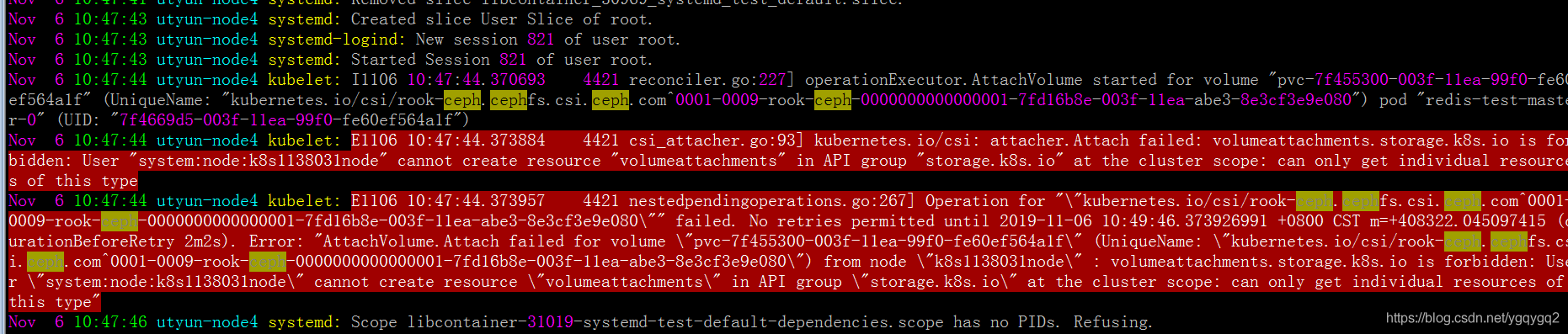
按日志提示,开始以为是权限不足:
kubectl get clusterrole system:node -oyaml

通过添加这个clusterrole的权限,报错仍旧一样。
才想起,创建cephfs storageclass时使用的是csi插件方式的。
而阿里云kubernetes只支持flex或者csi,我的集群选择的是使用flex插件方式的。
其flex插件方式下,集群节点kubelet参数,enable-controller-attach-detach为false。
若需要修改成csi方式,需要自行修改此参数为true。
说干就干,进到ContainerCreating状态的pod所在节点,
vim /etc/systemd/system/kubelet.service.d/10-kubeadm.conf,修改enable-controller-attach-detach为true,然后systemctl daemon-reload && systemctl restart kubelet重启kubelet,结果发现POD已正常挂载了。
可以得出结论,确实是阿里云kubernetes的kubelet参数enable-controller-attach-detach为false导致不能使用csi。
修改这个参数显然是不现实的,因为在购买阿里云托管版kubernetes时已经选择了flex插件方式,本来不需要维护kubelet,现在因为这个参数要维护所有节点的kubelet。那不修改kubelet参数,又有什么其它办法解决呢?
以前我用的是kubernetes-incubator/external-storage/ceph方式提供的provisioner,参考我以前的文章:
https://blog.51cto.com/ygqygq2/2163656
5.1 创建cephfs-provisioner
首先,将toolbox里的/etc/ceph/keyring内key后面的字符串,写到文件/tmp/ceph.client.admin.secret,做成secret,并启动cephfs-provisioner。
kubectl create secret generic ceph-admin-secret --from-file=/tmp/ceph.client.admin.secret  --namespace=rook-ceph
kubectl apply -f cephfs/rbac/
等待启动成功
[[email protected] ceph]# kubectl get pod -n rook-ceph|grep cephfs-provisioner
cephfs-provisioner-5f64bb484b-24bqf             1/1     Running     0          2m
然后创建cephfs storageclass。vim cephfs-storageclass.yaml
kind: StorageClass
apiVersion: storage.k8s.io/v1
metadata:
  name: cephfs
provisioner: ceph.com/cephfs
reclaimPolicy: Retain
parameters:
  # ceph monitor的svc IP 端口
  monitors: 10.96.201.107:6789,10.96.105.92:6789,10.96.183.92:6789
  adminId: admin
  adminSecretName: ceph-admin-secret
  adminSecretNamespace: "rook-ceph"
  claimRoot: /volumes/kubernetes
kubernetes节点还是要安装ceph-common和ceph-fuse。
使用阿里云的ceph yum源,cat /etc/yum.repos.d/ceph.repo
[Ceph]
name=Ceph packages for $basearch
baseurl=http://mirrors.cloud.aliyuncs.com/ceph/rpm-nautilus/el7/$basearch
enabled=1
gpgcheck=1
type=rpm-md
gpgkey=http://mirrors.cloud.aliyuncs.com/ceph/keys/release.asc

[Ceph-noarch]
name=Ceph noarch packages
baseurl=http://mirrors.cloud.aliyuncs.com/ceph/rpm-nautilus/el7/noarch
enabled=1
gpgcheck=1
type=rpm-md
gpgkey=http://mirrors.cloud.aliyuncs.com/ceph/keys/release.asc

[ceph-source]
name=Ceph source packages
baseurl=http://mirrors.cloud.aliyuncs.com/ceph/rpm-nautilus/el7/SRPMS
enabled=1
gpgcheck=1
type=rpm-md
gpgkey=http://mirrors.cloud.aliyuncs.com/ceph/keys/release.asc
5.2 验证cephfs
继续之前的测试,可以看到已经正常使用。
kubectl delete -f rook-ceph-cephfs-nginx.yaml -f rook-ceph-cephfs-pvc.yaml
kubectl apply -f rook-ceph-cephfs-pvc.yaml
kubectl apply -f rook-ceph-cephfs-nginx.yaml
[[email protected] ceph]# kubectl get pod|grep cephfs
nginx-cephfs-dy-5f47b4cbcf-txtf9   1/1     Running   0          3m50s
[[email protected] ceph]# kubectl exec -it nginx-cephfs-dy-5f47b4cbcf-txtf9 /bin/bash
[email protected]:/# df -h
Filesystem      Size  Used Avail Use% Mounted on
overlay         197G  9.9G  179G   6% /
tmpfs            64M     0   64M   0% /dev
tmpfs            32G     0   32G   0% /sys/fs/cgroup
/dev/vda1       197G  9.9G  179G   6% /etc/hosts
shm              64M     0   64M   0% /dev/shm
ceph-fuse       251G     0  251G   0% /usr/share/nginx/html
tmpfs            32G   12K   32G   1% /run/secrets/kubernetes.io/serviceaccount
tmpfs            32G     0   32G   0% /proc/acpi
tmpfs            32G     0   32G   0% /proc/scsi
tmpfs            32G     0   32G   0% /sys/firmware
[email protected]:/# echo test > /usr/share/nginx/html/test.html
6. 小结
Kubernetes外部并不能访问ceph monitor,由于这个局限,还是直接部署在机器上好得多。
rook-ceph可同时提供flex和csi驱动方式的rbd类型storageclass,而cephfs当前只支持csi驱动方式的storageclass,基于flex驱动的cephfs存储卷用法可参考示例:kube-registry.yaml
最后附上文中使用的相关Yaml文件:
https://github.com/ygqygq2/kubernetes/tree/master/kubernetes-yaml/rook-ceph
参考资料:
[1] https://rook.io/docs/rook/v1.1/ceph-quickstart.html
[2] https://rook.io/docs/rook/v1.1/helm-operator.html
[3] https://rook.io/docs/rook/v1.1/ceph-toolbox.html
[4] https://rook.io/docs/rook/v1.1/ceph-advanced-configuration.html#custom-cephconf-settings
[5] https://rook.io/docs/rook/v1.1/ceph-pool-crd.html
[6] https://rook.io/docs/rook/v1.1/ceph-block.html
[7] https://rook.io/docs/rook/v1.1/ceph-filesystem.html
[8] https://github.com/kubernetes-incubator/external-storage/tree/master/ceph
边栏推荐
猜你喜欢

PHP online examination system 4.0 version source code computer + mobile terminal

使用IPv6 Minecraft开服(无需外网穿透,经济、免费)
集成学习进阶

HCIP 18 days notes

网页版 Xshell支持FTP连接和SFTP连接 【详细教程】接上篇文章

Introduction of deep learning

【OpenCV】Face Recognition

智能三子棋——保姆级教学。

Interface automation landing practice
Web version Xshell supports FTP connection and SFTP connection [Detailed tutorial] Continue from the previous article
随机推荐
Hd 2022多校训练(5) BuyFigrines
[Mathematical Modeling] Linear Programming
nuxt页面访问速度优化
fastadmin搜索时同步进行修改
jupyter notebook & pycharm (anaconda)
Use font icons in nuxt to solve the problem that the icon can be loaded for the first time and the icon disappears after refreshing the page
HMM模型
UE5 使用Mesh Editor 查看骨骼相对于root的坐标系
Redis In Action —— Advanced —— Redis 的两种持久化方式 —— RDB 与 AOF 工作流程与原理 —— RDB 与 AOF 的对比 —— 囊括面试题
DO280管理和监控OpenShift平台--OCP升级
sqlalchemy 批量插入
使用栈判断括号是否匹配
响应式建筑工程集团公司类网站织梦模板(自适应手机端)
【机器学习】贝叶斯分类器
nuxt中使用字体图标,解决第一次可以加载出来,刷新页面图标消失的问题
Interface automation landing practice
NOIP 2012 普及组初赛 第28题 排列数
Folyd
DO280管理和监控OpenShift平台--使用probes监视应用
C. Virus (greedy)