当前位置:网站首页>ShardingSphere入门
ShardingSphere入门
2022-08-10 08:18:00 【苦 糖 果】
1、基本概念
1.1 什么是 Sharding Sphere
一套开源的分布式数据库中间件解决方案
有三个产品:Sharding-JDBC 和 Sharding-Proxy
定位为关系型数据库中间件,合理在分布式环境下使用关系型数据库操作
1.2 分库分表
1.2.1 概念
分库分表有两种方式:垂直切分和水平切分
垂直切分:垂直分表和垂直分库(表结构不同)
水平切分:水平分表和水平分库 (表结构相同)
垂直分表: 根据业务规则,或访问频次、是否大字段,将常用字段与不常用字段为为N个表
垂直分库: 根据业务规则,将不同模块的表分别放在不同数据库,库可以分布在不同服务器
水平分表: 根据表数据规则,将一个表得数据根据规则进行拆分成多个表(比如:分区,轮询,取模)
水平分库:根据表数据规则,将一个表的数据分到不同的库中,每个库只有这个表的部分数据
1.2.2 应用
(1)在数据库设计时候考虑垂直分库和垂直分表
(2)随着数据库数据量增加,不要马上考虑做水平切分,首先考虑缓存处理,读写分离,使用索引等等方式,如果这些方式不能根本解决问题了,再考虑做水平分库和水平分表
1.2.3 分库分表问题
(1)跨节点连接查询问题(分页、排序)
(2)多数据源管理问题
2. Sharding-JDBC
2.1 Sharding-JDBC简介
1)是轻量级的 java 框架,是增强版的 JDBC 驱动
2)主要目的是:简化对分库分表之后数据相关操作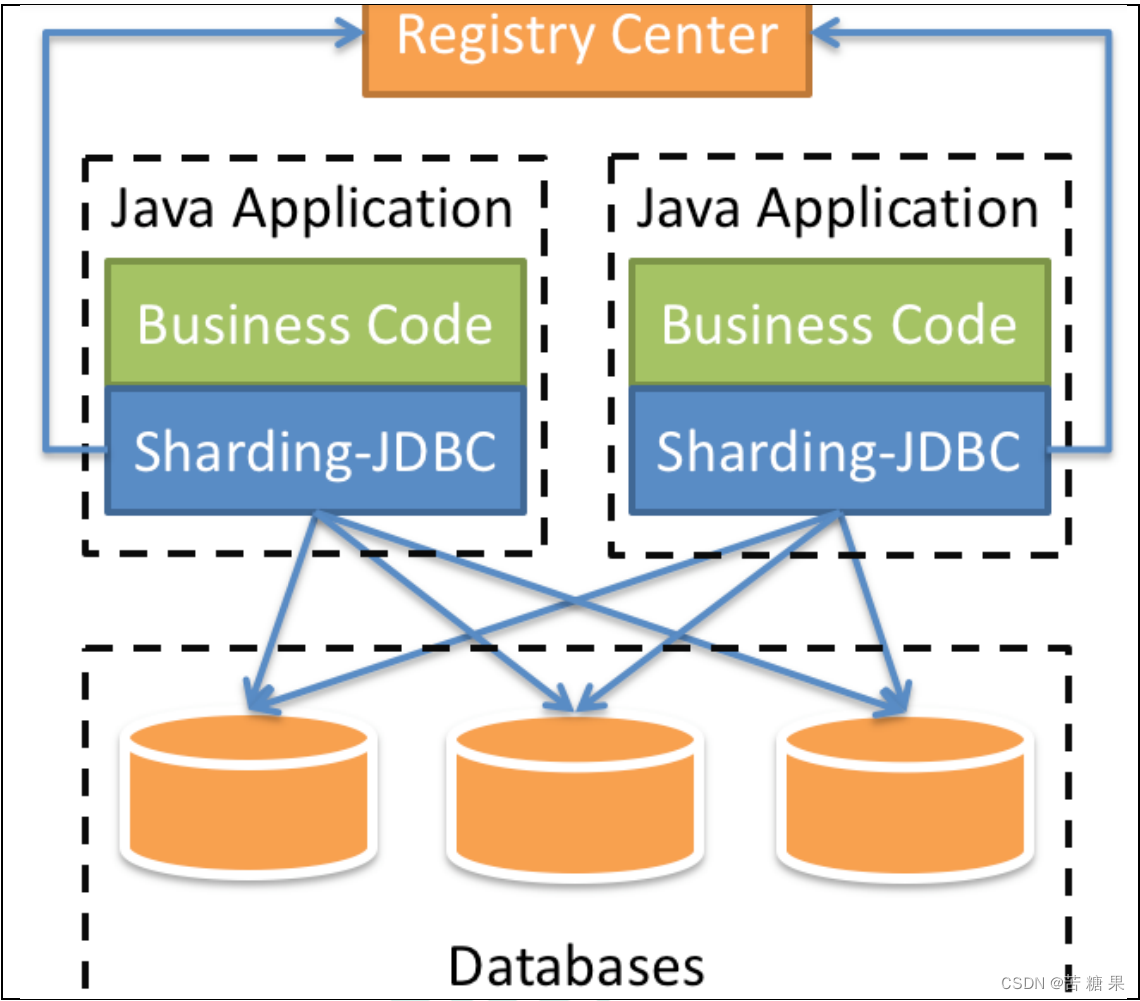
2.2 sharding-jdbc-demo工程搭建
2.2.1 新建module sharding-jdbc-demo
2.2.2 改pom
 <dependencies>
        <dependency>
            <groupId>org.springframework.boot</groupId>
            <artifactId>spring-boot-starter</artifactId>
            <version>2.2.1.RELEASE</version>
        </dependency>
        <dependency>
            <groupId>org.springframework.boot</groupId>
            <artifactId>spring-boot-starter-web</artifactId>
            <version>2.2.1.RELEASE</version>
        </dependency>
        <dependency>
            <groupId>org.springframework.boot</groupId>
            <artifactId>spring-boot-starter-test</artifactId>
        </dependency>
        <dependency>
            <groupId>com.alibaba</groupId>
            <artifactId>druid-spring-boot-starter</artifactId>
            <version>1.1.20</version>
        </dependency>
        <dependency>
            <groupId>mysql</groupId>
            <artifactId>mysql-connector-java</artifactId>
        </dependency>
        <dependency>
            <groupId>org.apache.shardingsphere</groupId>
            <artifactId>sharding-jdbc-spring-boot-starter</artifactId>
            <version>4.0.0-RC1</version>
        </dependency>
        <dependency>
            <groupId>com.baomidou</groupId>
            <artifactId>mybatis-plus-boot-starter</artifactId>
            <version>3.0.5</version>
        </dependency>
        <dependency>
            <groupId>org.projectlombok</groupId>
            <artifactId>lombok</artifactId>
        </dependency>
    </dependencies>
记得引入spring-boot-starter-web依赖,否则项目启动成功后会自动关闭。
2.2.3 启动类和业务类
@SpringBootApplication
@MapperScan(basePackages = "com.atguigu.springcloud.mapper")
public class ShardingJDBCApplication {

    public static void main(String[] args) {

        SpringApplication.run(ShardingJDBCApplication.class,args);
    }
}
@Mapper
public interface CourseMapper extends BaseMapper<Course> {

}
@Data
public class Course {

    private String cstatus;
    private String cname;
    private Long cid;
    private Long userId;
}
2.2.4 测试类
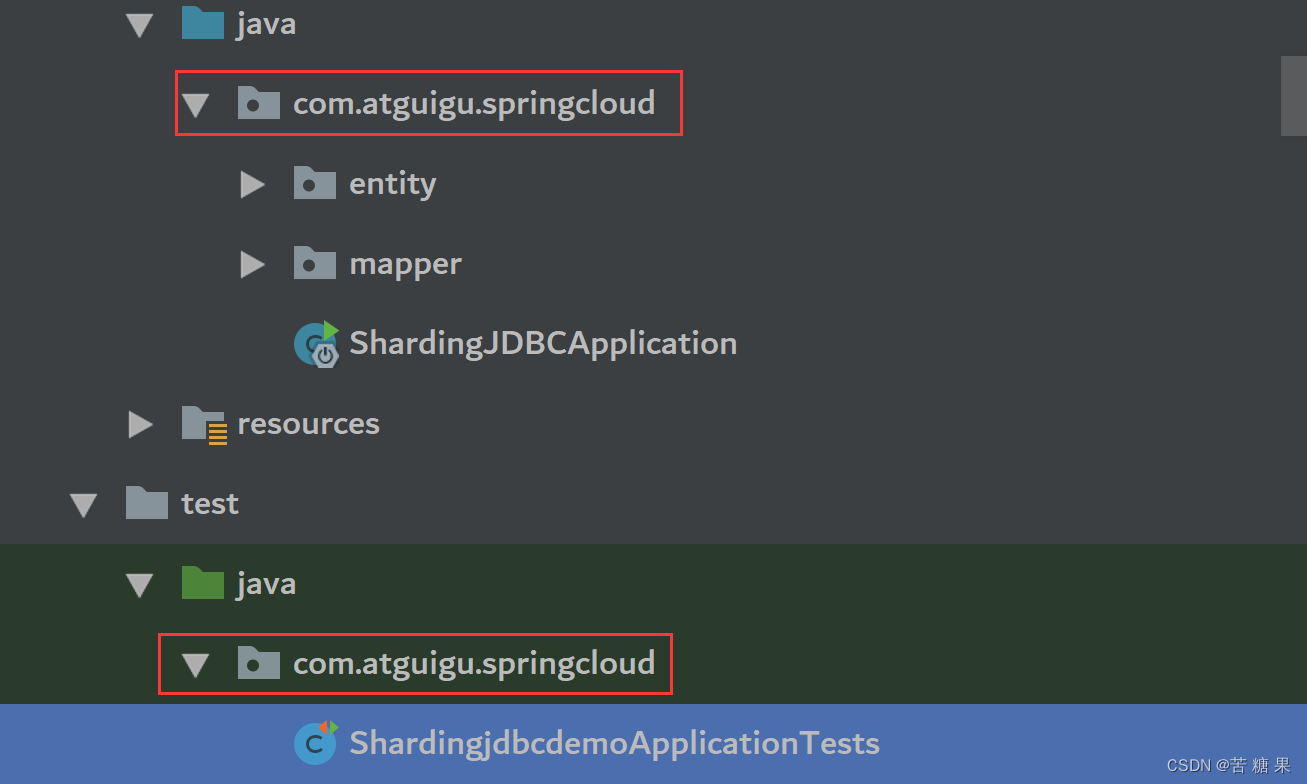
注意:测试类的包路径要与启动类一致,否则无法注入bean
@RunWith(SpringRunner.class)
@SpringBootTest
public class ShardingjdbcdemoApplicationTests {

}
2.3 Sharding-JDBC 实现水平分表
2.3.1 改properties
# shardingjdbc 分片策略
# 配置数据源,给数据源起名称
spring.shardingsphere.datasource.names=m1
# 允许覆盖重名bean
spring.main.allow-bean-definition-overriding=true
#配置数据源具体内容,包含连接池,驱动,地址,用户名和密码
spring.shardingsphere.datasource.m1.type=com.alibaba.druid.pool.DruidDataSource
spring.shardingsphere.datasource.m1.driver-class-name=com.mysql.jdbc.Driver
spring.shardingsphere.datasource.m1.url=jdbc:mysql://localhost:3306/course_db?useUnicode=true&characterEncoding=utf-8&useSSL=false
spring.shardingsphere.datasource.m1.username=root
spring.shardingsphere.datasource.m1.password=root

#指定 course 表分布情况,配置表在哪个数据库里面,表名称都是什么 m1.course_1 ,m1.course_2
spring.shardingsphere.sharding.tables.course.actual-data-nodes=m1.course_$->{
    1..2}
# 指定 course 表里面主键 cid 生成策略 SNOWFLAKE
spring.shardingsphere.sharding.tables.course.key-generator.column=cid
spring.shardingsphere.sharding.tables.course.key-generator.type=SNOWFLAKE
# 指定分片策略 约定 cid 值偶数添加到 course_1 表,如果 cid 是奇数添加到 course_2表
spring.shardingsphere.sharding.tables.course.table-strategy.inline.sharding_column=cid
spring.shardingsphere.sharding.tables.course.table-strategy.inline.algorithm_expression=course_$->{
    cid % 2 + 1}
# 打开 sql 输出日志
spring.shardingsphere.props.sql.show=true
注意:mysql 5.8 版本驱动类与之前不同。我使用的是5.7的mysql.Driver的实现类的全路径名是com.mysql.jdbc.Driver。 允许覆盖重名bean:dataSource这个bean已存在,允许覆盖。
spring.main.allow-bean-definition-overriding=true
cid % 2 + 1:为何+1?
+1的原因:如果下标从0开始就不用加,现在下标是从1开始,所以得加。本来下标0代表偶数,+1后下标1代表偶数
2.3.2 按照水平分表的方式,创建数据库和数据库表
1)创建数据库 course_db
2)在数据库创建两张表 course_1 和 course_2
3)约定规则:如果添加课程 id 是偶数把数据添加 course_1,如果奇数添加到 course_2
2.3.3 测试
//注入 mapper
    @Resource
    private CourseMapper courseMapper;

    //添加课程的方法
    @Test
    public void addCourse() {

        for (int i = 1; i <= 10; i++) {

            Course course = new Course();
            course.setCname("java" + i);
            course.setUserId(100L);
            course.setCstatus("Normal" + i);
            courseMapper.insert(course);
        }
    }

    //查询课程的方法
    @Test
    public void findCourse() {

        QueryWrapper<Course> wrapper = new QueryWrapper<>();
        wrapper.eq("cid", 763102447882207233L);
        Course course = courseMapper.selectOne(wrapper);
        System.out.println(course);
    }
2表cid全是奇数
2.4 Sharding-JDBC 实现水平分库
2.4.1 改properties
# shardingjdbc 分片策略
# 配置数据源,给数据源起名称
spring.shardingsphere.datasource.names=m1,m2
# 允许覆盖重名bean
spring.main.allow-bean-definition-overriding=true
#配置数据源具体内容,包含连接池,驱动,地址,用户名和密码
spring.shardingsphere.datasource.m1.type=com.alibaba.druid.pool.DruidDataSource
spring.shardingsphere.datasource.m1.driver-class-name=com.mysql.jdbc.Driver
spring.shardingsphere.datasource.m1.url=jdbc:mysql://localhost:3306/edu_db_1?useUnicode=true&characterEncoding=utf-8&useSSL=false
spring.shardingsphere.datasource.m1.username=root
spring.shardingsphere.datasource.m1.password=root

#配置数据源具体内容,包含连接池,驱动,地址,用户名和密码
spring.shardingsphere.datasource.m2.type=com.alibaba.druid.pool.DruidDataSource
spring.shardingsphere.datasource.m2.driver-class-name=com.mysql.jdbc.Driver
spring.shardingsphere.datasource.m2.url=jdbc:mysql://localhost:3306/edu_db_2?useUnicode=true&characterEncoding=utf-8&useSSL=false
spring.shardingsphere.datasource.m2.username=root
spring.shardingsphere.datasource.m2.password=root

#指定数据库分布情况,数据库里面表分布情况# m1 m2 course_1 course_2
spring.shardingsphere.sharding.tables.course.actual-data-nodes=m$->{
    1..2}.course_$->{
    1..2}
# 指定 course 表里面主键 cid 生成策略 SNOWFLAKE
spring.shardingsphere.sharding.tables.course.key-generator.column=cid
spring.shardingsphere.sharding.tables.course.key-generator.type=SNOWFLAKE

# 指定表分片策略 约定 cid 值偶数添加到 course_1 表,如果 cid 是奇数添加到course_2 表
# +1的原因:如果下标从0开始就不用加,现在下标是从1开始,所以得加。本来下标0代表偶数,+1后下标1代表偶数
spring.shardingsphere.sharding.tables.course.table-strategy.inline.sharding_column=cid
spring.shardingsphere.sharding.tables.course.table-strategy.inline.algorithm_expression=course_$->{
    cid % 2 + 1}

# 指定数据库分片策略 约定 user_id 是偶数添加 m1,是奇数添加 m2
spring.shardingsphere.sharding.tables.course.database-strategy.inline.sharding_column=user_id
spring.shardingsphere.sharding.tables.course.database-strategy.inline.algorithm_expression=m$->{
    user_id % 2 + 1}
# 打开 sql 输出日志
spring.shardingsphere.props.sql.show=true
2.4.2 建库表和测试

@Test
    public void addCourseDb() {

        Course course = new Course();
        course.setCname("javademo1");
        //分库根据 user_id
        course.setUserId(111L);
        course.setCstatus("Normal1");
        courseMapper.insert(course);
    }

    //查询操作
    @Test
    public void findCourseDb() {

        QueryWrapper<Course> wrapper = new QueryWrapper<>();
        //设置 userid 值
        wrapper.eq("user_id", 111L);
        //设置 cid 值
        wrapper.eq("cid", 763127952517890049L);
        Course course = courseMapper.selectOne(wrapper);
        System.out.println(course);
    }
cid与user_id都是奇数,2库的2表
2.5 Sharding-JDBC 实现垂直分库
2.5.1 改properties
# shardingjdbc 分片策略
# 配置数据源,给数据源起名称
spring.shardingsphere.datasource.names=m1,m2,m0
# 允许覆盖重名bean
spring.main.allow-bean-definition-overriding=true
#配置数据源具体内容,包含连接池,驱动,地址,用户名和密码
spring.shardingsphere.datasource.m1.type=com.alibaba.druid.pool.DruidDataSource
spring.shardingsphere.datasource.m1.driver-class-name=com.mysql.jdbc.Driver
spring.shardingsphere.datasource.m1.url=jdbc:mysql://localhost:3306/edu_db_1?useUnicode=true&characterEncoding=utf-8&useSSL=false
spring.shardingsphere.datasource.m1.username=root
spring.shardingsphere.datasource.m1.password=root

#配置数据源具体内容,包含连接池,驱动,地址,用户名和密码
spring.shardingsphere.datasource.m2.type=com.alibaba.druid.pool.DruidDataSource
spring.shardingsphere.datasource.m2.driver-class-name=com.mysql.jdbc.Driver
spring.shardingsphere.datasource.m2.url=jdbc:mysql://localhost:3306/edu_db_2?useUnicode=true&characterEncoding=utf-8&useSSL=false
spring.shardingsphere.datasource.m2.username=root
spring.shardingsphere.datasource.m2.password=root

#配置数据源具体内容,包含连接池,驱动,地址,用户名和密码
spring.shardingsphere.datasource.m0.type=com.alibaba.druid.pool.DruidDataSource
spring.shardingsphere.datasource.m0.driver-class-name=com.mysql.jdbc.Driver
spring.shardingsphere.datasource.m0.url=jdbc:mysql://localhost:3306/user_db?useUnicode=true&characterEncoding=utf-8&useSSL=false
spring.shardingsphere.datasource.m0.username=root
spring.shardingsphere.datasource.m0.password=root

# 配置 user_db 数据库里面 t_user 专库专表
spring.shardingsphere.sharding.tables.t_user.actual-data-nodes=m$->{
    0}.t_user
# 指定 course 表里面主键 cid 生成策略 SNOWFLAKE
spring.shardingsphere.sharding.tables.t_user.key-generator.column=user_id
spring.shardingsphere.sharding.tables.t_user.key-generator.type=SNOWFLAKE

spring.shardingsphere.sharding.tables.t_user.table-strategy.inline.sharding_column=user_id
spring.shardingsphere.sharding.tables.t_user.table-strategy.inline.algorithm_expression=t_user
# 打开 sql 输出日志
spring.shardingsphere.props.sql.show=true
2.5.2 测试
    @Test
    public void addUserDb() {

        User user = new User();
        user.setUsername("lucy");
        user.setUstatus("a");
        userMapper.insert(user);
    }

其实,我觉着垂直分库和分表不用刻意指定。因为垂直分库是把表分不到不同的库,垂直分表是把一个表拆分成多个表。这在设计之初是可以预见的。
2.6 Sharding-JDBC 操作公共表
2.6.1 建表和实体
分别在user_db、edu_db_2、edu_db_1中执行。
CREATE TABLE `t_udict` (
  `dict_id` BIGINT(20) NOT NULL,
  `uvalue` VARCHAR(64) DEFAULT NULL,
  `ustatus` VARCHAR(32) DEFAULT NULL,
  PRIMARY KEY (`dict_id`)
) ENGINE=INNODB DEFAULT CHARSET=utf8
@Data
@TableName("t_udict")
public class Udict {

    private Long dictid;
    private String ustatus;
    private String uvalue;
}
@Mapper
public interface UdictMapper extends BaseMapper<Udict> {

}
2.6.2 改properties
spring.shardingsphere.sharding.broadcast-tables=t_udict
spring.shardingsphere.sharding.tables.t_udict.key-generator.column=dict_id
spring.shardingsphere.sharding.tables.t_udict.key-generator.type=SNOWFLAKE
2.6.3 测试
@Test
    public void addDict() {

        Udict udict = new Udict();
        udict.setUstatus("a");
        udict.setUvalue("已启用");
        udictMapper.insert(udict);
    }

    //删除操作
    @Test
    public void deleteDict() {

        QueryWrapper<Udict> wrapper = new QueryWrapper<>();
        //设置 userid 值
        wrapper.eq("dict_id", 763535578640678913L);
        udictMapper.delete(wrapper);
    }

边栏推荐
- Unity—UGUI control
- LaTeX出现错误代码Command \algorithmic already defined
- 如何远程调试对方的H5页面
- 时序动作定位 | ASM-Loc:弱监督时序动作定位的动作感知片段建模(CVPR 2022)
- 详解构建mock服务最方便的神器——Moco
- 第十六天&charles的基本操作
- 预测股票涨跌看什么指标,如何预测明天股票走势
- The precise effect of network integration promotion outsourcing in the era of Internet of Things-Shenzhen Win-Win World News
- SQL建表问题,帮我看看好吗朋友们~大家人。!
- Discussion on Chinese Fuzzy Retrieval in Databases
猜你喜欢

明明加了唯一索引,为什么还是产生重复数据?

人工神经网络工作原理,神经网络的工作原理
模糊查询除了like+ % 还能用什么方式

js函数聚合的三种实现方式

Synchronization lock synchronized traces the source

Based on STC8G2K64S4 single-chip microcomputer to display analog photosensitive analog value through OLED screen

明明加了唯一索引,为什么还是产生重复数据?

PHP笔记 28 29 30 31

速卖通卖家如何抓住产品搜索权重
同步锁synchronized追本溯源
随机推荐
In the SQL SERVER database, if the data of the table is added, deleted, or modified, will the index of the table be recorded in the ldf log?
自动化测试框架搭建 ---- 标记性能较差用例
手把手教你进行Mysql查询操作
StringUtils的具体操作
Different command line styles
MySQL设置初始密码—注意版本mysql-8.0.30
Solve the problem that the win10win7win8 system cannot find the specified module and cannot register the desert plug-in
预测股票涨跌看什么指标,如何预测明天股票走势
FFT模板
PLSQL学习第一天
速卖通卖家如何抓住产品搜索权重
Go-Excelize API源码阅读(十一)—— GetActiveSheetIndex()
不同的命令行风格
【转】探秘钉钉的即时消息服务DTIM
JS reduce
深度剖析“八大排序”(上)_ 探寻一些不为人知的细节
Summary of ctfshow SSTI knowledge points
LaTeX出现错误代码Command \algorithmic already defined
Unity—UGUI control
Rust learning: 6.2_ Tuples of composite types