当前位置:网站首页>Nexus private server - (III) using private server warehouse in project practice
Nexus private server - (III) using private server warehouse in project practice
2022-04-22 05:01:00 【Zhenxiang】
One 、 Configure authentication information
stay Maven Of conf Catalog settings.xml Add Nexus Authentication information (servers Under the node ):
 <!-- Configure the user name and password to access the private server  -->
	   <server>
            <id>releases</id><!-- Official library    issue -->
			<username>admin</username>
			<password>admin123</password>
		</server>
		<server>

			<id>snapshots</id><!-- Test library   snapshot -->
			<username>admin</username>
			<password>admin123</password>
			</server>

	    <server>
			<id>thirdparty</id>
			<username>admin</username>
			<password>admin123</password>
		</server>
1、Snapshots And Releases The difference between
- nexus-releases: For publishing Release edition
- nexus-snapshots: For publishing Snapshot edition ( Snapshot version )
Release Version and Snapshot The definition is as follows :
Release: 1.0.0/1.0.0-RELEASE
Snapshot: 1.0.0-SNAPSHOT
- In the project
pom.xmlAdd... To the version number set inSNAPSHOTThe logo will be published asSNAPSHOTedition , No,SNAPSHOTThe logo will be published asRELEASEedition . SNAPSHOTThe version will be automatically marked with a time , Such as :1.0.0-SNAPSHOTAfter release, it becomes1.0.0-SNAPSHOT-20180522.123456-1.jar
Two 、 Configure automated deployment ( Automatic transmission jar To private server )
1、 add to POM rely on
stay pom.xml Add the following code to :
<distributionManagement>
  <repository>
    <id>nexus-releases</id>
    <name>Nexus Release Repository</name>
    <url>http:// Private service warehouse IP:8081/repository/maven-releases/</url>
  </repository>
  <snapshotRepository>
    <id>nexus-snapshots</id>
    <name>Nexus Snapshot Repository</name>
    <url>http:// Private service warehouse IP:8081/repository/maven-snapshots/</url>
  </snapshotRepository>
</distributionManagement> 
2、 Pull snapshot dependency
stay idea Set in maven You can pull the snapshot version to rely on 
In this way, when team collaborative development , Or multiple companies jointly develop , In order to prevent the source code that the public module depends on from being leaked due to open source , You can upload the code of the public module to the private server , Team members pull it in time OK 了 .
3、 ... and 、 Deploy to warehouse
The command will depend on jar Package deployment only in private server
mvn deployIn order not to let the test file execute , Select skip test file
mvn deploy -Dmaven.test.skip=true
stay Nexus You can see jar Packet dependency

snapshots It's a snapshot version ( The beta ), Sometimes it's released many times , however Nexus The version number in the private server has been determined , Can't you upload ?
Of course not. ,Nexus The private server will generate a timestamp according to the time + Number of Uploads Generate a second version , Keep the first .
Continue the second deployment upload
mvn deploy -Dmaven.test.skip=trueA second version will be generated

Four 、 Upload third party JAR package
Nexus 3.0 Page upload is not supported , You can use maven command :
Google com.google.code.kaptcha jar For example, bag , Google's jar The bag needs to climb over the wall , All must be uploaded to the private server first , To successfully pull .
mvn deploy:deploy-file
   # Organization name
  -DgroupId=com.google.code.kaptcha
   #jar Package name
  -DartifactId=kaptcha
   #  Version number
  -Dversion=2.3.2
   # file type
  -Dpackaging=jar
   # File address
  -Dfile=D:\kaptcha-2.3.2.jar
   # Upload destination
  -Durl=http://192.168.153.142:8081/repository/maven-releases/
   #settings In profile releases Corresponding ID
  -DrepositoryId=nexus-releases
In order to avoid the influence of Chinese comments, remove the comments
mvn deploy:deploy-file
  -DgroupId=com.google.code.kaptcha
  -DartifactId=kaptcha
  -Dversion=2.3.2
  -Dpackaging=jar
  -Dfile=D:\kaptcha-2.3.2.jar
  -Durl=http://192.168.153.142:8081/repository/maven-releases/
  -DrepositoryId=nexus-releases
open CMD Command line tools or idea The terminal changes the above instruction to one line , Copy in , Enter to execute

You can see that the build was successful
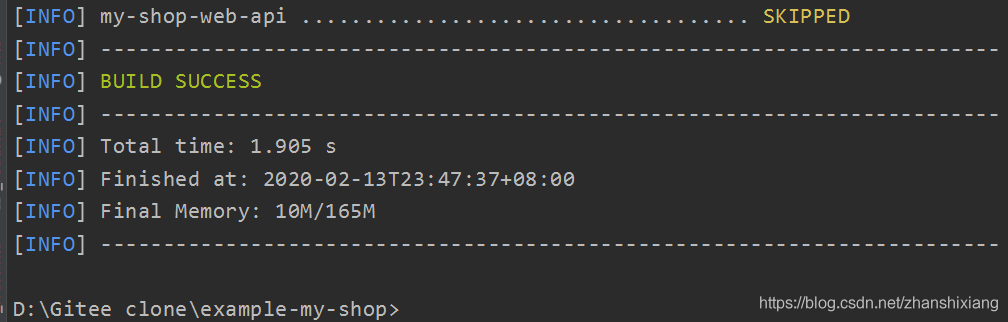
open Nexus The private server can see the uploaded Jar package .

5、 ... and 、 Configure agent warehouse
maven seek Jar Order of packages :

Find the corresponding... In the central warehouse Jar Download and store the package later :
Store it in the private server warehouse first , The project is then downloaded from the private server , Pull like this Jar Your efficiency will be greatly improved , also , Once downloaded, it will be stored permanently . Reusable

<!-- Configure agent warehouse   Specify the private server location to download dependency -->
    <repositories>
        <repository>
            <id>nexus</id>
            <name>Nexus Repository</name>
            <url>http://192.168.153.142:8081/repository/maven-public/</url>
            <!-- Whether it is allowed to rely on the snapshot version -->
            <snapshots>
                <enabled>true</enabled>
            </snapshots>
            <!-- Whether dependency on distribution is allowed -->
            <releases>
                <enabled>true</enabled>
            </releases>
        </repository>
    </repositories>
    <!-- Plug-in repository -->
    <pluginRepositories>
        <pluginRepository>
            <id>nexus</id>
            <name>Nexus Plugin Repository</name>
            <url>http://192.168.153.142:8081/repository/maven-public/</url>
            <snapshots>
                <enabled>true</enabled>
            </snapshots>
            <releases>
                <enabled>true</enabled>
            </releases>
        </pluginRepository>
    </pluginRepositories>
Delete the original Jar package

Refresh dependency

Dependence is pulled back

版权声明
本文为[Zhenxiang]所创,转载请带上原文链接,感谢
https://yzsam.com/2022/04/202204220456034655.html
边栏推荐
- MySQL forget root password solution
- TDD development mode and DDD development mode
- First knowledge of UI automation (inspect.exe + uiautomation)
- Final Cut Pro mosaics in multiple places of the video at the same time
- Summary of 2019 personal collection Framework Library
- 2021-08-14
- C language simple [stack and queue] (bracket matching problem)
- Log4 日志框架
- 2022.04.20华为笔试
- Application of an open current transformer with switching value
猜你喜欢
Combined sum leetcode
一个基于.NET Core3.1的开源项目帮你彻底搞懂WPF框架Prism

Linear regression API

Solve the problem of category imbalance in classification

博云 BeyondCMP 云管理平台 5.6 版本发布

Carina 本地存储入选 CNCF 云原生全景图

【板栗糖GIS】arcmap—如何将多张影像合并成一张

A collection of common methods of data exploratory analysis (EDA)

Error encountered when installing opencv

Junit Introduction et Introduction
随机推荐
C-随手写10
SSM + double uses redis to realize three logins, and three logins fail to lock for five minutes
JUnit assertion
Introduction to swagger UI
Junit簡介與入門
JVM - common parameters
The role and risk of setsql using lamdbaupdatewrapper
What is the difference between two-dimensional convolution kernel and three-dimensional convolution kernel in convolution neural network?
Rsync overview
2021-08-14
Error encountered when installing opencv
2022.04.20 Huawei written examination
Carina 的根基与诞生背景|深入了解 Carina 系列 第一期
2021-08-14
Solve the problem of category imbalance in classification
Carina 的根基與誕生背景|深入了解 Carina 系列 第一期
菜鸟的逆袭之路
JS Chapter 12
Nexus私服——(二) 3.2.0版 控制台安装,初始密码位置
[chestnut sugar GIS] ArcMap - how to combine multiple images into one