当前位置:网站首页>Secondary development of ABAQUS RSG plug-in (II)
Secondary development of ABAQUS RSG plug-in (II)
2022-04-22 12:34:00 【Install a sound 77】
This time we did a little more complicated than last time , This case is a part of a steel box girder bridge
That is, the left span includes the cantilever beam , All kinds of situations include , Well, let's look at the picture
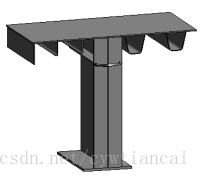
On the right side, it can be modified automatically U rib On the left is a spherical rib , There are two kinds of spherical ribs 180mm and 200mm
Because when modeling with shell element , It is impossible to build the thickness of the spherical rib , So it's approximate to replace .
This is a passage that has been in CATIA Model built in ,catia Has its own parametric design ,
Now we want to apply this function to abaqus On , Automatically build the model by setting the parameter size
To open the first RSG Set the parameters to be selected , Carry out interface layout , Note that the type should be selected float floating-point
The interface layout is as follows :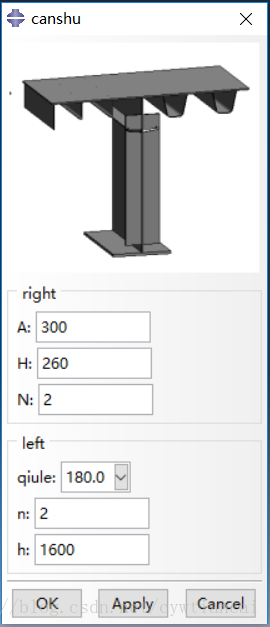
Pay attention to the ribs and U Ribs are generated in the form of arrays
There is a problem at this time ,
s.Line(point1=(0.0, 0.0), point2=(-1100 - (n - 1) * 200, 0.0))
s.HorizontalConstraint(entity=g[18], addUndoState=False)
Under different circumstances, the number of connections required is different , So we need to if Distinguish ,
meanwhile , According to different cantilever beam lengths , The number of spherical ribs and the spacing of spherical ribs are also different
In this regard, I wrote a paragraph before matlab There is a difference in the code of

This paragraph can be used without relationship , Simple exhaustive judgment .
But in the same way python Function , There are also several cycles to judge various situations
Next, insert the kernel code
from abaqus import *
from abaqusConstants import *
import math

def createPlateFunction(H,A,N,n,h,Q):
    list1=[1100,1300,1500,1700,1900,2100]
    list2=[325,325,350,350,375,375]
    list3=[3,4,4,5,5,6]

    R=1100+(n-1)*200
    for i in range(6):
        if R==float(list1[i]):
            a=float(list2[i])
            b=list3[i]

    Q=float(Q)
    s = mdb.models['Model-1'].ConstrainedSketch(name='__profile__',
                                                sheetSize=3000.0)
    g, v, d, c = s.geometry, s.vertices, s.dimensions, s.constraints
    s.setPrimaryObject(option=STANDALONE)
    s.Line(point1=(0.0, 0.0), point2=(100+600*N, 0.0))
    s.HorizontalConstraint(entity=g[2], addUndoState=False)
    s.ConstructionLine(point1=(400.0, 0.0), point2=(400.0, 450.0))
    s.VerticalConstraint(entity=g[3], addUndoState=False)
    s.Line(point1=(250.0, 0.0), point2=(300.0, -H))
    s.copyMirror(mirrorLine=g[3], objectList=(g[4],))
    s.HorizontalDimension(vertex1=v[3], vertex2=v[5], textPoint=(367.0419921875,
                                                                 -360.14013671875), value=A-H*2/4.5)
    s.Line(point1=(400-(A-H*2/4.5)/2, -H), point2=(400+(A-H*2/4.5)/2, -H))
    s.HorizontalConstraint(entity=g[6], addUndoState=False)

    s.FilletByRadius(radius=40.0, curve1=g[4], nearPoint1=(291.798278808594,
                                                           -200.214797973633), curve2=g[6],
                     nearPoint2=(371.829162597656,
                                 -253.40608215332))
    s.FilletByRadius(radius=40.0, curve1=g[5], nearPoint1=(521.689086914063,
                                                           -134.439208984375), curve2=g[6],
                     nearPoint2=(449.259521484375,
                                 -248.27099609375))
    if N > 1:
        s.linearPattern(geomList=(g[3], g[4], g[5], g[6], g[7], g[8]), vertexList=(),
                    number1=N, spacing1=600.0, angle1=0.0, number2=1, spacing2=300.0,
                    angle2=90.0)
        s.Line(point1=(0.0, 0.0), point2=(0.0, -h))
        s.VerticalConstraint(entity=g[15], addUndoState=False)
        s.Line(point1=(200.0, -370.0), point2=(-200.0, -370.0))
        s.HorizontalConstraint(entity=g[16], addUndoState=False)
        s.Line(point1=(250.0, -h), point2=(-250.0, -h))
        s.HorizontalConstraint(entity=g[17], addUndoState=False)
        s.Line(point1=(0.0, 0.0), point2=(-1100 - (n - 1) * 200, 0.0))
        s.HorizontalConstraint(entity=g[18], addUndoState=False)
        if a == 325:
            s.Line(point1=(-a, 0.0), point2=(-a, -Q))
            s.VerticalConstraint(entity=g[19], addUndoState=False)
            s.Line(point1=(-a, -Q), point2=(-a - 40, -Q))
            s.HorizontalConstraint(entity=g[20], addUndoState=False)
            s.PerpendicularConstraint(entity1=g[19], entity2=g[20], addUndoState=False)
            s.FilletByRadius(radius=10.0, curve1=g[19], nearPoint1=(-322.638732910156,
                                                                    -139.701538085938), curve2=g[20],
                             nearPoint2=(-345.492401123047,
                                         -199.322738647461))
        if a == 350:
            s.Line(point1=(-a, 0.0), point2=(-a, -Q))
            s.VerticalConstraint(entity=g[19], addUndoState=False)
            s.Line(point1=(-a, -Q), point2=(-a - 40, -Q))
            s.HorizontalConstraint(entity=g[20], addUndoState=False)
            s.PerpendicularConstraint(entity1=g[19], entity2=g[20], addUndoState=False)
            s.FilletByRadius(radius=10.0, curve1=g[19], nearPoint1=(-346.004302978516,
                                                                    -124.948425292969), curve2=g[20],
                             nearPoint2=(-366.399017333984,
                                         -200.446655273438))
        if a == 375:
            s.Line(point1=(-a, 0.0), point2=(-a, -Q))
            s.VerticalConstraint(entity=g[19], addUndoState=False)
            s.Line(point1=(-a, -Q), point2=(-a - 40, -Q))
            s.HorizontalConstraint(entity=g[20], addUndoState=False)
            s.PerpendicularConstraint(entity1=g[19], entity2=g[20], addUndoState=False)
            s.FilletByRadius(radius=10.0, curve1=g[19], nearPoint1=(-384.071136474609,
                                                                    -115.328598022461), curve2=g[20],
                             nearPoint2=(-396.226287841797,
                                         -196.57243347168))

        s.linearPattern(geomList=(g[19], g[20], g[21]), vertexList=(), number1=b - 1,
                        spacing1=a, angle1=180.0, number2=1, spacing2=300.0, angle2=90.0)

        s.Line(point1=(-R + 25, 0.0), point2=(-R + 25, -300.0))
        s.VerticalConstraint(entity=g[22], addUndoState=False)


    else:
        s.Line(point1=(0.0, 0.0), point2=(0.0, -h))
        s.VerticalConstraint(entity=g[9], addUndoState=False)
        s.Line(point1=(200.0, -370.0), point2=(-200.0, -370.0))
        s.HorizontalConstraint(entity=g[10], addUndoState=False)
        s.Line(point1=(250.0, -h), point2=(-250.0, -h))
        s.HorizontalConstraint(entity=g[11], addUndoState=False)
        s.Line(point1=(0.0, 0.0), point2=(-1100 - (n - 1) * 200, 0.0))
        s.HorizontalConstraint(entity=g[12], addUndoState=False)
        if a == 325:
            s.Line(point1=(-a, 0.0), point2=(-a, -Q))
            s.VerticalConstraint(entity=g[13], addUndoState=False)
            s.Line(point1=(-a, -Q), point2=(-a - 40, -Q))
            s.HorizontalConstraint(entity=g[14], addUndoState=False)
            s.PerpendicularConstraint(entity1=g[13], entity2=g[14], addUndoState=False)
            s.FilletByRadius(radius=10.0, curve1=g[13], nearPoint1=(-322.638732910156,
                                                                    -139.701538085938), curve2=g[14],
                             nearPoint2=(-345.492401123047,
                                         -199.322738647461))
        if a == 350:
            s.Line(point1=(-a, 0.0), point2=(-a, -Q))
            s.VerticalConstraint(entity=g[13], addUndoState=False)
            s.Line(point1=(-a, -Q), point2=(-a - 40, -Q))
            s.HorizontalConstraint(entity=g[14], addUndoState=False)
            s.PerpendicularConstraint(entity1=g[13], entity2=g[14], addUndoState=False)
            s.FilletByRadius(radius=10.0, curve1=g[13], nearPoint1=(-346.004302978516,
                                                                    -124.948425292969), curve2=g[14],
                             nearPoint2=(-366.399017333984,
                                         -200.446655273438))
        if a == 375:
            s.Line(point1=(-a, 0.0), point2=(-a, -Q))
            s.VerticalConstraint(entity=g[13], addUndoState=False)
            s.Line(point1=(-a, -Q), point2=(-a - 40, -Q))
            s.HorizontalConstraint(entity=g[14], addUndoState=False)
            s.PerpendicularConstraint(entity1=g[13], entity2=g[14], addUndoState=False)
            s.FilletByRadius(radius=10.0, curve1=g[13], nearPoint1=(-384.071136474609,
                                                                    -115.328598022461), curve2=g[14],
                             nearPoint2=(-396.226287841797,
                                         -196.57243347168))

        s.linearPattern(geomList=(g[13], g[14], g[15]), vertexList=(), number1=b - 1,
                        spacing1=a, angle1=180.0, number2=1, spacing2=300.0, angle2=90.0)

        s.Line(point1=(-R + 25, 0.0), point2=(-R + 25, -300.0))
        s.VerticalConstraint(entity=g[16], addUndoState=False)

    p = mdb.models['Model-1'].Part(name='Part-1', dimensionality=THREE_D,
                                   type=DEFORMABLE_BODY)
    p = mdb.models['Model-1'].parts['Part-1']
    p.BaseShellExtrude(sketch=s, depth=5000.0)
    s.unsetPrimaryObject()
    p = mdb.models['Model-1'].parts['Part-1']
    session.viewports['Viewport: 1'].setValues(displayedObject=p)
    del mdb.models['Model-1'].sketches['__profile__']
Above , Most of the code consists of pythonreader entry , Or you can choose to see for yourself rpy file ,
The rest of the interface code can be generated automatically
Let's see the result chart :


Hopefully that helped
版权声明
本文为[Install a sound 77]所创,转载请带上原文链接,感谢
https://yzsam.com/2022/04/202204221227431521.html
边栏推荐
- 【并发编程054】多线程的状态及转换过程?
- 基于STM32F103C8T6+ESP8266温室大棚远程监控系统
- Stm32f429bit6 SD card analog U disk
- [concurrent programming 047] cache locking performance is better than bus locking. Why not eliminate bus locking?
- Ros2 learning notes (IX) learn the bag recording of ros2 from turnlesim
- Tencent cloud domain name binding
- node.js数据库报错Failed to lookup view “list“ in views directory
- Express Can‘t set headers after they are sent.问题
- 抛物线型压力作用下悬臂梁的abaqus py命令流
- 智能家居的新想法(2022)
猜你喜欢

Application case sharing of isolated integrated current sensor ch704 which can measure current above 50A

栈的概念和操作

Pytorch processes RNN input variable length sequence padding

ORB_SLAM3学习:Tracking 线程介绍
![[concurrent programming 051] implementation principle of volatile memory semantics](/img/48/0a42f47d44d1a9385d723252629170.png)
[concurrent programming 051] implementation principle of volatile memory semantics

JS基础13

基于STM32F103C8T6+ESP8266温室大棚远程监控系统

Express Can‘t set headers after they are sent. problem
js原生代码实现三级联动效果

LeetCode 617、合并二叉树
随机推荐
【深入理解TcaplusDB技术】示例代码——异步调用接口
[logical fallacies in life] controlling violence with violence and suppressing rationality
【并发编程051】volatile 内存语义的实现原理
How to compare the hardware configuration when buying mobile phones of different brands?
ES6 deconstruction assignment of array of deconstruction assignment
分享一下自己最近寫的一個移動端項目積累的一些實用技巧
node. JS database error failed to lookup view "list" in views directory
ROS2学习笔记(七)从turtlesim学习ROS2的工具
【深入理解TcaplusDB技术】删除列表所有数据接口说明——[List表]
JS随机颜色
JS基础13
钢箱梁顶推作用下底板腹板局部应力 abaqus模型
The difference between let and VaR, several classic small questions
The ordering system breaks the bottleneck period of wholesale enterprises and helps enterprises with digital transformation
Concept and operation of stack
Redis cannot add data
[concurrent programming 050] type and description of memory barrier?
Ros2 learning notes (VII) tools for learning ros2 from turnlesim
LeetCode 389、找不同
Introduction of a protection circuit of heat pump device with automatic switching overcurrent protection module (application case of acs758 / ch704)