当前位置:网站首页>Installation of performance testing tool JMeter & JProfiler
Installation of performance testing tool JMeter & JProfiler
2022-04-21 07:30:00 【KK LUO】
When we finish the software development, how to test and optimize according to the requirements , Introduce two tools
Jmeter & Jprofiler Introduce
-
JMeter
- JMeter You can start multiple threads to access and simulate concurrent access , Used to access the server 、 Network or object simulating huge load , Test their strength and analyze their overall performance from different stress categories . Jprofiler
- Jprofiler yes ideal A plug-in of can capture the time-consuming memory proportion of program running , Optimize positioning .
How to install Jmeter
- Download installation package :http://jmeter.apache.org/download_jmeter.cgi(Linux Version download .tgz,Windows Version download .zip) Pay attention to environmental requirements Java8+, Usually it is .

- After downloading, unzip it to the installation folder

- Configure environment variables
- Search Xiaona “ environment variable ” Edit environment variables
- newly build JMETER_HOME environment variable ( User variables ), Variable value is JMeter Decompression path .

* edit CLASSPATH Variable , Add... At the end of the original variable value %JMETER_HOME%\lib\ext\ApacheJMeter_core.jar;%JMETER_HOME%\lib\jorphan.jar;%JMETER_HOME%\lib\logkit-2.0.jar;
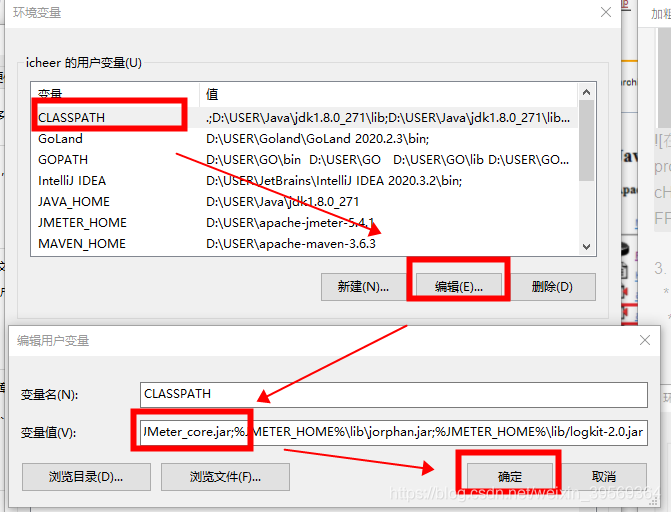
- start-up Jmeter : In the installation directory /bin Double click... Under file jmeter.bat, Two pop-up windows indicate that the installation is successful .JMeter Command window and JMeter Working interface of ,

- You can set Chinese for the first time , Familiar with components
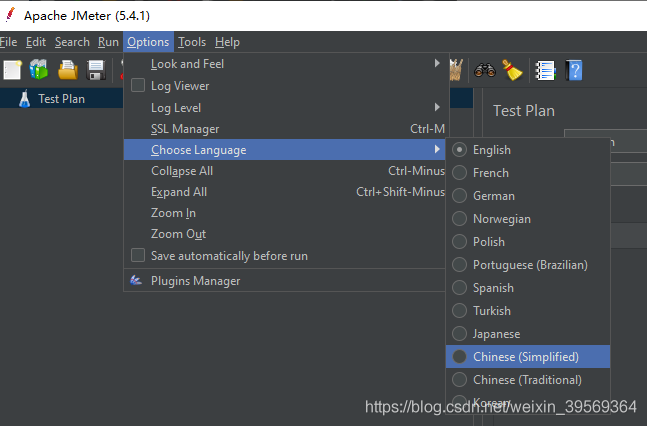
6. Create a new test plan
- Click file new to create a new test plan
- Right click the test plan to add and select the required test


- With HTTP For example, request testing , Fill in the test address and access path in turn

- After creating a new test sample , Various listeners can be added to monitor the test run .

Detailed use tutorial reference :https://blog.csdn.net/yaorongke/article/details/82799609
How to install Jporfiler
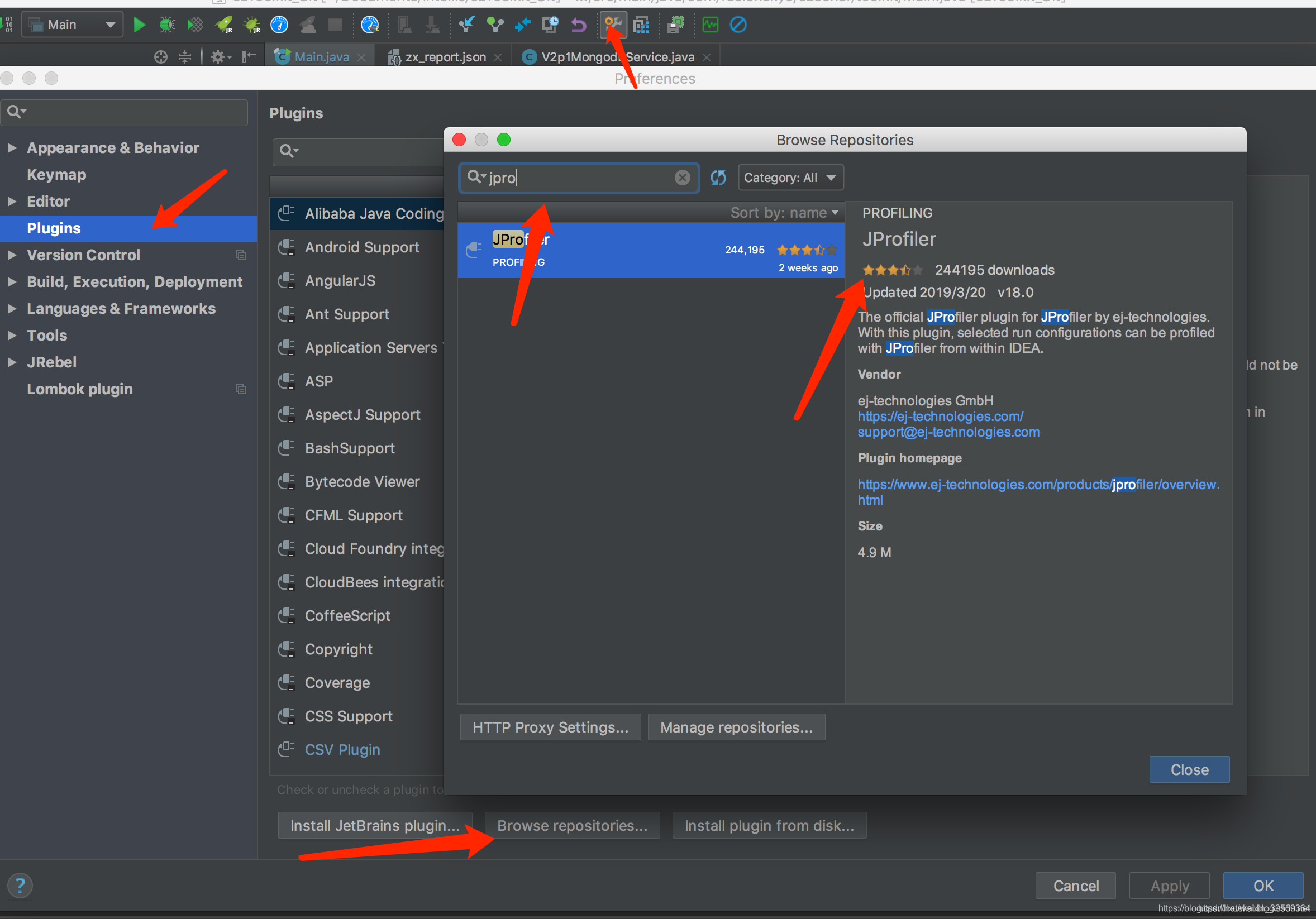
- 1. First, in the IDEA install Jprofiler plug-in unit
- 2. And then install it Jprofiler monitoring software
Plug in installation method 1 : stay idea Search and install in
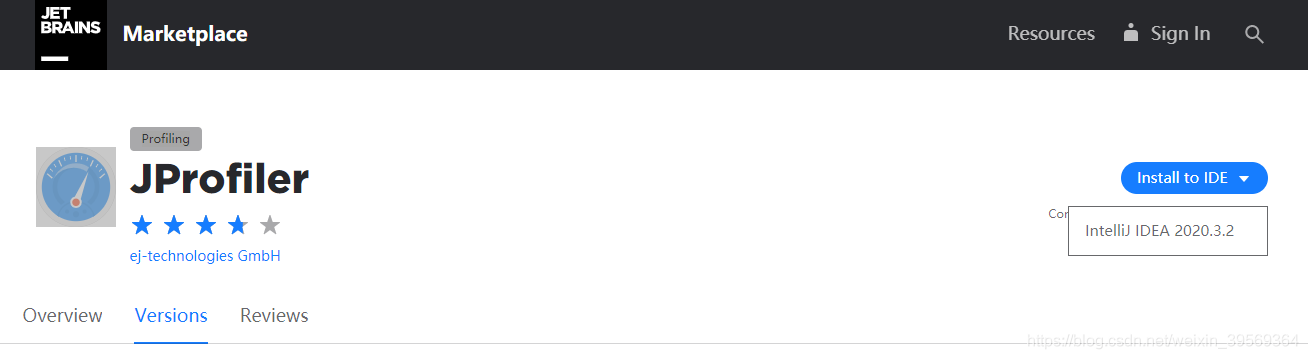
Plug in installation method 2 : stay IDEA In the open state , Click the official website to get https://plugins.jetbrains.com/plugin/253-jprofiler/versions
The browser will detect you idea Version of , return idea Click on the confirmation , Wait for download to complete .
When the plug-in is installed , The blue dashboard will appear in the toolbar
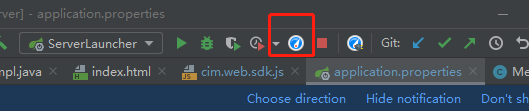
Then install the monitoring software , The monitoring software has more perfect monitoring components and chart display tools .
Enter official website https://www.ej-technologies.com/download/jprofiler/version_92 download , And install .

installation is complete , You can start running . go back to idea Click the blue dashboard on the toolbar to run and monitor the operation of the program . You need to select the location of the monitoring software just installed for the first time .


Jprofier Monitoring software cracking , The key can be obtained from this article https://blog.csdn.net/qq_42945742/article/details/85247734 It can also be used during the trial period without cracking
This paper refers to : The blog details Jprofiler The function of each component
版权声明
本文为[KK LUO]所创,转载请带上原文链接,感谢
https://yzsam.com/2022/04/202204210620350725.html
边栏推荐
- udevd 检索内核模块并加载的 demo
- Oracle uses DBMS_ Crypto realizes MD5 value calculation
- C语言版:循环队列的建立和基本操作
- 【手部姿态估计】开源数据集-合集-RGBD-IR-Depth
- C# Winform 关于ListView显示不全问题
- Lua程序设计--笔记
- Udevd retrieves the kernel module and loads the demo
- 机器学习——欠拟合、过拟合与正则化
- Missing key(s) in state_dict: “module.resnet50.conv1.weight“
- Fundamentals of graphics | area light rendering based on LTC
猜你喜欢

图形学基础|移动端GPU架构

机器学习——欠拟合、过拟合与正则化
C语言版:二叉树叶子结点和非叶子结点求法

Dpdk problem analysis: ice 100g network card RX_ Packets and RX_ Bytes statistical problem

在ensp上配置安全策略

Yolo pedestrian detection and counting (yolov3 + deepsort) using Google Lab

《21天實戰caffe》1-7天學習筆記一

Installing deepstream on TX2

网络攻防安全学习平台-上传关3

图形学基础|深度缓冲(DepthBuffer)
随机推荐
TX2上安装deepstream
Unity 简单事件系统的实现
JS不同时间格式转换
Could not initialize cudnn ,please check cudnn installation.
Error opencv error: assertion failed (img. Cols = = width & img. Rows = = height & channels = = 3) in write
Unable to resolve dependency for ':app@debug/compileClasspath': Could not download mapsforge-map.jar
VMWare vSphere Failed to create object
Hardware codec acceleration CSI interface camera on TX2
获取进程最后一次执行的 cpu 核的方法及原理
Process record of a failed migration of vmfstools from exsi
you-get 命令与踩坑
Advanced system settings click no response, can not open the solution
【手部姿态估计】开源数据集-合集-RGBD-IR-Depth
Lua程序设计--笔记
从零开始搭建一台深度学习服务器及环境配置
Learn Ruixin micro rk3399pro record (10)
《21天實戰caffe》1-7天學習筆記一
性能测试工具JMeter & Jprofiler 的安装
程序启动顺序引发的血案之 dpdk 进程死锁
Could not initialize cudnn ,please check cudnn installation.