当前位置:网站首页>[SCTF2019]Flag Shop erb模板注入
[SCTF2019]Flag Shop erb模板注入
2022-04-22 00:07:00 【-栀蓝-】
进入题目可以看到一个是要用自己的JinKela去购买flag 
这种类型的题目我想到之前都是有一个jwt认证,通过伪造验证信息修改金额以达到购买的效果
 点击work抓包可以发现确实有jwt(通过一段字符一个点来看出),便解码试试
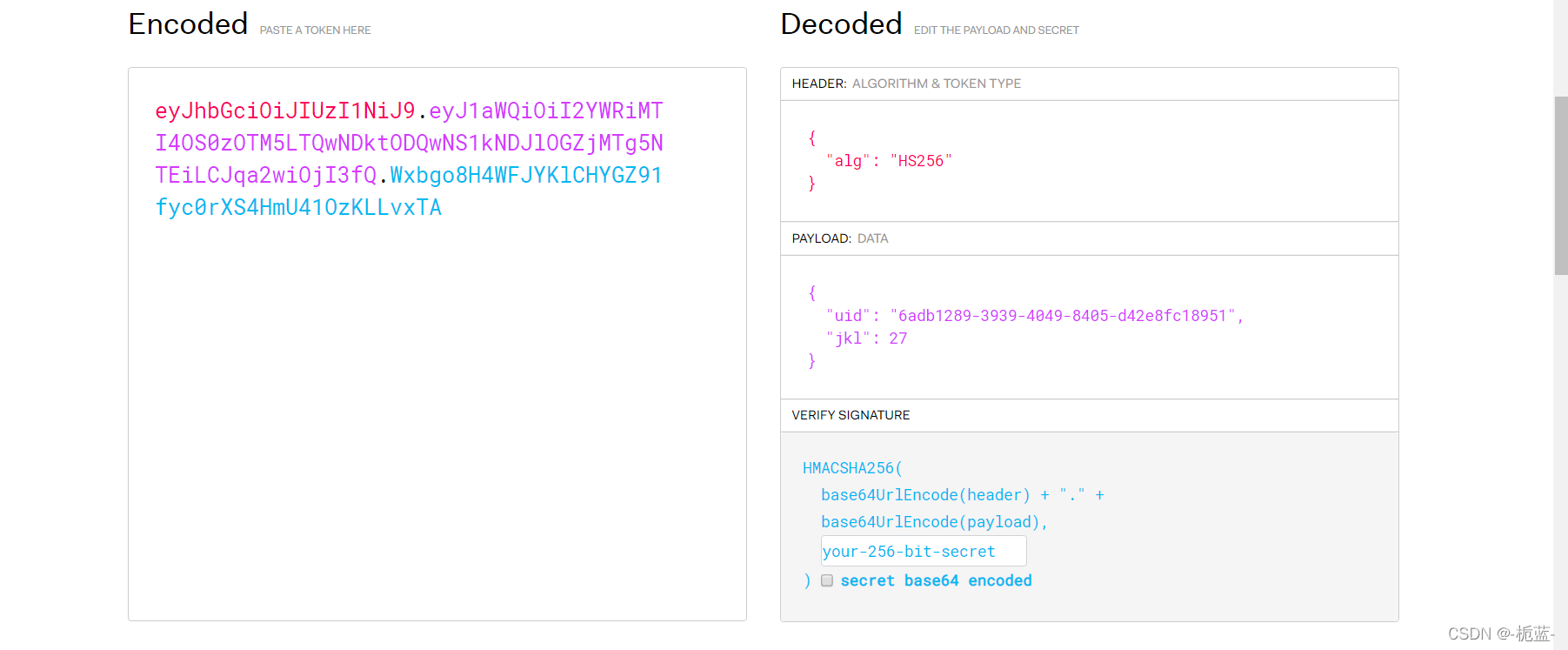
之前做过将alg这个算法改为none即可实现无算法认证,但是这里改后发现构造不出来jwt认证结果,不知什么原因,看来只能寻找密匙了。JWT介绍_没逛够的博客-CSDN博客

通过dirsearch扫描可以扫到robots.txt文件 
require 'sinatra'
require 'sinatra/cookies'
require 'sinatra/json'
require 'jwt'
require 'securerandom'
require 'erb'

set :public_folder, File.dirname(__FILE__) + '/static'

FLAGPRICE = 1000000000000000000000000000
ENV["SECRET"] = SecureRandom.hex(64)

configure do
  enable :logging
  file = File.new(File.dirname(__FILE__) + '/../log/http.log',"a+")
  file.sync = true
  use Rack::CommonLogger, file
end

get "/" do
  redirect '/shop', 302
end

get "/filebak" do
  content_type :text
  erb IO.binread __FILE__
end

get "/api/auth" do
  payload = { uid: SecureRandom.uuid , jkl: 20}
  auth = JWT.encode payload,ENV["SECRET"] , 'HS256'
  cookies[:auth] = auth
end

get "/api/info" do
  islogin
  auth = JWT.decode cookies[:auth],ENV["SECRET"] , true, { algorithm: 'HS256' }
  json({uid: auth[0]["uid"],jkl: auth[0]["jkl"]})
end

get "/shop" do
  erb :shop
end

get "/work" do
  islogin
  auth = JWT.decode cookies[:auth],ENV["SECRET"] , true, { algorithm: 'HS256' }
  auth = auth[0]
  unless params[:SECRET].nil?
    if ENV["SECRET"].match("#{params[:SECRET].match(/[0-9a-z]+/)}")
      puts ENV["FLAG"]
    end
  end

  if params[:do] == "#{params[:name][0,7]} is working" then

    auth["jkl"] = auth["jkl"].to_i + SecureRandom.random_number(10)
    auth = JWT.encode auth,ENV["SECRET"] , 'HS256'
    cookies[:auth] = auth
    ERB::new("<script>alert('#{params[:name][0,7]} working successfully!')</script>").result

  end
end

post "/shop" do
  islogin
  auth = JWT.decode cookies[:auth],ENV["SECRET"] , true, { algorithm: 'HS256' }

  if auth[0]["jkl"] < FLAGPRICE then

    json({title: "error",message: "no enough jkl"})
  else

    auth << {flag: ENV["FLAG"]}
    auth = JWT.encode auth,ENV["SECRET"] , 'HS256'
    cookies[:auth] = auth
    json({title: "success",message: "jkl is good thing"})
  end
end


def islogin
  if cookies[:auth].nil? then
    redirect to('/shop')
  end
end
不知道什么语言的代码,反正我是没见过,因为我们要获取密匙,因此寻在哪个方块可以获取密匙
get "/work" do
  islogin
  auth = JWT.decode cookies[:auth],ENV["SECRET"] , true, { algorithm: 'HS256' }
  auth = auth[0]
  unless params[:SECRET].nil?
    if ENV["SECRET"].match("#{params[:SECRET].match(/[0-9a-z]+/)}")
      puts ENV["FLAG"]
    end
  end

  if params[:do] == "#{params[:name][0,7]} is working" then

    auth["jkl"] = auth["jkl"].to_i + SecureRandom.random_number(10)
    auth = JWT.encode auth,ENV["SECRET"] , 'HS256'
    cookies[:auth] = auth
    ERB::new("<script>alert('#{params[:name][0,7]} working successfully!')</script>").result

  end
end
可以看到work板块有三个我们可以自主控制的参数do和name和SECRET
当参数do的值等于name参数的前七位+is working则会执行jkl随机数的增加,也就是我们点击work为什么每次增加的数不一致的原因
可以看到它将name参数并入了输出语句alert,我寻思肯定要利用这个地方,但是我没接触过这个,因此只能看看别人如何做的了
【技术分享】手把手教你如何完成Ruby ERB模板注入 - 安全客,安全资讯平台
Ruby语言的erb模板注入其实跟之前pythonSSTI挺像的,只不过python是用{ {}}或{%%}来执行判断,而Ruby则是用<%=%>,我们可以试试最简单的<%=1%>是否成功

这里注意要将<%=1%>进行url编码 ,避免%这种敏感字符
现在我们就需要获得密匙了,可以看见源码开头给出了环境变量密匙是一个随机数,并且上面密匙还要经过正则过滤,这里过滤有点跟我们不一样Ruby Regexp match()用法及代码示例 - 纯净天空

可以看到 搜索对象值.match("搜索的字符串") ,如果我们这里SECRET参数传入数据的话,他会因为后面的字符串是任意数字和字母,返回的就是SECRET参数的值,如果再进行一次匹配的话,密匙肯定不完整
还有字符数的限制,因此这里要用到ruby语言的预定义变量了globals - Documentation for Ruby 2.4.0

因此当我们传入$'的时候,它会返回最后一次成功匹配的右边字符串Ruby 预定义变量和常量_Looooking的博客-CSDN博客

去修改jwt,并在购买界面伪造,将返回的jwt解密

关于ruby的预定义变量看了好久,终于理解一点为什么要用$'了
版权声明
本文为[-栀蓝-]所创,转载请带上原文链接,感谢
https://blog.csdn.net/qq_54929891/article/details/124307761
边栏推荐
- Centos7 install MySQL using Yum - specify the version
- XSS-Game Level 4
- R语言广义线性模型GLM:线性最小二乘、对数变换、泊松、二项式逻辑回归分析冰淇淋销售时间序列数据和模拟
- Functional coverage cov of coverage series learning
- 08. 树莓派安装MySQL
- 《数字电子技术基础》3.3 CMOS门电路(下)
- [network protocol] DHCP and PXE
- Analysis of EMI suppression methods of switches and diodes in switching power supply
- A list of the latest changes in Mandelbrot set -- mandelbox, mandelbulb, burning ship, nebulabrot
- CocosCreator学习示例合集v3.4.2
猜你喜欢

活动预告 | 4月23日,多场OpenMLDB精彩分享来袭,不负周末好时光!

CODESYS读取csv文件的方法(非excel)

Basic understanding of initial redis
2022中国眼博会,北京青少年眼健康产业展会,护眼教育设备展
Dw07d two in one lithium battery protection IC

Three special data types of redis -- geospatial geospatial

容器云系列之容器技术相关概念介绍

Browser principle learning notes 1 - browser process

University four years, self-study programming commonly used 10 learning websites

msf --攻击MySQL 和简单实用
随机推荐
浅谈摸鱼的快乐 —— 4月20日
Applet subcontracting
University four years, self-study programming commonly used 10 learning websites
R language generalized linear model GLM: linear least squares, logarithmic transformation, Poisson, binomial logistic regression analysis, ice cream sales time series data and simulation
2022年起重机械电气安装维修考试题库模拟考试平台操作
CocosCreator学习示例合集v3.4.2
【网络协议】DHCP和PXE
Union, intersection and difference tool classes based on Apache set Toolkit
小程序 分包
Operation of simulated examination platform of test question bank for electrical installation and maintenance of hoisting machinery in 2022
How to obtain a module of a certain layer in pytorch? (it is convenient to change gradient, obtain feature map, cam, etc.)
[untitled] 2022 simulated examination platform operation of work license of coal production and operation unit (electromechanical transportation safety management personnel)
Centos7 install MySQL using Yum - specify the version
Main parameters and structure of LED
Leetcode daily question 824 Goat Latin
AI助力劳保防护装备穿戴监测,为企业安全生产保驾护航
Blender mmd 导出FBX模型 和 烘焙动画
Deeptech released seven trends of advanced computing in 2022, breaking the shackles of Moore and winning the era of computing power
比较方便安全的期货开户怎么办理好?
浏览器原理学习笔记1-浏览器进程