当前位置:网站首页>C#与 Halcon 联合编程
C#与 Halcon 联合编程
2022-04-22 18:51:00 【风雨飘摇中的石头】
显示图像C#与 Halcon 联合编程:
1、调用 Halcon 图像处理数据库,是否调用成功,是利用 Halcon图像显示控件—能否正确显示图像进行判断。
如何利用 C#与 Halcon 联合编程 调用 Halcon 图像显示控件来显示图像。
1.创建 C#项目,创建 Windows 窗体应用程序。
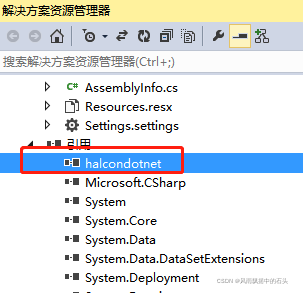
2.项目中引用 Halcon 的 DLL 文件。鼠标右键单击“引用”–“添加引用
2.1弹出 引用管理器 点击下方 “浏览”按钮。选择 Halcon 安装目录下 halcondotnet.dll文件,点击添加–确定。
3.添加 halcon 图像显示控件。 Visual Studio 左侧点击“工具箱”,空白区域点击鼠标右键,选择“选择项”。在".NET Framework 组件“页中点击”浏览“按钮,同样添加刚刚引用那个 halcondotnet.dll 文件。

4、异常处理
4.1、fatal error C1083: 无法打开包括文件: “Halcon.h”: No such file or directory
这个文件是有包括的。但编译时报错。解决方法1:debug模式改为release模式就好了。
4.2、error MS8020 Build tools v140 cannot be found解决办法
将 "项目——属性——配置属性——常规——平台工具集” 选项更改为你所用的VS版本平台集的选项即可,如用VS2013,便将其更改为v120的,v140应为VS2015/2017版本的平台工具集;如下图所示:


4.3下列控件已成功添加到工具箱中,但未在活动设计器中启用
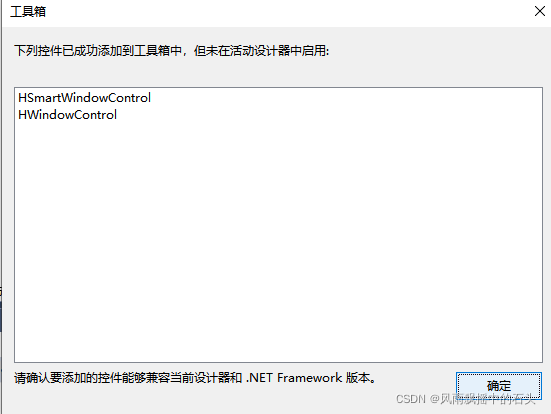
当前工程.NET的目标框架太低。解决办法:右键工程—点击“属性”–进入回击“应用程序”----界面里有一个“目答标框架”,默认的应该是“.NETFramework 2”,改成NET Framework 4 4.5就行了。
4.4 没有halcon

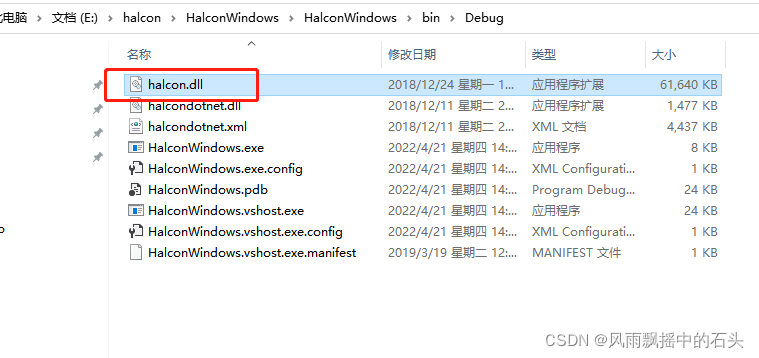
DLL文件放置位置:
(1)项目文件夹下的…/bin/Debug/
(2)系统文件夹下的C:/WINDOWS/system32
拷贝如下图
5 ok
using System;
using System.Collections.Generic;
using System.ComponentModel;
using System.Data;
using System.Drawing;
using System.Linq;
using System.Text;
using System.Threading.Tasks;
using System.Windows.Forms;
using HalconDotNet;
namespace HalconWindows
{
public partial class Form1 : Form
{
HWindow win = null;
HImage image = null;
    public Form1()
    {
        InitializeComponent();
        win = hWindowControl1.HalconWindow;//窗口与空间进行关联

        image = new HImage();//实例化变量
        image.ReadImage(@"E:\halcon\HalconWindows\HalconWindows\metal-parts\bracket_tilted_01.png");
        int width = 0;
        int height = 0;
        image.GetImageSize(out width, out height);
        win.SetPart(0,0, height - 1, width - 1);
        win.DispObj(image);
    }

    private void hWindowControl1_HMouseMove(object sender, HalconDotNet.HMouseEventArgs e)
    {

    }

    private void Form1_Load(object sender, EventArgs e)
    {

    }
}
}
错误 1 error C1083: 无法打开包括文件: “Halcon.h”: No such file or directory e:\halcon\modelmatchdemo\modelmatchdemo\HalconCpp.h 32 1 ModelMatchDemo
D:\Program Files\MVTec\HALCON-18.11-Progress\include
项目–属性–c+±-附加属性

版权声明
本文为[风雨飘摇中的石头]所创,转载请带上原文链接,感谢
https://blog.csdn.net/ydk001001/article/details/124301585
边栏推荐
- Kellerman Software .NET SFTP Library
- Global type in description file
- yes. Net future
- STC current interrupt list of all series
- Model Inspector — 软件模型静态规范检查工具
- 2020-11-04 go test编译成可执行文件
- Some problem records using rectclerview
- 我们需要什么样的数据库产品
- Simple application of tablayout + viewpager2 + fragment
- 华为设备配置策略路由引流到旁挂防火墙
猜你喜欢

聊聊缓存布尔值踩到的坑

【全网最全】JSR303参数校验与全局异常处理(从理论到实践别用if判断参数了)
![[proteus simulation] 51 single chip microcomputer 8-way actuator inching ± 90 ° inching control](/img/ab/d905bd1493f17acd8909d25308a07d.png)
[proteus simulation] 51 single chip microcomputer 8-way actuator inching ± 90 ° inching control

花样机模板电脑CAD免费打板转格式软件PS300B使用步骤教程:日本兄弟牌Brother花样机通用CAD画图打板.dxf文件转.emb文件
RHCE-ansible

CData Drivers for Jira完整的特征和属性
RHCE-ansible

2022語言與智能技術競賽再昇級,推出NLP四大前沿任務
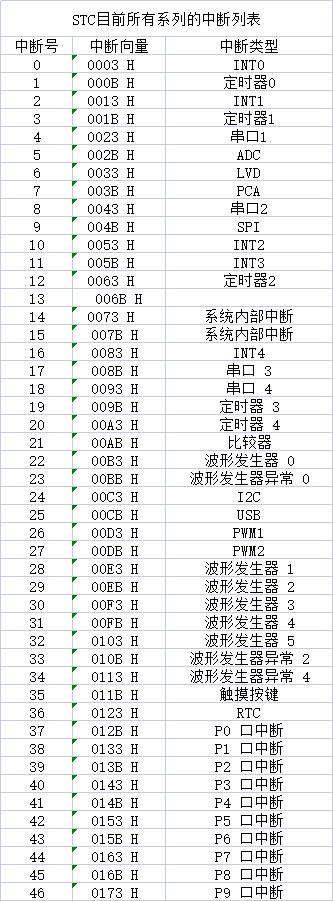
STC current interrupt list of all series

leetcode151. Reverse the words in the string (thought + explanation)
随机推荐
Jsonobject data guarantee order of fastjson
2019-12-07 wav音频剪切与合并
mmdeploy快速上手
MySQL MHA
yes. Net future
C# 将OFD转为PDF
【全网最全】JSR303参数校验与全局异常处理(从理论到实践别用if判断参数了)
一份数据满足所有数据场景?腾讯云数据湖解决方案及DLC内核技术介绍
Model Inspector — 软件模型静态规范检查工具
Question bank and answers for the retraining of excavator drivers (special types of construction work) in 2022
What are the advantages of enterprise communication software compared with other communication software
[extensive reading of papers] eating embedded learning by comprehensive transcription of heterogeneous information networks
【CIcadplayer】进度条回调
如何做好性能压测:压测环境的设计和搭建
运维工具那么多,选择哪个好? 跟着我3秒搞定
Take you to understand the principle of highly flexible spark architecture
DL之YoloV3:YoloV3论文《YOLOv3: An Incremental Improvement》的翻译与解读
文本分类问题中的一些指标
RHCE-ansible
[network security] duomics variable coverage vulnerability from white box test to actual combat