当前位置:网站首页>RTT学习笔记9-IO设备模型
RTT学习笔记9-IO设备模型
2022-08-07 14:55:00 【Car12】
I/O 设备模型框架


分成三层,从上到下分别是
- I/O 设备管理层
- 设备驱动框架层
- 设备驱动层。
I/O 设备管理层实现了对设备驱动程序的封装。
设备驱动框架层是对同类硬件设备驱动的抽象,将不同厂家的同类硬件设备驱动中相同的部分抽取出来,将不同部分留出接口,由驱动程序实现。
设备驱动层是一组驱使硬件设备工作的程序,实现访问硬件设备的功能。
不经过驱动框架层
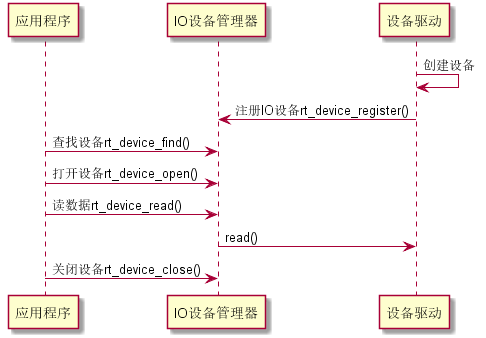
经过驱动框架层
下图一看门狗为例
I/O 设备模型

struct rt_device
{

    struct rt_object          parent;        /* 内核对象基类 */
    enum rt_device_class_type type;          /* 设备类型 */
    rt_uint16_t               flag;          /* 设备参数 */
    rt_uint16_t               open_flag;     /* 设备打开标志 */
    rt_uint8_t                ref_count;     /* 设备被引用次数 */
    rt_uint8_t                device_id;     /* 设备 ID,0 - 255 */

    /* 数据收发回调函数 */
    rt_err_t (*rx_indicate)(rt_device_t dev, rt_size_t size);
    rt_err_t (*tx_complete)(rt_device_t dev, void *buffer);

    const struct rt_device_ops *ops;    /* 设备操作方法 */

    /* 设备的私有数据 */
    void *user_data;
};
typedef struct rt_device *rt_device_t;
I/O 设备类型
RT_Device_Class_Char             /* 字符设备 */
RT_Device_Class_Block            /* 块设备 */
RT_Device_Class_NetIf            /* 网络接口设备 */
RT_Device_Class_MTD              /* 内存设备 */
RT_Device_Class_RTC              /* RTC 设备 */
RT_Device_Class_Sound            /* 声音设备 */
RT_Device_Class_Graphic          /* 图形设备 */
RT_Device_Class_I2CBUS           /* I2C 总线设备 */
RT_Device_Class_USBDevice        /* USB device 设备 */
RT_Device_Class_USBHost          /* USB host 设备 */
RT_Device_Class_SPIBUS           /* SPI 总线设备 */
RT_Device_Class_SPIDevice        /* SPI 设备 */
RT_Device_Class_SDIO             /* SDIO 设备 */
RT_Device_Class_Miscellaneous    /* 杂类设备 */
2.设备框架涉及函数
2.1创建和注册 I/O 设备
rt_device_t rt_device_create(int type, int attach_size);

一个新的设备驱动程序需要试下的框架函数
struct rt_device_ops
{

    /* common device interface */
    rt_err_t  (*init)   (rt_device_t dev);
    rt_err_t  (*open)   (rt_device_t dev, rt_uint16_t oflag);
    rt_err_t  (*close)  (rt_device_t dev);
    rt_size_t (*read)   (rt_device_t dev, rt_off_t pos, void *buffer, rt_size_t size);
    rt_size_t (*write)  (rt_device_t dev, rt_off_t pos, const void *buffer, rt_size_t size);
    rt_err_t  (*control)(rt_device_t dev, int cmd, void *args);
};

2.2销毁一个设备
void rt_device_destroy(rt_device_t device);
2.3 注册到 I/O 设备
rt_err_t rt_device_register(rt_device_t dev, const char* name, rt_uint8_t flags);
flags可选参数
#define RT_DEVICE_FLAG_RDONLY 0x001 /* 只读 */
#define RT_DEVICE_FLAG_WRONLY 0x002 /* 只写 */
#define RT_DEVICE_FLAG_RDWR 0x003 /* 读写 */
#define RT_DEVICE_FLAG_REMOVABLE 0x004 /* 可移除 */
#define RT_DEVICE_FLAG_STANDALONE 0x008 /* 独立 */
#define RT_DEVICE_FLAG_SUSPENDED 0x020 /* 挂起 */
#define RT_DEVICE_FLAG_STREAM 0x040 /* 流模式 */
#define RT_DEVICE_FLAG_INT_RX 0x100 /* 中断接收 */
#define RT_DEVICE_FLAG_DMA_RX 0x200 /* DMA 接收 */
#define RT_DEVICE_FLAG_INT_TX 0x400 /* 中断发送 */
#define RT_DEVICE_FLAG_DMA_TX 0x800 /* DMA 发送 */
2.4 注销 I/O 设备
rt_err_t rt_device_unregister(rt_device_t dev);
3. I/O设备的访问
I/O 设备管理接口与 I/O 设备的操作方法的映射关系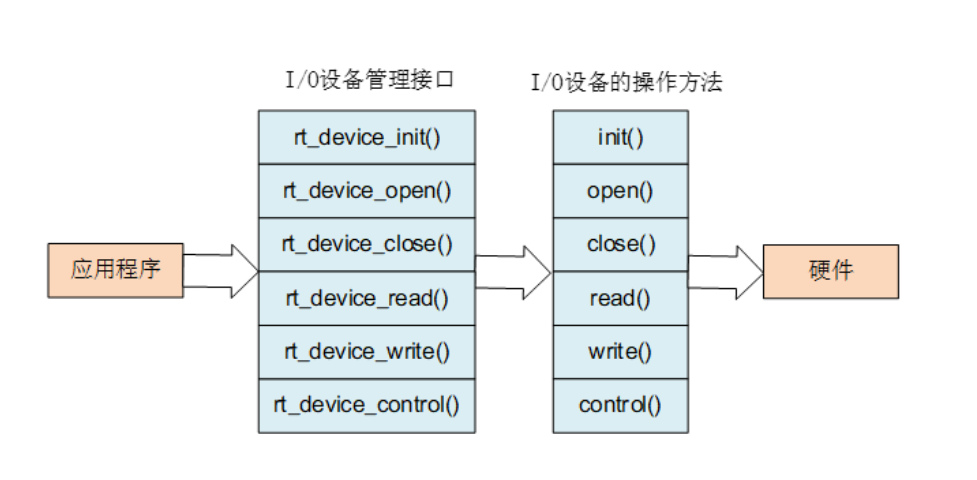
3.1查找设备
rt_device_t rt_device_find(const char* name);

3.2 初始化设备
获得设备句柄后,应用程序可使用如下函数对设备进行初始化操作:
rt_err_t rt_device_init(rt_device_t dev);

3.3 打开设备
通过设备句柄,应用程序可以打开和关闭设备,打开设备时,会检测设备是否已经初始化,没有初始化则会默认调用初始化接口初始化设备。通过如下函数打开设备:
rt_err_t rt_device_open(rt_device_t dev, rt_uint16_t oflags);
flag可选参数
#define RT_DEVICE_OFLAG_CLOSE 0x000 /* 设备已经关闭(内部使用)*/
#define RT_DEVICE_OFLAG_RDONLY 0x001 /* 以只读方式打开设备 */
#define RT_DEVICE_OFLAG_WRONLY 0x002 /* 以只写方式打开设备 */
#define RT_DEVICE_OFLAG_RDWR 0x003 /* 以读写方式打开设备 */
#define RT_DEVICE_OFLAG_OPEN 0x008 /* 设备已经打开(内部使用)*/
#define RT_DEVICE_FLAG_STREAM 0x040 /* 设备以流模式打开 */
#define RT_DEVICE_FLAG_INT_RX 0x100 /* 设备以中断接收模式打开 */
#define RT_DEVICE_FLAG_DMA_RX 0x200 /* 设备以 DMA 接收模式打开 */
#define RT_DEVICE_FLAG_INT_TX 0x400 /* 设备以中断发送模式打开 */
#define RT_DEVICE_FLAG_DMA_TX 0x800 /* 设备以 DMA 发送模式打开 */
3.4关闭设备
rt_err_t rt_device_close(rt_device_t dev);
3.5 控制设备
rt_err_t rt_device_control(rt_device_t dev, rt_uint8_t cmd, void* arg);
arg参数可选
#define RT_DEVICE_CTRL_RESUME 0x01 /* 恢复设备 */
#define RT_DEVICE_CTRL_SUSPEND 0x02 /* 挂起设备 */
#define RT_DEVICE_CTRL_CONFIG 0x03 /* 配置设备 */
#define RT_DEVICE_CTRL_SET_INT 0x10 /* 设置中断 */
#define RT_DEVICE_CTRL_CLR_INT 0x11 /* 清中断 */
#define RT_DEVICE_CTRL_GET_INT 0x12 /* 获取中断状态 */
3.6 读设备
rt_size_t rt_device_read(rt_device_t dev, rt_off_t pos,void* buffer, rt_size_t size);

3.6 写设备
rt_size_t rt_device_write(rt_device_t dev, rt_off_t pos,const void* buffer, rt_size_t size);

3.7数据收发回调
rt_err_t rt_device_set_rx_indicate(rt_device_t dev, rt_err_t (*rx_ind)(rt_device_t dev,rt_size_t size));

rt_err_t rt_device_set_tx_complete(rt_device_t dev, rt_err_t (*tx_done)(rt_device_t dev,void *buffer));
3.8 设备访问示例
#include <rtthread.h>
#include <rtdevice.h>

#define IWDG_DEVICE_NAME "iwg"

static rt_device_t wdg_dev;

static void idle_hook(void)
{

    /* 在空闲线程的回调函数里喂狗 */
    rt_device_control(wdg_dev, RT_DEVICE_CTRL_WDT_KEEPALIVE, NULL);
    rt_kprintf("feed the dog!\n ");
}

int main(void)
{

    rt_err_t res = RT_EOK;
    rt_uint32_t timeout = 1000;    /* 溢出时间 */

    /* 根据设备名称查找看门狗设备,获取设备句柄 */
    wdg_dev = rt_device_find(IWDG_DEVICE_NAME);
    if (!wdg_dev)
    {

        rt_kprintf("find %s failed!\n", IWDG_DEVICE_NAME);
        return RT_ERROR;
    }
    /* 初始化设备 */
    res = rt_device_init(wdg_dev);
    if (res != RT_EOK)
    {

        rt_kprintf("initialize %s failed!\n", IWDG_DEVICE_NAME);
        return res;
    }
    /* 设置看门狗溢出时间 */
    res = rt_device_control(wdg_dev, RT_DEVICE_CTRL_WDT_SET_TIMEOUT, &timeout);
    if (res != RT_EOK)
    {

        rt_kprintf("set %s timeout failed!\n", IWDG_DEVICE_NAME);
        return res;
    }
    /* 设置空闲线程回调函数 */
    rt_thread_idle_sethook(idle_hook);

    return res;
}
边栏推荐
- SWM32系列教程7-I2C及其应用
- 处理乱码的问题oracle字符集WE8MSWIN1252和WE8ISO8859P1
- 微信小程序——小程序中计算属性的使用
- 【高等数学】高数整理:常见等价无穷小、导数和微分、微分方程
- 服务器管理面板aaPanel使用中的一些问题汇总
- 基于TCP的聊天系统
- 联盛德W801系列2-WIFI一键配网,信息保存
- php源码随机输出某个目录下的图片API
- Browser working principle and practical study notes (1) Browser from a macro perspective
- WeChat automatic card issuance robot description
猜你喜欢


随机推荐
链路聚合 VRRP
Acwing/3359. 更多奇怪的照片
06 【泛型】
win10 uwp InkCanvas控件数据绑定
初始百度地图API
03 【常用类型(下)】
小技巧——postman生成在线文档
重命名文件夹下的所有子文件夹名,重命名子文件夹下的所有子文件夹名
Getting started with shell scripting
Tensorflow的contrib报错
亚马逊云科技 Build On 参与心得
AQS同步组件-Semaphore(信号量)解析和案例
Open3D 点云变换(变换矩阵)
002_认识微服务
LeetCode Hot Questions HOT 100 (1. Sum of two numbers)
想交易场内基金去哪个证券公司开户更快更安全
【HCIP】BGP 选路问题小型实验
微信小程序——swiper设置同时显示滑块数量
【数据库系统原理】第三章 BC范式、第三范式和第四范式
[Principle of Database System] Chapter 4 Advanced Database Model: E/R Model and Its Design Rules and Constraints