当前位置:网站首页>Iotdb permission management
Iotdb permission management
2022-04-21 23:36:00 【Diheng】
Rights management
IoTDB It provides users with permission management operations , So as to provide users with permission management function for data , Secure data .
Basic concepts
user
The user is the legal user of the database . A user corresponds to a unique user name , And have a password as a means of Authentication . Before a person uses a database , Legal must be provided first ( That is... Stored in the database ) User name and password , Make yourself a user .
jurisdiction
The database provides a variety of operations , Not all users can perform all operations . If a user can perform an operation , It is said that the user has the permission to perform the operation . Authority can be divided into data management authority ( Such as adding, deleting, modifying and checking the data ) And rights management ( user 、 Creation and deletion of roles , Granting and revocation of authority, etc ). Data management authority often needs a path to limit its effective scope , Its effective range is a subtree rooted at the node corresponding to the path .
role
A role is a collection of permissions , And have a unique role name as the identifier . Users usually correspond to a real identity ( For example, traffic controllers ), A real identity may correspond to multiple users . These users with the same real identity often have the same permissions . Role is an abstraction that can uniformly manage such permissions .
Default users and their roles
After initial installation IoTDB There is a default user in :root, The default password is root.

This user is an administrator user , Fixed has all permissions , Cannot be endowed with 、 Revoke authority , Can't be deleted .
Example of permission Operation
According to the Sample data content ,IoTDB The sample data may also belong to ln, sgcc Different power generation groups , Different power generation groups do not want other power generation groups to obtain their own database data , Therefore, we need to isolate different data at the group level .
Create user
Use CREATE USER <userName> <password> Create user .
We can ln and sgcc The group creates two user roles , be known as ln_write_user, sgcc_write_user, All passwords are write_pwd.SQL Statement for :
CREATE USER ln_write_user 'write_pwd'
CREATE USER sgcc_write_user 'write_pwd'

In this case, the user's SQL sentence :
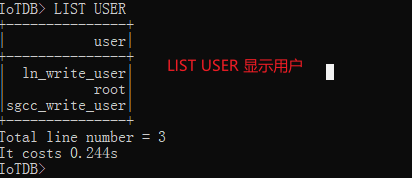
LIST USER
We can see that these two users have been created , give the result as follows :
IoTDB> LIST USER
+---------------+
|           user|
+---------------+
|  ln_write_user|
|           root|
|sgcc_write_user|
+---------------+
Total line number = 3
It costs 0.244s
Give users permission
here , Although two users have created , But they don't have any authority , Therefore, they cannot operate on the database , For example, we use ln_write_user The user writes the data in the database ,SQL Statement for :
First , To the user ln_write_user Sign in iotdb-cli:
./start-cli.bat -h 127.0.0.1 -p 6667 -u ln_write_user -pw write_pwd

Then write :
INSERT INTO root.ln.wf01.wt01(timestamp,status) values(1509465600000,true)
here , The system does not allow the user to perform this operation , It will give you an error :
IoTDB> INSERT INTO root.ln.wf01.wt01(timestamp,status) values(1509465600000,true)
Msg: 602: No permissions for this operation INSERT

Now? , We respectively grant them write permission to the corresponding storage group data , And try to write data to the corresponding storage group again .
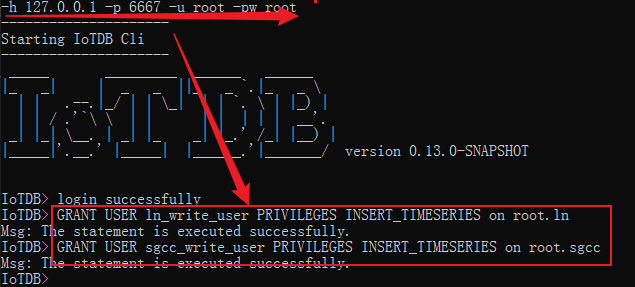
We GRANT USER <userName> PRIVILEGES <privileges> ON <nodeName> Statement gives the user permission ( Be careful : Use the default user for empowerment ), for example :
GRANT USER ln_write_user PRIVILEGES INSERT_TIMESERIES on root.ln
GRANT USER sgcc_write_user PRIVILEGES INSERT_TIMESERIES on root.sgcc
INSERT INTO root.ln.wf01.wt01(timestamp, status) values(1509465600000, true)
The execution status is as follows :

Revoke user privileges
After granting user rights , We can use REVOKE USER <userName> PRIVILEGES <privileges> ON <nodeName> To revoke the granted user rights . for example :
REVOKE USER ln_write_user PRIVILEGES INSERT_TIMESERIES on root.ln
REVOKE USER sgcc_write_user PRIVILEGES INSERT_TIMESERIES on root.sgcc

INSERT INTO root.ln.wf01.wt01(timestamp, status) values(1509465600000, true)
The execution status is as follows :

The execution status is as follows :
SQL sentence
Permission related statements include :
Create user
CREATE USER <userName> <password>;
Eg: IoTDB > CREATE USER thulab 'passwd';
Delete user
DROP USER <userName>;
Eg: IoTDB > DROP USER xiaoming;
Create the role
CREATE ROLE <roleName>;
Eg: IoTDB > CREATE ROLE admin;
Delete the role
DROP ROLE <roleName>;
Eg: IoTDB > DROP ROLE admin;
Give users permission
GRANT USER <userName> PRIVILEGES <privileges> ON <nodeName>;
Eg: IoTDB > GRANT USER tempuser PRIVILEGES DELETE_TIMESERIES on root.ln;
Give role permissions
GRANT ROLE <roleName> PRIVILEGES <privileges> ON <nodeName>;
Eg: IoTDB > GRANT ROLE temprole PRIVILEGES DELETE_TIMESERIES ON root.ln;
Revoke user privileges
REVOKE USER <userName> PRIVILEGES <privileges> ON <nodeName>;
Eg: IoTDB > REVOKE USER tempuser PRIVILEGES DELETE_TIMESERIES on root.ln;
Revoke role permissions
REVOKE ROLE <roleName> PRIVILEGES <privileges> ON <nodeName>;
Eg: IoTDB > REVOKE ROLE temprole PRIVILEGES DELETE_TIMESERIES ON root.ln;
Revoke user role
REVOKE <roleName> FROM <userName>;
Eg: IoTDB > REVOKE temprole FROM tempuser;
List users
LIST USER
Eg: IoTDB > LIST USER
List the characters
LIST ROLE
Eg: IoTDB > LIST ROLE
List permissions
LIST PRIVILEGES USER  <username> ON <path>;
Eg: IoTDB > LIST PRIVILEGES USER sgcc_wirte_user ON root.sgcc;
List user permissions
LIST USER PRIVILEGES <username> ;
Eg: IoTDB > LIST USER PRIVILEGES tempuser;
List all roles of the user
LIST ALL ROLE OF USER <username> ;
Eg: IoTDB > LIST ALL ROLE OF USER tempuser;
List role permissions
LIST ROLE PRIVILEGES <roleName>
Eg: IoTDB > LIST ROLE PRIVILEGES actor;
List the permissions of the role on the specific path
LIST PRIVILEGES ROLE <roleName> ON <path>;
Eg: IoTDB > LIST PRIVILEGES ROLE wirte_role ON root.sgcc;
Update the password
ALTER USER <username> SET PASSWORD <password>;
Eg: IoTDB > ALTER USER tempuser SET PASSWORD 'newpwd';
Other instructions
user 、 The relationship between permissions and roles
Roles are sets of permissions , Permissions and roles are attributes of users . That is, a role can have several permissions . A user can have several roles and permissions ( It is called user's own permission ).
Currently in IoTDB There are no conflicting permissions in , Therefore, the authority a user really has is the union of the user's own authority and the authority of all his roles . That is to determine whether the user can perform an operation , It depends on whether one of the user's own permissions or all permissions of the user's role allows the operation . The user's own permissions and role permissions , The same permissions may exist between the permissions of his multiple roles , But it doesn't have an impact .
It should be noted that : If a user has certain permissions ( Corresponding operation A), And one of his characters has the same permissions . Then, if you only revoke the permission from the user, you cannot prohibit the user from performing operations A Purpose , You also need to revoke the corresponding permissions from this role , Or revoke the role from this user . Again , If you revoke permissions only from the above roles , Nor can you prohibit the user from performing operations A.
meanwhile , Changes to the role will be immediately reflected to all users who have the role , For example, adding a certain permission to a role will immediately make all users who have the role have the corresponding permission , Deleting a permission will also cause the corresponding user to lose the permission ( Unless the user has this permission ).
List of permissions contained in the system
| Permission to name | explain |
|---|---|
| SET_STORAGE_GROUP | Create storage group . Contains permissions to set storage groups . Path related |
| DELETE_STORAGE_GROUP | Delete storage group . Path related |
| CREATE_TIMESERIES | Create time series . Path related |
| INSERT_TIMESERIES | insert data . Path related |
| READ_TIMESERIES | Query data . Path related |
| DELETE_TIMESERIES | Delete data or time series . Path related |
| DELETE_STORAGE_GROUP | Delete storage group . Path related |
| CREATE_USER | Create user . Path independent |
| DELETE_USER | Delete user . Path independent |
| MODIFY_PASSWORD | Change the passwords of all users . Path independent .( People without this permission can still change their password .) |
| LIST_USER | List all users , List the permissions of a user , List the roles of a user and the permissions of four operations of the roles of all users . Path independent |
| GRANT_USER_PRIVILEGE | Give users permission . Path independent |
| REVOKE_USER_PRIVILEGE | Revoke user privileges . Path independent |
| GRANT_USER_ROLE | Give users the role of . Path independent |
| REVOKE_USER_ROLE | Revoke user role . Path independent |
| CREATE_ROLE | Create the role . Path independent |
| DELETE_ROLE | Delete the role . Path independent |
| LIST_ROLE | List all roles , List the permissions of a role , List the permissions of all users with a certain role for three operations . Path independent |
| GRANT_ROLE_PRIVILEGE | Give role permissions . Path independent |
| REVOKE_ROLE_PRIVILEGE | Revoke role permissions . Path independent |
| CREATE_FUNCTION | register UDF. Path independent |
| DROP_FUNCTION | uninstall UDF. Path independent |
| CREATE_TRIGGER | Create trigger . Path related |
| DROP_TRIGGER | Unload trigger . Path related |
| START_TRIGGER | Start trigger . Path related |
| STOP_TRIGGER | Stop trigger . Path related |
| CREATE_CONTINUOUS_QUERY | Create a continuous query . Path independent |
| DROP_CONTINUOUS_QUERY | Uninstall continuous queries . Path independent |
User name restrictions
IoTDB The character length of the specified user name shall not be less than 4, The user name cannot contain spaces .
Password restrictions
IoTDB The character length of the specified password shall not be less than 4, The password cannot contain spaces , The default password is MD5 To encrypt .
Role name limit
IoTDB The character length of the specified role name shall not be less than 4, The role name cannot contain spaces .
版权声明
本文为[Diheng]所创,转载请带上原文链接,感谢
https://yzsam.com/2022/04/202204212331066519.html
边栏推荐
- Man machine verification reCAPTCHA V3 complete instructions
- Technology, products and brand are not problems. For SAIC Audi, these two points may be life and death
- There are Chinese characters in the input parameter, and an error of 500 is reported. There is an internal error in the server
- 信噪比和信干噪比
- CentOS7使用yum安装MySQL——指定版本
- Wechat server configuration
- JMeter association parameters
- JDBC概念 在idea里创建JDBC项目步骤
- 【acwing】1125. Cattle travel * * * (Floyd)
- 叹为观止,4款惊喜满满的高质量软件,使用起来倍感舒适
猜你喜欢

Developing Cami community system with ThinkPHP
341 Linux connection database

Mobile app Games / software / resource download station / software box source code

solidworks按住CTRL,拖动复制实体

Ruffian Heng embedded: talk about the application and influence of system watchdog wdog1 in the startup of i.mxrt1xxx system

339 leetcode word rules

Necessary skills for large factory interview, Android audio and video framework

【接口测试基础】第三篇 | 传统风格接口与RESTful风格接口区别

Amazing, 4 high-quality software full of surprises, feel more comfortable to use

STM32&STM8系列MCU产品命名
随机推荐
STM32&STM8系列MCU产品命名
The element clicked by selenium is blocked and cannot be operated
JDBC方法参数详解 DriverManager,Statement,Connection,ResultSet,PreparedStatement
6、協議層次化和服務模型(重點)
系列文章分类汇总(第二期)
Robot OS驱动开发
.101键盘事件
[openh264] timing of SPS_ info_ present_ flag
Mobile app Games / software / resource download station / software box source code
Difference between breadth first notes and breadth first notes
7.9 线程 互斥锁
(Reprinted) MySQL ha
Wechat server configuration
Two benchmark performance test methods of redis
如何构建一个可“持续演进”的可观测体系?| QCon
Classified summary of series articles (second issue)
SolidWorks hold down Ctrl and drag to copy entities
The three secret softwares of the leaders are practical and powerful, which are powerful tools for office efficiency and workplace promotion
Good morning and good night. Punch in V2 0.1 official account module
6. Hiérarchie des protocoles et modèle de service (clé)