当前位置:网站首页>Qt 5.14.2 connect to Mysql database
Qt 5.14.2 connect to Mysql database
2022-08-06 06:33:00 【MStudioStudio】
本文所使用的是MSVC 2017 Compiled belowmysql的dll驱动
Used in the third updateMinGW 64 编译的,操作和MSVC类似,Just replace one file.MSVC 2017生成的pluginThe driver can be downloaded directly.
1.下载mysql 5.7.30 winx64
Mysql 5.7.30 winx64
本文安装目录为 D:\mysql-5.7.30-winx64
2.下载Qt 5.14.2
Qt 5.14.2
本文安装目录为 D:\Qt5.14.2
安装的时候记得选择source 以及 msvc 2017 x64的版本(This article was compiled based on this version,Please choose other versions)
3.添加系统环境变量


4.编译mysql项目工程
工程目录为:D:\Qt5.14.2\5.14.2\Src\qtbase\src\plugins\sqldrivers\mysql
使用qt5.14.2 Open this directory .pro项目文件,Modified after opening the projectpro中的代码
TARGET = qsqlmysql

HEADERS += $$PWD/qsql_mysql_p.h
SOURCES += $$PWD/qsql_mysql.cpp $$PWD/main.cpp

#QMAKE_USE += mysql

OTHER_FILES += mysql.json

PLUGIN_CLASS_NAME = QMYSQLDriverPlugin
include(../qsqldriverbase.pri)

INCLUDEPATH += "D:/mysql-5.7.30-winx64/mysql-5.7.30-winx64/include"
DEPENDPATH += "D:/mysql-5.7.30-winx64/mysql-5.7.30-winx64/include"
LIBS += "D:/mysql-5.7.30-winx64/mysql-5.7.30-winx64/lib/libmysql.lib"
5. Open after compilationD:\plugins\sqldrivers Folder discovery generated driver files,And copy the file selected below and copy to
D:\Qt5.14.2\5.14.2\msvc2017_64\plugins\sqldrivers

The copied file directory is shown in the following figure

5.复制 D:\mysql-5.7.30-winx64\mysql-5.7.30-winx64\lib The two files in this directory are shown below

Copy to the following directory D:\Qt5.14.2\5.14.2\msvc2017_64\bin

6. 在mysqlCreate a database for testing and create any table,如下图所示

7. 在QT中新建一个widget工程,测试代码如下,

7.1 首先在pro中添加
QT += sql
7.2 并引用相应的头文件
#include <QSqlDatabase>
7.3 在main中或widget中添加如下代码进行测试
    qDebug()<<"available drivers:";
    QStringList drivers = QSqlDatabase::drivers();
    foreach(QString driver, drivers)
        qDebug()<<driver;

    QSqlDatabase data_base = QSqlDatabase::addDatabase("QMYSQL");
    data_base.setHostName("127.0.0.1");  //设置主机地址
    data_base.setPort(3306);  //设置端口 默认3306
    data_base.setDatabaseName("sql5user");  //设置数据库名称
    data_base.setUserName("root");  //对应数据库的用户名
    data_base.setPassword("123456");//The password of the corresponding database

    if(!data_base.open())
        qDebug()<<"failed";
    else
        qDebug()<<"success";
7.4 The output of the program is shown in the figure below

第一次更新
在使用qt连接阿里云服务器mysql5.28的时候,应该注意的是
- The specified database table name should exist
- Check the authorized username in the database,通常默认情况下root 的 host 为“localhost”,故此,A user needs to be authorized for access,使你的host 变为"%"即可
- 默认情况下,Newly authorized access users do not have permission,So the permissions should be given to the newly added user
Check authorized firstip,authentication_string指的是 password(5.7的原因)
SELECT host,user,authentication_string,Grant_priv,Super_priv FROM mysql.user;
Then use the following statement to change the permissions,代码中xxxx指的是用户的username,
(在出现ERROR:1142 That is, when the permission is denied, the following statement needs to be executed,同时刷新mysql, 重启mysql即可解决)
   UPDATE mysql.user SET
  `Select_priv` = 'Y',
  `Insert_priv` = 'Y',
  `Update_priv` = 'Y',
  `Delete_priv` = 'Y',
  `Create_priv` = 'Y',
  `Drop_priv` = 'Y',
  `Reload_priv` = 'Y',
  `Shutdown_priv` = 'Y',
  `Process_priv` = 'Y',
  `File_priv` = 'Y',
  `Grant_priv` = 'Y',
  `References_priv` = 'Y',
  `Index_priv` = 'Y',
  `Alter_priv` = 'Y',
  `Show_db_priv` = 'Y',
  `Super_priv` = 'Y',
  `Create_tmp_table_priv` = 'Y',
  `Lock_tables_priv` = 'Y',
  `Execute_priv` = 'Y',
  `Repl_slave_priv` = 'Y',
  `Repl_client_priv` = 'Y',
  `Create_view_priv` = 'Y',
  `Show_view_priv` = 'Y',
  `Create_routine_priv` = 'Y',
  `Alter_routine_priv` = 'Y',
  `Create_user_priv` = 'Y',
  `Event_priv` = 'Y',
  `Trigger_priv` = 'Y',
  `Create_tablespace_priv` = 'Y'
   WHERE User='xxx';
在qtThe format for running a database statement in is
#include <QSqlError>
#include <QSqlQuery>

QSqlQuery  SqlQuery;
SqlQuery.exec(" Insert yours heresql语句"); //If it can be guaranteed to be performed correctly,Just use this sentence,Otherwise, use the following statement to judge

if(!SqlQuery.exec("Insert yours heresql语句"))//此语句==!QSqlQuery.exec("Insert yours heresql语句")
 {

     qDebug()<<"语句执行错误";
 }
 else
 {

	 qDebug()<<"语句执行成功";
 }
If the query statement to run,Need to know the format and number of columns in the database table
使用如下示例,If there are two columns in the table, respectively name 和 password
#include <QString>
  QString login_check =QString("select * from userlogin;");
  if(!SqlQuery.exec(login_check))//==!QSqlQuery.exec(create_sql)
  {

      qDebug()<<"语句执行错误";
  }
  else
  {

      QString show_name ;
      QString show_pwd ;
      while(SqlQuery.next())
      {

          show_name = SqlQuery.value(0).toString();

          show_pwd = SqlQuery.value(1).toString();
             qDebug() <<show_name<<show_pwd;
      }
      if(show_name==NULL || show_pwd==NULL)
           qDebug()<<"not user";
  }
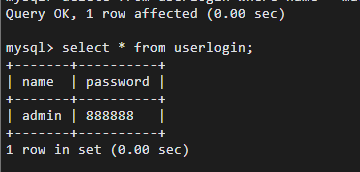
The data in the table and inqtThe received data is shown in Fig

第二次更新
在qt5.14.2 release后,The file packaging test is unable to connect directlymysql数据的
The workaround is after using the packager,在exe同级目录下添加libmysql.dll
libmysqlThe source file location is shown in the following figure
第三次更新
due to recent useMiniGW 64-bit 进行编译,The corresponding driver needs to be generated,首先按MSVCmethod to copy,
The environment does not need to be changed,Generate the original before compilingD:\ plugindirectory is cut elsewhere
再次使用mysql.profile to compile,选择MiniGW 64-bit 编译.
会生成如下文件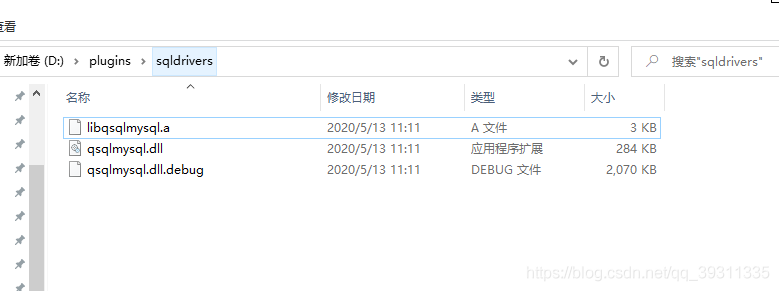
将qsqlmysql.dllRe-copy to the following directory,注意是mingw的,Make a replacement to connect to the database.
Mingw 64 的大小是284kb ,MSVC 2017 64bit 的是61kb!
边栏推荐
- 【Programming】编程常用英文术语中文对照,及其解释
- error: C1083: 无法打开包括文件: “stddef.h”: No such file or directory
- 【Numpy】np.stack()最通俗易懂解释
- 旷视提出PETRv2:统一的多摄像头3D感知框架
- Vs2019编译OpenCv3
- QSpinbox 将中文句号 处理 为英文小数点
- Quick图形旋转、缩放和平移
- libcurl+openssl库交叉编译
- Sprinig Boot + Redis 实现接口幂等性,写得太好了
- 【Pytorch】torch.nn.functional.conv2d(F.conv2d) same padding实现方法(输入与输出大小相同)
猜你喜欢

【多传感器融合】激光雷达与相机前融合

关于Warning:Implicit declaration of function “xxx” is invalid in C99警告!

十五、一起学习Lua 协同程序(coroutine)

QT自定义安装包

Talk预告 | 德国马普所修宇亮:如何多快好省地重建三维数字人
CMU联合DeepMind发布”高质量“通用多模态表征框架HighMMT

工业相机镜头选型

error: C1083: 无法打开包括文件: “stddef.h”: No such file or directory

Convolutional Neural Network Notes 2

Qt教程(3) : 信号与槽
随机推荐
科普:String hashCode 方法为什么选择数字 31 作为乘子
R语言 地理加权随机森林(GWRFC )
统计字符串中英文字母、空格、数字和其它字符的个数.读取文件中的学生信息,计算出考试的平均分。创建一个Student类的数组,封装5个学生的信息,按指定条件查找学生.计算当前时间距明年春节还有多长时间。
Ununtu20.04安装OSI及相关组件
C#脚本CSharpScript
C语言常用的宏定义
字符流Reader和Writer
R数据分类汇总
图像处理(8) : 模板匹配
上传shp.zip并加载至arcgis地图中(web端)
【多传感器融合】卡尔曼滤波
Qt教程(2) : Qt元对象系统
geoserver 发布 矢量切片(pbf)并用openlayers 6.14 /leaflet 1.8 加载展示 (三)(小白必备:超详细教程)
IO流文件复制
R语言Logist回归
Oracle配置st_geometry
卷积神经网络笔记2
【R语言】一文解决R语言包安装不上问题(尤其是devtools)
十二、一起学习Lua table(表)
Convolutional Neural Networks for Handwritten Digit Classification