Your self-hosted bookmark archive. Free and open source.

Overview


Your self-hosted bookmark archive. Free and open source.


Get support for LinkAce and chat about the project Follow LinkAce on Twitter Docker Repository Latest Release License


Contents


About LinkAce

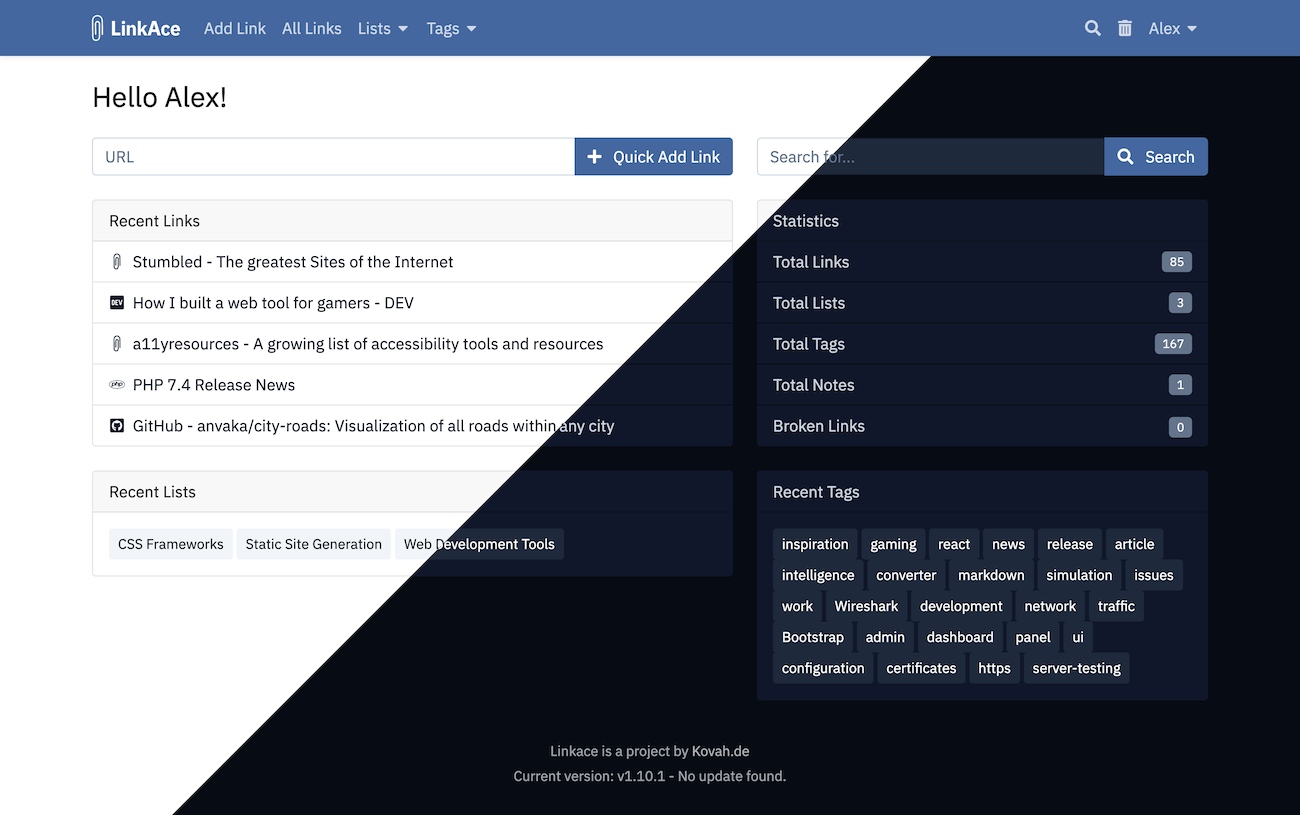
Preview Screenshot

LinkAce is a self-hosted archive to collect links of your favorite websites. Save articles to read them later, tools to use them in your next project, or historic content to archive it for the long term. LinkAce comes with a lot of features while keeping a clean and minimal interface.
It provides a long-term archive to store links to websites, media files or anything else with a valid URL. The user is able to categorize the added links to be able to find them later, and share lists of links with friends, family or coworkers. However, LinkAce should not provide a solution to sync your browser bookmarks.

Feature Highlights

  • Save links with automatic title and description generation.
  • Automated link monitoring informs you when any links become unavailable or were moved.
  • Automated backups of saved sites via the Internet Archive.
  • Organize bookmarks with the help of lists and tags.
  • A full REST API offers access to all features of LinkAce from other apps and services.
  • LinkAce ships with a light and dark theme, that can be toggled or changes automatically.
  • A bookmarklet to quickly save links from any browser.
  • Links can be private or public, so friends or internet strangers may see your collection.
  • Both private and public links are accessible via RSS feeds.
  • Add notes to links to add thoughts or other relevant information.
  • An advanced search including different filters and ordering.
  • Import and export of bookmarks from HTML.
  • Support for complete database and application backups to any AWS S3 storage.

More features are already planned. Take a look at the project board for more information.

More screenshots of the app and further details about the features can be found on the LinkAce Website.


💡 Support for LinkAce

I built LinkAce to solve my own problem, and I now offer my solution and code without charging any money. I spent a lot of my free time building this application, so I won't offer any free personal support, customization or installation help. If you need help please visit the community forum and post your issue there.

You can get personal and dedicated support by becoming a Patreon or Github Sponsor.

Documentation and Community

Details about all features and advanced configuration can be found in the project documentation.
Additionally, you may visit the community forums to share your ideas, talk with other users or find help for specific problems.


⚙️ Setup

LinkAce provides multiple ways of installing it on your server. The complete documentation for all installation methods can be found in the wiki.

  • Setup with Docker (recommended)
    • Simple setup with 1 Docker image
    • Advanced setup with multiple Docker images
  • Setup without Docker


🚧 Contribution

Translations Code Climate maintainability Code Climate coverage GitHub Build Status

Please consult the contribution guidelines to start working on LinkAce.


Thanks go to these wonderful people for their contributions:

List of contributors


LinkAce is a project by Kevin Woblick and Contributors

Comments
  • Filesystem permission issues while trying to import

    Filesystem permission issues while trying to import

    I was struggling with the setup instructions for some time:

    4. Run the Setup
    After you started the Docker containers, you are almost ready to run the setup. Before the setup, we have to generate a secret key. Please note that linkace_php_1 is the name of your PHP container here. It may differ from your name. You will find the name of your container in the output of the previous command, but will most likely end with _php_1.
    
    docker-compose run php php artisan key:generate
    

    Eventually I found that the working command should be

    docker exec -it linkace_app_1 php artisan key:generate

    Providing this to help others in the same situation, but it would probably be an idea to fix the instructions - both here an on the website.

    Support 
    opened by dokbua 21
  • Could not open input file: artisan

    Could not open input file: artisan

    Hi, I can't even get started on this docker compose setup, following https://www.linkace.org/docs/v1/setup/setup-with-docker/advanced/

    [email protected]:~/Projects/Docker/my-cloud-infrastructure $ sudo docker exec linkace-app php artisan key:generate
    Could not open input file: artisan
    

    Any ideas as to whats going on?

    Thanks

    Bug 
    opened by aashish108 17
  • Clarification of Backup Strategy

    Clarification of Backup Strategy

    Describe the bug

    This may or may not be a bug. Looking at config/backup.php I see there appears to be a default backup strategy at the bottom of file, however this configuration does not seem to be obeyed as I currently have 23 backups.

    To Reproduce

    1. Setup LinkAce, I am currently using the "advanced" Docker deployment.
    2. Configure backups w/ S3.
    3. Let the backup process take place, and see it continue to occur.
    4. Does it ever remove older backups?

    Expected behavior

    At this point I am not sure what to expect since nothing appears to be documented, except for looking at the backup.php file.

    Screenshots

    N/A

    LinkAce setup (please complete the following information):

    • Version: v1.2.2 (though I see there is a new version - not sure if anything in regards to backups was touched in that version)
    • Installed via: Docker
    • OS: Ubuntu 20.04.x

    Desktop (please complete the following information if applicable):

    N/A

    Smartphone (please complete the following information if applicable):

    N/A

    Additional context

    N/A

    Bug 
    opened by jimmybrancaccio 16
  • Update to 1.4.0 with docker-compose.production.yml configuration file ends in 500 - Server Error

    Update to 1.4.0 with docker-compose.production.yml configuration file ends in 500 - Server Error

    Hello, i use the service containrrr/watchtower to automatic update my docker apps. ( https://containrrr.dev/watchtower/ )

    Today it runs an update and i get after the login i get the 500 server error.

    I'm not sure if the problem is this recent change:

    https://github.com/Kovah/LinkAce/commit/b0058663975f1916e43a643ecdcbf006f9fdf163#diff-939173f100b9faaec94fb740138ad0f6376d79e4317974d4dc28a5b489bab7b8

    LinkAce setup (please complete the following information):

    • Version: 1.3.1 update to 1.4
    • Installed via: Docker
    • OS: Debian

    Desktop (please complete the following information if applicable):

    • OS: Windows
    • Browser Firefox
    • Version 87

    Additional context watchtower update log. watchtower log.txt

    Bug 
    opened by steffenweb 13
  • Make app less depended on .env

    Make app less depended on .env

    Is your feature request related to a problem? Please describe.

    Using that kind of flag to check if the setup is complete or not is making automated installs harder.

    e.g. I'm maintain an app catalog (TrueCharts) based on helm charts for TrueNAS Scale. I'm in the process of adding this app on the said catalog. We aim to have apps with automated setup, which SETUP_COMPLETE, makes it a bit harder than usual.

    So with this flag, after a user deploys the app and finish installation, the user must go change the flag to true in order to make installer not run again on next app startup. While this is easy on TN Scale as there is a GUI for all those, it's not "ok". As most users won't read any notices in the GUI. This will lead to bug reports to both our catalog and your repo.

    I don't know how you handle an instance with initiallized db and setup_complete set to false, but if its not handled users might aswell lose data.!

    Don't get me wrong, there are ways to get around that in Helm, like mounting a volume with the .env file inside with the SETUP_COMPLETE in there, so the app can modify it. But that feels "hacky".

    I don't really know your app's codebase, but one thing I could recommend is to add a db entry when the init setup is run. and on each app startup check the DB for that entry. If it's missing, then the setup must run.

    Describe the solution you'd like Get rid of the SETUP_COMPLETE flag.

    Describe alternatives you've considered Write init scripts and init containers to detect if app has setup run and change env.

    Additional context Add any other context or screenshots about the feature request here.

    Enhancement 
    opened by stavros-k 12
  • Unable to import in 1.7.0 (both HTML and CVS) saved bookmarks from 1.4.1

    Unable to import in 1.7.0 (both HTML and CVS) saved bookmarks from 1.4.1

    Describe the bug A clear and concise description of what the bug is.

    To Reproduce Steps to reproduce the behavior:

    1. Go to '...'
    2. Click on '....'
    3. Scroll down to '....'
    4. See error

    Expected behavior A clear and concise description of what you expected to happen.

    Screenshots If applicable, add screenshots to help explain your problem.

    LinkAce setup (please complete the following information):

    • Version: [e.g. 0.0.43]
    • Installed via: [e.g. PHP, Docker]
    • OS: [e.g. Ubuntu, CentOS, Windows]

    Desktop (please complete the following information if applicable):

    • OS: [e.g. iOS]
    • Browser [e.g. chrome, safari]
    • Version [e.g. 22]

    Smartphone (please complete the following information if applicable):

    • Device: [e.g. iPhone6]
    • OS: [e.g. iOS8.1]
    • Browser [e.g. stock browser, safari]
    • Version [e.g. 22]

    Additional context Add any other context about the problem here.

    Bug awaiting Response 
    opened by gianter962 12
  • Import exception:

    Import exception: "Undefined variable: time"

    This call throws an error: "Undefined variable: time" https://github.com/Kovah/LinkAce/blob/3987f5ddbf4bb9bc46a9c388f49307a21dbb85b9/app/Http/Controllers/App/ImportController.php#L46

    because in this commit, the author replaced the time() with an $time variable

    https://github.com/shaarli/netscape-bookmark-parser/commit/78b316f1a0154873e9621889ba495e607896eb28#diff-4a59dbd62a2dae2500f43e35fb7d51ceR232

    Bug 
    opened by newpdv 12
  • Problem importing bookmarks

    Problem importing bookmarks

    I installed Linkace in docker/ubuntu and I have no experience in tuning Linux. When importing I get an error: Something went wrong while trying to import the bookmarks. Please consult the application logs. In the log I see several such messages production.ERROR: SQLSTATE[42S02]: Base table or view not found: 1146 Table 'linkace.settings' doesn't exist (SQL: select * from settings where user_id is null)

    And what should I do with it now?

    Support 
    opened by mike2003 11
  • Epoch doesn't fit in a PHP integer, date and time issues

    Epoch doesn't fit in a PHP integer, date and time issues

    but now I'm getting a 500 with this error:

    [2071-05-12 03:41:52] production.ERROR: Epoch doesn't fit in a PHP integer {"exception":"[object] (ValueError(code: 0): Epoch doesn't fit in a PHP integer at /app/vendor/nesbot/c
    arbon/src/Carbon/Traits/Units.php:136)
    

    this is what I get for date in the app container:

    /app/storage/logs # date
    Sun Jan  0 00:100:4174038  1900
    

    it seems the date/time is way misconfigured on the app container. I tried some suggestions from stack overflow like mounting some timezone/localtime directories but it didn't seem to help. any ideas?

    Originally posted by @galonsky in https://github.com/Kovah/LinkAce/issues/175#issuecomment-808761741

    ToDo 
    opened by Kovah 11
  • All new links are private

    All new links are private

    Describe the bug A clear and concise description of what the bug is. All links are created as private, even though settings are set to no. To Reproduce Steps to reproduce the behavior:

    1. Go to the website you want to create a link from
    2. Click on the browser add-on for LinkAce, fill in what you need and save.
    3. Go to LinkAce web interface and find the new link has a lock to it. Check your settings again to find out, it clearly says 'no' for private links.
    4. See error

    Expected behavior A clear and concise description of what you expected to happen. I expect links to not be private as st in the settings. Screenshots If applicable, add screenshots to help explain your problem.

    LinkAce setup (please complete the following information):

    • Version: v1.10.1
    • Installed via: Docker
    • OS: Ubuntu

    Desktop (please complete the following information if applicable):

    • OS: siduction (Debian Sid)
    • Browser: Chrome
    • Version: 102.0.5005.115

    Smartphone (please complete the following information if applicable):

    • Device: [e.g. iPhone6]
    • OS: [e.g. iOS8.1]
    • Browser [e.g. stock browser, safari]
    • Version [e.g. 22]

    Additional context Add any other context about the problem here. linkace2 linkace1

    Bug 
    opened by fethomm 10
  • 500 - Server Error when adding one specific link

    500 - Server Error when adding one specific link

    Describe the bug A clear and concise description of what the bug is. Getting an error stating: 500 - Server Error An internal server error occured. If you are the administrator, consult the application logs for details.

    When attempting to add link: https://www.grc.com/passwords.htm

    Have tried Quick Add and Add via Firefox extension with same result.

    To Reproduce Steps to reproduce the behavior:

    1. Go to main screen, in Quick Add Link enter 'https://www.grc.com/passwords.htm'
    2. Click on Add button
    3. See error: 500 - Server Error An internal server error occured. If you are the administrator, consult the application logs for details.

    In docker log I see the following:

    127.0.0.1 - 02/Mar/2022:21:04:05 +0000 "POST /index.php" 500 172.20.0.4 - - [02/Mar/2022:21:04:07 +0000] "POST /links HTTP/1.1" 500 5456 "https://linkace.local.REDACTED.co.uk/dashboard" "Mozilla/5.0 (Windows NT 10.0; Win64; x64; rv:97.0) Gecko/20100101 Firefox/97.0" "192.168.1.98"

    Expected behavior Link should add correctly, dont have an issue adding another other links.

    Screenshots NA

    LinkAce setup (please complete the following information):

    • Version:1.9.1
    • Installed via:Docker Simple
    • OS: Raspbian GNU/Linux 11 (bullseye)

    Desktop (please complete the following information if applicable):

    • OS:Windows 10
    • Browser Firefox
    • Version 97.0.1

    Additional context NA

    Support 
    opened by mmozzano 9
  • Import: imported tags are public by default

    Import: imported tags are public by default

    Bug Description

    I was watching the #577 issue because I wanted to import all my bookmarks as private. I updated LinkAce today and it works correctly. I think that the same issue applies to tags too, which wasn't mentioned. In my case the tags were folders from a Chrome bookmark export.

    How to reproduce

    1. Make new tags private by default
    2. Import some bookmarks that include tags
    3. Check the tags

    Expected behavior

    The default setting for new tags should be respected

    Logs

    No response

    Screenshots

    No response

    LinkAce version

    v1.11.0

    Setup Method

    Docker

    Operating System

    Linux (Ubuntu, CentOS,...)

    Client details

    No response

    Bug 
    opened by nonmaterialistically 1
  • Use tag & lists name for HTML title

    Use tag & lists name for HTML title

    Bug Description

    When creating a bookmark, they are all labelled as My Bookmarks in Firefox.

    How to reproduce

    • Create a bookmark
    • Drag from url bar

    Expected behavior

    The should inherit the name of list or tag.

    Logs

    No response

    Screenshots

    Screenshot 2022-12-08 at 09 51 18

    LinkAce version

    latest

    Setup Method

    Docker

    Operating System

    macOS

    Client details

    No response

    Enhancement 
    opened by Drallas 0
  • Import: check the content before importing, maybe ask for confirmation

    Import: check the content before importing, maybe ask for confirmation

    Bug Description

    I just misclicked while trying to import bookmarks, and thus imported a standard HTML file. It took a long time, and obviously gave very weird results, and also took a lot of time afterwards.

    How to reproduce

    1. Save some website to html file
    2. Import it
    3. Enjoy

    Expected behavior

    To avoid this, one could maybe check that the file to be imported a) is actually valid HTML and b) starts with <!DOCTYPE NETSCAPE-Bookmark-file-1>. Moreover, showing the number of links or maybe even a preview of the raw URLs + then asking for confirmation beforehand would be really helpful.

    Logs

    No response

    Screenshots

    No response

    LinkAce version

    v1.10.5

    Setup Method

    PHP

    Operating System

    Linux (Ubuntu, CentOS,...)

    Client details

    Arch Linux, Chromium

    Bug 
    opened by piegamesde 1
  • Import: Tags get messed up

    Import: Tags get messed up

    Bug Description

    I just tried to import a bookmarks file and it went fairly well, it even recognized the tags properly. However there seems to be a bug: some links got tags that were not present in the HTML file. For example, the bookmarks tag got added to almost all or all bookmarks. I did a few checks and could not find any missing tags, only added ones.

    How to reproduce

    TODO. I'll try to create a small reproducer file soon

    Expected behavior

    Tags are properly imported. (Alternatively, tags are not imported at all.)

    Logs

    No response

    Screenshots

    No response

    LinkAce version

    v10.5

    Setup Method

    PHP

    Operating System

    Linux (Ubuntu, CentOS,...)

    Client details

    Arch Linux, Chromium

    Bug 
    opened by piegamesde 2
  • Postgresql no unix socket connection

    Postgresql no unix socket connection

    Bug Description

    It looks like that there is no way to connect to the postgresql server via unix socket. This is important because it allows using peer authentication instead of having to deal with passwords. I found that there is a DATABASE_URL environment variable in the configuration but it does not seem to be used (tbh I'm not sure what it exactly does).

    How to reproduce

    Set the following environment:

    DB_CONNECTION=pgsql
    DB_DATABASE=linkace
    DATABASE_URL=/run/postgresql
    

    php artisan migrate --force --no-interaction

    Expected behavior

    It works

    Logs

    `SQLSTATE[08006] [7] connection to server at "127.0.0.1", port 5432 failed`
    

    Screenshots

    No response

    LinkAce version

    1.10.5

    Setup Method

    PHP

    Operating System

    Linux (Ubuntu, CentOS,...)

    Client details

    No response

    Bug 
    opened by piegamesde 0
  • Bump loader-utils from 1.4.0 to 1.4.2

    Bump loader-utils from 1.4.0 to 1.4.2

    Bumps loader-utils from 1.4.0 to 1.4.2.

    Release notes

    Sourced from loader-utils's releases.

    v1.4.2

    1.4.2 (2022-11-11)

    Bug Fixes

    v1.4.1

    1.4.1 (2022-11-07)

    Bug Fixes

    Changelog

    Sourced from loader-utils's changelog.

    1.4.2 (2022-11-11)

    Bug Fixes

    1.4.1 (2022-11-07)

    Bug Fixes

    Commits

    Dependabot compatibility score

    Dependabot will resolve any conflicts with this PR as long as you don't alter it yourself. You can also trigger a rebase manually by commenting @dependabot rebase.


    Dependabot commands and options

    You can trigger Dependabot actions by commenting on this PR:

    • @dependabot rebase will rebase this PR
    • @dependabot recreate will recreate this PR, overwriting any edits that have been made to it
    • @dependabot merge will merge this PR after your CI passes on it
    • @dependabot squash and merge will squash and merge this PR after your CI passes on it
    • @dependabot cancel merge will cancel a previously requested merge and block automerging
    • @dependabot reopen will reopen this PR if it is closed
    • @dependabot close will close this PR and stop Dependabot recreating it. You can achieve the same result by closing it manually
    • @dependabot ignore this major version will close this PR and stop Dependabot creating any more for this major version (unless you reopen the PR or upgrade to it yourself)
    • @dependabot ignore this minor version will close this PR and stop Dependabot creating any more for this minor version (unless you reopen the PR or upgrade to it yourself)
    • @dependabot ignore this dependency will close this PR and stop Dependabot creating any more for this dependency (unless you reopen the PR or upgrade to it yourself)
    • @dependabot use these labels will set the current labels as the default for future PRs for this repo and language
    • @dependabot use these reviewers will set the current reviewers as the default for future PRs for this repo and language
    • @dependabot use these assignees will set the current assignees as the default for future PRs for this repo and language
    • @dependabot use this milestone will set the current milestone as the default for future PRs for this repo and language

    You can disable automated security fix PRs for this repo from the Security Alerts page.

    Dependencies Javascript 
    opened by dependabot[bot] 0
Releases(v1.11.0)
Owner
Kevin Woblick
Full Stack Web Engineer and Open Source Creator.
Kevin Woblick
An easy way to access to your EPITECH subjects based on the Roslyn's database.

An easy way to access to your EPITECH subjects based on the Roslyn's database.

Mathias 1 Feb 09, 2022
Make pack up python files easier.

python-easy-pack make pack up python files easier. 目前只提供了中文环境 如何使用? 将index.py复制到你的项目文件夹,或者把.py文件拷贝到这个文件夹。 打开你的cmd或者powershell 切换到程序所在目录,输入python index

2 Dec 15, 2021
Tips that improve your life in one way or another

Tips that improve your life in one way or another. This software downloads life tips from reddit.com/r/LifeProTips and tweet the most upvoted tips on Twitter.

Burak Tokman 2 Aug 04, 2022
This Python script can enumerate all URLs present in robots.txt files, and test whether they can be accessed or not.

Robots.txt tester With this script, you can enumerate all URLs present in robots.txt files, and test whether you can access them or not. Setup Clone t

Podalirius 32 Oct 10, 2022
pgvector support for Python

pgvector-python pgvector support for Python Great for online recommendations 🎉 Supports Django, SQLAlchemy, Psycopg 2, Psycopg 3, and asyncpg Install

Andrew Kane 37 Dec 20, 2022
Render reMarkable documents to PDF

rmrl: reMarkable Rendering Library rmrl is a Python library for rendering reMarkable documents to PDF files. It takes the original PDF document and th

Robert Schroll 95 Dec 25, 2022
An Airflow operator to call the main function from the dbt-core Python package

airflow-dbt-python An Airflow operator to call the main function from the dbt-core Python package Motivation Airflow running in a managed environment

Tomás Farías Santana 93 Jan 08, 2023
Anki for desktop computers

Anki This repo contains the source code for the computer version of Anki. If you'd like to try development builds of Anki but don't feel comfortable b

Ankitects 12.9k Jan 09, 2023
Backend/API for the Mumble.dev, an open source social media application.

Welcome to the Mumble Api Repository Getting Started If you are trying to use this project for the first time, you can get up and running by following

Dennis Ivy 189 Dec 27, 2022
Script for resizing MTD partitions on a QNAP device in order to be available to upgrade from buster to bullseye

QNAP partitions resize for kirkwood devices. As explained by Marin Michlmayr, Debian bullseye support on kirkwood QNAP devices was dropped due to [mai

Arnaud Mouiche 26 Jan 05, 2023
Plugins for Agisoft Metashape

Данные плагины предназначены для расширения функциональных возможностей Agisoft Metashape. Плагины представляют собой отдельные программы с собственным интерфейсом, которые запускаются внутри Agisoft

GeoScan 17 Dec 10, 2022
About A python based Apple Quicktime protocol,you can record audio and video from real iOS devices

介绍 本应用程序使用 python 实现,可以通过 USB 连接 iOS 设备进行屏幕共享 高帧率(30〜60fps) 高画质 低延迟(200ms) 非侵入性 支持多设备并行 Mac OSX 安装 python =3.7 brew install libusb pkg-config 如需使用 g

YueC 124 Nov 30, 2022
ToDo - A simple bot to keep track of things you need to do

ToDo A simple bot to keep track of things you need to do. Installation You will

3 Sep 18, 2022
Simple Calculator Mobile Apps

Simple Calculator Mobile Apps Screenshoot If you want to try it please click the link below to download, this application is 100% safe no virus. link

0 Sep 24, 2022
0xFalcon - 0xFalcon Tool For Python

0xFalcone Installation Install 0xFalcone Tool: apt install git git clone https:/

Alharb7 6 Sep 24, 2022
Donatus Prince 6 Feb 25, 2022
La version open source du bot Discord Sblerboy

Sblerboy-Open-Source La version open source du bot Discord Sblerboy Sblerboy est un bot Discord permettant de jouer à des jeux de Gameboy directement

15 Nov 19, 2022
JPMC Virtual Experience

This repository contains the submitted patch files along with raw files of the various tasks assigned by JPMorgan Chase & Co. through its Software Engineering Virtual Experience Program on Forage (fo

Vardhini K 1 Dec 05, 2021
Very Simple 2 Message Spammer!

Very Simple 2 Message Spammer!

Syntax. 4 Dec 06, 2022
serological measurements from multiplexed ELISA assays

pysero pysero enables serological measurements with multiplexed and standard ELISA assays. The project automates estimation of antibody titers from da

Chan Zuckerberg Biohub 5 Aug 06, 2022