当前位置:网站首页>编译原理——词法分析程序(C#)
编译原理——词法分析程序(C#)
2022-08-08 20:47:00 【郭麻花】
词法分析实验目的与要求
编制一个读单词过程,从输入的源程序中,识别出各个具有独立意义的单词,即基本保留字、标识符、常数、运算符、分隔符五大类;要求能对五类单词符号进行正确的分析,给出相应的提示信息。
实验内容
对于这个实验,我主要使用了三种函数:文件读取函数,逐行分析函数,以及数据打印函数。
实验步骤
首先规定好程序中合法的关键字、边界符、运算符、关系符、以及用户定义变量表,程序中所出现的常量记录表等。
在主函数中调用GetWord(filename)方法分析程序文件,调用Display系列函数打印内容。
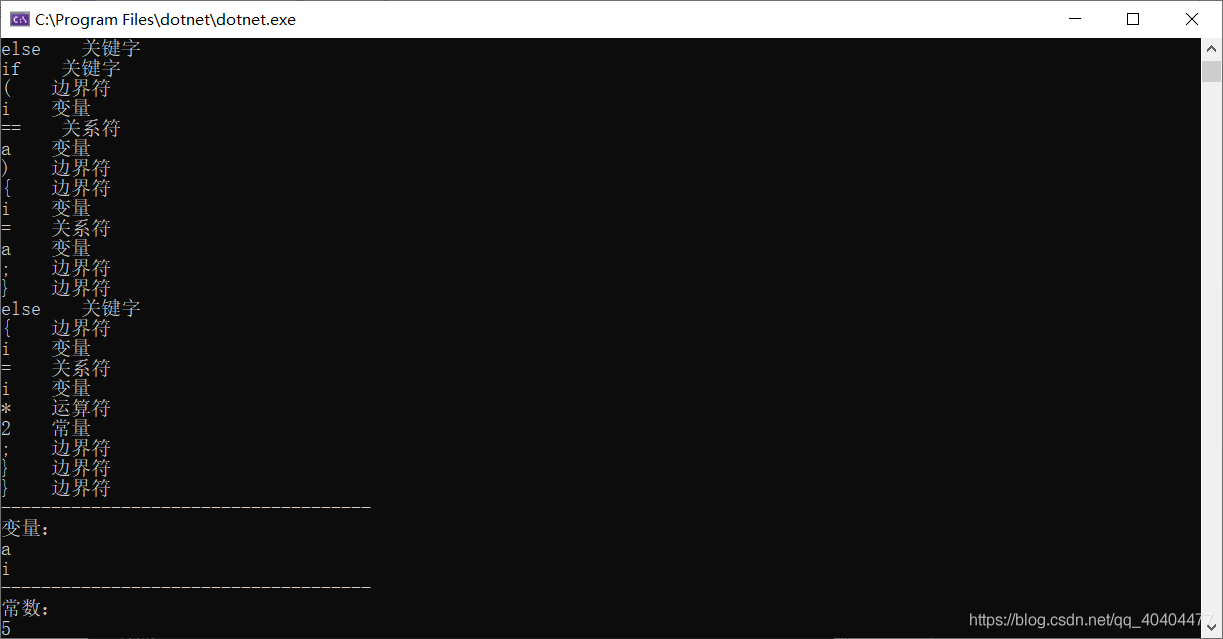
test.txt
int a=5;
for(int i=0;i<10;i++)
{
	if(i>=5)
	{
		i=i+1;
		continue;
	}
	else if(i==a)
	{
		i=a;
	}
	else
	{
		i=i*2;
	}
}
Program.cs
using System;
using System.Collections.Generic;
using System.IO;
namespace Lexer
{
    class Program
    {
        static List<char> borders = new List<char>() {',',';','{','}','(',')'};
        static List<string> keys = new List<string>() { "int", "if", "else", "for", "while", "do", "return", "break", "continue" };
        static List<string> arithmetics = new List<string>() { "+", "-", "*", "/","++"};
        static List<string> relations = new List<string>() { "<", "<=", "=", "==", ">", ">=","!=" };
        static List<string> consts = new List<string>();
        static List<string> labels = new List<string>();
        static void Main(string[] args)
        {
            string fileName = "test.txt";
            GetWords(fileName);
            DisplayLabel();
            DisplayConsts();
            Console.ReadKey();
        }
        /// <summary>
        /// 打开一个程序文件,逐行分析
        /// </summary>
        /// <param name="fileName"></param>
        static void GetWords(string fileName)
        {
            using(Stream stream = File.OpenRead(fileName))
            {
                StreamReader reader = new StreamReader(stream);
                while (!reader.EndOfStream)
                {
                    string line = reader.ReadLine();
                    Analysis(line);
                }
            }
        }
        /// <summary>
        /// 分析每行代码
        /// </summary>
        /// <param name="line"></param>
        static void Analysis(string line)
        {
            char[] chars = line.ToCharArray();//将每行字符串看作是字符数组
            List<char> word = new List<char>();//临时保存分解出来的变量,关键字,边界符等,可将其转化成string,用于打印
            for (int i = 0; i < chars.Length;)
            {
                char ch = chars[i];
                while (ch <= 32 && ch > 0)//跳过不可见字符
                {
                    if (i < chars.Length - 1)
                    {
                        ch = chars[++i];
                    }
                    else
                    {
                        break;
                    }
                }
                if (ch >= 'a' && ch <= 'z' || ch >= 'A' && ch <= 'Z')//若以字母开头,判断是关键字还是变量
                {
                    while (true)
                    {
                        word.Add(ch);// 保存当前分析出来的变量、关键字、边界符等,可将其转化成string,用于打印
                        if (i < chars.Length - 1)//是否到达字符数组末尾时
                        {
                            ch = chars[++i];
                        }
                        else
                        {
                            string Word = new string(word.ToArray());
                            //判断是关键字还是变量
                            if (keys.Contains(Word))
                            {
                                Console.WriteLine($"{Word}    关键字");
                            }
                            else
                            {
                                if (!labels.Contains(Word))
                                {
                                    labels.Add(Word);
                                }
                                Console.WriteLine($"{Word}    变量");
                            }
                            word.Clear();
                            i++;
                            break;
                        }
                        if (!(ch >= 'a' && ch <= 'z' || ch >= 'A' && ch <= 'Z' || ch >= '0' && ch <= '9'))//当出现非字母或数字的字符,即到达变量或关键字的结尾
                        {
                            string Word = new string(word.ToArray());
                            if (keys.Contains(Word))//判断是关键字还是变量
                            {
                                Console.WriteLine($"{Word}    关键字");
                            }
                            else
                            {
                                if (!labels.Contains(Word))
                                {
                                    labels.Add(Word);
                                }
                                Console.WriteLine($"{Word}    变量");
                            }
                            word.Clear();
                            break;
                        }
                    }
                }
                else if(ch >= '0' && ch <= '9')//遇到数字时
                {
                    while (true)
                    {
                        word.Add(ch);
                        ch = chars[++i];
                        if (!(ch >= '0' && ch <= '9'))//直到数字结束
                        {
                            string Word = new string(word.ToArray());
                            if (!consts.Contains(Word))
                            {
                                consts.Add(Word);
                            }
                            Console.WriteLine($"{Word}    常量");
                            word.Clear();
                            break;
                        }
                    }
                }
                else if (ch == '+' || ch == '-' || ch == '*' || ch == '/')//遇到运算符
                {
                    string Word;
                    word.Add(ch);
                    ch = chars[++i];
                    if (chars[i-1]=='-'&&ch >= '0' && ch <= '9')//是负数还是 '-' 运算符
                    {
                        while (true)
                        {
                            word.Add(ch);
                            ch = chars[++i];
                            if (!(ch >= '0' && ch <= '9'))
                            {
                                Word = new string(word.ToArray());
                                if (!consts.Contains(Word))
                                {
                                    consts.Add(Word);
                                }
                                Console.WriteLine($"{Word}    常量");
                                word.Clear();
                                break;
                            }
                        }
                    }
                    else if(ch == '+' || ch == '-' || ch == '*' || ch == '/')//判断是否是“++”,“--”等运算符
                    {
                        word.Add(ch);
                        ch = chars[++i];
                    }
                    Word = new string(word.ToArray());
                    word.Clear();
                    if (arithmetics.Contains(Word))//编程语言是否包含此运算符
                    {
                        Console.WriteLine($"{Word}    运算符");
                    }
                }
                else if(ch == '>' || ch == '<' || ch == '=' || ch == '!')//判断是否是关系运算符
                {
                    word.Add(ch);
                    ch = chars[++i];
                    if (ch == '=')
                    {
                        word.Add(ch);
                        ch = chars[++i];
                    }
                    string Word = new string(word.ToArray());
                    word.Clear();
                    if (relations.Contains(Word))
                    {
                        Console.WriteLine($"{Word}    关系符");
                    }
                }
                else if(borders.Contains(ch))//是否是边界符
                {
                    word.Add(ch);
                    if (i < chars.Length - 1)
                    {
                        ch = chars[++i];
                    }
                    else
                    {
                        i++;
                    }
                    string Word = new string(word.ToArray());
                    word.Clear();
                    Console.WriteLine($"{Word}    边界符");
                }
                else
                {
                    i++;
                }
            }
        }
        /// <summary>
        /// 打印变量表
        /// </summary>
        static void DisplayLabel()
        {
            Console.WriteLine("-------------------------------------");
            Console.WriteLine("变量:");
            foreach(string label in labels)
            {
                Console.WriteLine(label);
            }
        }
        /// <summary>
        /// 打印程序中出现的常数
        /// </summary>
        static void DisplayConsts()
        {
            Console.WriteLine("-------------------------------------");
            Console.WriteLine("常数:");
            foreach (string c in consts)
            {
                Console.WriteLine(c);
            }
        }

    }
}
边栏推荐
猜你喜欢
Notes: The difference between laravel, updateOrCreate and updateOrInsert
![Servlet.service() for servlet [dispatcherServlet] in context with path [] threw exception](/img/95/1041a1c23d020c272ca345d87019b2.png)
Servlet.service() for servlet [dispatcherServlet] in context with path [] threw exception
com.alibaba.fastjson.JSONException: default constructor not found. class

超人飞来!Flutter 实现满屏的力量感动画!

劳务派遣业务流程图

Matlab用回归、SEIRD模型、聚类预测美国总统大选、新冠疫情对中美经济的影响
方舟开服务器教程——开服配置常见问题及解决方法
C语言初阶-指针
随手记:laravel、updateOrCreate 和 updateOrInsert 的区别
我们仍未知道那天踩的MultipartFile file为null的大坑是为什么
随机推荐
SushiSwap「SUSHI」下降了 93%,但还没有完全消失
Kotlin study notes
用固态U盘让你的办公环境随身移动
方舟开服务器教程——开服配置常见问题及解决方法
测试计划
编写CMakeLists生成静态库及可执行文件的make文件
1259 Alice and Bob
磁控胶囊胃镜:具有良好耐受性的非侵入性胃镜检查
自定义MVC
Solve the problem of slow speed of gradle import package
Experience Sharing | A low-cost and fast-paced approach to building an enterprise knowledge management system
正则表达式的限定符、或运算符、字符类、元字符、贪婪/懒惰匹配
源码分析Canal专栏
iMeta | 深圳先进院戴磊组开发可同时提取共存菌株的组成和基因成分谱的菌株分析工具...
Redis Bloom Filter
0-1 背包问题
【无标题】
学习笔记:栈的应用1_递归(重点)
知乎高赞:如果一个程序员工作5年后还没成为大牛,是不是该考虑别的路子了?
暑期“小候鸟”超员增多 惠州交警提醒:安全出行不能忘