当前位置:网站首页>Install Mysql8.0 on windos, and solve the problem of re-login exception ERROR 1045 (28000)
Install Mysql8.0 on windos, and solve the problem of re-login exception ERROR 1045 (28000)
2022-08-09 22:37:00 【QLH0101】
mysqlInstallation and exception resolution
1、下载安装包
下载地址:https://dev.mysql.com/downloads/mysql/
点击下载之后,可以选择注册Oracle账号,也可以跳过直接下载.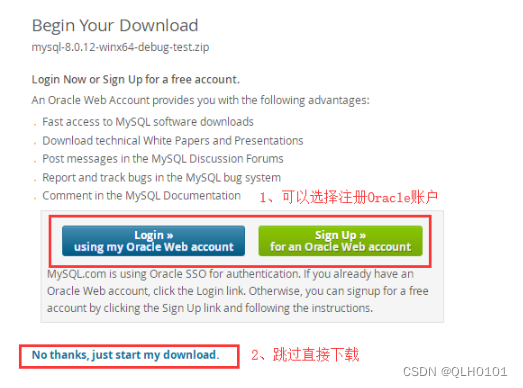
下载完成后,选择一个磁盘内放置并解压.
If the official website turtle speed download,It is recommended to use the following mirror images.相对的~
Mysql国内镜像:http://mirrors.sohu.com/mysql/MySQL-8.0/
下载完成之后,解压即可!
2、安装教程
(1)、配置环境变量
变量名:MYSQL_HOME
变量值:E:\mysql-5.7.20-winx64
(2)、生成data文件
以管理员身份运行cmd
进入E:\python\mysql\mysql-8.0.12-winx64\bin>下(这里在说一下:这里的路径需要根据自己的实际安装位置进行调整,总之就是刚刚解压的文件放在那,就在哪打开)
执行命令:mysqld --initialize-insecure --user=mysql This step can be completedE:\python\mysql\mysql-8.0.12-winx64Check the directory to see if it is generateddata目录,This exception may also exist,解决方案如下:
(3)、安装MySQL
继续执行命令:mysqld -install
(4)、启动服务
继续执行命令:net start MySQL
(5)、登录MySQL
登录mysql:(因为之前没设置密码,所以密码为空,不用输入密码,直接回车即可)
E:\python\mysql\mysql-8.0.12-winx64\bin>mysql -u root -p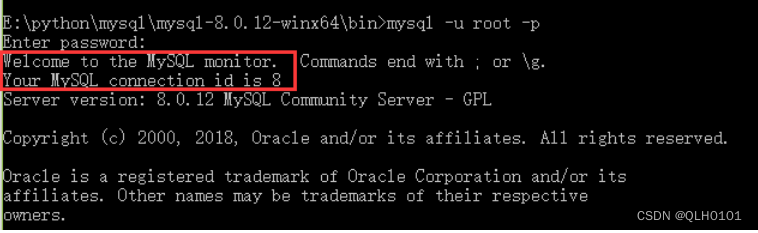
(6)、查询用户密码
查询用户密码命令:mysql> select host,user,authentication_string from mysql.user;
(7)、设置(或修改)root用户密码
mysql> use mysql;
mysql> ALTER USER 'root'@'localhost' IDENTIFIED WITH mysql_native_password BY '123456';
mysql> flush privileges;
flush privileges; 作用:相当于保存,执行此命令后,设置才生效,若不执行,还是之前的密码不变,可以多输入几次
(8)、退出
mysql> quit

(9)、再次登录
3、ERROR 1045 (28000)解决方案.
Re-login if this exception exists: ERROR 1045 (28000): Access denied for user ‘root’@‘localhost’ (using password: YES)
关于修改密码再次登录出现ERROR的解决方案:
首先问题出现的原因在于可能是因为版本不同,命令有所差异.
如果你是按照上面的完整教程安装出现这种问题的解决方案:
3.1、所有东西都删除,然后重装,按照上面教程再来一遍;
3.2、如果你之前装了,报错之后就一直放在那里,现在请严格按照下面步骤进行:
3.2.1、打开cmd,切换到mysql的bin目录下,输入命令net stop mysql,停止mysql服务;

3.2.2、打开mysql的安装目录,找到data文件夹,将其删除!

3.2.3、回到cmd命令窗口,输入mysqld -remove

3.2.4、接下来按照上面教程,从第二步生成data文件开始执行,一定要注意修改密码那里:
mysql> ALTER USER 'root'@'localhost' IDENTIFIED WITH mysql_native_password BY '123456';
边栏推荐
- URL Protocol 网页打开应用程序
- 力扣15-三数之和——HashSet&双指针法
- Unity_物体自转
- Can I make a TCP connection without accept?
- MySQL, which is asked on both sides of the byte, almost didn't answer well
- Interviewer: How to deal with Redis big key?
- leetcode二叉搜索树与双向链表
- OpenSSL SSL_read: Connection was reset, errno 10054
- Characteristics and Development Prospects of Korea's Cyber Security System
- C语言之实现倒置字符串的两种方法
猜你喜欢







随机推荐
访问控制知识
场效应管Mosfet之雷卯Leiditech对应英飞凌Infineon
威纶通触摸屏制作自定义弹出窗口的具体方法(3种)
蓝牙模块有哪些种类?BLE低功耗蓝牙模块有什么特点?
真香|持一建证书央企可破格录取
tki-tree 树组件控制默认展开第几层数据
Two methods of implementing inverted strings in C language
NetCore路由的Endpoint模式
Win11搜索不到文件的解决方法
DSPE-PEG-Azide, DSPE-PEG-N3, phospholipid-polyethylene glycol-azide can react directly with DBCO
MySQL笔记-06 基础SQL操作
PMP每日一练 | 考试不迷路-8.9(包含敏捷+多选)
安科瑞支持以太网通讯、profibus通讯嵌入式电能表APM指导性技术要求-Susie 周
gmail+mtalk配合打免费网络电话。
普源精电上半年扭亏为盈,高端产品持续发力!你看好仪器界“华为”吗?
字节二面问的MySQL,差点没答好
source install/setup.bash时出现错误
PCL学习之滤波Filtering
解决执行Command报错executable file not found in $PATH
Next second data: the transformation of the modern data stack brought about by the integration of lake and warehouse has begun