当前位置:网站首页>JS foundation 8
JS foundation 8
2022-04-22 12:54:00 【Pengcheng 933】
DOM Document object model
Definition
Provide operation HTML Document object capability , Provide API
operation
- Get tag elements
- Operation content
- Operation style
- Operation properties
DOM object
- document.title
- document.write()
<title>Document</title>
<script>
    var box=document.title
    console.log(box)
// result Document
    document.write('hello word')
// result hello word
</script>
Get tag elements
| attribute | meaning |
|---|---|
| document.getElementById(’’) | adopt ID obtain |
| document.getElementsByClassName(’’) | adopt CLASS obtain |
| document.getElementsByTagName(’’) | Get... Through tags |
| getElementsByName(’’) | adopt NAME obtain |
| document.querySelector(’’) | image CSS Sample acquisition |
| document.querySelectorAll(’’) | image CSS Sample acquisition |
notes :
- getElementsByName(’’) Used to get form elements name
- Only document.getElementById(’’) and document.querySelector(’’) To get a single value , Others are pseudo arrays
	<div id="box">box1</div>
    <div class="box">box2</div>
    <p>p1</p>
    <input type="text" name="text">
<script>
    var box1=document.getElementById('box')
    var box4=document.querySelector('#box')
    var box5=document.querySelector('.box')
    var box6=document.querySelectorAll('div')
    var box2=document.getElementsByClassName('box')
    var box3=document.getElementsByTagName('div')
    var input=document.getElementsByName('text')
    console.log(box1)
// result <div id="box">box1</div>
    console.log(box2)
// result [div.box]
    console.log(box3)
// result [div#box, div.box, box: div#box]
    console.log(input)
// result [input]
    console.log(box4)
// result <div id="box">box1</div>
    console.log(box5)
// result <div class="box">box2</div>
    console.log(box6)
// result [div#box, div.box]
 </script>
Operation content
- innerHTML Get text content , Including the tag elements inside
- innerText Get text content , Do not include the tag elements inside , You can only get plain text
- value Get text content , You can only get text (input) What's in it
<div>
        <div> Test text </div>
    </div>

    <script>
        var divEle=document.querySelector('div')
        var content1=divEle.innerHTML
        var content2=divEle.innerText
        console.log(content1);
// result  <div> Test text </div>
        console.log(content2);
// Result test text
    </script>
Set contents
- Ele.innerHTML=‘ Content ’
- Ele.innerText=‘ Content ’
Operation style
| attribute | meaning |
|---|---|
| Ele.style.color=‘red’ | Add inline style |
| Ele.className=‘ Class name ’ | Add class name |
| Ele.classList.add(‘ Class name ’) | Add class name |
| Ele.classList.remove(‘ Class name ’) | Remove class name |
 <div></div>
    <script>
        var divEle=document.querySelector('div')
        divEle.style.backgroundColor='red'
        console.log(divEle);
// result <div style="background-color: red;"></div>
        divEle.className='box'
        console.log(divEle);
// result <div class="box" style="background-color: red;"></div>
         divEle.classList.add('box2')
         console.log(divEle)
// result <div class="box box2" style="background-color: red;"></div>
        divEle.classList.remove('box2')
        console.log(divEle);
// result <div class="box" style="background-color: red;"></div>
    </script>
Operation properties
- Set properties
setAttribute(‘ Property name ’,‘ Property value ’) - get attribute
getAttribute(‘ Property name ’) - Remove properties
removeAttribute(‘ Property name ’)
<div></div>
    <script>
       var divEle=document.querySelector('div')
       divEle.setAttribute('class','box')
	   console.log(divEle);
// result <div class="box"></div>
       var ToObtain=divEle.getAttribute('class')
// result box
       var ToObtain=divEle.removeAttribute('class')
        console.log(ToObtain);
 // result <div></div>
    </script>
Find node
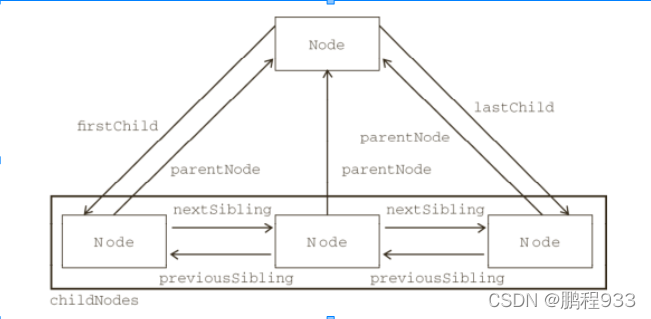
DOM Node object
- Whole HTML A document is treated as a document object document
- Whole HTML Label elements are treated as DOM Node object
- Every HTML The content attribute of the tag element is also regarded as DOM Node object
notes : There are blank text nodes between element nodes
Dynamic operation node
- Create nodes
- Create element node
var elment=document.createElenment('div') - Create text node
var textNode=document.createTextNode(' Elements ')
- Add a node
- Add child nodes to the element
Parent node .oppendchild(' Child node ') - Insert the child node specified in the parent element
Parent node .insertBefore(' New child nodes ', Old child nodes )
- Delete node
Delete the child node under the parent node
Parent node .removeChild(' Child node ')
Child node .remove() - Replacement node
The new node replaces the child node under the parent node
Parent node .replaceChild(' New node ',' Old node ')
<div></div>
    <script>
        var elmentNode=document.createElement('div')
// Create element node
        var textNode=document.createTextNode(' Test creation element ')
// Create text elements
        elmentNode.appendChild(textNode)
// The text element is added to the node
        var node=document.querySelector('div')
		node.appendChild(elmentNode)
// result <div>
		<div> Test creation element </div>
	  </div>
        elmentNode.remove()
// result <div></div>
     </script>
Clone node
node .clone()
node node
All node types must inherit node type , Become node A subclass or descendant of
| attribute | nodeType | nodeName | nodeValue |
|---|---|---|---|
| Elements | 1 | Upper case label name | null |
| Text | 3 | #text | Content |
| attribute | 2 | Property name | Property value |
Get non line style
window.getComputedStyle( Node object ). Style name
<style> div{

            width: 100px;
            height: 100px;
        }
    </style>
</head>
<body>
    <div></div>

    <script>
        var divEle=document.querySelector('div')
        var accept=window.getComputedStyle(divEle).width
        console.log(accept)
// result 100px
    </script>
Offset
- offsetTop
Distance above the parent element - offsetLeft
Distance above the parent element
notes : No positioning and window , There is a parent element positioned
Get the element width
| attribute | meaning |
|---|---|
| window.getComputedstyle( Node object ). Style name | Content |
| clientWidth | Wide content +padding |
| offsetWidth | Wide content +padding+border |
<style> div{

            width: 100px;
            height: 100px;
            padding: 10px;
            border: 10px solid #000;
        }
    </style>
</head>
<body>
    <div></div>

    <script>
        var divEle=document.querySelector('div')
        var content=window.getComputedStyle(divEle).width
        console.log(content)
// result 100px
        var contentPadding=divEle.clientWidth
        console.log(contentPadding);
// result 120
        var contentBorder=divEle.offsetWidth
        console.log(contentBorder);
// result 140
    </script>
版权声明
本文为[Pengcheng 933]所创,转载请带上原文链接,感谢
https://yzsam.com/2022/04/202204221222463231.html
边栏推荐
- R language ggplot2 visualization: calculate the number of missing values of each data column in the dataframe, and visualize the missing values of each data column using a stacked bar plot (set the co
- Ros2 learning notes (IX) learn the bag recording of ros2 from turnlesim
- Chinese characters and screenshots suitable for the test boundary are selected
- VR panorama truly restores the driving school environment, and VR live shows the hard power of the driving school
- Try opencv crack detection
- Today's sleep quality record 76 points
- April 21, 2022 s s s m framework integration @ lesson 1 s s m environment configuration & focus on practical operation. Summary in practice. The results are not shown here.
- Opencv project 1-ocr recognition
- 启牛app证券账户合法吗,新手在这里开户安不安全
- 分享一个最近遇到的标签<iframe>
猜你喜欢
vnpy本地导入csv数据

Express Can‘t set headers after they are sent. problem

分享一下自己最近写项目遇到的小问题

ABAQUS py command flow of cantilever beam under parabolic pressure

使用PHPstudy开启MySQL服务,并创建一个数据库
这个开源项目是要把我笑死吗?

Ros2 learning notes (IX) learn the bag recording of ros2 from turnlesim

IDE導入項目

abaqus RSG插件二次开发(二)

396. Fonction de rotation
随机推荐
Use of sqlserver cursor
从结构化上下文解读闭包
R language data Table import data practice: data It is more convenient to set key, compound key, delete key and data join after setting key value. After setting key value, you can use keyby syntax ins
What equipment is needed for VR panoramic shooting? What does it do?
Detailed explanation of C language preprocessing
可执行文件的生成过程
書城項目注册頁面和郵箱驗證
[jz48 longest substring without repeated characters]
MySQL 5.0安装教程图解详细教程
科研——Sci-Hub教程
ABAQUS py command flow of cantilever beam under parabolic pressure
The R language uses the treemap function in the treemap package to visualize the treemap graph: treemap displays the hierarchical data as a group of nested rectangles, customized label color, label ba
Matlab automatically selects non-standard bridge span code (full version of source code)
R language ggplot2 visualizes the aspect ratio of fixed images_ Fixed() function
Enterprise code static testing tool helix QAC - technical specifications
【生活杂谈】中体平台教你如何提高彩票中奖率
51单片机之串口通信详解及代码示例
Page d'inscription du projet Bookstore et vérification de la boîte aux lettres
Write your own compiler: build a syntax tree through syntax compilation and realize intermediate code generation
21. merge two ordered linked lists